 Your new post is loading...
The Padagogy Wheel is designed to help educators think – systematically, coherently, and with a view to long term, big-picture outcomes – about how they use mobile apps in their teaching. The Padagogy Wheel is all about mindsets; it’s a way of thinking about digital-age education that meshes together concerns about mobile app features, learning transformation, motivation, cognitive development and long-term learning objectives.
The Padagogy Wheel, though, is not rocket science. It is an everyday device that can be readily used by everyday teachers; it can be applied to everything from curriculum planning and development, to writing learning objectives and designing centered activities. The idea is for the users to respond to the challenges that the Wheel presents for their teaching practices, and to ask themselves the tough questions about their choices and methods.
Via John Evans

|
Scooped by
GwynethJones
February 6, 2016 12:31 PM
|
|
|
Scooped by
GwynethJones
February 4, 2016 1:02 PM
|
Many dedicated educators blog about some of the best education technologies and trends available to teachers and students. These 10 are our favorites...
|
|
Scooped by
GwynethJones
January 30, 2016 1:15 PM
|
|
|
Scooped by
GwynethJones
January 30, 2016 12:35 PM
|
Public school libraries have always served an admirable purpose in education. In an indirect way, K-12 libraries have given students support in learning
|
|
Scooped by
GwynethJones
January 30, 2016 12:18 PM
|
Active Learning Spaces In the book Get Active: Reimagining Learning Spaces for Student Success, the authors identify six types of active learning spaces that are essential for creating an engaging learning environment for students.
A year is a lot of time to meet your goals. Google Calendar can be the master planning tool for an entire year. These time management tips show you how.
Via Dr. Tom D'Amico (@TDOttawa)
Modular origami is the fancy name for geometric origami that is made up of many repeating “units” that are then assembled to create a more complex geometric form. Unlike traditional origami that uses a single sheet of paper to fold a figure, modular origami uses many sheets of paper that are folded into basic modules or units. Once you learn how to make the basic unit for a design, you repeat the process to make enough copies of the unit to assemble your final form. (For a look at some modular origami projects, check out my Pinterest board. https://www.pinterest.com/alyciazimmerman/modular-origami/ )
Via John Evans
|
|
Rescooped by
GwynethJones
from Creativity in the School Library
January 26, 2016 6:15 PM
|
Kiddle - a visual search engine for kids, powered by editors and Google safe search.
Via Mary Reilley Clark
|
|
Scooped by
GwynethJones
January 10, 2016 11:44 AM
|
President Obama’s Race to the Top initiative emphasizes STEM learning, particularly in mathematics, in order for more students to make it to high school g
|
|
Scooped by
GwynethJones
January 10, 2016 11:10 AM
|
Bored in school, failing classes, at odds with peers: This child might be an entrepreneur, says Cameron Herold. In his talk, he makes the case for parenting and education that helps would-be entrepreneurs flourish -- as kids and as adults.
Our makerspace celebrated its first birthday at the beginning of this year. That first year involved a lot of experimentation, figured out what worked and what didn’t. With that behind us, year two of our makerspace gave way to new projects, new spaces and new challenges. We started really using our whiteboard walls and tables as important parts of our library. I had someone question whether or not our space was a “real makerspace“ and got some great conversations started. Our students represented our school at Gulf Coast Maker Con. We held our second annual Stewart Maker Fair, which was even more awesome than the first one. I got on my soapbox about how making doesn’t have an age limit. We celebrated an amazing array of LEGO walls that have popped up in schools all over the place. And our space was featured in School Library Journal All in all, I would say it’s been a great Maker year, and our makerspace continues to grow.
Via John Evans
|
|
|
Scooped by
GwynethJones
February 6, 2016 12:34 PM
|
Formative assessment is an important part of effective instruction. Teachers can use observations, checklists, and quick quizzes to gather data that will inform their instruction. Formative assessment identifies areas where students are excelling and struggling so that teachers can best alter their instruction to meet the needs of all students. Earlier this year, I had the opportunity to work with a school looking to strengthen its formative assessment data collection by leveraging the power of tech-friendly tools.
Technology can make formative assessment a seamless part of everyday activities. Online tools and mobile devices can help teachers stay organized when collecting data that will make analyzing information easier and more meaningful. Formative assessment can take place throughout a unit of study during daily lessons that incorporate technology. As you examine the systems that work for you in your classroom, technology tools can make this process easier and seamless when used effectively.
Via John Evans
|
|
Scooped by
GwynethJones
February 4, 2016 11:00 AM
|
What Is Meant By "Restorative" Justice or Practices? is the new "question-of-the-week" at my Education Week Teacher column. Feel free to leave responses in the comments there or here...
|
|
Scooped by
GwynethJones
January 30, 2016 12:38 PM
|
Are big cities becoming more like separate countries?
|
|
Scooped by
GwynethJones
January 30, 2016 12:31 PM
|
The technologies of tomorrow are already making headway into education, and others are poised for mass distribution in 2016.
Gmail is a powerful mail service that we have been recommending for teachers over the last couple of years. The strength of Gmail lies in the arsenal of features it provides to users from tips on how to organize and sort emails for easy access to setting auto-replies and automatically saving attachments. Gmail Tips for Teachers section here in EdTech and mLearning features a number of key resources to help you tap into the educational potential of Gmail. Additionally, to take your Gmail experience to the next level you may want to try out some third party tools designed particularly for this purpose. Below is a curated list of some of our favourite apps. Check them out and share with your colleagues
Via John Evans
|
|
Scooped by
GwynethJones
January 26, 2016 6:21 PM
|
Explore Library Patch's board "Inquiry, PBL, Makerspaces" on Pinterest, a visual bookmarking tool that helps you discover and save creative ideas | See more about Engineering, Genius Hour and Stems.
Via John Evans
|
|
Scooped by
GwynethJones
January 19, 2016 12:44 PM
|
|
|
Scooped by
GwynethJones
January 10, 2016 11:16 AM
|
|
|
Scooped by
GwynethJones
January 10, 2016 10:55 AM
|
Eric Schmidt explains all in a blog post.
The question is, to prevent this deterioration in scores and perceived ability, how do we empower elementary school girls to embrace an interest in STEM and develop leadership skills that will help them navigate their way through school to be prepared to choose any career, including STEM? How can educators address the main factors at this critical 9- to 12-year-old window that are standing in the way of more girls going into STEM fields?
Via John Evans
|


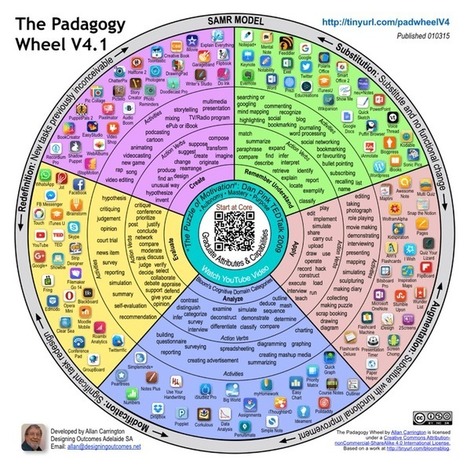













Who doesn't love a good INFOGRAPHIC that puts the Apps in the right place!