𝗩𝗶𝗱𝗲𝗼 𝗗𝗲𝘀𝗰𝗿𝗶𝗽𝘁𝗶𝗼𝗻 This tutorial is about RS-485 communication using the MAX485 Module from Maxim Integrated. If you've worked with microcontrollers before, you might know that protocols like UART, I2C, and SPI are great for short distances. But when you start extending those wires, problems can crop up—like lost or corrupted data. That's where RS-485 comes in, letting you communicate over distances as long as 1200 meters without a hitch.
In this video, we’re focusing on the MAX485 IC, a sturdy little device that’s built to handle RS-485 communication even in places with a lot of electrical noise. We’ll explore how to set up your Arduino to communicate using simplex, half-duplex, and full-duplex modes. The MAX485 is perfect RS-485 Module as it operates on 5V, can handle data speeds up to 2.5 Mbps, and allows up to 32 devices on the same communication line.
We’ll walk you through everything from the basics to more complex setups, showing you how to manage sending and receiving data with ease. Whether you’re setting up a network of devices or just experimenting with new ways to communicate, this tutorial has got you covered.
This is one of my news digests. If you like my editorial choices, there are more to be found by clicking on the "dear reader" link, and on my name above. Enjoy !
Takeoff projects help students complete their academic projects. Register at takeoff projects today to find and learn about different interesting big data projects and grab the best jobs. Get started right now.
(TrendHunter.com) The Poor Man’s Polaroid is a DIY instant camera project created by maker Boxart that replaces traditional instant film with thermal receipt paper. The Poor Man’s Polaroid uses a Raspberry Pi...
The Raspberry Pi 500 Plus is a modern all-in-one keyboard computer inspired by classic machines like the Amiga and BBC Micro. In this video I see how far that inspiration can go by turning it into the ultimate Amiga using the latest version of PiMiga, one of the most complete Amiga environments available for the Raspberry Pi. From Workbench and classic software to games and modern enhancements, I’ll show how easy it is to transform a tiny computer into a surprisingly powerful Amiga setup.
0:00 Intro 0:24 PiMiga Introduction 01:42 Download & Setup PiMiga 02:44 Sponsor Message 04:54 Raspberry Pi 500 Plus Tour 06:14 Installing PiMiga 07:06 PiMiga First Run & Tour 09:15 Playing Amiga Games on Raspberry Pi 17:06 Amiga Demo Scene Titles 21:41 Classic Mac Emulation on Raspberry Pi 23:33 Atari ST Emulation on Raspberry Pi 24:47 ScummVM 25:33 SNES Emulation 26:55 Arcade Emulation MAME 28:18 Amiga Applications 31:22 Conclusion
**Sources used in this video (with permission or under fair use):
In this demo, I show how I took my company, AlephZero’s radar-based remote breathing monitoring IP and ported the core demo onto a Raspberry Pi running the DreamRF Infineon-based radar through the DreamHat+ Radar platform.
The demo shows real-time remote breathing extraction at roughly 1.5 to 1.6 meters away. As I breathe, the system tracks the breathing waveform, estimates breathing rate in BPM, reports the target range, and computes a post-processing breathing SNR. I also change my position by moving the chair backward and forward to show how quickly the system responds to range shifts and target motion within the sensing volume.
To further stress the demo, I intentionally stop breathing for a moment and then resume, showing how the algorithm reacts to the disappearance and return of the chest micro-motion signal. The result is a practical example of how radar can isolate and enhance very small physiological motion, retaining strong breathing observability even out to around 2 meters.
This demo is a simple but powerful illustration of embedded radar sensing on low-cost hardware: real-time respiration monitoring, fast adaptation to position changes, and meaningful signal enhancement on the edge using a Raspberry Pi-based radar platform.
1.Design and Development of an IoT-Enabled Multi-Factor Smart Locker Security System with Intruder Photo Alert. 2.IoT-Based Smart Locker Security System with Biometric Authentication and OTP Verification. 3.Intelligent Multi-Layer Locker Security System using Raspberry Pi Pico and ESP32-CAM. 4.Hybrid Biometric and OTP Based Smart Locker with Real-Time Intrusion Monitoring. 5.Advanced Smart Locker Security System with GSM SMS and Telegram Intruder Notification. 6.IoT-Driven Digital Locker with Multi-Factor Authentication and Image Surveillance. 7.Design of a Secure Embedded Locker System with Biometric and OTP Access Control. 8.Development of a Smart IoT Locker with Fingerprint Authentication and Intruder Detection. 9.Secure Smart Locker System with GSM Alert and Real-Time Camera Surveillance. 10.An Intelligent Locker Security Architecture using Raspberry Pi Pico and ESP32-CAM. 11.Next-Generation Smart Locker with Multi-Factor Authentication and Intruder Capture. 12.IoT-Enabled Smart Vault System with Biometric Access and Remote Alert. 13.Embedded Smart Locker with Fingerprint Authentication and GSM Notification. 14.AIoT-Based Secure Locker System with OTP Verification and Intruder Photo Alert. 15.Smart Anti-Theft Locker with Biometric Authentication and Telegram Notification. 16.IoT Surveillance Locker with Real-Time Intrusion Detection and SMS Alert. 17.Multi-Authentication Smart Locker using Fingerprint, OTP, and Camera Monitoring. 18.Secure IoT Locker System with GSM Communication and Image Alert. 19.Smart Access Control Locker using Raspberry Pi Pico and ESP32-CAM. 20.Advanced Embedded Locker Security with Intruder Image Capture System. 21.Design and Implementation of a Multi-Factor IoT Locker Security System. 22.IoT-Based Embedded Locker with Biometric Authentication and Remote Monitoring. 23.Secure Access Control Framework for Smart Lockers using IoT Technologies. 24.Development of an Embedded Smart Locker with Real-Time Intrusion Alert. 25.Biometric and OTP Enabled Secure Locker with GSM and Camera Surveillance. 26.IoT-Integrated Digital Locker System with Multi-Layer Authentication. 27.Design of an Intelligent Smart Locker using Raspberry Pi Pico. 28.Development of an IoT Surveillance Locker with Intruder Detection. 29.A Multi-Factor Authentication System for Secure Digital Lockers. 30.Smart IoT Locker with Biometric Identification and Remote Alert Mechanism. 31.Smart Guardian Locker with Biometric and OTP Security. 32.Triple-Shield Smart Locker Security System. 33.Smart Anti-Theft Locker with Intruder Photo Capture. 34.SecureX Smart Locker with Multi-Layer Authentication. 35.Digital Security Locker with Fingerprint and Mobile Alert. 36.IoT Smart Safe Locker with Real-Time Intruder Detection. 37.Next-Gen Smart Locker with Camera-Based Intrusion Alert. 38.Smart Digital Locker with Biometric and OTP Protection. 39.Intelligent Security Locker with SMS and Camera Alerts. 40.Ultra-Secure Smart Locker with Biometric Authentication.
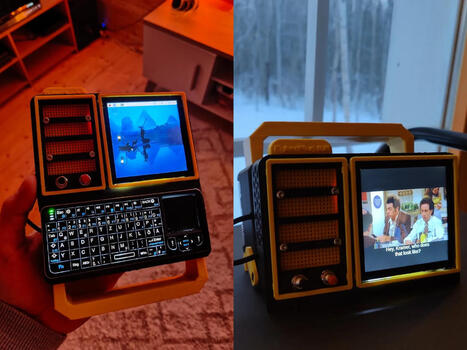
https://www.youtube.com/watch?v=PBpG40nH68s Most portable computers are sealed boxes, which is exactly what makes them frustrating for anyone who wants to experiment with electronics.You can run code on a laptop, but try wiring a temperature sensor or an infrared transmitter directly to it, and you'll...
How to Make a Simple Arduino Uno Project for Beginners #viralvideo #shortvideo
Dosto, aaj ke is video mein maine Arduino Uno ka use karke ek naya aur interesting project banaya hai. Agar aap electronics mein naye hain ya DIY projects pasand karte hain, toh ye video aapke liye bahut helpful hone wali hai.
Agar aapko ye video pasand aaye toh Like karein aur channel ko Subscribe karna na bhoolein aise hi aur bhi electronics projects dekhne ke liye!
Arduino Project Automatic Gate Smart Barrier, Arduino Uno Sensor Project DIY Electronics ultrasonic Sensor Project Servo Motor Arduino Smart City Project School Science Project Project Motion Arduino Hindi Automatic Door Opener Robotics Engineering Project.
Remember those brick cellphones in the 1990s? They were comically large by today’s standards. These phones used the 1G network to communicate and, as such, have been unusable for decades now. Howeve...
Having trouble uploading code to your microcontroller? This tech tutorial guides you through common issues like incorrect pin connections, specifically with TX/RX pins, and provides a clear solution by using alternative pins. Learn how to successfully upload code to your arduino uno using the arduino ide and master essential electronics for problem solving.
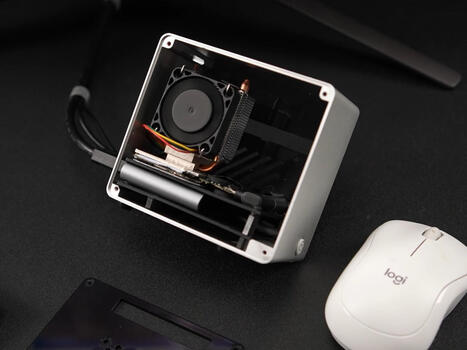
We take a close look at the M5STACK LLM 8850, an exciting new piece of ai hardware designed to boost the capabilities of the raspberry pi. This tech review highlights its features and how it facilitates efficient llm inference for various iot projects. See how this module simplifies local AI processing!
Miktver Display: 30% off code: 30% Off Code:4T5UL2Y9 https://amzn.to/3MEBshq ----------------------------------------------------------------------------------------------------------------------------------------------------------- Support Our Awesome Developers:
00:00 AI Accelerators for Raspberry Pi 5 00:28 Introducing the M5Stack LLM8850 01:10 Do You Need an AI Accelerator? (Jeff Geerling Mention) 02:01 LLM8850 Hardware Overview 02:35 Full Specs: 24 TOPS AI Accelerator 03:52 Required M.2 HAT for Raspberry Pi 5 04:41 Rockchip Compatibility Concerns 05:09 M5Stack AI Pyramid SBC 06:04 Power Requirements & Fan Noise 07:06 Enabling PCIe on Raspberry Pi 5 08:45 Waveshare Dual M.2 HAT Setup 09:54 Final Thoughts: Running Local AI
There were a plethora of tiny, local ISPs in the days of dial-up internet. Along with the big providers, many cities would have more than one. Some of those have survived broadband, but none of them w...
Learn how to make an Automatic Smart Barrier with Traffic Light using Arduino in this simple DIY electronics project. 🚦🤖 This project demonstrates how Arduino can be used to automate a barrier gate and control a traffic light system for vehicles.
The automatic smart barrier detects vehicles and controls the barrier while the traffic light indicates stop and go signals. This type of system is commonly used in parking gates, toll gates, and railway crossings.
🔧 What you will learn in this video: • How an Arduino automatic barrier system works • How a traffic light control system operates • How to build a simple smart barrier using Arduino • Basic automation using Arduino for beginners
This Arduino project is perfect for students, beginners, and electronics enthusiasts looking for creative DIY automation projects.
Subscribe for more Arduino projects, DIY electronics, smart automation circuits, and engineering mini projects. 🚀
ESP8266MOD vs ESP8266EX explained in a clear and practical way. Learn the key differences, specifications, applications, and which ESP8266 module is better for IoT, WiFi projects, and embedded system development.
The Smart Attendance System is an Arduino-based project designed to automate the attendance process using RFID technology. In this system, each student is provided with an RFID card. When the card is scanned near the RFID reader, the system reads the unique ID (UID) and marks the attendance automatically.
The project reduces manual work, saves time, and avoids proxy attendance. An LCD display shows messages like “Attendance Marked” or “Invalid Card”, and a buzzer/LED provides instant indication for successful or unsuccessful scans.
This project was developed for the ATL Marathon to demonstrate the practical use of embedded systems and IoT concepts in schools. It promotes smart classroom solutions and efficient digital record management.
I made a Smart Automatic Door using Arduino Uno. This DIY project automatically opens and closes the door when someone comes near the sensor. It is a simple and beginner-friendly Arduino project using ultrasonic sensor and servo motor. This project is perfect for home automation and smart door systems. Watch the final test of the Arduino automatic door project. If you like DIY electronics and Arduino projects, don’t forget to like and subscribe.
arduino automatic door smart door using arduino arduino projects arduino uno projects automatic door project diy arduino projects smart home arduino arduino ultrasonic sensor project servo motor arduino project beginner arduino project arduino smart door system arduino door opener home automation arduino
We introduce the Electrix Microbeaks TP-Box, a beginner-friendly robot car kit for learning robotics, coding, and electronics. This tutorial showcases the unboxing and components, including the robot car and a Micro:bit board, making it perfect for robotics for beginners.
Designed for Raspberry Pi and PCs, Volumio is a Debian-based distro fine-tuned exclusively for music playback that delivers a HiFi-grade audio experience. The latest update refreshes most system components but focuses on reliability and audio quality, so most pieces of code are not the latest ones...
https://youtu.be/TZrrmwKLPEE You know what's ridiculously expensive these days? RAM. You know what isn't? A broken phone on eBay.ETA PRIME spent under $70 on a Samsung Galaxy S20 FE with a busted screen, stuffed it into a Raspberry Pi tower case, and ended up with a mini PC that boots into Samsung...
To get content containing either thought or leadership enter:
To get content containing both thought and leadership enter:
To get content containing the expression thought leadership enter:
You can enter several keywords and you can refine them whenever you want. Our suggestion engine uses more signals but entering a few keywords here will rapidly give you great content to curate.


 Scoop.it!


 Your new post is loading...