
|
Rescooped by
michel verstrepen
from New Web 2.0 tools for education
September 17, 2011 9:11 AM
|


No comment yet.
Sign up to comment

 Your new post is loading...
 Scoop.it! No comment yet.
Sign up to comment
Scoop.it!
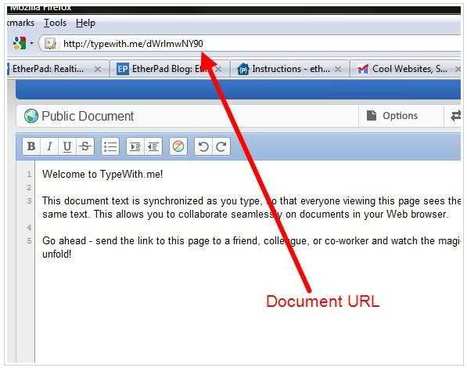
Applications, tutorials, ideas, educational games, mobile apps, and web tools to help you integrate technology into education and enhance mobile learning... Via Kathleen Cercone
Scoop.it!

Scoop.it!
A teacher tool for easily sharing links with their class so the teacher can say Click on the yellow circle to goto the website.. Via Kathleen Cercone
Scoop.it!

Want to tap the power behind search rankings, product recommendations, social bookmarking, and online matchmaking? This fascinating book demonstrates how you can build Web 2.0 applications to mine the enormous amount of data created by people on the Internet. With the sophisticated algorithms in this book, you can write smart programs to access interesting datasets from other web sites, collect data from users of your own applications, and analyze and understand the data once you’ve found it Via Howard Rheingold
Scoop.it!

Vergelijking van de beste online webdiensten. Deze website-makers zijn gratis, bevatten geen reclame, en maken het mogelijk om zonder technische kennis een eigen website te maken. Via Cedric Saelens
Scoop.it!

Listener is an audio player for foreign language learners. It has some useful features that make training of listening, shadowing, dictating easier for you. Via Heath Sawyer
Scoop.it!

Here we have more than 45 recent lessons in graphic design theory. Great for designers at any level as either a refresher or an intro.
Scoop.it!

Nous sommes dans une optique « Rich Learning® » et non dans une optique « Blended Learning ». Le but n'est pas d'associer nos modules avec ceux de notre partenaire CrossKnowledge mais de revoir la conception ...
Scoop.it!

Google Docs now offers a gallery of spreadsheet, presentation, and document templates for use in your work. Whether you're designing a resume, invoice, calendar, or slideshow, there are a few templates here to get you started. Template categories include Business, Calculators, Calendars & Schedules, Cards & Certificates, Letters, Presentation Designs, and more. You can also sort them by how many users each has and user ratings. To use a template in your Google Doc, from the New menu drop-down, choose "From template..." Via Mark Rounds
Scoop.it!

Print Screen Capture Software with Special Effects, Annotation Tools and support for Windows 7, Vista and XP Alpha Transparency (Translucency). Via Let's Learn IT, Juergen Wagner
Scoop.it!

It's all about the A-B-C's in education, why should resources for higher education professionals be any different? Via Ana Cristina Pratas, Let's Learn IT, Juergen Wagner
Scoop.it!

Certes, mais à qualité égale : peut-on comparer un Powerpoint retravaillé en interne sous Articulate Presenter (rapid learning) avec un module e-learning sous-traité en Flash à une équipe intégrant des concepteurs ...
|
Scoop.it!
Free crossword puzzles you can play right in your Web browser. You can also build your own crossword puzzle and put it right on your own Web site. Via Kathleen Cercone
Scoop.it!
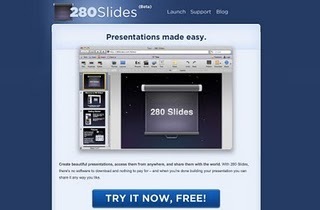
Over the summer I was running a number of two week ICT in language teaching courses for teachers from around the world. The courses were part of the Bell summer campus at Homerton College Cambridge. This was the first time in a while I had been asked to teach such long courses and i thought it was a great opportunity to see if I could fundamentally change the way the teachers related to technology, not just in the classroom as a tool for teaching learners, but as a tool within their everyday working practice. As sub goals I set out to run the course with absolutely no paper. That meant no photocopied handouts and no paper based note taking from trainees. I wanted to push these teachers to the point where they could work totally in the digital medium and where paper became totally unnecessary. Via Kathleen Cercone
Scoop.it!
Create a free website in minutes! Set up a store, blog, or photo gallery. Try our gorgeous layouts or make your own. Drag & drop editing means no coding! Via Kathleen Cercone
Scoop.it!

TIC & Net. "L'Internet représente une menace pour ceux qui savent et qui décident. Parce qu'il donne accès au savoir autrement que par le cursus hiérarchique." Accueil · Moodle de Poche · Cartable de Poche · RSS · ← Prezi ...
Scoop.it!

Wibbitz provides a video player plugin for your site that takes static web content like images, headlines and video clips- in real-time and automatically creates an interactive video, giving users an engaging overview of the website by... Via Ana Cristina Pratas
Scoop.it!

POTATI est un navigateur Web entièrement conçu pour les 3-12 ans qui leur permet d’accéder au meilleur du Web en toute sécurité. Potati ne fonctionne pas comme les logiciels de contrôle parental habituels, ici pas de filtrage web mais tout simplement un système fermé (le logiciel s’ouvre en plein écran), avec des contenus pré-sélectionnés par l’équipe éditoriale. Les enfants naviguent sur leurs sites préférés à l’intérieur de POTATI et ils ne peuvent quitter l’interface sans l’autorisation des parents ce qui assure un ordinateur et une navigation 100% sécurisés. Via Freewares&Tutos
Scoop.it!
Create a free website in minutes! Set up a store, blog, or photo gallery. Try our gorgeous layouts or make your own. Drag & drop editing means no coding! Via Kathleen Cercone
Scoop.it!

Wylio est un moteur de recherche qui permet de trouver des photos disponible sous licence Creative Commons pour pouvoir les utiliser sur un site ou un blog. Via Patrick W., Gilles Le Page
Scoop.it!

A killer web 2.0 graphics package!!Web 2.0 Graphics (Web 2.0 Graphics http://t.co/MLzX6RV...)... Via Juergen Wagner
Scoop.it!

"We all love infographics. Why? Well, they help us grasp information in a quick and fun way that appeals to our visual senses. Below you’ll find 10 infographics that discuss learning in many different capacities – online, blended, mobile, etc." Via Bucky Dodd, Mariano Fernandez S., Juergen Wagner
Scoop.it!

Wylio is an image search engine designed to help bloggers and others quickly find, cite, and use Creative Commons licensed images. Wylio results only return images that are listed with a Creative Commons license. Wylio makes it easy to give proper attribution to the creator of the image by providing you with html code that includes attribution. All you have to do is copy the code and paste it into your blog post or webpage. Via Mark Rounds, Juergen Wagner
|