


Rapid eLearning
63.2K views |
+0 today
 Your new post is loading...
 Scoop.it! 
From
soloprpro

Between Pinterest’s rise to fame as the third most popular social network in the U.S. by some accounts and Facebook’s $1 billion acquisition of the mobile photo sharing app Instagram – a company that was just two years old – it’s easy to see that if content is still king, visual content rules the social web in 2012. There’s been a lot of interesting discussion about the trend toward more visual content/learning, and strong visuals are clearly here to stayas an increasingly important element in any PR program.As solo PR pros with budgets that are often more limited, the ability to find free, high-quality images online for use in blog posts, presentations, and on social networks – and edit them using free tools – is now more essential than ever. But don’t just search Google Images and copy something from there (this is tantamount to stealing). There are many resources and tools available for no cost, high quality visuals – our favorites follow. Via Sylvie Guiziou 
Scoop.it!

Here's how to use free TED-Ed tools to turn any YouTube video into a flipped lesson. Via Yuly Asencion
Scoop.it!

A downloadable 3D model maker from Lego. Designed for children and simple to use.
Scoop.it!
From
grockit
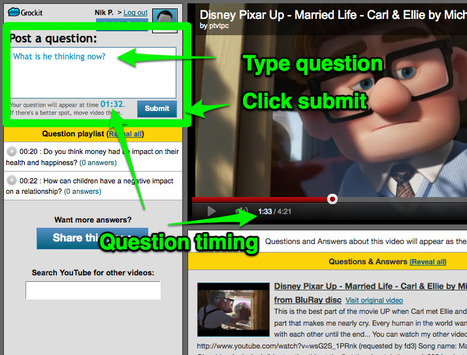
Robin Good: Grockit Answers is a web app that allows anyone to build a Q&A or discussion board around a specific video. Multiple questions can be asked and each one of them can be connected to a specific point in the video.
Great to introduce new video-based content and engage your fans on it.
"In Grockit Answers, interactions happen around video lectures, and participants ask and answer questions about specific points in the lecture.
Since every question is attached to a specific point in time in the video, Grockit Answers displays a question and its answers at the point in the lecture that they are most relevant.
And since the things that confuse you are likely to be the same things that confuse others, you'll find that answers to your own questions pop up on the screen just as you're starting to get confused."
Free to use.
Review: http://quickshout.blogspot.it/2011/10/create-online-social-interaction-around.html ;
Try it out now: https://grockit.com/answers ; Via Robin Good, Alessandro Lanzarini

Robin Good's comment,
May 11, 2012 11:51 AM
Great Neil! Glad to have contributed an additional possible solution. :-)

Neil Ferree's comment,
May 11, 2012 1:16 PM
Robin - would like to chat w/ you about Grockit (if) you have a few vids in the Q&A engine? I've got a few ideas that might interest you if so - Neil
Scoop.it!

#elearning Articulate - Word of Mouth Blog - Using Gamification To Transform Your Learners from Angry Birds into Lea...
Scoop.it!

From
soundcli
SoundCli.ps empowers users to Share, Listen, & Download sound clips that have been uploaded to it's site. Via Dr. Tom D'Amico (@TDOttawa)
Scoop.it!
From
vimeo
Robin Good: Hamster Free Converter is a free Windows-only downloadable software that makes it extremely easy to convert to just about any eBook format.
Hamster utilizes the same conversion engine utilized by Calibre but without the many options and advanced features.
It supports more than 200+ devices including Amazon Kindle, iPad, iPhone 3, iPhone 4, iPod, FR Book, iRiver, Sony, Digma, Nook, BenQ, Kobo, Explay,CrossElec, boeye, PAGEone, WexLer.
Hamster Free Converter converts any eBooks to run on Amazon, Sony, Asus, iPod, iPad, iPhone, PSP, Blackberry, Zune, iRiver, etc.
Free.
Download it here: http://store.hamstersoft.com/hamsterfreeebookconverter.exe (Win only)
Find out more: http://ebook.hamstersoft.com Via Robin Good

A_G_Storm's comment,
June 27, 2012 11:28 PM
What? No Mac version? Only for Windows. So much for my ever using it.

Louise Robinson-Lay's curator insight,
December 27, 2012 5:37 PM
This is very handy if you have multiple e readers on different platforms. You can change the format of any ebook.
Scoop.it!

Quatre ans après la dernière refonte, l'éditeur d'images Gimp s'offre une nouvelle mouture, baptisée 2.8.
Scoop.it!
Presentations are not meant to be slide after slide of bullet points. Breathe new life into presentations with engaging videos... The song and lyrics http://www.billselak.com/2012/videokilled
Via Baiba Svenca, Heiko Idensen
Scoop.it!

E-Learning vendors, specifically content authoring tools and LMSs have failed to listen to end users when it comes time for emerging technology and its incorporation within their products. A survey...
Scoop.it!

Great news for everybody who creates content for iPad! iSpring announces the new technology whichconverts PowerPoint to HTML5 and allows viewing presentations on iPads.
Scoop.it!

This post presents a list of the top 5 Rapid Authoring Tools that allow you to publish courses for your iPads. Via Jenny Pesina
|
Scoop.it!

True or false? It takes an animator and 3D graphics to create a learning game. This statement is false, as you'll discover if you read the timely book, The Gamification of Learning and Instruction: G...
Scoop.it!

Learn to create your own quiz in PowerPoint with all the animations. Make your training more engaging and interesting with this useful tutorial. Via Baiba Svenca
Scoop.it!

From
grabilla
Grabilla - ScreenShot and ScreenCast tool: Take a screenshot or screencast with a single click. Via Baiba Svenca, Rogério Queirós
Scoop.it!
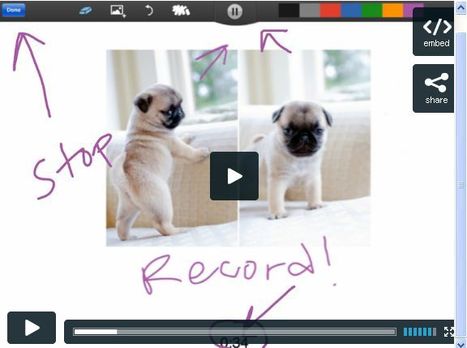
This How-To goes over the steps you take after you finish creating your ShowMe. The app http://www.showme.com/create Via Baiba Svenca
Scoop.it!

Screenr | Instant screencasts: Just click record. Screenr’s web-based screen recorder makes it a breeze to create and share your screencasts around the web. Just click the record button, capture your screen & voice, and share the link.
Scoop.it!

From
www
Robin Good: Idroo is a Windows-only downloadable collaborative whiteboard that works seamlessly with Skype.
Key features include: Real-time collaborative editing Unlimited participants Tools for math tutoring Multiple drawing and writing tools Images upload or paste from clipboard or drag-and-drop directly into the IDroo window.
N.B.: The software if free for personal and home use, but you’ll need to pay a fee for commercial or educational use.
Download: http://www.idroo.com/download (Win only)
Via Robin Good
Scoop.it!

There are times when you may want to reuse content created in PowerPoint in e-learning. Adobe Captivate does a great job of integrating with PowerPoint and converting slides to an e-learning format. Captivate can bring in ...
Scoop.it!
Read reviews, get customer ratings, see screenshots, and learn more about Articulate Mobile Player on the App Store. Download Articulate Mobile Player and enjoy it on your iPhone, iPad, and iPod touch.
Scoop.it!

Scoop.it!

La version 2.8 de GIMP, célèbre logiciel de traitement d’images, sortie le 3 mai 2012, concrétise trois ans et demi de développement. Les principales nouveautés concernent tant l’interface (avec l’introduction des groupes de calques, la possibilité de présenter des boites de dialogue en colonnes, et surtout le fameux mode à fenêtre unique [...]
|






