Ever wondered how people show you so clearly what is happening on their computer, like in the Photoshop Video Tutorials we shared with you? Thanks to screencasting software, anyone can do it.

 Your new post is loading...
 Scoop.it! Ever wondered how people show you so clearly what is happening on their computer, like in the Photoshop Video Tutorials we shared with you? Thanks to screencasting software, anyone can do it. 
No comment yet.
Sign up to comment
Scoop.it!

lino is an online web sticky note service that can be used to post memos, to-do lists, ideas, and photos anywhere on an online web canvas. lino is a completely free service that runs on all popular web browsers.
Scoop.it!

Les académies mettent à disposition des enregistrements de locuteurs natifs afin d'entraîner ou évaluer la compréhension de l'oral. Vous pouvez accéder à ces banques son répertoriées sur notre site. Via Laurence Bernard
Scoop.it!
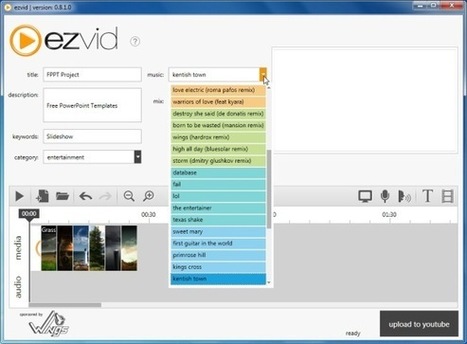
Ezvid is an easy to use free software for recording screencasts and slideshows with narrations. It can be used to import both static images and videos, which can then be used for creating attractive slideshows. Furthermore, you can record a screencast in just a click... Ezvid homepage http://www.ezvid.com/ Via Baiba Svenca, Tom Perran

dilaycock's comment,
June 17, 2012 1:07 AM
Looks great. We've just created a library You Tube channel, so this will be useful for kids to make book trailers with. Thanks :)
Scoop.it!
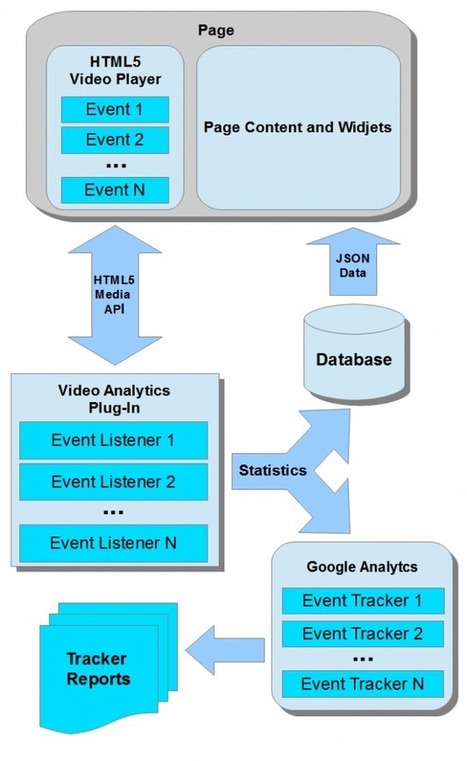
If you offer online video services, no doubt you have not once thought of video views analytics. In a Flash-based OSMF framework, there is GTrackPlugin to collect statistics on content viewing. Also, you can also use our OSMF Video Analytics.
However, if your service HTML5 based, you need a purpose designed viewing analytics. To build such a plugin, HTML5 Media API should be used. Via Nicolas Weil
Scoop.it!

Combine sharing pictures and narration and what do you get? Slidestory! Slidestory is a new, exciting and FREE way to make presentations and share them on the Internet CURATION RESTART EDUCATION PROJECT http://bit.ly/credproject . Welcome in the new Age of #Curation http://bit.ly/CurationKing & http://bit.ly/curationglog by @ https://twitter.com/#!/web20education - wish you all Lucian http://xeeme.com/Lucianecurator/ . I invite to subscribe for NEW #edtech20 #socialmedia #Curation newsletter http://bitly.com/edtech20newsteller register to join free http://bitly.com/docedtech20 #edtech20 #socialmedia #curation project http://web20education.bo.lt/g6538 and Install free our #mlearning app http://bitly.com/edtech20mLearningapp .Like and collaborate on facebook http://on.fb.me/likeedtech20facebookpage and Circle on Google Plus http://bitly.com/circleedtech20googlepluspage and Subscribe free to gr8 #edtech20 blogs : top 10 blog http://bitly.com/egr8blog :http://bitly.com/feededtech20blogs related to new web 2.0, social media startups http://bitly.com/web20eblog , curation http://bitly.com/curationblog ; mLearning apps http://bitly.com/mLearningblog , google plus http://bitly.com/googleplusblog , and my romanian blog http://bitly.com/eblogulmeu . Like and collaborate on facebook http://on.fb.me/likeedtech20facebookpage , linkedin http://linkd.in/edtech20linkedin , diigo http://bitly.com/edtech20diigo Via LucianeCurator
Scoop.it!

Pour redimensionner des images, il existe les logiciels de retouches d’images tels que Photoshop et Gimp mais aussi des outils qui font très bien le travail. Cropp.me est un outil qui permet de redimensionner des images à la volée sans inscription.
Le principe est simple : il faut commencer par sélectionner une ou plusieurs photos sur son ordinateur et choisir une ou plusieurs tailles de redimensionnement. Une fois que c’est fait, on peut télécharger une archive des images redimensionnées.
Il est possible de choisir parmi une liste de tailles d’images prédéfinie (50×50, 75×75, 160×120, 300×250, 850×315, 728×90, 640×480, 800×600, 1024×768) ou de choisir une taille personnalisée en spécifiant la largeur et la hauteur.
Croppola est un service similaire qui fait plus ou moins le même travail.
Autant pour manipuler une ou plusieurs images légères, ces services sont très utiles. Ils le sont forcément moins lorsqu’il faut redimensionner des fichiers lourds de plusieurs megas.
Redimensionner des images à la volée avec
Cropp.me : http://cropp.me/ Croppola : http://croppola.com/ Via 173 Sud
Scoop.it!
It's super cool to share, so I thought I'd share another ... SNEAK! Adobe Captivate 6 is going to be phenomenal. Here's another reason why. Via Mayra Aixa Villar
Scoop.it!
From
www

"Très « trop » souvent utilisé comme terme générique pour désigner une Présentation assistée par ordinateur, le programme de Microsoft n’est plus le seul outil utilisable pour réaliser un diaporama attractif.
Voici une sélection d’outils libres et/ou gratuits, en version logiciel ou accessibles en ligne qui permettent de réaliser des présentations performantes."
- LibreOffice ou OpenOffice.org - Google-Docs Présentation - SlideRocket - Zoho Show - Prezi Via Valérie Quenet
|
Scoop.it!

From
camdip
CamDip is a Free Group Video chat application, very easy to use and very intuitive, designed with the ease of Via Jean-Charles Blondeau
Scoop.it!

Dessiner en ligne est actuellement donné à tout le monde grace à des applications gratuites qui permettent de dessiner facilement en ligne avec la souris et sans avoir des connaissances en la matiere. Un bon exemple à essayer est Sketchpad dont nous avons parlé il y a quelque temps. Aujourd'hui les choses sont plus simples encore et vous etes désormais capables de dessiner en ligne si seulement vous utilisez google chrome comme navigateur. Grace à un certain nombre d'extensions gratuites vous aurez plus besoin d'un programme quelconque. Lire la source: http://www.applicanet.com/2012/06/10-extensions-google-chrome-pour.html#ixzz1xwfPAEg9 Via Frédéric DEBAILLEUL
Scoop.it!

En alternative à Camstasia ? HyperCam permet de capturer les actions effectuées à l'écran et de les enregistrer sous forme de fichiers vidéo AVI. Les sons transmis via un microphone connecté à votre système peuvent également être enregistrés. Via alexislucas
Scoop.it!
Ezvid is an easy to use free software for recording screencasts and slideshows with narrations. Via Alex Briscese
Scoop.it!

I love being part of a team.There are few things in life more rewarding than pulling together with a group of like-minded souls in order to... Via Mayra Aixa Villar
Scoop.it!
Scoop.it!

Screencasting is an excellent way to communicate to clients, potential customers, or people in general. With many screencast software options available, it is not hard to find one that fits your specific needs. This article will examine various popular screencasting programs currently available for PCs and Macs, as well as their features. While many of the programs listed below have other features, such as the ability to take screenshots and record only audio, I will concentrate only on the screencasting abilities of each of these tools.
Scoop.it!

by Roger McNamee Via appMobi
Scoop.it!
"PowToon is a brand new presentation software that is so simple and intuitive, it allows anyone who ever used PowerPoint or KeyNote to easily evolve their presentations to AWSOMENESS!
PowToon contains themes of animated characters, props and cool transitions which you can just drag and drop into a slide to create eye catching and fun presentations that can be presented in person, or turned into animated videos at the click of a button - to be shared on YouTube, Facebook or Twitter."
Website: http://www.powtoon.com
Via: Digital presentations in education Via Timo Ilomäki
Scoop.it!
From
ipiccy
Edit and apply awesome effects online. iPiccy is a powerful and easy photo editor for your images in your browser. Via Juan Arbulu
Scoop.it!

HTML5 & CSS3 for the Real World by Goldstein, Lazaris & Weyl HTML5 Includes all elements from XHTML and HTML4, attempts to be inclusive and less picky about syntax Changes: Simplification of doctype declaration ...
Scoop.it!

Découvrez les 7 principes de base à respecter absolument pour réussir vos prochaines présentations et captiver votre audience. Via Sylvia Crozemarie
|