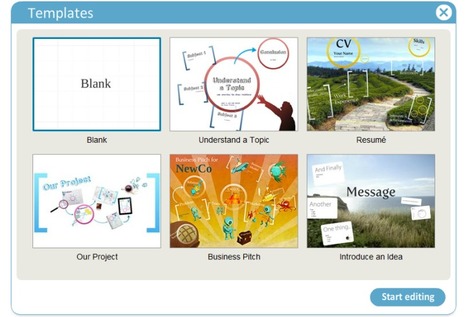
This morning, at the Washington Library Media Association's annual conference I ran a workshop on digital storytelling tools and ideas for digital storytelling projects. As I do for every workshop I run I promised to post the resources and slides before night-fall. Below are the slides from the lecture portion of my workshop. The last slide will link you to my big list of free digital storytelling tools. (The slides lose a lot of meaning when you can't hear me talk about them).
Algunas veces ya he comentado en el blog las características de las licencias Creative Commons y, la recomendación de su uso que hago para publicaciones...
Social media may have started out as a fun way to connect with friends, but it has evolved to become a powerful tool for education and business. Sites such as Facebook and Twitter and tools such as Skype are connecting students to learning opportunities in new and exciting ways. Whether you teach an elementary class, a traditional college class, or at an online university, you will find inspirational ways to incorporate social media in your classroom with this list.
Ideas for K-12 Classrooms
Implement these great ideas in your K-12 classroom to have students learning in a dynamic new way.
Make literature real. Have students create a Facebook page for a character from literature you are studying like this class did.Follow famous people. Many famous people are on Twitter. Have students follow someone related to what you are studying, such as following President Obama when looking at government.Twitter treasure hunt. Use GPS treasure hunting to send students in search of educational clues as one teacher did. (Skip to number 22 in the slide show.)...
This article lists several different Social Media resources and suggestions regarding how they can be used in the classroom. These resources could be used to support the Digital Technologies processes and production skills strand of the proposed Technologies learning area of the Australian Curriculum. There resources can be applied to the sub-strands, 'Creating and interacting online' and, 'Managing and analysing data". Different resources are suited to different year levels.
Smore is a new service for quickly creating great-looking webpages. Smore markets itself as a service for creating online flyers, but it's a little bit more than that. To me "flyer" implies that you're creating a single-use PDF and posting it online. Smore's flyers are dynamic and changeable, they're not single-use PDFs. Your Smore flyers can include many types of media including videos. Deleting or adding elements to your Smore flyer is as simple as dragging and dropping them on or off your page. Watch the one minute video below for an overview of Smore in action.
Why Use YouTube in your classroom? Increase student engagement Start your class off with an engaging video clip that brings a lesson to life and sparks a lively discussion. No longer will students be late for physics class when you begin the class with an engaging clip.
Make the subjects applicable to your students' everyday lives by showing culturally relevant YouTube clips. Teach students video production and editing skills through projects and upload the videos to your classes YouTube channel. Free access to thousands of high quality educational videos YouTube provides free, unlimited access to tens of thousands of videos of high quality educational content. These videos range from the world's best professors giving hour long lectures to great teachers giving short lessons. Check out the diverse array of educational content at YouTube.com/EDU Teach to every type of learner Tap into the mind of the visual learner. Each student has different learning needs. You can create videos or playlists to suit the different types of learners in your classroom. On YouTube you can find videos explaining the same topic, many different ways. For example, here are four different videos, all explaining the concept of number patterns in a different way. This video presents number patterns in a real world context.
From its inception, the web has always had appeal as an educational resource. Recognising the potential for remote learning, in 2002, the launch of OpenCourseWare at MIT helped propel the initiative into the spotlight, with many universities following suit and providing quality educational material available through the web. No longer is there an excuse for anyone with access to the web to say that education is outside of their reach.
This collection of links and applications highlights just the tip of the iceberg of educational resources that are available on the web. If you are interested in teaching yourself a new skill or learning a new topic indepth in your spare time, hopefully some of these will be of use.
Los centros educativos andaluces necesitan una gestión integral que libere de carga administrativa a equipos directivos y profesorado. Con esta misión se ha desarrollado y sigue creciendo Maimónides.
Maimónides es una herramienta que busca simplificar los procesos administrativos y facilitar la comunicación con Séneca desde los centros educativos, lo cual evita tener que introducir datos por duplicado: Maimónides es capaz de recuperar y enviar datos desde y hacia Séneca: profesorado, matriculaciones, calificaciones, absentismo,…
Maimónides se ha desarrollado en conjunto con profesionales de la educación en activo y programadores con mas de diez años en el sector, de esta labor común ha surgido una aplicación que une experiencia docente y nuevas tecnologías. Al frente del proyecto se encuentra CODEKO, una PYME granadina que ha apostado por el software libre. Maimónides es completamente gratuito, es decir, cualquier centro escolar puede descargarlo y utilizarlo sin tener que pagar ninguna licencia.
Esta aplicación ya forma parte de los repositorios de Guadalinex, si bien puedes consultar la documentación, instalarla o acceder a los fuentes desde su propia web. En la página de descargas están disponibles los enlaces para descargar las versiones para Guadalinex y Windows, así como el paquete .deb para distribuciones Linux basadas en Debian o el lanzador WebStart para Java.
Como parte de su modelo de negocio, Codeko ofrece ciertos servicios a los centros educativos, como por ejemplo:
Quality documentary videos can provide students with useful explanations or demonstrations of concepts. Unfortunately, documentary dvds can be expensive acquisitions for some school departments. Here are five places where you can find and watch documentaries for free online.
Snag Learning offers access to hundreds of high quality documentary videos. Snag Learning categorizes documentaries by grade level and content area. Additionally, Snag Learning offers a series of guiding questions for each film. You can embed previews of each video into your blog, but you have to watch the full-length versions on Snag Learning.
Explore.org produces and hosts high-quality documentary films and photographs. The films and images focus on exploring the world and the work of non-profit organizations around the world. The films and images are organized by destination. There are twelve destinations in all including China, Tibet, the Middle East, and India. Explore.org is funded in part by the Annenburg Foundation...
"Crea tu red: Edmodo es un sistema de microblogging que permite mantener en contacto profesores y alumnos. Características: Medio totalmente privado y seguro. Apto para todas las edades de alumnos. Control parental. Permite la comunicación a través de mensajes de texto. Inserción de: Imágenes, vídeos, sonido, enlaces, animaciones flash. Clases de alumnos con subgrupos. Dominio personalizado para centros educativos."
Speak It is a Google Chrome extension that enables you to have the text on most webpages read to you. With Speak It installed just highlight the text on a the page you're viewing then right-click to activate Speak It. Then click the play button to have the text read to you. The voice is very digitized, but it is clear.
Installing Speak It takes just a few seconds. To install it go to Speak It's page in the Chrome Web Store and click the install button. Restarting your browser is not required in order to activate Speak It. If you decide that you don't want to use Speak It any longer you can uninstall it by right-clicking on the Speak It icon in your browser and selecting uninstall.
A video demonstration of Speak It is embedded below...
En tiempos como los nuestros, en los que las imágenes juegan un papel fundamental en la tarea de enseñanza-aprendizaje, una herramienta como Educaplus nos enriquece con su aporte. Recomendamos ampliamente visitar este sitio.
En los campos de las ciencias nos ofrece una gran cantidad y variedad de animaciones referentes a áreas como química, física, matemáticas, ciencias de la tierra, biología y más. En cada rama que cubre tiene material para una gran cantidad de temas que conviene investigar.
A su vez, cada tema tiene su propio espacio lo que permite profundizar y ampliar en los temas específicos que se necesite de los diferentes espacios curriculares.
Educaplus.org es el sitio personal de Jesús Peñas Cano, profesor de Física y Química. El proyecto Educaplus.org se encuentra en línea desde 1998 y su objetivo fundamental es compartir con todos, pero fundamentalmente con la comunidad educativa hispanohablante, los trabajos que vengo realizando para mejorar mi propia práctica profesional como docente.
Via Teresa Torné
Desde el Colegio Nº 17 “Primera Junta” de Buenos Aires, Argentina, nos presentan esta herramienta educativa creada por un alumno de esta escuela secundaria.
En Interred podemos realizar búsquedas de cualquier contenido académico relacionado con temas como la literatura, la biología, la sociología, etcétera, además de incluir el sitio web tres bloques temáticos relacionados con la estructura del cuerpo humano, la estructura de las plantas y la estructura del sistema solar. Cada uno de los bloques es interactivo y si hacemos clic en una parte de la cual queramos buscar más información, la página nos redirigirá automáticamente a otros sitios web como Wikipedia o Botanical Online en caso de querer saber más sobre plantas, por ejemplo.
Aunque no es un buscador comparable a los gigantes que solemos analizar por aquí, sí es todo un ejemplo teniendo en cuenta el contexto y los recursos utilizados para su creación...
Libro impreso multimedia."La presentación perfecta en Power Point no existe, pero podemos acercarnos" Es el primer capítulo de un libro casi terminado sobre...
Presentación utilizada por Linda Castañeda, Profesora de la Universidad de Murcia, y Jordi Adell, Profesor de la Universidad de Castellón, el 30 d ejunio en (Jordi Adell y Linda Castañeda: El desarrollo...)...
Live Minutes is a new service offering free hosting for webinars. It takes less than thirty seconds to set-up a webinar on Live Minutes. To get started just click "start sharing" and a meeting space is created for you. That meeting space is assigned a URL that you can share with the people you want to join you.
Live Minutes offers a good selection of tools that you can utilize to share ideas with others. You can talk to each other using either the Live Minutes audio or by connecting through Skype. Live Minutes offers a collaborative whiteboard for drawing. Uploading images and documents for others to see and comment on is also an option. And in the future Live Minutes will allow you to share videos during your webinar...
LearnBoost es una herramienta educativa orientada a profesores, padres y alumnos que lanza ahora su versión en español y planea ampliar su servicio y traducirlo a múltiples idiomas en las próximas semanas.
Su software gratuito permite a profesionales de la educación crear y administrar tareas para los estudiantes, controlar el progreso de los deberes realizados por los alumnos, realizar estadísticas y analíticas sobre los datos recogidos durante el curso y compartir los resultados con estudiantes y padres. El sitio web también incluye un blog con distintas noticias relacionadas con el mundo de la educación o que nos informan de las actualizaciones que se aplican en LearnBoost.
LearnBoost pueden integrarse además en Google Apps, de forma que el libro de notas y tareas aparecerá integrado fácilmente cuando nos registremos desde la web en nuestra cuenta de Google.
The best Mind mapping, Brainstorming Software, A great productivity tool with ease-to-use features, friendly UI, and human design. A free and open source mind map software, awarded as the best Project for Academia.
Easy-to-use With XMind, you can just double-click to create and edit topics anywhere on the map. Drag-and-drop for reorganizing topics, moving markers, taking a mapshot, and adding attachments. You can even search on topic with Google and drag images into your map without leaving the working window.
Easy-to-share XMind.net is the best place to share your ideas and thoughts with the world. Adding an embedded mind map viewer into your blog will enable more people to visualize and learn from your ideas. If you want to share privately, or brainstorm ideas with selected friends, just upgrade to XMind Pro.
Brainstorming XMind is a great brainstorming tool for your team. And XMind Pro provides a special brainstorming editing mode to offer you a place to focus on recording and organizing sparkles.
Manage Tasks With Gantt View in XMind Pro, you can easily manage and adjust your tasks in a single view. And with the mix-usage of structures, multiple sheets in one file, and other features, you can plan and track projects fast.
Export to PDF/Office XMind's intuitive design and powerful features let you focus on your work and share it easily with others. You can export maps into a variety of popular formats such as PDF, Word and PowerPoint.
Meeting Presentation XMind Pro makes it easier to express your ideas and share your information in your meeting presentation. Your audiences not only see the ideas, but also follow a logical progression of them. And you can also record what they say as MP3.
El factor que más puede colaborar para que los alumnos y alumnas comprendan un texto de manera cabal es la ayuda del profesorado en el proceso de lectura haciendo de guía de la misma y favoreciendo la interacción entre el alumnado para llegar a una construcción compartida del sentido del texto.En este proceso, también, es posible utilizar alguna de las herramientas 2.0 que lo haga más eficaz.
En primer lugar, se puede citar la Pizarra Digital Interactiva que permite proyectar un texto e interactuar con él y sobre él.
Por ejemplo, se pueden sugerir los siguientes pasos:
Leer un párrafo e identificar si se conoce y entiende el vocabulario.
Subrayar las palabras claves del párrafo.
Extraer la idea principal de cada párrafo expresada en dos o tres palabras.
AWW – A Web Whiteboard, es una interesante pizarra digital que nos permitirá, de forma colaborativa, crear bocetos con otros usuarios y compartir los resultados, ya sea de manera manual difundiendo la URL por los medios que deseemos, o bien a través de diversas redes mediante los botones que tenemos a nuestra disposición.Para usar esta aplicación, no será necesario registrarnos.
Tan sólo tenemos que acceder mediante el botón “Start Drawing” y empezar a trabajar, cuya sesión tendrá una URL específica que será la que indiquemos a los colaboradores para que entren y participen.
Selección de color, grosor, y una serie de opciones de menú conforman esta sencilla aplicación, que podemos usar tanto en ordenadores de escritorio como en dispositivos móviles...
Zooburst es una herramienta con la que se pueden crear libros en 3D, en los que podras incluir vídeos, textos, imágenes de manera muy facil.
Los usuarios de cualquier edad pueden crear sus propios libros en 3D online y se puede experimentar usando nada más que un navegador web que ejecuta el plugin Adobe Flash. Los autores pueden diseñar personajes y objetos en un mundo 3D cargando sus propias obras de arte o simplemente seleccionar elementos que se encuentran en una base de datos incorporada de más de 10.000 imágenes y materiales gratuitos.
Además, los autores pueden optar por hacer artículos interactivos en los cuales los lectores podran “hacer clic”, permitiendoles aprender más acerca de los personajes o elementos dentro de una historia. Cada personaje puede tener su propia “burbuja de chat” que aparece al hacer clic. Se pueden desarrollar los personajes y accesorios dentro de un mundo en 3D que se pueden personalizar mediante obras de arte o artículos subidos en una base de datos integrada de más de 10.000 imágenes y materiales gratuitos.
Nota: El sitio está en inglés, pero las herramientas que usamos pueden aplicarse sin problemas a las narraciones...
To get content containing either thought or leadership enter:
To get content containing both thought and leadership enter:
To get content containing the expression thought leadership enter:
You can enter several keywords and you can refine them whenever you want. Our suggestion engine uses more signals but entering a few keywords here will rapidly give you great content to curate.


 Your new post is loading...