


Nokia Maps for Windows Phone 8 has been updated to version 3.0.125.8. There are no major features changes, but the Windows Store description notes that the app has improved stability and performance.

 Your new post is loading...
 Scoop.it! Nokia Maps for Windows Phone 8 has been updated to version 3.0.125.8. There are no major features changes, but the Windows Store description notes that the app has improved stability and performance. 
No comment yet.
Sign up to comment
Scoop.it!

OtterBox cases are now available for the Lumia 920, with two listed on the official website. Both the Defender (left) and Commuter Series (right) can be ordered online for $49.95 and $34.95 respectively. Tough it's common for smartphone owners to invest in device protection, one has to ask - does the Lumia 920 need protecting, or should we worry about the surrounding environment? In case (pun intended) you're wandering how tough the Lumia 920 is, PhoneBuff recently ran a series of tests that looked at causing as much pain and misery to the Windows Phone as possible. From being smacked by a wooden post to thrown against a lamp post, the device took a beating. It was only after a number of forced throws did it eventually begin to crack under pressure. We previously reviewed both the Commuter and Defender cases for the Lumia 900 earlier in the year, so be sure to read up on our thoughts before looking at investing in either for your new Lumia 920. A case is always there for peace of mind, though we doubt you'll actually see any issues with strength should you purchase a Lumia 920. Just be sure to carry a bag of cement around to patch up the ground where it left a crater. Our Paul Acevedo has also spotted the cases in his local AT&T store, so be sure to check with your nearest for information on stock. We're looking at getting some for the Windows Phone Central Store, but unfortunately the only way to pick one up is from OtterBox as the company has recently switched to direct-sales only.
Scoop.it!
Jollan Senior Designer Jaakko Roppola esittelee Sailfish-käyttöjärjestelmän käyttöliittymää.
Here’s a look at the Sailfish UI for Jolla, as demoed on the Nokia N950. by puhelinvertailu
Scoop.it!

Damian Dinning, Nokia's head of imaging has decided to leave the struggling smartphone.
The man behind the camera technology on handsets like the headline-making, 41-megapixel Nokia 808 Pureview and the new Nokia Lumia 920 device will leave at the end of this month. The company said: "Following the relocation of key strategic roles to Finland, and with great reluctance, Damian Dinning has made a personal decision to leave the company effective 30 November 2012.
Scoop.it!

If you want the most powerful, feature-rich Windows phone available, then pick the Nokia Lumia 920. But if you're looking for a slim, light smartphone, you'll find the 920's cumbersome dimensions a drag.
Scoop.it!
Nokia's Sound Design team have created 25 classical music ring tones of their own with help from the Bratislava Symphony Orchestra. Four of these will make their first appearance on the Nokia Lumia 920 and Nokia Lumia 820.
Scoop.it!
Nokia uses high-tech cameras and sensors on a fleet of 45 Volkswagen Jettas to create elaborate 3D maps for its Here location services.
Today Nokia released Here, its upgraded and re-branded location services, for iOS. The launch follows the company’s big unveiling of the service last week, which takes advantage of Nokia’s 3D maps. After the event, Nokia was kind enough to show me how it creates its maps, taking me on a ride around San Francisco. To create Here maps, Nokia is using a fleet of Volkswagen Jettas — 45 of them to be exact — to capture 3D representations of roadways and the surrounding environment. The cars don’t just take into account the buildings they drive by, they’re also capable of mapping street signs and even elevation. That data can then be used provide drivers with fuel-efficient routes to their destination. For instance, Nokia knows where all the hills are in downtown San Francisco and could potentially create a driving or walking route that helps you bypass those hills –- saving fuel or energy. In the long term, it could help self-driving cars navigate through cities. To make all that magic happen, the cars are outfitted with over $25,000 worth of computing and mapping equipment. The top of the car has a 360-degree LIDAR (Light Detection and Ranging) set up, which uses rotating lasers to capture 1.3 million 3D digital data points every second, essentially recreating the world around it in 3D. Panoramic cameras capture 360-degree images synchronized with the LIDAR points. (Check out all the cool mapping toys in the gallery below.) SEE ALSO: Nokia Shows Off The Future of Maps With ‘Here’ Vehicles are most often driven by professional drivers, who are assigned a certain route to drive in the car each day. Focused more on attractions rather than homes and residential areas, Nokia’s drivers are traditionally assigned city streets and places travelers might be looking for over residential areas that are primarily homes. As drivers are often experts on their particular city, they’ll often suggest changing areas that need to be re-mapped, and provide input on landmarks that can be used for future directions. In the future, for instance, Nokia’s turn-by-turn directions might tell you to “Turn right at the horse statue,” rather than onto a street that might not be clearly marked. ...
Scoop.it!

According to the reports from various WP forum, some Nokia Lumia 920 owners are experiencing random reboots and poor battery life and some attempts to...
Scoop.it!

...
There are some slight niggles which I’ll talk about later but nothing major (perhaps it’s just me unaware of what to do). But otherwise, another welcome addition (and very nice that it does not require a PC counterpart like Zune). We will look at: Backup This is quite simple and can be done on the phone whenever you want. ...
Scoop.it!

When we're asked this question, what do you say?
.....
Like it or not, smartphones have become very personal items for most people. They become attached to them quickly, and usually stick with a particular brand. Iphone 4S owners maintain the Apple ecosystem link by purchasing the iPhone 5. Samsung Galaxy S II owners upgrade to the S III, and so on. There is a much more tangible connection between people and their smartphones than they’re prepared to admit. It’s not as if people are particularly attached to the Dell brand, for example, they just need a good PC or laptop. The next one could very well be an HP or Asus. Phones have become that thing that we have to help identify who we are; why we stick with a Honda over a Ford for example. Nokia is one of those brands that people choose not because of prestige necessarily, but because they have likely stuck with that brand for many years. And in that time Nokia have shown us the excellence they are capable of (most of the time!) It seems very apparent that they are maintaining this excellence with the new Lumia 920, and I think you’d be hard pushed to disagree with that, whether you’re a Windows Phone fan or not. The device itself is stunning. The thing about Nokia phones is this: describing your current one as stunning could easily be something you’ve been saying for a long, long time. And so when I’m asked the question, “Why Nokia?”…that’s why.
Scoop.it!

Apple Maps sucks hard but Nokia's navigation solution, a product called Here that was just announced today, is fast as hell. You can try it in on the desktop or in web app form at m.here.net. I wish I had had this over the weekend—I visited San Francisco for the first time and kept forgetting Apple Maps lacks transit directions. And I cried and cried. Here, on the other hand, is an answer to your commuting woes. And you don't even have to download an app or anything. Here works in multiple browsers across major operating systems—we tried it on iOS, Android, and Windows Phone. However, it did freeze up a little for us in Chrome on Android and IE on Windows Phone. Nokia already powers maps for a laundry list of services—Rand McNally, Garmin, Bing, Yahoo Maps, and more. That alone speaks volumes about its reliability. The company's Stephen Elop said the location data is "very, very fresh," and it seems...
Scoop.it!

As promised back in June, two of the world’s favourite social games, Draw Something and Words with Friends, are now available for all Nokia Lumia devices, whether running Windows Phone 7.5 or Windows Phone 8.
While the games are available for all Windows Phone users, lucky Nokia Lumia users will be able to download the apps for free, for the next two months. Draw Something is a social drawing game. You’re given a word for your friends to guess, through the medium of a finger-drawn sketch on your Lumia’s screen. It can be played co-operatively with friends, or competitively with rivals. Features include push notifications and colour packs which turn simple doodles into rich masterpieces. So far, the hit game has produced 7bn drawings across the world, and now Lumia owners can join the fun. So start drawing and get your inner artist out! Words with Friends is a social word game in which you challenge friends, or strangers, to create better words than you on a square grid. In-game chat messaging allows players to easily keep in touch. You are probably quite familiar with the basics of the format. But you get a triple-word score bonus for spelling ‘L-U-M-I-A’ (not really, we’re afraid). There’s little more to say here. They’re great, world-famous games with millions of players. And they’re free for Nokia Lumia users only a limited time, so grab your copies now and let us know what you think of these titles in the comments.
Scoop.it!

One of the services we constantly update, basically on a weekly basis, is maps.nokia.com. What started as a web companion for your mobile experience has grown in features so much that you can now use it to plan your travels. By now, for instance, you should be familiar with our city pages from which you can explore and get the feeling for a city before even going there. Groupon We have been providing the possibility to discover Groupon Now! deals around you with Nokia Maps for Nokia Lumiasince last August. Now we are extending this option to maps.nokia.com. Groupon Now! on maps.nokia.com is a great way to get nearby deals on demand. You can buy them and use them right away for instant gratification. We think that this is a perfect way to try new places or find great offers around you, in your home city or when traveling. On maps.nokia.com you will see Groupon Now! deals at the bottom...
|
Scoop.it!

Are you interested in a classy case to protect and personalize your new Nokia phone? We found 10 great options that could fit the bill.
Scoop.it!

Microsoft is currently preparing an update for Windows Phone 8, codenamed Apollo Plus. Sources have confirmed to The Verge that Apollo Plus will bring new features to Windows Phone 8 that weren't fully in scope for the initial release. This won't be the next major version of Windows Phone, but more of a point update to push fixes and features. We're told that Microsoft is preparing to include VPN support in Windows Phone, a missing option since the reset of Microsoft's mobile OS efforts, that will allow corporate users to connect to work systems — this feature may make it into the first Apollo Plus update. A Wi-Fi connection fix is also planned to let connections always remain on, alongside some audio improvements. Apollo Plus will also test Microsoft's ability to deliver Windows Phone 8 updates over-the-air, a change from the previous OS that required users to plug devices into PCs to get similar updates. MICROSOFT "RAN OUT OF TIME" ON A NUMBER OF FEATURES Microsoft has admitted it "ran out of time" on a Notification Center Windows Phone 8 feature addition, and the company will likely push additional features that failed to make the final cut as part of its upcoming update. We're told that Microsoft will be detailing Apollo Plus at Mobile World Congress in February.
Scoop.it!

Users of the Swype keyboard have reportedly run into trouble this weekend, as the beta version's certificate expired. A post on the Nokia Beta Labs forum confirmed that it would expire sometime after the 19th of September this year. ...
Scoop.it!

The Nokia Luna is one of the smaller bluetooth headsets I’ve come across, in a beautifully compact and different design. The first time I saw the Luna headset a year...
The Luna is a NFC enabled device, which means pairing it with a NFC phone is a breeze, just tap the two together and you’re connected. You can also use plain ol’ Bluetooth pairing if you don’t have a NFC enabled phone yet. It works great either way. The headset fits in your ear for easy use. The earpiece is just as large as a coin not too big at all. ...
Scoop.it!

Proving Nokia Beta Labs hasn't forsaken Symbian altogether, there's a big new update today to Nokia Public Transport, bringing better coverage and over the air data updates to schedules. Great stuff, see the quotes, screens and links below.
Scoop.it!

Apple's own Maps app has been heavily criticized, and Google does not yet have a Maps app for iOS ready, so Nokia's timing in offering an alternative on the iOS platform is good as it tries to build up its user base.
Scoop.it!

One of the hardware improvements in Windows Phone 8 is support for NFC. Devices like the HTC 8X, Lumia 920 and Samsung ATIV S can use NFC to trigger the sharing of media (Tap+Send), pair with Bluetooth accessories, read NFC tags (e.g....
The reading of NFC tags offers a wide variety of possibilities, from viewing a string of text, to triggering an action on the phone (e.g. opening a web address, open a specified app, and more). It's also possible to write your own tags, but to do this you'll need a helper app. One of the first of this type of app that we've seen for Windows Phone 8 is Nfc Interactor. The Nfc Interactor app, from Mopius, can read any NFC tag and will show information about the data stored on the tag, and the writeable size of the tag, in an easy to read layout. That's useful for developers working with NFC tags, but may also be of interest to the NFC enthusiast. Potentially more useful is the ability to write data to programmable NFC tags. Nfc Interactor can be used to write a variety of formats to including Smart Poster, URI, Text, Social Networks (Twitter, Facebook, Skype, etc.), SMS, Telephone call, Geo Tags, LaunchApp (for Windows 8 and Windows Phone 8), Android Application Record, Nokia Accessories, and Custom Records. This functionality can be used to create your own custom NFC tags. For example, you could create a tag that opens up an alarm app and place it next to your bed, or you you could write tag that triggers a call to a regularly called number.
Windows Phone Store description:
Nfc Interactor is a powerful Near Field Communication tag reader / writer app, aimed at enthusiasts and developers. Tap NFC tags to analyze their real contents. Nfc Interactor will instantly tell you the writable tag size and parse standardized messages to human readable form. Write your own NFC tags using a dynamic message editor - including Smart Posters, geo tags, social networks and LaunchApp tags. Additionally, you can also send your messages to other NFC devices simply by tapping.
Nfc Interactor can be downloaded from the Windows Phone Store. A free trial is available (limited to writing 10 NFC tags), with the full version costing £1.49 / $1.99 / €1.99.
Developers will be interested to know that the core NDEF (NFC Data Exchange Format) library used by Nfc Interactor is available as open source through CodePlex. This has the potential to save significant amounts of time and effort when implementing NFC solutions on Windows Phone 8 and Windows 8.
Scoop.it!

The state of a Symbian phone when you first turn it on is dependent on the firmware that's installed (e.g. v111.xx.xxx), this is stored in a read only area of your phone's flash memory, designated Z:, which is where the OS gets loaded from; and it's also dependent on the sales package software, the extra apps which are (usually) market-dependent and which get preloaded at the factory - games, offers, major third party apps, trials, and so on. It's these latter that were missing if you went for the 'ultimate' reset in my earlier tutorial. So I thought I'd better at least give you some pointers about restoring the sales package software, in case you decide that you wanted all this after all. All 1.2GB of it (though admittedly that does include some full-fat 'HD' games). ...
Scoop.it!

Although it seemed perfectly fine at the time, watching VHS tapes is far inferior to the DVDs that many of us enjoy today. Likewise, the Blu-Ray format is an improvement again on the DVD viewing experience. PureMotion HD+ is the fastest screen on a smartphone. In fact, it is over twice as fast as the displays on competitor smartphones currently on the market. It’s a result of an evolutionary process that, with each new development, has enhanced the user experience one step further. With the PureMotion HD+ display you get crisper graphics and less blurring while e.g. scrolling, navigating and playing games. If you’re interested in the technical details of what makes the screen on Lumia 920 so fast, read on! The challenge “There are a few things that really affect the blurriness of the display,” says Jussi Ropo, Nokia’s Senior Technology Manager. “First of all, all rendering should happen at a stable 60fps as only then you get rid of the jaggedness in the moving content. You can say it’s a prerequisite for all the further improvements.” Another important aspect related to displays is LCD and how fast the liquid crystal can change its state, meaning how fast it can change from one colour to another. “First, when you measure 60fps it means 16.7ms – you have a new image coming every 16.7ms on the display. It is intuitive to think that when your LCD response or transition time is longer than this one frame period then you will actually get quite a lot of blur. This is because your liquid crystal is still trying to get the previous value at the same time as it has to start turning again for the next frame,” says Jussi. Transition speeds Therefore, the trick, and the solution on the Lumia 920, is to actually have a faster response time than 16.7ms. “On average it takes about 9ms for all of the transitions so regardless of e.g. what shade of blue you are turning into what shade of yellow, it is always below 9ms. This is the biggest step forward in the screen speed of the Lumia 920.” This phenomenal transition speed was achieved by boosting the voltage to each LCD pixel – overdriving the panel. By comparison, other competitor phones will have a like-for-like transition speed of around 23ms. Nokia Lumia 920 and Lumia 820Our first Windows Phone 8 smartphones.Be a part of it. More technical details of how this was done can be found in the PureMotion HD+ White Paper. Ultimate blur-free? As well as the transition speeds, there are other factors that can cause blurriness on your screen. The ultimate display, says Jussi, for blur free motion is the old Cathode Ray Tube (CRT) televisions but obviously given their size (and power consumption) they are not practical at all for mobile phones. Modern LCD and plasma TVs also use upscaling via frame interpolation (inserting extra frames) to dramatically increase the fps rate. Again though, compared to mobile phones, TVs are immensely power-hungry, so these techniques are not directly applicable to mobile phone displays. Of course, progress never rests. Nokia is still looking to improve their displays to reduce blur even further. It is a complex problem that requires a detailed understanding of how the human eye works and balancing other factors such as power consumption. For now though, Nokia has already produced a world-leading display on the Lumia 920. Whether you are scrolling, navigating, playing games or watching video it offers a real feast for your eyes. Read also about the screen brightness and sunlight readability and the super sensitive touch capability of the screen on the Lumia 920. image credits: MSVG, Patrick Hoesly, Nathan E photography
Scoop.it!
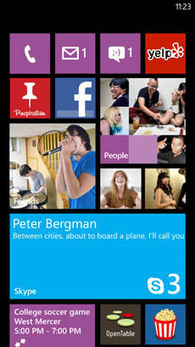
With around 280 million active users every month, Skype is very high on a lot of people’s communications priorities. Here on Conversations, we use it all-day, every day for everything from team chats and one-to-one messaging, to intercontinental videoconferences. Download Skype Press the Search button on your Nokia Lumia and then tap Vision Skype’s mission is to bring people together. We enable people to be there when they’re not, and share moments and connections. Being available on every screen that people use is important for us, so of course this new version for Windows Phone 8 is enormously important for us. We understand that some technology changes in the newest version of Windows Phone were important to the evolution of Skype? We really wanted a version of Skype for Windows Phone, and to be able to take advantage of the cool, modern design: the ability to use panoramas to switch between all the core functions and pivot from one screen to the next. So we were delighted to be able to produce a version for earlier Windows Phone models. But we also wanted to build Skype into an always-on experience. And that’s something we have been able to do through the advanced capabilities of Windows Phone 8. On this platform, Skype is always reachable, without any impact on either performance or battery life. Baked in Skype is also a part of the Windows Phone 8 operating system as a whole. This has been the first product where we’ve had a full planning cycle as part of Microsoft. That’s given us a lot of privileges and foreknowledge that we don’t necessarily get with other operating systems. ...
|






