


This video is of course by the awesome LE55ONS who treats us this time to a half hour long disassembly and assembly of the Nokia Lumia 920. Specifically for screen/case replacement. Skip Intro 1:28...

 Your new post is loading...
 Scoop.it! This video is of course by the awesome LE55ONS who treats us this time to a half hour long disassembly and assembly of the Nokia Lumia 920. Specifically for screen/case replacement. Skip Intro 1:28... 
No comment yet.
Sign up to comment
Scoop.it!

Setting up an iPhone or other non-Android smartphone to sync with Gmail's services just got a little more difficult. Google is dropping consumer support for the Exchange ActiveSync protocol soon as a part of a "Winter Cleaning," the company has announced. As a replacement, Google is recommending CalDAV for calendar, CardDAV for contacts, and IMAP for email — though obviously iPhone owners will also likely use the new Gmail app for that. The move isn't entirely unexpected, Google has been updating its help pages to deprecate Exchange ActiveSync recently, leading us to speculate that it would be dropping support.
Using the Exchange ActiveSync protocol to connect smartphones to Google's services was a very convenient way to get contacts, calendars, and especially push email set up. More recently, its importance has lessened as smartphones have had built-in auto-setup for Google accounts, but it's still disappointing to see it go away. The situation on Windows Phone may be more dire, with Google deciding not to offset the end of EAS with apps as it has on iPhone. Google Sync will be fully supported for people who have paid for a Google Apps account for business, government, or education. For consumers, Google says that Sync will no longer be available on new accounts beginning on January 30th, 2013 — but it will still work for users who have already set it up. Calendar Sync support is already gone for new users, though again existing setups will continue to work. Google has provided a full FAQ about the Google Sync end-of-life with more details, and you can see how to set up your iPhone with Google's services here. Alongside this announcement, Google also dropped support for Google Sync for Nokia S60, SyncML, and some little-used Google Calendar features like "Smart Rescheduler
Thomas Kalhauge 's insight:
Google, you are not nice :(
Scoop.it!

To design something as stunning as your Nokia Lumia 920 takes years of practice and training. The same is no less true of the processor chip that powers it. It has taken thousands of man-hours for Qualcomm to design and refine its Snapdragon S4 processor.
In a way, designing a chip is like following a very complex recipe, with fundamental and quality ingredients that are essential for great results. Perhaps the best way to grasp what goes into making a successful processor chip is to check off its list of ingredients, just as a Master Chef might. A powerful “Krait” Dual-Core CPU Krait is the second in the family of Snapdragon CPUs custom-designed by Qualcomm. Based on the ARM instruction set and technologies such as asymetric processing (aSMP), Krait can deliver higher performance for multimedia-related SIMD operations, which works to make the Windows Phone 8 experience lightn...
Scoop.it!

We dig deep into our mobile memories to discuss one of the gems of the past, the Nokia N900.
It's not an easy task to explain why exactly we rank the Nokia N900 as one of our favourite phone ever. Perhaps, there are things in life that we grow too fond of, and soon enough we become so enamoured that separating reason from emotions becomes a nigh impossible task. What's certain, however, is that you have to view and measure the N900 in the context of time it was released, and what our preferences and needs were back then, back in the far distant year of 2009. ...
Of course, the N900 was far from being a universally perfect device. It was considered heavy and bulky even back then, and the battery life was such that you'd do well to bring along an extra battery to avoid unpleasant surprises. Likewise, the underlying hardware to run the mighty OS was inadequate to say the least. Unlike other mobile OS of that day, Maemo 5 possessed that brutish strength to really push the hardware to its limits. Instead, the enormous potential of Maemo 5 was notably squandered by a single-core 600 mHz processor that cunning users nevertheless managed to overclock to more respectable speeds at the expense of the already poor battery life. While considered to be among the best, the resistive touchscreen on Nokia N900 was, of course, nowhere as responsive as the capacitive screen phones that came en masse soon after. And, finally, the deep tablet roots that entwined Maemo 5 meant that most of the UI elements as well as apps on Nokia N900 ran in landscape orientation only, which meant that single-handed use of the handset was tricky at best. Nokia N900 was one of...
Scoop.it!

It's not often you encounter an application which does, literally, everything right. If this was a formal review it would get over 90% - happily, there's a ad-supported free version so you can just try it for yourself.
Scoop.it!

aking CinemagraphsThe first thing you will see on Cinemagraph is what looks like a regular camera viewfinder. You will see some guidance along the top that reads ‘take picture, holding phone steady’.Just take a photo as you normally would but it is very important that you hold the phone very still all the way until the full image has been captured.You’ll see a circle in the middle of the screen while the app processes the image. It’ll only take 3-4 seconds. Some things worth keeping in mind. When creating a Cinemagraph, I always find it useful to have an idea in my mind, which part of the photo that I want to animate. So try to visualise what (you hope!) your Cinemagraph will look like. You want some movement, so I’ve found that running taps and passing cars are good subject matters for you to get acquainted with the app.Adding the animationYou’ll first be asked to ‘pick areas to animate’ – these are the places in your photo where the app has detected movement. Most of the time, this should be pretty obvious. For example in the photo below, a little square appeared where the water flows out of the tap. ...
Thomas Kalhauge 's insight:
...
Scoop.it!

An amusing review of the Nokia Lumia 920 on Amazon.com has compared the device’s many features with some of the more disappointing aspects of the new iPhone 5, with the buyer pointing out the issues with Apple Maps, purple pictures, extremely scratch-prone finish, small screen and new proprietary plug. The funny part of the post above was just a preamble for a much longer and detailed review of the handset in which he concludes: Anyway, despite some wanting, I am in love with my Lumia. I hesitated when Lumia 800 came out, knowing that it would be incompatible with WP8. Now Lumia 920 is such an attractive package. I don’t think I’ll change my phone anytime soon, although I do hope that there would be some nice updates from both Microsoft and Nokia to make this phone even better.
Scoop.it!

Nokia has announced a new entry level Windows Phone 8 smartphone, the Nokia Lumia 620, and Pocket-lint has already grabbed and fondled the phone ahead...
But that is Nokia and the Nokia 620 shows us why the company is still in business. The cheaper the handset, the better the experience - just read our review of the flagship Nokia Lumia 920 to see where we are coming from with this. From a design point of view the Lumia 620 is as hip as it is square. The replaceable covers are fun and enjoyable - we would go for the bright green or orange - and there's internal power to match, too. It is not just about enjoyable looks: there is substance to this package with the Lumia 620 boasting specs even the year-old Lumia 800 would be proud of. Running Windows Phone 8, the Lumia 620 doesn't struggle in the same way budget Android devices always seem to. ...
Scoop.it!

Alongside the flagship Nokia Lumia 920 and midrange Nokia Lumia 820, the Nokia Lumia 620 adds more youthful appeal to our Windows Phone 8 range. Compact and fun, it takes advantage of a new ‘dual-shot’ technique to create a variety of interesting new colours and textures. Dual Shot involves casting two layers of polycarbonate, a single base layer and a second colour, in a transparent or translucent layer, to produce depth effects and secondary colour blends. For example, yellow and cyan are combined to produce an exciting new lime green, our own favourite. What’s more, since the Nokia Lumia 620 uses exchangeable shells, you can change the colour as often as you change your mood with seven shells to choose from. While this may be the most affordable of our three new Windows Phone 8 smartphones, it packs a punch. The 3.8-inch display has the same sunlight readability enhancements as the Nokia Lumia 920 and Nokia Lumia 820, so you should be able to see what’s on the screen however sunny your surroundings (not a problem for those of us in Finland right now). It also takes advantage of the same Nokia exclusive camera lenses, like Cinemagraph and Smart Shoot, transforming the creative power of the 5-megapixel camera and front-facing VGA camera. Of course it also has the world’s best mapping and location experience, based on the Here platform, with Nokia Maps, Nokia Drive and Nokia City Lens all available. Of course, with the emphasis on a younger audience, it also has Nokia Music, providing free streaming of ad-free tracks with no subscription or registration required and the ability to download playlists to listen offline. With NFC connectivity, you can easily pair the Nokia Lumia 620 with one of the great speakers from JBL, such as the JBL PlayUp Portable for Nokia, to set your music free. Or if you want to avoid upsetting everyone on the bus, try the Nokia Purity Pro Stereo Headset by Monster for professional audio sounds on the move. ...
Scoop.it!

Creating ringtones on Windows Phone isn't technically a difficult task, but it's not incredibly straight forward either. Nokia has taken steps to address this for its Lumia Windows Phone owners with a new app that's available in the Nokia Collection. Ringtone Maker is a simple app that does exactly what it says on the tin - it enables users to take tracks saved locally on the device and turn them into ringtones. This eliminates the requirement to upload, edit and save files which is what's necessary to create ringtones in Windows Phone. The only problem with Nokia's ringtone app is that it doesn't appear to support tracks downloaded through Xbox Music (songs downloaded for offline usage, as well as purchased tracks) which is a shame. We attempted to purchase a track from the Store but it still didn't show up when using Ringtone Maker. ...
Scoop.it!

With all the fancy things you can do with your Nokia Lumia, it’s easy to forget the handset’s core function: making phone calls. In fact, there are apps in the Windows Phone Marketplace that can jazz up how you can make those phone calls and to change the look of your dialler altogether. At this point you might very well be thinking, how could you possibly improve on a simple numerical keypad? Well, give these apps a try and you can see for yourself! ...
...The free version of RapDialer enjoys extremely high ratings in the Marketplace, and after using it for a short while it’s easy to see why. It’s perhaps the first app here that could make a genuine case for replacing the native Windows Phone dialler. It’s packed full of features such as groups, speed dial, swipe gestures and is highly customisable. My favourite feature is that once you’ve brought up your contact using the super-responsive T9 predictive text, you can send them a SMS just by swiping across their name. RapDialer works really, really well and you will be rewarded by the effort spent getting used to it. ...
Scoop.it!

Finnish mobile phone maker Nokia appears to have registered quite a bit of success with the launch of its new Windows Phone 8-based Lumia 920, and that it is already celebrating. The Lumia 920 smartphone was delivered to a blogger in a special package that can be seen in the photo attached to this post and which is most probably either a limited edition or a one-time-only box. “I actually got this as a VIP gift box from Nokia’s PR because I’m a blogger and I attended the launch of it in Dubai,” said blogger told MyNokiaBlog. According to some Chinese websites, Lumia 920 might arrive in this packaging on shelves sometime in December, though there’s no confirmation on such plans from Nokia. One thing that is sure, however, is that users would actually like receiving the high-end device in such boxes.
Scoop.it!

The best innovations in technology are often the ones that combine simplicity with a sprinkle of magic. Think about the first time you connected a device to WiFi or the first time you made a video call with Skype.
Our latest app for the Nokia Lumia 820 and Lumia 920, PhotoBeamer, offers a similarly amazing new experience for smartphone users. Download PhotoBeamer Press the Search button on your Nokia Lumia and then tap Vision Scan the QR code Tap on the link when it appears on the screen Install the application from the Windows Phone Store This is what happens. You install the app and use it to look at pictures in your gallery. As soon as you open a picture, you’re told to go to photobeamer.com in any web browser (not the one on your phone!). Point the phone camera at the QR code that appears on the website, tap it when it’s visible on the camera screen, and then the magic happens. Your photos are automatically transmitted to the website and shown on the screen without another click. It’s the fastest and most adaptable way to show off your pictures we’ve seen. Simplicity is hard to do Of course, behind the scenes, there’s quite a lot of complexity going on that’s required to allow things to happen so quickly and simply. David Fredh, who joined Nokia as part of the recent acquisition of imaging know-how from Scalado, is the lead product manager behind the app. David explains: “We had two main aims for PhotoBeamer: to make sharing as simple as possible. But also to make it as fast as possible.” The QR code is, of course, unique every time the site is opened, and as soon as you’ve scanned it, the app starts sending your pictures, caching them for fast performance as you scroll back and forth through a set. Images are streamed progressively from the device to the target screen. Thanks to this optimisation of the data, PhotoBeamer can work even on a standard 3G connection, as well as 4G and WiFi. Samuli Hänninen, who heads up Nokia’s imaging efforts, commented: “It’s great to see the first full delivery from our colleagues in the new Lund office, and a terrific product that reaffirms Nokia’s leadership in the imaging space.”.

Thomas Kalhauge 's curator insight,
November 30, 2012 8:02 AM
One of the best apps , seen for a long while. |
Scoop.it!

A not-so-serious review first:
Lumia 920 >>>>>>>>>>>>>>>>>>>>>>>>> iPHone 5 32GB ---------------------------------------------32GB $99------------------------------------------------$299 Master Maps-------------------------------------Mess-up Maps Offline GPS---------------------------------------iLost Public transit guide for global traveler ------iLonely and secretly flirt with Siri PureView Camera-------------------------------PurpleView Camera Clear lowlight photos---------------------------My party photos are drunker(fuzzier) than yours Anti-scratch--------------------------------------Full-Scratch Survives a fall-----------------------------------The poor pretty thing! Gets the job done-------------------------------What job? Good for normal people-----------------------Good for Apple worshipers Nokia: "Sorry, we will update"-----------------Apple: "You're holding it wrong!" Clear view under direct sunlight--------------Is my phone on? 4.5" viewing asset-------------------------------Squint retinally Wireless charger--------------------------------Where is my this-year's-special cable? Touchscreen wearing gloves-----------------Cut a hole on glove A more serious review follows: Having used the phone for a while now, I'd like to provide a more objective assessment. I give ratings below first, followed by detailed explanations. The rating numbers are on a scale of 10. A score of "10" means it is not only the best but also has no apparent need to improve, and a score less than "10" just means there is room to improve but does not necessarily mean another product is better. The numbers in the parentheses are for iPhone 5 as a reference. RATINGS------------- Lumia 920 (vs. iPhone 5) Call Quality --------------------10 (8) Uncompromising call quality from Nokia, a true phone company Instant Messaging------------10 (10) Big improvement over WP7; group messaging and MMS E-Mail-----------------------------9 (7) WP8 has the best enterprise-ready e-mail client Skype and VoIP calls----------9 (7) International VoIP calls a reality with on WP8 Contact Management---------9 (6) WP8's multi-contact aggregator and integrator the best Entertainment-----------------10 (10) Too much already, what more could you want Social Networking--------------9 (8) Facebook integration is an edge Web browsing------------------9 (8) IE10 is outstanding Shopping------------------------7 (9) Comes from Apple's apps edge Navigation-----------------------8 (5) Apple's first Maps is actually impressive, but see discussions Productivity---------------------6 (3) Not there yet, but at least WP8 can do some work Screen--------------------------10 (8) Lumia 920 has the best looking screen consumers have ever seen Camera--------------------------9 (7) In its own league Build quality-------------------10 (8) You might have trouble to say goodbye to Lumia 920 two years later Thermal performance---------8 (8) Competitive Battery life----------------------5 (5) All need improvement badly in this area OS reliability--------------------9.9 (9.5) WP8 never even freezes, much less crashes OS fluency----------------------9.5 (9) Ice-skating with WP8, and floor dancing with iOS, I much prefer the former OS flexibility/customization---8 (8) Android is the king OS refinement------------------7.5 (9.5) Microsoft is still no Apple on refined details OS apps ecosystem-----------6 (9.5) iOS rules for now Current Fashion Index--------0 (11) To ease your reading, I'll put the conclusion first before the detailed sections. CONCLUSION: Laying aside the nitpicking, I am in love with my Lumia. There are so many great phones today that it has become a problem to choose one. But the top WP8 phone is the choice by both my brain and my heart. If I were a bit geekier, I might have gone with Android; and if I didn't have to work I might have gone with iPhone. But this is my phone. It's for a practical man with a taste. I hesitated when Lumia 800 came out, knowing that it would be incompatible with WP8. Now Lumia 920 is such an attractive package. I don't think I'll change my phone anytime soon, although I do hope that there would be some nice updates from both Microsoft and Nokia to make this phone even better. 1. CALL QUALITY It is a phone after all. The call quality of Lumia 920 is absolutely top-notch. The voice is so clear it puts my landline cordless phone to shame. Nokia knows how to make phones. They are the true phone company. The HAAC microphones (Rich Recording Mic) are not your ordinary microphones on cell phones. A different league. The speakerphone is pretty good too, quite loud and clear. In fact I once had a conference call using the speakerphone with several people on my side, and it worked out fine. 2. E-MAIL Overall, WP8 has the best mobile e-mail. Windows Phone has an inherent advantage in e-mail, especially work e-mails. Apple does not own a popular e-mail service, and can only support third-party e-mails. Android enjoys the excellent Gmail, but Gmail does not have a strong foothold in the workplace. WP8 has deep integration of Exchange, Office 365's Outlook e-mail, Hotmail and Live Mail on Windows Phone. WP8 further has excellent integration with the popular Gmail and Yahoo Mail. All this results in an e-mail client that is more capable and efficient than other platforms. To name a few, contact management, contact synchronization, message management, message synchronization, file management, attachment management, folder management, conversation thread management, and e-mail search, are significantly better on Windows Phone e-mail. The difference is far deeper than appearance. If you handle e-mails with some degree of sophistication, you will appreciate the difference. I travel with both my iPad and Windows Phone. Unless I am using my computer, I usually reach out for the Windows Phone for e-mails instead of the iPad, despite the fact that the e-mails on iPad have so much better readability. To just read a recent e-mail, the iPad is an obvious choice. But you don't just read a recent e-mail. Work e-mails have history and threads, and they need to be searchable, and fully synchronized with your computer, and that's where the Windows Phone shines. For example, if you just read or deleted an e-mail on you phone, you want the read status or deletion to synchronize with the server and other devices, otherwise you end up paying attention to the same e-mail too many times and having to delete the same e-mail multiple times, and often even get confused because you thought you have deleted it already but the same e-mail still appears on other devices. WP8 performs this flawlessly. On iOS, this type of backward synchronization is spotty. It seems to work with Gmail, but not with Outlook mail, Hotmail and Live Mail. For another example, if you need to search to find an older e-mail which is not stored on your phone (due to memory conservation, mobile devices do not download and keep a copy of every e-mail in the past), you want your mobile e-mail to give you an opportunity to search e-mails on the server. WP8 does this perfectly. I also like the fact that Windows Phone has a separate live tile with a customized icon for each e-mail account. I don't like the idea of mixing my work e-mail and personal e-mail in the same box, or even under the same icon. I need a clean definition of territories. Of course, if you intend to combine e-mails, you can do that as well on WP8. Flexibility. 3. SKYPE AND NON-CELLULAR SERVICE DEPENDENT PHONE CALLS Skype, owned by Microsoft now, is an important function on WP. Microsoft also makes a Skype app for iOS, but the app is still not as nearly good as the integrated Skype on the Windows Phone. If you use Skype Pro and/or Skype Out, you can actually make phone calls anywhere in the world as long as you have Wi-Fi or cellular data connection. I'm not talking about Skype-to-Skype calls. I'm talking about calling real phone numbers. (This works only with Skype Pro; the free Skype account can only make online Skype calls). No cellular phone connection is required with Skype Pro on Windows Phone. Take an international trip you will understand what I'm saying. Being able to call home and work at international airports *without* a SIM card for the local service is a major convenience. Even if you already have got a local SIM card, using Skype Pro on Windows Phone to make calls on the 3G/4G data service is still a great convenience because it costs only two cents a minute, less than 1/20 of the cost for international calls made on a regular cell phone. It also works other way around. You can make international calls from the US using Skype Pro on your Windows Phone for two cents a minute. Cheap international calls anywhere on your cell phone (and enjoying the integrated phone contacts) - I hope this concept registers with you. 4. CONTACT MANAGEMENT The People Hub on the Windows Phone deserves a separate mentioning. This is by and large the best contact management on a cell phone (WebOS users might have an issue with the statement). It automatically integrates all the contacts from different sources (e-mails, Skype and Facebook) and provides the best accessibility and connectivity on a mobile device. This significantly betters iOS, which has a pretty address book and good editing capabilities, but very little beyond that. When it comes to multi-source contacts integration, accessibility and connectivity, the People Hub on WP is much superior to iOS's contact management. For example, iOS address book has links to internal phone numbers and e-mail addresses, but basically that's it. It does not have active links to external phone numbers (e.g.,contacts pulled from e-mail accounts), Skype contacts, and Facebook friends, etc.. In the People Hub, all these have active links, meaning that they provide a single click connection. In addition, People Hub pulls contacts from Skype, which iOS does not do at all. If you use Skype, especially Skype Pro, you'd suffer a disconnection on iOS. Both address books link contact addresses to maps, but the Apple maps is essentially dysfunctional in this respect. Apple hasn't really spent time to make sure this function actually works (they have been focused on making the thing look pretty). It doesn't work most of the time. Unless you have entered the contact address in a particular manner, clicking the address will result in a "not found" on the maps. The People Hub works perfectly with maps. Under the hood, this is actually a search algorithm issue, not a user interface issue. Like Google, Microsoft knows search. It shows. 5. PRODUCTIVITY Windows Phone 8 wins this important area hands down, not because it is so good, but because others are so bad. The major thing is the Office App and OneNote App, and their integration with the excellent and generous (but underrated) SkyDrive. This allows Windows Phone to do the most essential things for productivity. WP8 further integrates Office 365 and SkyDrive perfectly. If you or your company subscribe to Office 365 and use the cloud versions of the OneNote, Office, Outlook, TeamSite and SharePoint, the productivity is boosted to a whole new level. The iPhone and Android simply cannot provide that kind of productivity. Even if you don't use Office 365, getting the Windows Live and Skydrive would already be the best productive user experience because of the integration with the Web version of Office. Overall, if documents and e-mails are just different ways of casual "instant messaging" to you, the iPhone is fine. But if documents and e-mails are a work tool to you, Windows Phone is the way to go. 6. NAVIGATION First of all, for those who miss Bing Maps, your Windows Phone still has it. It's only two taps away: tap the Bing search button (hardware button on the right side at the bottom), and then tap the "Local Scout" button (on the left side of the three on the search page). In addition to Bing Maps, Nokia offers a set of navigation apps including Nokia Maps, Nokia Drive, Nokia Transit, and Nokia City Lens. They together offer excellent navigation, better than Bing Maps alone, and also better than what iOS has to offer. I'm actually impressed by Apple's first map. It has some good features and of course great looks. But as Google has said, doing maps is hard. It's years of exercise versus a morning makeup. Currently, Apple Maps does have a problem. The reports of Apple's terrible map performance are related to map data inaccuracy and map search algorithms. Those Apple fans who refute such reports by claiming that they haven't experienced any problems are missing the point. Unlike other software in which a test is usually universal, your map test results only have to do with the location you tried, and only proves that the map is OK in that one location. When there is a problem at another location, there is a problem. And Apple has a lot of such problems reported. The company acknowledges it. They're not fools. I don't know how fast Apple can improve on that. Data and fundamental algorithms are far more than just doing some programming to add skins. They might need to shell out a billion dollars to buy up. Compared to the excellent Google Maps, Nokia's navigation solution is mixed. It's worse in some ways, but better in other ways. Google shines on map data, especially in the North America segment, no question about it. Google's superiority in search is also reflected in its maps. The app overall feels more mature and advanced, further boosted by is far greater user base (which they earned). But Nokia has several important things on its side. The segmented downloadable maps for off-line GPS is a unique and significant advantage for Nokia. The reliable integration with contact addresses (People Hub) is another. The multi-angle approach of Nokia's navigation app set suits user's particular need better. Nokia also has comparable map data (although arguably slightly inferior North America segment) and mature map algorithms. Nokia's navigation solution comes with several separate apps. In comparison, Google puts everything under Google Maps. I like Nokia's way of tasking. At least in theory, if you use Nokia Drive, you have Maps connected with it, and vice versa; if you start with City Lens, you have both Drive and Maps connected with it. This all make sense, because if you want a pure traditional GPS, you'd start with Nokia Drive; if you just want to search for specific address on a map, you'd use Maps; and if you simply have no idea of what address it is but instead want to explore the city, you start with City Lens. But from where you started, (and have the power of Maps and Drive come along with it). If done right, Nokia's approach could directly put the user at the best leveraging angle depending on the actual situation, using a specific app with the most suited user interface to maximize the user experience. Some people complain about it either because of their unfamiliarity with this design or their dissatisfaction with the current execution. I hope Nokia doesn't change this good concept, but just keeps on perfecting the apps and improving the integration under this framework. An often overlooked but significant feature Nokia offers is downloadable maps segmented according to regions. Once downloaded to your phone's local storage, the maps are fully functional off-line even when you don't have any cellular network or WiFi access. That could be a matter of getting or not getting to the destination. If you don't think this is important, I don't know what is. Even when cellular network is present, the off-line GPS map means big savings on your data usage. With the downloaded maps, the navigation on Lumia 920 may replace standalone GPS units. It has vastly better user interface to start with. Address search, which is probably the most frustrating thing on standalone GPS units, is far better on Nokia Drive. The overall user experience is superior despite its lack of a few features. But if you need a dedicated GPS unit constantly mounted in the car, that's a different story. If you happen to be at a place without a car (Americans, have you traveled to other places in the world? People don't always drive), try Nokia Transit, which provides detailed guide for public transportation of cities around the world. Nokia takes navigation seriously. They have had an excellent maps tradition and accumulated expertise with Symbian-based cell phones. Considering that they jumped on the WP ship only recently, I'm confident that they will make this whole thing even better in a quite fast pace. 7. THE SCREEN Both Lumia 920 and iPhone 5 have gorgeous screens, but the Lumia is still better. The viewability under direct sunlight is noticeably better on Lumia 920. Both are extremely clear for text and webpage rendering, but Lumia 920 works much better in the portrait mode because of its greater viewing dimension. And Lumia 920 has touchscreen capability when you wear gloves. This may come handy in very cold winter outdoors. But for me, the usefulness is more than during the winter. I often need to wear one glove on my right hand while I'm doing air traveling to protect my hand, or I would have painful skin and split fingernails. Lumia 920 is the only phone that I can use wearing a glove. It is not a gimmick at all. 8. THE CAMERA Lumia 920 has the best cell phone camera on the market, leading by a significant margin, except for Nokia's own PureView 808 which is a different type of device. I say this very objectively. Those who don't see the difference either didn't test it under right conditions, or simply can't tell the differences in photo quality. Lumia 920 is the only smart phone camera that can take decent concert (or party) photos and videos. Its lowlight performance is at least two ISO stops (that's 4 times) better than the iPhone 5. This is primarily due to Nokia's unique pixel binning technology further combined with image stabilization. Neither Nokia nor Apple makes the camera sensors (Sony does), but the photo quality is not only about the sensor itself. Nokia has a tremendous technological and patent advantage in this area. By the way, stop comparing which camera has more megapixels. High MP is a trick used by camera makers to tax on consumer ignorance, and in most cases has very little correlation to picture quality. On cell phones in particular, there are several reasons why it's meaningless to pursue higher MP count. First, no tiny lens on a cell phone is capable of optically resolving pixel numbers beyond 5MP. I challenge you to find a scientific test to prove otherwise. Second, because of the very small sensor sizes, low light performance is a far bigger problem than the number of pixels. Third, you don't need more than 2MP on a cell phone. Generally, photos taken by smart phones are only used for screen viewing instead of making large prints. Even 2MP would be plenty. For web posting, a high-quality 1MP photo would look far better than a lousy 10MP photo. I'm not saying that a smaller pixel number is always a good thing in itself. On the contrary, I'm just saying that for a given sensor technology, pixel density is the best sacrifice to make if the goal is to take better pictures with a cell phone camera sensor. Most consumers don't realize that for any given sensor technology, an increase of pixel density comes at the expense of lowlight performance and dynamic range. (Many people intuitively reject this notion, reasoning that it does not make sense that lowlight performance and dynamic range would be affected by pixel density as you can always downsample. But to understand this, you must stop treating pixels as abstract geometrical concepts but actual engineered photosites with optically dead physical boundaries. That is a different topic though.) Every time when the sensor chip technology is improved, they usually have two options: (1) increase the lowlight performance and dynamic range by keeping the same pixel density, or (2) increase the pixel density (to get a greater MP count for a given sensor size) by holding back the real performance. Unfortunately they usually choose the latter because the MP count is a much more marketable gimmick. Few people may know about ISO and dynamic range, but everyone understands 8 is greater than 5, and 10 than 8. So instead of honest value, we now have the madness of smartphones reaching and going beyond 10MP with little meaningful result but unnecessarily bad lowlight performance, poor dynamic range, and a big waste of storage, data usage and processing time. Had they focused on real performances on 2-4MP sensors with a generous sensor size permissible on smartphones, we would have now had much more useful cameras on these gadgets. In this regard, Nokia is doing great in spite of (not because of) joining the megapixel race, again thanks to its pixel binning technology and image stabilization. 9. BUILD QUALITY Nokia 920 is a marvelous piece of engineering and manufacturing. Both Nokia 920 and iPhone 5 have a premium appearance, only very different flavors. But the Nokia is without question tougher. I say this not because Nokia is heavier. They use different materials. In choosing materials, these two companies have very different philosophies. Apple always goes after materials that enable extremely slim and light products, while Nokia has always been concerned of durability. If you are already conditioned to update your phone every year, you are an ideal Apple-kind person already. But still, hold your iPhone dearly and don't drop it. I have an iPad 3 that was accidentally dropped from a sofa sidetable to a hard floor head-down. I was completely shocked by the amount of damage it caused. I was expecting a dent on the edge or at worst a crack on the screen, but the whole thing was smashed like glass. That's when I discovered that the iPod 3 uses a glasslike material even for the frame, which looks great, but, well, just don't drop it. You might actually need a case for your iPhone. Lumia 920 does not need a case for protection. In fact, I can't imagine a case for Lumia 920 without ruining its gorgeous appearance. 10. THE DESIGN This is completely subjective. But I personally feel iPhone 5 is too youthful and delicate and better in a hand of a teenager, while the Samsung Galaxy S3 too rounded and has no character. I love the overall masculine (but gentle and absolutely not rough) and squarely straight style of Lumia 920. Go to YouTube to hear Marko Ahtisaari of Nokia articulating the design philosophy. 11. THERMAL BEHAVIOR AND BATTERY LIFE The Nokia 920 does not run hot, thankfully. This is one thing I was particularly worried after the bad experience with the Dell Venue Pro which had disgusting thermal performance and power management. Battery life is good, although not excellent, comparable to other top performers such as iPhone 5. If there would be an improvement that could persuade me to change my phone again, it would be a new phone that could last at least a couple of busy days without recharging. I am not a heavy mobile user, but I'm out on a trip quite often. The battery life of my cell phone is among the biggest mental burdens while traveling. Unfortunately, it looks like battery life is not what these companies are focusing on at this time. 12. APPS iPhone wins by a large margin in terms of app number. Although last majority of apps are junk on both systems, there are some great apps on both; iOS just has more due to its sheer larger base. So it seems that most people will need to sacrifice a few apps by choosing Windows Phone platform for now. I'm missing quite a few useful apps on the Windows Phone, and make up the deficiency by using the iPad. Windows Phone also has some very good apps that are missing on iOS (in addition to Nokia apps and Microsoft apps), although not as critical. The most important app I miss on the Windows Phone is a decent PDF reader. Microsoft rushed out its own PDF reader, which works for basic reading but has some serious limitations. I hope Adobe or a third-party releases a better PDF reader on WP8 soon. This is a big pain point. However, none of these missing apps has the kind of importance comparable to that of navigation and productivity. To me, the choice is clear. I think it's misleading to do "bean counting" the small things of each system. You've got to have priority. If you need one function that has a dominating priority, then one million less useful "apps" would no longer matter. Windows Phone 8 has got a much better foundation in the program architecture than WP7, despite the relative minor changes in appearance. With the Windows NT kernel and 90% source code compatibility with Windows RT, the app future looks good. 13. FLUENCY AND EFFICIENCY OF THE OPERATING SYSTEM Windows Phone 8 on Lumia 920 beats iOS on iPhone 5 in terms of fluency and efficiency. WP has a hardware "Back" button in addition to the Home button, while iPhone has just a Home button. This has a significant impact on the flow of operation. I know this is rather subjective, but one thing that particularly bothers me on the iOS is that it requires you to always go back to the home button. You can't directly go back to another place you have just visited. You always have to go back home and start from there again. I remember Steve Jobs proudly making a big point out of it. Theoretically, going back home and then to the last app takes only two steps, but problem is that when you have multiple pages of apps, it causes a bit of hesitation to locate an app. Both iOS's "double-clicking Home" and WP's "long-pressing back button" give you a nice quick list of the opened apps to simplify the selection of apps, but still the additional "Back" button functionality WP is very much appreciated. Another thing that impacts the efficiency is the management of installed apps. The iOS manages installed apps in a simplistic way with much emphasis on the appearance not the functionality. Windows Phone has a much more sophisticated way. The installed apps are directly and separately searchable, and are also automatically organized under alphabetical categories that can be quickly accessed through a single page grid (which itself is accessible by a single swipe). If you have less than 20 installed apps, you will see no difference. If you have about 20-50, the difference would start to show. With 50-100, it becomes apparent, and beyond 100, the difference would be huge. The more apps you install, the greater the difference would be. So power users will find this an advantage on Windows Phone. When you come to think of it, the above may be the reasons why the iOS is so intuitive for beginners, but less efficient for more experienced users. On user interfaces, these two things often conflict. I can see why many like the flow design of iOS, but I prefer WP8's flow much better. 14. CUSTOMIZATION It almost sounds silly that one of the biggest improvements WP8 has over WP7 is adding some smaller sized tiles. Hardly innovative, but it makes a big difference, largely speaking against the old design. I don't like those big tiles. I simply don't think any app deserves that much attention, especially in such a uniquely precious small room. I customized my start page to have all tiles in quarter size except for the phone button. Thank you, Microsoft, for allowing such basic freedom. My start space is now much more efficiently used and no longer a victim of the almost tyrant "less is more" so-called clean design philosophy. The level of customization further down is mostly on par with the iOS, but Android would still have an edge over both. I think this is got to a very reasonable level already. But I do have one big complaint against Windows Phone: With WP8, you still can't turn off that stupid screen auto-rotation. You simply can't so far. No user settings has that. No app that does that. Even unlocked phone can't do that. Forgive me to call auto-rotation feature stupid. But it is one of those tech-things that make no sense on a mobile phone, precisely because a mobile phone is just so, mobile. The problem is that these device designers fail to understand that the proper (or desired) orientation of the screen simply cannot be determined by an orientation sensor. The sensor determines the orientation using gravity and the earth as the reference, not your body. As a result, the sensor can only detect the phone's orientation itself, not its relative orientation to the user's body posture, which is what actually matters. So it works properly only when you are standing straight, not when you are inclined or lie down. In fact, it always turns to the wrong orientation when you are inclined or lie down, so you have to fight it. In practice, the non-switchable autorotation causes much more annoyance than any utility. It is OK if they just want to use it as a gimmick to attract feature counters, but it is not OK to have it permanently implemented and cannot be turned off. It's simply stupid. I think the best solution is iPad 3's combination of autorotation plus a hardware-based button for a mechanical lock. It combines the best of both worlds. The iPhone has autorotation plus user manual options in the settings and apps, which is not as good as the iPad, but still much better than Windows Phone's autorotation only, whenever and wherever. The reason why I make this auto-rotation issue such a big deal is just to make a point, not because the thing itself is so life-threatening. I can live with the annoyance. But the failure or overlook of such issues after all these years is very telling of Microsoft. 15. REFINEMENT OF THE OPERATING SYSTEM When it comes to very fine details, Apple wins. WP8 has improved over WP7, but still no match to the iOS in its refinement of details. Company wise, and culture wise, Microsoft has not fully learned this art yet. Let me name a few: (1) You can't quickly do a "select all" to copy and paste a text. It requires a painful maneuver to do so, many times more difficult than doing the same on iOS which gives you a selection in an automatically pop-up menu. Oh please, they struggled with this copy and paste thing from the very beginning and received a disproportionately great amount of criticisms, so you would think that they would have jumped all over it to not only improve it, but in fact over-improve it. Not at all. It's still a half cooked solution. (2) The network status indicators on the top of the screen don't stay. They show up shortly and then disappear to leave a blank and unused space for you to stare at and be uncertain about. You have to touch the screen in a particular manner to bring them back. And there is no way to change that in the settings. (No, I'm not talking about the common automatic screen lockout, which is necessary for battery conservation.) There is no utility in making these essential indicators disappear transiently. The indicators don't occupy extra space at all when they are displayed, and their disappearance does not result in any benefit. It just makes the system fussy and less certain. My basic assertion is that cell phone's network status is a constant user concern, and being able to glance at these essential indicators any time gives you peace of mind, and is a good part of the harmonious "handset environment". Having to always struggle for such a simple thing is nonsense especially when the sacrifice is made for no purpose. I think what happened at Microsoft was like this: One day, someone from Microsoft management shouted in a meeting: "Less is more! Less is more! Look at Apple, we need to learn from them!" And shortly after that, a Microsoft engineer came up with this idea of hiding the network status indicators... Those are just several among many small details. Microsoft has done the hard part of building a very promising mobile OS, it shouldn't be so difficult for them to do these very basic and simple things right. It is obviously not an engineering issue. It is a product management issue, a company culture issue. Microsoft's level of paying attention to user experience details still has a long way to go. Why didn't Nokia fix those deficiencies? They probably don't have a license from Microsoft to do so.
Scoop.it!

Nokia Drive+ Beta, which is available for all of Nokia's Windows Phone 8 devices, has been updated to version 2.1.0.1451. The new version has a battery saver mode, an added on-screen shortcut to return to your current position when exploring the map, and a number of minor UI improvements and bug fixes.
The battery saver mode, which ca be switched off/on in the app's settings, will turn off the GPS when the app is sent to the background, unless the app is in guidance mode (i.e. activate navigation going on). This preserves battery life by reducing the polling of the GPS in the background. The small downside to this is the it will take a few seconds to get a location lock, but that's a small price to pay for improved battery life. The on-screen my position indicator, which appears in the bottom left hand corner of the screen when you are exploring or panning the map (i.e. scrolling around), allows you to return the map to your current location with a single tap. The indicator also shows the distance (of the centre of the map) from your current position. It's a simple addition, but a very welcome one, as it makes it much quicker and simpler to "snap back" to your current position, while maintaining the maximum possible amount of screen space for map display. Nokia is constantly expanding the number of countries supported by Nokia Drive. According to the app's description the number of countries currently support is 89. Nokia Drive+ is the version of Nokia Drive for Nokia's Lumia device running on Windows Phone 8. The name reflects the fact that Nokia is willing to license the standard version of Nokia Drive to other manufacturers, although none of the other Windows Phone manufacturers have yet taken this option up. Nokia Drive+ will have a number of extra features over the standard version. This is likely to include the "My Commute" functionality, which is currently only available on Windows Phone 7.5 devices. The updated version of Nokia Drive+ can be downloaded from the Nokia collection in the Windows Phone Store. Note that when you first run the updated version you will need to re-download the voice files for Nokia Drive+. This is a one time process and is best done over WiFi as, depending on the number of voices you have installed, it can be a significant size download.
Scoop.it!
Nokia Lumia 920 wins Gizmodo Aus’s Mobile Phone of the Year 2012 People’s Choice Award | WMPoweruser
The Nokia Lumia 920 may not have 50 million owners, but what it does have is millions of fans, which is why the device easily beat the iPhone 5 and the Google Nexus 4 to the Best Mobile Phone of the Year 2012 Readers Choice award at Gizmodo Australia. With 49% of the vote the NL 920 beat the pants of the iPhone 5, which garnered only 13.5% of the vote, and the Google Nexus 4, which scored 8.97% of the vote. While the vote is mainly a contest of the fans, the Nokia Lumia 920 also earned a Editors Choice honourable mention after the Google Nexus 4, which mainly won for breaking new price barriers for a HD screened smartphone. See the results at Gizmodo here.
Scoop.it!

UK retailer Clove sold out of their first shipment of Nokia Lumia 920s in less than a day, and their second shipment was mostly sold out even before it arrived, and is now of course all gone. They tweeted the above picture, saying:
Just a fraction of what we are shipping today. Working to get all orders out #nokialumia920 http://instagr.am/p/S7YJNSuejU/
Nokia is widely expected to resolve their Nokia Lumia 920 shortages this week, and the shipment may be part of that easement. Hopefully anyone who wants a Lumia 920 will not be able to lay their hands on one. Are any of our readers expecting a Nokia Lumia 920 next week? Let us know below. ...
Scoop.it!

Nokia has introduced a new service, Tweetsender, that will send you a Direct Message (DM) on Twitter when a "cool new app or new software update" is available for your phone. In order to use the service you will need to be following @nokia on Twitter (so you can be sent DMs) and specify which handset, and which market, you want to receive notifications for by signing up to the Tweetsender service here. Once you have signed up to the Tweetsender service you can use the dashboard to manage your handsets, allowing you to sign up to receive alerts for multiple devices, should you so wish. If you no longer want to receive alerts, you can also use the dashboard to unsubscribe from the service. It's worth noting that, in some markets, Twitter will let you configure your account to recieve DMs by SMS. Combing this feature with Tweetsender means you'll get a text message when a software update is available for your device. Here is Nokia explanation of the service: The idea is quite simple: If you’re a Nokia phone user who follows us on Twitter you probably want to find out about the latest updates, apps etc. for your Nokia phone, but tweets are fleeting and if we only tweet once or twice about a software update then you’ll probably miss it… So we decided to create an app that allows you to sign...
Scoop.it!
Marko Ahtisaari, Head of Nokia Design, talks about the design approach behind Nokia's latest flagship phone.
Scoop.it!
Nokia Ringtone Maker is the latest exclusive app for your Nokia Lumia 920 and Nokia Lumia 820 smartphones, allowing you an even more personalised user experience on your Windows Phone 8 smartphone. The editing tools on Ringtone Maker are incredibly easy and allow you to choose the start, end and length of your ringtone. Once it's been made simply head to Settings then Ringtones and Sounds and choose it from the Custom list.
Scoop.it!
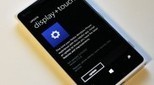
Nokia appears to enjoy tinkering with their Windows Phone 8 customizations, so it seems from the near constant stream of minor System updates that they’ve been delivering lately. We’re okay with that too as it shows they’re looking to make things work their best. Such is the case with the update to version 1.1.2.4 of Display + Touch, the switch for toggling the Lumia 810/820/822 and 920’s Super Sensitive Touch display. When enabled, the Lumia’s display becomes extra sensitive to physical contact, allowing users the ability to manipulate their device while wearing thin gloves--a first in mobile technology. What this update changes or fixes is of course unknown as no change log is presented, though presumably something is now “better” than before. If you haven’t received the update notification via your Store Tile, sit tight as you will in due time. Since there is no hardlink to the update, we cannot provide you a download option. Thanks, Skynetz, for the tip
Scoop.it!
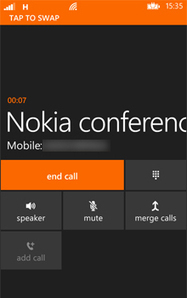
Dealing with conference calls is a daily fact of working life for many people. Indeed, they are also increasingly being used so that groups of friends can chat together on the same phone call. There are also several useful apps in the Windows Phone Marketplace that can help you manage your work conference calls, for example automatic dialling of PIN codes and syncing with your calendar. Before we look at some of these apps, here’s a quick recap of how to make conference calls on your Lumia. Also, check with your operator if they allow conference calls on your line. Making conference calls To start you need to need to make a call to one person as normal. Either dial in their number or select them from your People hub. Once you have them on the line, you then need to press ‘Add Call’ to then start dialling up another person – again you can either manually dial their number or find them via your People hub. At this stage you are only making two separate phone calls – to create the conference call so that all parties can hear and talk to one another you need to press ‘Merge calls.’ The word ‘Conference’ will then appear at the top of your screen. You can add more than once person to the conference call although be advised that the maximum number varies by mobile operator. A further nice feature of making conference calls on your Nokia Lumia is that you can still have a private conversation with someone on the call if necessary. To do this, select ‘Private’ and a ‘choose call’ screen will appear with the names and numbers of everyone on the conference call. Select the person that you wish to speak to privately – no one else on the call will be able to hear your conversation. To return back to the full conference call just select ‘Merge calls’ again. Once you’re finished then just press ‘End’ as normal. Conference call apps So actually making conference calls on your Nokia Lumia is pretty simple and straightforward. However, when making conference calls for work it can often involve entering conference IDs, PIN codes and the like. Here are several apps in the Windows Marketplace that can help you with your work conference calls.
Conference Caller (free) ...
Scoop.it!

Want Bing Maps back in your WP8-powered Lumia? There's an app for that.
So you picked up a shiny new Nokia Lumia with Windows Phone 8 and you're happy as can be...until you get to maps. Nokia Maps is an excellent service, but compared to Bing Maps it's not quite up to snuff in terms of its speed and fluidity. Also, in recent weeks Nokia Maps has had a few issues generating detailed information for some areas where Bing originally worked just fine. Well, it might surprise you to learn that Bing Maps is actually still ticking inside that new Lumia (just try searching for any Local results with Bing and it'll pop you right into the original Maps app). Nokia has simply chosen to hide Maps from the Lumia's app list. For those who want the best of both worlds, there is now an ingenious solution: Mohammed Adenwala's Maps. Simply put, the app just functions as a shortcut to access the native Maps app that should have been there from the start. Just install it and you're good to go, plus there are no ads. Really, there's no 'app' — it just puts Maps back into your Lumia's app list so you can launch Bing Maps as you should. Kudos to Adenwala for the clever solution to Nokia users qualms. Download Maps from the Windows Phone Store for free by clicking on the link below, or by scanning the QR code.
Scoop.it!

If Pureview was about oversampling and zooming , what’s Pureview phase 2 about? Post processing can be either behind the scenes (Nokia 808 style) or like the Lumia 920 visible to end users. (one can spot the picture being post processed in the view finder) This post processing algorithm can ruin a picture with a bright light source so Nokia engineers choose not to let that happen by crippling the algorithm leaving you with a normal 8mp shooter capabilities, and Carl Zeiss optics , coming from 808′s camera many will be underwhelmed, but coming from any other camera phone many will still be overwhelmed too . But wait if it’s just an algorithm? why the Optical Image Stabilizer? well that’s a good question , it turns out that this algorithm works best with low light pictures that has no shakes , the pictures bellow will show you how less movements made Phase 2 a lot better. So now that we got the introduction out of the way and you’re caught on let me explain just one thing, In the Lumia 920 in the photos app if you clicked on the three dots “…” and choose edit > Crop, rotate, auto-fix > and clicked on the Magic wand named Fix … The same algorithm used for post processing will be applied.! This means in theory any picture you edit could have a Pureview phase 2 flavor … So naturally I tried old pictures / 808 pictures and even picture off the internet here’s my results. First , I wanted to show how this fix tool could help people who already own Lumia 920 , by explaining some of its extra potential (lf some reason your low light picture didn’t light up.) Here we’ve got a lovely picture , watch what happens to it when we force apply Phase 2 algorithm on it. ...
Scoop.it!

If you’re like me — you can be a stickler for keeping your phone updated. I’ve had my Nokia Lumia 920 for about 3 weeks now and there’s been numerous updates from 3rd party ...
A big handful of apps for Windows Phone have been updated in the past few days so be sure to check the list to see if any apply to you. Windows Phone app updates for 11/29/2012 Nokia Maps – v3.0.125.8 improves stability and performance. WordPress – save drafts locally, Windows Phone 8 compatibility, post formats. More here. Words With Friends – v1.0.0.1 addresses issues such as stability and crashes, performance and load times. myAT&T Updated yesterday: Peregrine – v2.1 enhancements and bug fixes include Instagram preview image support, added infinite scrolling to all lists, minor bug fixes and stability improvements. Smart Shoot PayPal extras+info I’ll be trying to publish these app update articles ...
|




