...This is just awesome! I’ve used AccuWeather since I first got my N9, mainly as it integrated with the Events screen. I had tried MeeCast, and really liked the UI, but the integration with Events screen made AccuWeather the better option. For some reason today, I decided to install it again. AND I AM GLAD I DID!MeeCast now integrates with the events view, as long as you uninstall AccuWeather. (Uninstall is done via Settings>Applications>Manage Apps>AccuWeather>Uninstall). It gives you a better looking (at least in my opinion) widget iconset. But it doesn’t stop there! This is where the app gets really cool.
You can add the same sort of icon shown in the widget on the standby screen as well. This will overwrite the Operator Logo of your device, but makes the Standby Screen more useful. After all, Marko said it’s there to give you “daily info at a glance”. (I don’t knowThis is just awesome! I’ve used AccuWeather since I first got my N9, mainly as it integrated with the Events screen. I had tried MeeCast, and really liked the UI, but the integration with Events screen made AccuWeather the better option. For some reason today, I decided to install it again. AND I AM GLAD I DID!MeeCast now integrates with the events view, as long as you uninstall AccuWeather. (Uninstall is done via Settings>Applications>Manage Apps>AccuWeather>Uninstall). It gives you a better looking (at least in my opinion) widget iconset. But it doesn’t stop there! This is where the app gets really cool.
You can add the same sort of icon shown in the widget on the standby screen as well. This will overwrite the Operator Logo of your device, but makes the Standby Screen more useful. After all, Marko said it’s there to give you “daily info at a glance”. (I don’t know...
Shot entirely on the Nokia 808 PureView http://nokia.ly/J5CWGs our all-access documentary brings you the full exclusive story behind the creation of this revolutionary new smartphone and the ground-breaking technology that lies within.
May 18, 2012: New version (0.93.6) of the Symbian client released!
New features:
ability to sign-in with Facebook credentialsnow easier to add people to your groups with auto-complete names/matches and other improvementsedit your user profile, name and photobetter integration with Nokia Maps, and tappable location stamps
Enjoy! Nokia Pulse team
Nokia Pulse is a simple, instant and private way to send rich location messages to your friends and family with just one tap. Available on web, mobile web, Windows Phone, Meego, and Symbian devices and soon on all major mobile platforms.
Say goodbye to dull SMS messages and hello to Nokia Pulse. Now your conversations around pick-ups, drop-offs, and meet-ups come to life, because every message (even a photo message) is automatically tagged with your current location.
Key features:
Create private groups by adding people directly from your phonebook. No need to be part of a network. All you need is an email address to participate, and on some clients we’ll even auto-fill the email address as you’re typing it.Your location is automatically added to every update. Send a place you want to propose for your next gathering, or send a photo of where you are, or simply say “I’m here!” and we’ll add in the rest.Deep integration with Nokia Maps. See rich details (ratings, reviews, photos, info) of the place where your friends are, view the place on a map, see a route to get there, or even call to make a reservation!Cloud-based conversations. All your conversations are saved and accessible for as long as you need themOn the device clients you can receive push notifications for every update. On Windows Phone you can pin the app to Start to see your group updates with just a glance at the Live Tile.
Photography has been on the rise & today we have wonderful cameras even on our mobile phones.Forget about megapixels but these camera offer much more than that. Low noise, fast apertures, good flash exposures & even decent video capabilities. Recently I got my hands on the Nokia N8 – The N-Series Nokia device & was excited to have a look at its camera.
At the time I received the Nokia N8, I had decided to rest my primary camera in the favour of a mobile camera. I thought it would be a great challenge to produce some wonderful pictures from this small pocket-able mobile camera. Going around with the N8 proved a relief as I was able to keep my tripod & bulky camera bag at home and travel really light.
The N8 offers quite a few adjustments in the form of White Balance, ISO, Flash, Exposure Compensation, Colour Tone etc which I found very handy while shooting. Due to this I was able to retain some control over the outcome. My only gripe was the camera settings used to get reset each time I exited the camera application(can be perceived good by some) & the camera home-screen did not make good use of the real estate of the screen. The image parameters were tucked away under a sub-menu which took more than a few touch’s to access. At times, this might even lead to missing a shot.(This can be remedied by installing Camera Pro application which brings all the settings right on the camera home-screen).
The N8 camera has a 12MP sensor & optics certified by Carl Zeiss. The sensor is 1/1.83” in size, a real step up from the tiny sensors which other phones have. The lens covers 28mm field of view in 35mm parlance & has an fixed aperture of f/2.8. Moreover, the camera also bundles a ND Filter & a mechanical shutter. Upon launching the camera, it takes 3.5 secs to start & ready to shoot. The auto-focus locks onto subject in max a sec. There is a small red LED besides the Xenon flash unit which acts as an AF assist light when shooting in dark conditions. Often it acquires focus most of the times & I had only a few misses. However, there is no option to set the focus manually which would have come handy in certain scenarios where the AF failed. That said, the shutter release button on the side provides a really good tactile feedback. The half press for AF lock & complete press for shutter are properly differentiated and feels similar to one on small point & shoot cameras.
The 28mm lens covers a wide area. Even shooting in cramped interior spaces proved no challenge. During my testing, the lens exhibited absolutely no colour fringing, a phenomena which occurs when a subject is back-lighted sharply. Often you might have seen red, blue, purple light halo around the edges of back-lighted object. With the N8 however, there was not even a hint of it. Next was flaring, which is again excellently controlled. Flaring occurs when the lens is pointed directly at a light source & it causes a reduction in contrast along-with loss of details & colour saturation. Pointing the N8 to light sources, yielded very little flare which could be easily be removed in post-process. To sum the lens, its an excellent piece of engineering & is coated adequately to provide superior optical quality.
The 12MP sensor offers a good dynamic range. Dynamic range is the ability of the imaging sensor to eke out the details in shadow & highlight area of the image. The shadow area showed amazing amount of details. Even the higlights are preserved properly & are not washed out which happens with a lot of cellphone camera’s. A good credit of this goes to the large sensor in N8 measuring at 1/1.83”. The larger size further helps in keeping the noise low even at ISO 800. Shooting in low light, adds some noise but its unobtrusive & one can easily shoot without worrying about grainy images. The noise reduction applied is not aggressive & is a proper balance of retaining details & controlling noise. The images shot in low light show impressive details. Even the colours are rendered properly & show no degradation or colour shift which often occurs in low light.
The Xenon flash is powerful & provides uniform illumination. While shooting in complete dark environment with no light, it provided a good illumination on the subject. I was impressed with the way, it underexposed the scene a bit in order to retain details on it. The flash colour temperature is properly balanced & shows no colour casts which is a really good sign. Further the fill flash performance of the flash was really good. It provide enough light to fill in the shadow area while not going overboard & making it look like a flash picture. This proved handy in shooting natural looking pictures which look great. The red eye flash reduction however did not work with good accuracy & I got red-eye most often. This is not a defect of the flash but a general defect when one shoots with flash close to the lens. So one can excuse this. This tiny little red eye effect can removed quite easily with the inbuilt photo editor. Its just a matter of selecting the red-eye & voila! Red-eye gone in a snap.
Shooting macros with the N8 proved a tough task. Since the 28mm lens covers a large field of view, one needs to get closer & the N8 didn’t focus too close. I was a bit disappointed by this. One needs to keep a minimum of at-least 10cms distance from the subject for the AF to lock on. Using flash while shooting macros proved to be a Achilles heel as most often the subject got washed out. I thought the built-in ND filter might be able to control this but it was not the case. However, again the macros were detailed as other shots. The camera handled a white flower well in my macro test. Now you may ask, what is so special about a white flower? Well, most cameras find it difficult to lock focus on white flower when in macro mode. (You fell for that right? I can’t believe.) Jokes apart, the real reason behind shooting white flowers is the exposure. Most often the camera’s metering system gets fooled by the white colour & often leads to underexposure resulting in a gray muddy flower which off-course nobody likes to look at. At other times, the metering may over-expose it taking into consideration the luminosity of the area around the flower resulting into a white flower sans any details which again nobody likes to look at. However the N8 cruised through this hurdle with ease. The white flowers were rendered perfectly white, no blown out highlights here. To my surprise, the N8...
The first big update to the AAWP (All About Windows Phone) app, version 1.1, is now available from the Windows Phone Marketplace.
...The updated version adds support for a dark theme, improves comment integration, has a few minor styling improvements and includes a number of behind the scenes performance improvements and bug fixes. The AAWP app aims to make it easy to access all of our content directly on your Windows Phone device. You can view our latest content, browse or search for content by section, and stream episodes of the podcast.
Following the release of the initial version of the AAWP app, the most requested feature was to add support for a dark theme. The updated version of the app now includes a dark theme. By default, the theme will follow that set in the phone's settings. However, if you prefer, you can override this in the app's settings and specify the dark or light theme....
Well spotted by Nokialino, there are new maps available for Nokia Maps, adding latest road information along with extra traffic coverage.
...Note that, as shown above centre, the existing maps will get deleted ('cleaned up') first. A typical 300MB maps update will take around ten minutes to download and install over wi-fi.
According to Nokialino, the maps update also now enabled traffic updates to more cities around the world. Comments welcome if you notice improvements in functionality in your area.
Updating the underlying maps in any sat-nav product is easy to forget, but is well worth checking periodically - if nothing else, you'll reduce the chances of driving up a road which has been altered and getting thoroughly confused!
BelleChat is an IRC client for Symbian^3 devices (running Anna or Belle). The app's UI follows the Nokia Belle style guide, giving a visual pleasing and coherent user interface that matches the native apps. Features include split screen keyboard text entry, ability to join more than one channel at once and support for rendering output in mIRC colours. On its first start up BelleChat will ask you to provide details for your IRC server of choice. Once you've connected to that channel you are, optionally, presented with a list of available channels, which you can join with a single tap. You can also manually enter a channel to join. Each channel will open its own tab, as shown in the screenshot below and you switch between channel by tapping on the appropriate tab in the tab bar at the top of the screen. ....
In all the fuss over Apple's (effectively bought in) Siri and Samsung's (effectively bought in) S-voice, Symbian owners eager for a little voice recognition action shouldn't forget about Vlingo, free for our OS and recently updated to v2.4.50, bringing better recognition, new settings and under the hood improvements. Some screenshots and examples below, just to refresh your memory! We last mentioned Vlingo here on AAS back in September 2011, when the utility had just gone 'free' and was at v1.7.425 - there have been several updates since then, taking us up to today and v2.4.50, presumably some of the updates are to maintain compatibility with improvements at the server side, which is where the actual voice recognition takes place. Just a few screenshots to whet your appetite - if you fancy the idea of voice recognition and haven't tried Vlingo yet...
A Nokia spokeswoman criticises Apple after it appears to "override" its Siri software over the question: "What is the best smartphone?
...Over the weekend, users of Siri were told the answer was Nokia's Lumia 900.
But Siri now responds to the same question with a jovial: "Wait... there are other phones?"
Nokia has accused Apple of "overriding the software" after the quirk was noticed.
Apple would not confirm that a change had been made.
The Siri software, which is featured on Apple's iPhone 4S, uses the computational search engine Wolfram Alpha to serve answers to some questions.
'Flattered'For a question such as "what is the best smartphone ever?", Wolfram Alpha would pool available reviews and comment in order to come up with what it feels is the right result.
In this instance, the "best" result was determined by reviews on the website of US retailer Best Buy.
Nokia's Lumia 900 - which launched in the UK this month - came out on top.
However, when asked the same question, the software no longer attempts to search Wolfram Alpha to find its answer, instead producing a default answer.
Nokia spokeswoman Tracey Postill told the Sydney Morning Herald: "Apple position Siri as the intelligent system that's there to help, but clearly if they don't like the answer, they override the software."
However, when contacted by the BBC, Nokia said Ms Postill's comments were "lighthearted" and "taken out of context".
"We were certainly flattered and honoured," Nokia spokesman Doug Dawson added.
...Installing a painting app will not necessarily make you Picasso, but there’s no reason why touchscreen smartphones can’t be art tools in the same way that people are writing cell-phone symphonies, shaping smartphone sculptures, shooting movies and taking high quality photos. Last year a friend took up smartphone art, and the results were a visual feast – in a finger painting by five year-olds kind of way. Then I discovered that not all mobile drawing came with roughly outlined stick figures, under an orange sun.
Legendary artist David Hockney has created mini-smartphone masterpieces, using his touchscreen to display them like an easel, and then emailing them out to friends. In fact there’s a growing movement of digital artists using smartphones, and even taking part in international art competitions.
If the amazing optics on your Nokia Lumia camera can’t fulfill all your creative urges, Windows Phone Marketplace already has a number of apps to add to the artistic experience –
Fantasia Painter has 28 brush sizes, and the facility to either start on blank canvas, or adapt a photo. You can ‘brush’ colour backwards and forwards with a finger, and re-colour...
iBomber Defence is the latest tower defence game for Symbian, and being my favourite genre of game, I jumped at the chance to review it. This is a title that has been ported from the iPhone, and Electronic Arts have done a great job. ...
...iBomber Defence is vaguely set during World War II, with the campaign mode being set across the Afro-European front and the choice to join the Allies or Axis. Other similarities of the era relate to the weaponry, but it's all superficial – this is a tower defence game. As such, there are fast-but-weak bad guys, and slow and heavily armoured bad guys; you have a range of weaponry ranging from light damage with high rate of fire, to heavy damage weapons that are slow to reload. To mix things up though, iBomber Defence comes complete with a comprehensive set of enhancements too.
During testing, I uncovered three different maps to play on, which appear in both the quick play missions, and represent the different environments that were being fought in during World War 2. There are more maps which become unlocked for Quick Play as you progress through the campaign. All of these have simple routes for the enemy to follow – the game mechanics don't allow for routing enemies through the longest possible path. All you can do is cover the path set out, and hope they don't make it through to your base – or at least more than ten of them don't!
You start off with the machine gun and the cannon (anti-air too, but early levels don't feature aircraft) – you place them by dragging from your arsenal, and upgrade by tapping for each tower's menu. Unusually for a tower defence game (and that's a good sentence to see in this kind of review), the enemy can fire back at you. This means you'll have to keep an eye on the tower's health and spend your cash to repair them. You'll have to repair them before you...
The unique Swipe UI of the MeeGo Harmattan-powered Nokia N9 has inspired many Maemo and Symbian developers. One aspect of its UI is the multitasking view which gave live previews of applications and could be zoomed from, say, a three by three grid, to a two by two grid; and to close applications. Whenever one tries to graft the user interface of one mobile operating system onto another, though, things are never going to fit perfectly, but compliments to the developer of Tasks Widget, who has given it his/her best shot.
The point of Tasks Widget is to provide a multitasking view directly on your homescreen without having to call up the Task Switcher (via a long press of the menu key). As mentioned, this mimics the multitasking view built into MeeGo Harmattan. Not only can you view what's running, but each preview has an icon for you to close the application.
Once you install Tasks Widget, there's no application icon, and no settings; instead, you find it via the widgets list. Once added, you'll find two portrait blocks, which are grey at first, but will be populated with images of the first two applications that you subsequently run. This limitation of half a screen per widget is a departure from MeeGo Harmattan's Swipe U's full screen multi-tasking view.
To create the full-screen view, a second widget can be added, but no more than two. The widgets don't have to be on the same homescreen, but it makes sense to have them together. Once placed, they work in concert showing previews of the first four applications launched after their activation. The previews aren't live, in the sense that you can't see things happening in real time – rather they are screenshots of the app taken just as you switched away..
I'm sure I've seen similar applications for iOS, but it turns out Symbian can do this too - FlightAware, free in the Nokia Store, lets you track commercial planes in mid air, plus there's detailed take-off and landing information.
...Tapping through on an individual flight's entry shows the details above left, including the landing time and current planned speed. Tapping on the 'Flight map' shows the plane's track and current position. The track is since you opened the application, as far as I can tell - there's no going online to retrieve a full historical path....
Nokia has caught some flack for their less-than-stellar Windows Phone cameras, something which we probably remind people of all too often. Regardless, you have to admire their commitment to offering some of the best OEM apps on Windows Phone.
Word on the street (specifically Hong Kong) is that Nokia will be launching a new app for the Lumia line called Camera Extension which will allow users to have a new panorama feature, smart group capture, burst mode and self timer as new camera functions. These additions look to compliment the photo editing abilities in their Creative Studio app released a few weeks ago. ...
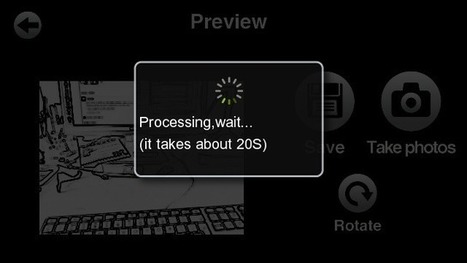
CamEfx, available for free in the Nokia Store.Right off the bat, there are filters for:
ThermalMirror (think reflection in a lake)Night vision (i.e. black and green)X-ray (think negative)PinkBlack and white (actually monochrome)Sketch (think line drawing)BlueLomo (a vintage look from the days of the earliest cameras)Brown
Each is shown in real time on-screen (i.e. at nHD resolution) and taking a shot is done with the on-screen button - there's no support for the camera phone shutter key: ...
Something a little different for a Friday. Frustrated that a lot of the Symbian and Windows phones I wanted to try day to day didn't have a built-in FM transmitter (I'll explain why that's important to me below), I opted to grab the Belkin In Car Tunecast 6 Universal FM Transmitter and try it out and about in the UK. Summary: it works brilliantly, far better (surprisingly) than the few phones which did have the functionality built-in......
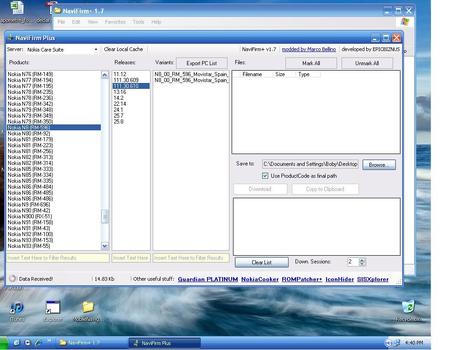
I am a happy Nokia N8 user. Sometimes though something stands in the way of what you want to do. My N8 was bought in UK from Tesco Mobile direct who had an amazing early deal on the phone.
The problem however came with Tesco Mobile's long delayed firmware updates for the Product Code UK N8 059C951.
The Belle roll out by Nokia benefited from better communication of availability than previous roll outs like Anna. http://europe.nokia.com/find-products/nokia-belle-update/nokia-belle-update-a... but with each passing week Belle was still not available for UK N8 059C951. I wanted Belle for the latest Nokia Maps, latest widgets, latest browser, latest phone app, latest performance improvements etc. etc.
In fact, better than that, it has additional improvements over what I had been waiting for. I now have an N8 with Belle & components of Feature Pack 1 (FP1). To say I was pleased is an understatement and I am now OK to wait a bit longer for my next phone the Ubber Camera Phone, 41 Megapixel, Nokia 808.
What surprised me was that a Nokia N8 fan had put together a firmware update...
Tasks Widgets on Nokia N8 with Symbian Belle This widget gives you a view of your running applications in a Card style view like on Meego. Available at Nokia...
...With the launch of two new phones today, Nokia continues its mission to connect the next billion to the Internet. The Nokia 110 and Nokia 112offer a young, urban audience the power to connect on social networks, get fast, inexpensive access to the Web, and keep themselves entertained with an exclusive bundle of 40 games from EA.
SPECS
Screen: 1.8-inch TFT LCD; 128 x 160px
Dual SIM capability
FM Radio & Media player
VGA digital camera
Operating system: Series 40
Size and weight:
Nokia 110: 110 x 46 x 14.8mm; 80g
Nokia 112: 110.4 x 46.9 x 15.4mm; 85.5g
Radio: GSM 900/1800
Connectivity: GPRS/EDGE, 2.0 mm Charger Connector, Bluetooth v2.1 with EDR, 3.5 mm AV connector
Both devices come with Nokia Browser, which reduces data consumption up to 90%, saving time and data costs. The phones offer direct access to Twitter, Facebook and other social networks from the home page. Email and Instant Messaging are also supported to keep the phones’ owners connected to their friends. The Nokia 112 also comes with the eBuddy instant messaging service preloaded.
The EA games will be downloadable from Nokia Store through an icon pre-loaded on the phones. Owners will be able to download the games for 60 days, starting from their first access to the offer. Key titles in the collection of 40 include classics like Tetris®, Bejeweled®, Need for Speed™ The Run, Monopoly Here & Now, and SimCity™ Deluxe. After downloading the games, they can be kept on the phone forever.
But it’s not just games. There’s a VGA camera built in so you can capture the moment when you’re out and about. To keep your ears entertained, there’s an FM radio and a media player that can play both video and music. Both support MicroSD cards up to a capacity of 32GB for massive media storage.
Both phones also come with Dual SIM capability, with Nokia’s unique Easy Swap technology allowing for a fast switch without opening up the phone. The phone remembers personalisation details from up to five different SIM cards, so it’s easy to share without fuss or keep swapping so you get the maximum value from different operators. Single SIM varieties of the Nokia 110 – dubbed the Nokia 111 (which is also quad-band) and Nokia 113 – will also be available in some countries.
After all this, you might be asking what the difference is between the two phone models? Good question and it’s fairly subtle. The designs are very slightly different. Also, while the Nokia 110 offers 10.5 hours talktime from a charged battery, the Nokia 112 offers 14 hours. Standby time on both is measured in weeks rather than days: 26.5 days for the Nokia 110 and 35 days for the Nokia 112....
...your phone should be able to handle text messaging, Facebook messages and email so simply you don’t even have to think about it.This is where the Nokia Lumia 900, Lumia 800 and Lumia 710 truly shine. Using the Messaging application, text messages and chatting all happen in the same application. So, for me, it doesn’t matter if my Mom messages me from inside Facebook on her computer or from her mobile via SMS, it all comes through as “Mom Harris”.
Text and Facebook chat messaging, all together As explained above, I use a variety of messaging methods depending on who is trying to connect with me. When it comes to text messaging or Facebook Chat, Nokia and Windows Phone have It covered.
Using the Messaging application and viewing Threads, you can see conversations split up by the name of the contact you initiated the conversation with.
For example, if you click “New” in Threads, you’re prompted to put in a name. If you’re signed into Facebook on your phone and Facebook Chat is enabled in Messaging Settings, you’ll be asked how you want to reach that recipient.
I love how, in this situation, Facebook and SMS messages are displayed in one window – this creates ease in an already hectic life and puts people at my fingertips, no matter where they happen to be. Also, group SMS messages are all handled in one thread, keeping the conversation in context no matter who replies and when they decide to do so.
How do you enable this amazing functionality of Facebook and SMS messages appearing in one place? Be sure you connect your Windows Phone to Facebook by adding your account (more info below on this below). Then, when you receive messages (either Facebook or SMS), if the person is in your phone’s contact list and a Facebook friend, their messages will be visible in one handy spot..
Email to the rescue
Personally, I have three email accounts to keep track of, consisting of a single work account and two personal email accounts. In my case, my work email is Exchange based and my two personal emails are both Gmail accounts. This mix is easily handled by Windows Phone.
When I set up a new email account, Exchange, Yahoo, Gmail and Windows Live accounts are handled easily with on-screen menus. For those of you who use IMAP or POP, enter your credentials and server information in the Settings -> Accounts configuration menus.
Each account is given its own Live Tile on the homescreen. The email interface in Windows Phone is threaded and shows all essential information including sender name, subject and time the email was sent.
Separate or linked Inboxes One capability I find very useful is the ability to see unread message counts in the home screen for each individual email account. Alternatively, Windows Phone users can link inboxes to that all your email is seen in one application in a more easy-to-use scenario.
The buttons and information provided in the inbox view and individual message views are intuitive...
With the world of Symbian seemingly shrinking around us, in terms of 'sales marketshare' at least, because of lack of presence in shops around the world, and with mainstream application development only including Symbian rarely, the question of...
...The Nokia 808 takes the N8's functionality and adds: a more up to date OS version, a faster processor, more RAM, a better camera, a better flash, a better speaker, a better screen and a far more easily removable battery, with no real 'downside', other than perhaps physical material and thickness preferences. You may remember that I wrote before, at length, about why the N8 is unique in the smartphone world? With the 808 arriving imminently, the N8 won't be alone anymore.
And, yes, the rest of the smartphone world be damned. With the Nokia 808, as with the N8, the extent of my 'modern' smartphoning will be email, some basic web searches, social sharing of my photos and comments - plus the usual application and game mix from the Symbian app pool....
Last time, in part 3 of our continuing review, we looked at the Lumia 800's communication and personal information management applications. Now we turn our attention to another area of productivity – the Office Hub.
...Overall, OneNote is the jewel in the Office Hub crown – which is appropriate given that smartphones are more suited to grabbing impromptu notes rather than typing full documents. Its status is knowingly reflected by having been given a section of its own in the Office Hub. It is also the best mobile implementation of OneNote that I've come across. For example, the Android version lacks the ability to indent items and has zero text formatting functions.
Sharing and collaboration
All of the Office Hub applications have an option to share a document, by means of emailing a SkyDrive (or SharePoint) link. The Windows Phone 7 clients are not advanced enough to provide real time collaboration though. While you can view a cloud file that someone is editing, if you try to save any changes, an error will notify you that someone else is editing the file, and so you'll need to save a new copy or abort.
For the desktop web-based applications; Word will notify you that someone else is editing the file while you are, but you won't see their changes until you save the document. In this case, only the section of the document being worked on becomes locked to avoid conflicts. However, online editing of Excel and PowerPoint files does allow for real time multi-user editing in both SkyDrive and SharePoint.
File Management
Somewhat infamously, Windows Phone 7 has no file system to speak of, as far as users are concerned. Thus, there's no USB mass storage mode to manage files via a PC. This presents a challenge to those used to having file system access – here is a summary of the tools at your disposal for managing and transferring files with Windows Phone 7 and the Lumia 800.
The primary way that consumers will manage content stored on their Windows Phone 7 device is currently via the Zune Desktop application (or the equivalent Windows Phone 7 Connector on the Mac). We'll focus more closely...
To get content containing either thought or leadership enter:
To get content containing both thought and leadership enter:
To get content containing the expression thought leadership enter:
You can enter several keywords and you can refine them whenever you want. Our suggestion engine uses more signals but entering a few keywords here will rapidly give you great content to curate.


 Your new post is loading...