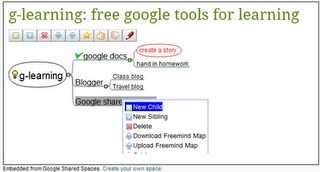
Ingredients:
Google Search
Google Reader
Google Listen
If you have an iOS device like an iPod you probably know where to go to when you want to listen to a podcast: iTunes.

 Your new post is loading...
 Scoop.it! Ingredients: No comment yet.
Sign up to comment
Scoop.it!

English Club ESL Learning Centre is where you'll find lessons and resources to help you learn English. You'll find the online English lessons here useful to learn or revise all aspects of English. You can also use the interactive pages like ESL Forums or ESL Games to have fun and learn English at the same time. If you have a question about English grammar check out ESL Help for answers. In the special interest pages you'll find resources for Business English, Young Learners and other areas of English.
Scoop.it!

Der fremdsprachliche Unterricht in Zeiten des Web 2.0. posted on bit.ly/fDOpdI. Comments and faves. Want to format your comment? By kikuyumoja No real name given + Add Contact. This photo was taken on April 14, 2011.
Scoop.it!

Corkboard is a cool real-time digital equivalent of the real-thing, allowing you to easily brainstorm, post notes and ideas, alone or together with others. Via Robin Good
Scoop.it!
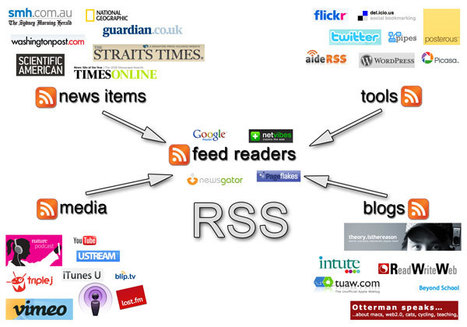
Exploring Web 2.0 in the classroom and beyond The aim of this workshop is to demonstrate the importance and relevance of Web 2.0 tools in the twenty-first century classroom as demonstrated by the research of individuals such as Marc J. Via Paul McKean
Scoop.it!

Scoop.it!

An Ohio English teacher decided to test whether iPads were a worthwhile investment for his school district. Via juandoming
Scoop.it!

RT @vicensvives: Queréis probar el nuevo Moodle 2.1? En @vicensvives somos los primeros a ponerlo en marcha! Via Jose Alvarez Huete
Scoop.it!
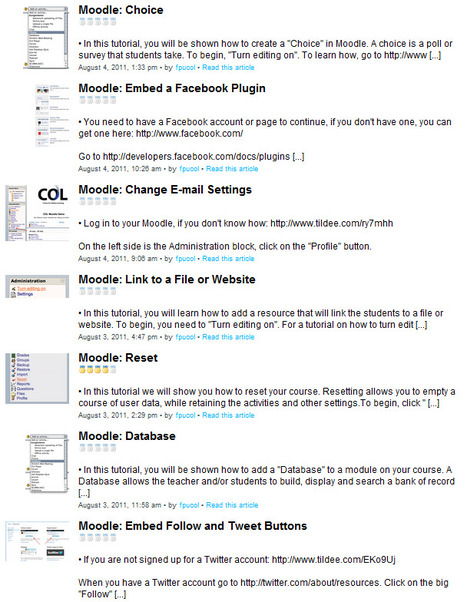
48 text/image Moodle Tutorials http://t.co/Mr2Y96c #moodlenews #moodle #edtech...
Scoop.it!
Copyright and Moodle: “What can I put on my course? 
Greenwich Connect's curator insight,
October 17, 2013 5:16 AM
from Australia, so with some Australian legal examples, but very similiar |
Scoop.it!

Library of over 20,000 peer-reviewed educational links for teachers, students, and parents. Easily find classroom resources that are safe for students. Use these links for homework, webquests, research and classroom enrichment. Via R.Conrath, Ed.D.
Scoop.it!

Print Screen Capture Software with Special Effects, Annotation Tools and support for Windows 7, Vista and XP Alpha Transparency (Translucency). Via Let's Learn IT
Scoop.it!

Dropbox, the app we all (at least many of us) know and love, has a plethora of advanced uses to make life so much easier in managing data between multiple... Via Kathleen Cercone
Scoop.it!
Scoop.it!

EFLnet has a wide collection of activities: Grammar, listening, phrasal verns, reading and vocabulary. The activities are mostly multiple-choice review questions that provide instant audio and visual feedback although some activities require keyboard input. Most of the review activities in each topic area go from beginner to advanced and most activity groups contain 10 questions.
Scoop.it!

New online service makes easier to create quizzes and glossaries in Moodle. vletools.com - a free online Moodle XML converter.
Scoop.it!
Create and share your work online and access your documents from anywhere. Manage documents, spreadsheets, presentations, surveys, and more all in one easy to use productivity suite. It's easy to get started - just upload a file from your desktop. Via Jean-Charles Blondeau
Scoop.it!

Read reviews, get customer ratings, see screenshots, and learn more about My Moodle on the App Store. Download My Moodle and enjoy it on your iPhone, iPad, and iPod touch. Via Moodle_UK
Scoop.it!

This is part two of the “Back to School with the Class of Web 2.0″ series. In this blog, we will cover web-based alternatives to desktop office applications including: word processing, presentations, diagrams, spreadsheets, and more. |