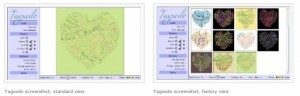
@andyfield yes this is to find out #moodle version without logging in but maker's not telling http://t.co/5c6F9OIk...
Your new post is loading...
@andyfield yes this is to find out #moodle version without logging in but maker's not telling http://t.co/5c6F9OIk... No comment yet.
Sign up to comment
Moodle 2.3 was released on Tuesday (release notes). I updated my college's Moodle from 2.2.3 to Moodle 2.3 last night. The upgrade took 21 minutes. I.
Shona Whyte: 2009 handbook edited by Michael Thomas with articles on different technologies in language learning from a wide variety of perspectives and including examples of many different tools in different teaching contexts.
Free to read online, or $5 to download. Via Shona Whyte
So I had time yesterday to peruse some online courses and came across the site alison.com, which offers 400 free interactive online courses in areas like business and enterprise skills, digital lit... Via Carola Brunnbauer
Mobile learning is seen by many as a disruptive technology. This is because it has been identified as a technology which holds great potential to transform t... Via Adelina Moura
How would you like to have a Hobby field show up in the Participants List in Moodle 1.9? Well it can be done! Charles Kelly of http://www.manythings.org has done it in his post here. The purpose of my blog post today, is to ...
Click here to view these instructions as a PDF (with images). Scales are a method of evaluating student performance. A standard set of numeric scales exist by default, but you can create custom scales of any sort.
Mind Mapping, Brainstorm, Collect ideas, Structure thoughts. SimpleMind is a mind mapping tool that turns your android phone or tablet into a brainstorming, idea colle... Via ganassa
Interesting video, drawings and view on curation: learning is more about how learners construct knowledge, so it’s positive to contribute to the scaffolding construction that enables people to learn (by Curatr http://www.curatr.co.uk/) Via Paula Silva, catspyjamasnz
Educator? Try our exciting new Web 2.0 tool that aligns comic-making with curriculum standards & interactive rubrics. Includes picture-uploading, voice-over, and much more. A teacher's dream! Via Baiba Svenca
Human Interest Agency- Child Support Enforcement's curator insight,
September 14, 2016 12:54 PM
HIATX.com
Deploying iPads at any kind of scale is just short of maddening. While the process of tapping around to install one app on one iPad isn’t too bad, installing a dozen apps on hundreds iPads isn’t a particularly appealing way to spend a month. If you are going to deploy iPads at scale, you need a strategy. You need a battle plan. In addition, you will also need to stay hydrated. I don’t think I’ve discovered the silver bullet, but I’ll share some of my experiences with you in order to, hopefully, shorten the learning curve. Via Nik Peachey
Shona Whyte: Worth a look for language teachers - collect and share resources for teaching, or send students out on project work.
Robin Good: If you need to do research on a specific topic or need to easily collect and organize notes, web clippings and other content from the web into shareable "public" collections, you may want to consider Evernote (and in particular its Chrome extension and its Web Clipper feature).
Useful. 7/10
http://www.contentcurationdesktop.com/content-curation-tools/using-evernote-content-curation/ ;
Evernote on iTunes: http://itunes.apple.com/app/evernote/id406056744?mt=12 
Check out the Evernote Web Clipper here: http://evernote.com/webclipper/ ;
More info: http://evernote.com/ ; Via Robin Good, Shona Whyte
Russell Webster's comment,
June 18, 2012 3:18 AM
Wouldn't be without this, I have the mobile version on my Android phone too. It syncs across different machines which is great.
I use it for Blog ideas, funnies, etc.
Shona Whyte: A 2010 article in the English Teaching Forum by Hayo Reinders about phones for language learning and teachers: not just texting and tweeting, but using other features in pedagogically interesting ways. Includes practical advice about classroom management, privacy issues and cost. Via DAvid Cordina, Shona Whyte |
Extensive list of Web 2.0 tools!Web 2.0 Guru - Web 2.0 Resources http://t.co/BaZSMjcu...
How do you embed presentation and quiz material made in eLearning authoring tools like Articulate, Wimba, Captivate, iSpring, etc. into Moodle? How does the SCORM format work? How can you integrate it all with your ...
Robin Good: Academic Pub allows academic institutions and professors to curate their own custom textbooks, by tapping into a copyright-cleared library of over 130 different publishers.
Key features:
-> Add articles from the web or self-authored content to custom course materials, allowing for relevant and timely material to teach courses.
-> AcademicPub course materials are available in eBook or print format, providing flexibility for both faculty and students.
-> Aggregate web content, self-authored materials and content from the library in minutes - with instant copyright clearance.
-> Coursepacks and class syllabus can be delivered in a protected digital file, or as a perfect-bound, professionally printed book.
How it works: http://academicpub.sharedbook.com/academicpub/how_pro.html ;
FAQ: http://academicpub.sharedbook.com/academicpub/faq.html ;
Find out more: http://academicpub.sharedbook.com/academicpub/ Via Robin Good
Michigan's MI Learning have created a series of video guides for Moodle 2 administrators covering such topics as themes, custom menus, custom site headers and footers, course categories, course settings and others.
Click here to view these instructions as a PDF (with images). The Quickmail block is a tool that allows you to select specific students or groups of students in a course to send email to. Composing Email Step 1.
This video explains how the new alias/shortcut method works to link to files that already exist in another course in Moodle that you have access to. Via Gisele Brugger
Welcome to the fourth post in this exciting Word Cloud Series. Last time I gave you nine Word Cloud Generators and promised you that the next post would have one of my favorites. Today I want t... Via Luísa Lima
From
edte
Kirsten Wilson's curator insight,
February 8, 2014 2:44 PM
The list is endless. Looking through this helps generate ideas on how to utilize forms to enhance/inform instruction, gain insight and individualize learning for students..
Julie West's curator insight,
November 16, 2014 3:23 PM
This is a great tool to use with our students.
Pamela Alaniz's curator insight,
May 13, 2019 8:50 PM
When I created an assignment for one of my Master classes I experimented with Goggle Forms as one of my assessments and as a means of getting back feedback fro my learners and boy was it fun. Google forms would be a perfect fit in building tests, quizzes, and questionnaires to get your students work automatically graded therefore saving you more time. My mom is a 1st grade teacher and one of the things she struggles with is to stay up to date with her Read Naturally data sheet, and using a google form that is already built into her Google classroom would really help her keep track of her student's progress much easier. However, my mom is an old school, traditional teacher and doesn't use other devices except for her projector and document reader for classroom instruction. She has never assimilated into the new technological innovations and as she nears retirement she believes it is to late for her to learn, however it would make her life in the classroom much easier. This would be a great article for her to read so she could see the benefits of using Google apps to transform her classroom.
The Resource for Education Technology Leaders focusing on K-12 educators.
Shona Whyte: Michael Gorman has a nice list of teaching resources, from familiar sites such as the BBC or PBS teachers to more specifically targeted science resources, for example. A short introduction to each will help you decide which to explore and which to leave for another time.
There is nothing exclusively for language teaching, but these are English resources and many are aimed at under 18s, so much of what you see can be exploited in the EFL classroom under the "authentic materials" umbrella. Via Jon Samuelson, Yuly Asencion, Shona Whyte |
Your new post is loading...