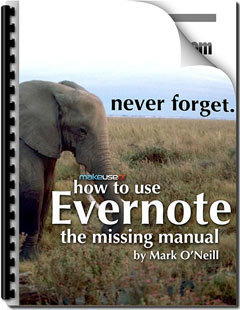

Are you a digital packrat? Are you in need of a searchable repository for everything you want to recall later?
Via Pilar Pamblanco

 Your new post is loading...
 Scoop.it! Are you a digital packrat? Are you in need of a searchable repository for everything you want to recall later? Via Pilar Pamblanco No comment yet.
Sign up to comment
Scoop.it!
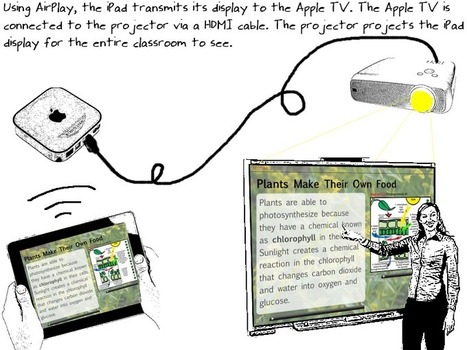
RT @eyeoneducation: Displaying iPad Screen Using a Classroom Projector http://t.co/vbKGwcmv @jameshollis #ipaded #edchat #edtech #slide2 ... Via Jon Samuelson, John Evans
Scoop.it!

In a previous post, Evaluating Apps with Transformative Use of the iPad in Mind, I describe my ambivalence about teacher asking my for the “perfect” app to teach this or that.
4 Different app lists include: Gardner MI for iPad, 21st Century Skills & Literacies, Bloom's Taxonomy, and Digital Learning Farm 
Shannon Brown's curator insight,
March 11, 2013 3:19 AM
This site provides ideas for apps to use on classroom iPads, influenced by Gardner's Multiple Intelligences, 21st Century Skills and Literacies, and Bloom's Taxonomy. In particular, are the apps on Digital Technology which are provided for the 21st Century Skills and Literacies under communication/collaboration.
Scoop.it!

Human Interest Agency- Child Support Enforcement's curator insight,
August 31, 2016 4:37 PM
HIATX.com
Scoop.it!

Word Clouds for Kids... Easy and catchy interface to help kids learn about word clouds... an easy way to introduce them to word categories Via Ricard Garcia
Scoop.it!

Human Interest Agency- Child Support Enforcement's curator insight,
September 6, 2016 8:08 PM
HIATX.com
Scoop.it!

This detailed guide describes the various options that will help you record movies (screencasts) of your iPad or iPhone screen. You can use it for capturing app demos, game walkthroughs and more. Via Timo Ilomäki
Scoop.it!
Doodlecast Pro is the easiest way to create presentations on your iPad. The app records your voice as you draw to create quick presentations. Doodlecast Pro saves videos to the camera roll making it easy to import them into popular video editors or presentation tools such as iMovie, Keynote, or iBooks Author. Perfect for teachers, students, business people and anyone needing an elegant way to share ideas. Via Ana Cristina Pratas
Scoop.it!

IFTTT is an awesome tool, which lets users automate several daily web tasks. Some of them are related to e-books, as listed in this post.
Scoop.it!
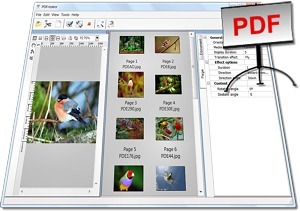
From the official site: "The PDFrizator is a Freeware tool to create PDF presentations, with the possibility to setup the PDF page transition effect, page advance time, and background music.
This can be done for already existing PDF's, or from the various file type formats supported, that can all be converted, and visually combined, in the same project.
Because of the possibility to convert multiple file formats, the PDFrizator is also a handy tool to rapidly, and visually, create PDF files"
Key features include: Powerful Resource Explorer, able to browse local files and online ones using Internet services such as: Bing images, Google images, Picasa, Flickr and Twitpic.
For Windows PCs only.
Download here: http://www.rttsoftware.com/downloads.html#DownloadPDFrizator
Find out more: http://www.rttsoftware.com/pdfrizator.html
Via Robin Good, R.Conrath, Ed.D. |
Scoop.it!

"iBooks Author is still making the news in the educational sphere. This is probably the first mobile app to be embraced wholly in education in such a short time since its release. After posting a simple and guided tutorial on how teachers can use the different services of iBooks Author , today I am sharing with you some hands-on examples of what students can actually do with it." Via John Evans, Richard Jones
Scoop.it!

Nice!RT @haikugirlOz: The Enablers: Apps that free you to work anywhere | @scoopit http://t.co/yadniHg... Via Ludmila Smirnova
Scoop.it!

by Angelita Williams, OnlineCollegeCourses.com GameZone: Dozens of simple, straightforward games about grammar, spelling, and vocabulary reach out to English language learners at all levels. Keep i... Via Ana Cristina Pratas 
Cheynee Scott's curator insight,
May 31, 2013 11:36 PM
1. In what way/s can online games help develop your english learning levels? 2. What genre of games could best identify with english criteria? 
Mae Guerra's curator insight,
July 5, 2013 12:08 PM
ELLs should be taught to bookmark suggested sites on there ipad and practice at home.
Scoop.it!
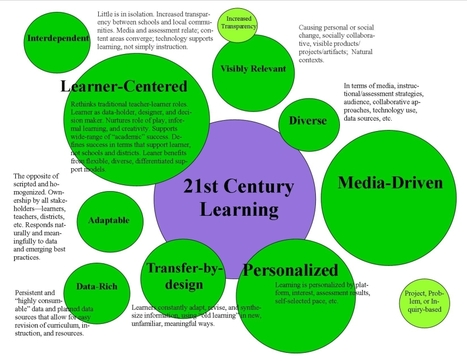
The label of “21st Century learning” is vague, and is an idea that we here at TeachThought like to take a swing at as often as possible, including:
–weighing the magic of technology with its incredible cost and complexity
–underscoring the potential for well thought-out instructional design
–considering the considerable potential of social media platforms against its apparent divergence from academic learning
Some educators seek out the ideal of a 21st century learning environment constantly, while others prefer that we lose the phrase altogether, insisting that learning hasn’t changed, and good learning looks the same whether it’s the 12th or 21st century.
At TeachThought, we tend towards the tech-infused model, but do spend time exploring the limits and challenges of technology, the impact of rapid technology change, and carefully considering important questions before diving in head-first.
The following take on 21st century learning developed by TeachThought is notable here because of the absence of technology. There is very little about iPads, social media, 1:10 laptops, or other tech-implementation. In that way, it is closer to the “classic” approach to “good learning” than it is the full-on digital fare we often explore.
The size of the circles on the map are intended to convey priority.
9 Characteristics Of 21st Century Learning...
Read more: http://www.teachthought.com/learning/9-characteristics-of-21st-century-learning/
Via Gust MEES
Scoop.it!

When I was younger I used to read detective comics called Julia, it was a quite popular monthly publication in Italy so many of my friends were also reading it, and we were having fun sharing ideas... Via Yuly Asencion
Scoop.it!
The ability to create narrated slideshows and screencasts and share them online should be a basic skill for digitally literate learners today... Via Baiba Svenca, Dennis Richards, Ana Rodera
Scoop.it!

Do you work - or wish you worked - in an English-speaking office? Get the phrases you need to succeed in business and avoid embarrassing mistakes with colleagues and clients Via Sue Lyon-Jones, Renee Maufroid
Scoop.it!

Vocabulary games for kids and ESL students: Hangman, Memory matching games, Drag and Drop games, Hidden object games...
Scoop.it!

Intro to Thinglink...
Read more with How-To: http://www.mentormob.com/learn/i/thinglink-for-teaching-learning/article-what-is-thinglink
Via Gust MEES, kathy pryor 
Gust MEES's comment,
September 3, 2012 11:21 AM
http://www.scoop.it/u/hteague
Hi Helen, Thx for sharing this! With Thinglink one can also share a whole course, I realized this here http://www.thinglink.com/scene/296377469991124993 Please check. Have a great day :) 
Dr. Helen Teague's comment,
September 6, 2012 9:05 AM
Hi Gust: Thanks for the link: http://www.thinglink.com/scene/296377469991124993
it is very informative! Have a great time today! 
Adam Schulman's curator insight,
May 17, 2014 5:44 AM
ThingLink helps you create and find images from all over the net. With those images you can then place comments and details to help your students to understand the image. You can also make your images come to life with music and video clips. you tell your stories. I have found that the use of Thinglinks are very useful in educating students with LD's because it places: images, texts, and audio methods, at the teacher's disposal.
Scoop.it!
http://www.youtube.com/user/JRESHOW?feature=mhee In this video I show 16 New ipad tips for new users. I cover the basics from copy and pasting to multitasking. Via Cornélia Castro 
AAEEBL's curator insight,
January 20, 2013 9:10 PM
Not entirely focused on eportfolio, but definitely mobile!
Scoop.it!

Online challenge encourages users to protect their identities by searching for personal mentions of themselves on the web.
Read more: http://www.edtechmagazine.com/k12/article/2012/08/google-yourself-safety-infographic
Via Gust MEES, Petra Pollum |