|
Rescooped by
Juergen Wagner
from TEFL & Ed Tech
August 16, 2013 9:08 AM
|


No comment yet.
Sign up to comment

 Your new post is loading...
 Scoop.it! No comment yet.
Sign up to comment
Scoop.it!
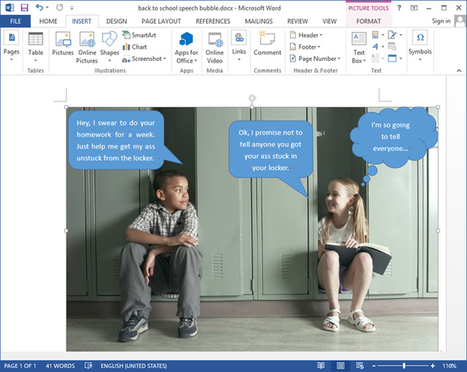
“I have some photos (JPEG files) and wish to add "speech bubbles". Do you know of a program or any online app that will do this? Many thanks!” Via Baiba Svenca, Marylin Alvarez 
BookChook's comment,
August 8, 2013 8:42 PM
I add speech bubbles often for my blog pics. Ribbet is online and very simple too.
Scoop.it!

If you're using a theme with custom menu enabled it's really simple to add some short cuts and links for navigating around the site. This is especially handy if students need additional resources w...
Scoop.it!

DIE WELT Via Klaus Meschede
Scoop.it!
Scoop.it!

HTML5 Maker is an online service/tool for creating animated, interactive content using HTML, HTML5, CSS and JavaScript. It's very easy to use and at the same time it can help you achieving extremely good results. Along with being able to create animation, presentation and slideshows we provide you with a way to host your work/projects on the cloud. Via Baiba Svenca 
Payman Taei's comment,
August 16, 2013 12:02 AM
Interesting but why use Flash to generate HTML5? May want to look at Presenter where its fully based on HTML5 to generate HTML5 based content.
Scoop.it!

Excellent educational content can be found on YouTube. However, not every teacher can access YouTube in his or her classroom. That's why a few years ago I compiled a big list of alternatives to YouTube. Over the years some of those sites have shut-down, started charging a fee, or have switched into another market. Via Alfredo Calderón, juandoming
Scoop.it!
Scoop.it!

Designed to be lightweight, free and simple to use — everything you need to make a 3 minute QuickCast. Right now QuickCast is Mac only, but it's open source so if you would like to see QuickCast on more platforms please get involved. Via Baiba Svenca 
Baiba Svenca's curator insight,
August 12, 2013 3:54 PM
Screencasting application for Mac users, produces 3 minute screencasts. Free and easy to use. 
Alfredo Corell's curator insight,
September 22, 2013 7:24 PM
Only for Mac Users Only 3 minutes screen-cast
Scoop.it!

Microsoft OneNote will help you organize any large project into manageable sections. For students, OneNote is an excellent tool for organizing research papers. Via R.Conrath, Ed.D.
Scoop.it!

Where Good Ideas Come From & How Your Classroom Can Respond The source for innovative or creative thinking is as much as mystery as that of curiosity or particular genius. In a traditional classroom, “having... 
Elena Keating's curator insight,
August 13, 2013 8:56 AM
“ Chance favours the connected mind.” - Steven Johnson. What a powerful statement. This quote came from the end of the video presentation but I found it the most powerful of all his statements. We need a space for collaboration to take place in order to create. We need the following 4 steps in order to provide opportunities for creativity. The identification of a problem or opportunity. An awareness of potential resources and previous modelsThe interdependence of people, technology, past experience, and collectively-wrought social goalsThe iteration of thinking that leads to a solution or further important thinking Steven Johnson “Good ideas require connectivity, time, iteration, and the macro recognition of systems & patterns.” Connectivity at its best and transformation. I will be using Steven’s 5 Takeaways. Takeaway 3 lends itself to risk taking in class. Takeaway 5 gives me permission to create self-directed learning and Flipping the Classroom. The many Apps we have seen in our Scoops such as Prezzies, mind Maps etc support Steven’s Metacognitive thinking ideas. Finally takeaway 1 and 2 give me permission to create something that I can use to build self-esteem and confidence in my students of their creativity and ability to learn.
Scoop.it!

|
Scoop.it!

Badges and Moodle – Part 2. Posted August 14, 2013 * Comments(0). Perhaps the hardest part of working with badges was actually creating them. I decided to use Adobe Illustrator since it generates vector based images (and I haven't used it ...
Scoop.it!

ICT - A selection of tips and ideas for making the most of an interactive whiteboard - age range : 5 to 11 Via Scoopingaddress, Marylin Alvarez
Scoop.it!

Content curation is a useful part of any content marketing strategy though it should not be used as a cheap or quick alternative to creating original content.
You need to read carefully and decide if resources are relevant, if they are unique and if they are of value to your audience. In doing this you will use your own expertise, judgement and your own insights.
Rather than simply sharing you may provide a summary, add context or add your personal perspective. In this way you really begin to add value and authority as a content curator.
by Steve Rayson Via Ivo Nový, Lynnette Van Dyke
Scoop.it!

Mary Reilley Clark's curator insight,
August 13, 2013 11:46 PM
I use Scoop.it for things I plan on sharing, and Diigo mostly for organizing things for myself, but it is a powerful social bookmarking site. Steven Anderson explains the wonders of Diigo in this post.
Scoop.it!

Search over 100,000 free photos, cliparts, and vector graphics or share your own pictures as Public Domain on Pixabay. Via Marie-Hélène Fasquel-Erhart
Scoop.it!

Linda Jones's curator insight,
August 14, 2013 10:05 AM
Educators using Pinterest as a collobrative tool.
Scoop.it!

The Moodle Journal blog chronicles using LAMS, Mahara, web 2, podcasts, streaming, downloads, training, metadata, scorm, lessons, quizzes, forums, chat, journals and assignments in the deployment of the vle as part of the e-learning programme...
Scoop.it!

Un manuel d’utilisation du logiciel « Xmind Plus 2012 » présenté sous forme innovante et heuristique. Via Lockall
Scoop.it!
This series walks you through building a native HTML5 video player with flash fallback for unsupported browsers. Official website http://phpacademy.org Suppo... Via michel verstrepen
Scoop.it!

Here are over 50 online software and applications for creating interesting infographics. These tools range from visualization tools to data sources, etc. Via Let's Learn IT, michel verstrepen |