Shared with Dropbox

 Your new post is loading...
 Scoop.it! 
“ For years, I kept hearing how awesome Evernote was: how it could store everything you possibly needed, make it available everywhere, and how scores of people couldn't live without it. I tried it multiple times, and never saw the appeal until now.” Via Ilkka Olander, Jenny Smith 
Melissa Marshall's curator insight,
December 8, 2013 6:05 PM
This has to be one of the programs I cannot do without - for personal as well as professional organisation of my life. I am finding that the more I add, the better it is. It is my digital filing cabinet, my bookmarks, my reminders, my collection of stuff. It is utterly wonderful. If you are looking for a method by which to reduce paper and sort out your online presence, this is it - but be persistent!
Scoop.it!

#moodle useful post: Did you know about the new font settings in Moodle 2.6?: by Mary Evans http://t.co/96IDTJ54wI Via Miloš Bajčetić
Scoop.it!

In a Moodle course teachers can grade students’ work and view the report via the “Grades” option under the “Course administration” (see figure 1). However the default view of the report is not easy to read as there are too many available columns in the table and teachers have to scroll left and right horizontally to be able to see all the column data. Although it is not a big problem when there are only couple of students, imagine that you have more than 10 students in the course – it will get difficult to keep track of whose grade report you are looking at as you scroll the student names column out of view.
Luckily there is a useful “Static student column” feature which can be enabled to make the Moodle Grader report easier to read.
All you need to do is to navigate to Administration > Grades > Report settings > Grader report and tick the checkbox for the “Static students column” option. Click the “Save changes” button before you leave the page. Via Miloš Bajčetić
Scoop.it!

What happens when you or your students forget your online password? You should start using some of these web tools for teaching without student logins. Via Yuly Asencion
Scoop.it!

Sometimes it happens that you want to print off some of our emails in PDF format; of course there are several third party tools to do this and Zamzar is one the most popular among them all. However what I don't like about Zamzar is that each time you use it to turn your email into a PDF you will have to visit their homepage to retrieve you PDF. Via Frédéric DEBAILLEUL 
Amélie Silvert's curator insight,
November 30, 2013 12:58 PM
really impressive. Just by forwarding at attachconvert@pdfconvert.me you transform the email into a pdf.
Amélie Silvert's comment,
November 30, 2013 12:59 PM
ça marche super bien, merci pour ce tuyau super utile.
Scoop.it!

Scoop.it!

Ressources pour les cours d'anglais's curator insight,
February 27, 2014 1:13 PM
Des idées intéressantes pour utiliser Padlet en cours.
Scoop.it!

Alain MICHEL's insight: Carte conceptuelle rasemblant des dizaines de liens vers des sites où vous pourrez obtenir des images, des pictogrammes et des icones libres de droits.À garder dans ses favoris...
Scoop.it!
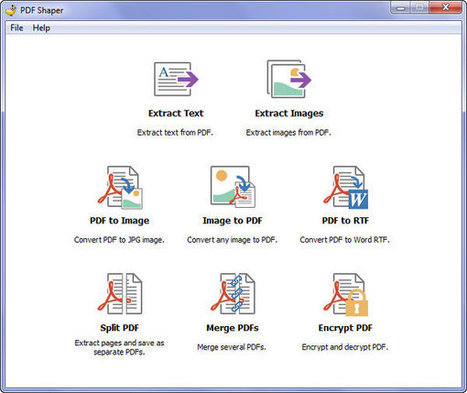
PDF Shaper est une collection d’outils gratuits pour gérer vos fichiers PDF sous Windows. Il permet de fusionner, fractionner, crypter et décrypter les fichiers PDF, convertir des images au format PDF, convertir des PDF en RTF ou images, en extraire le texte et les images et permet le traitement par lots. Via Freewares&Tutos, Frédéric DEBAILLEUL 
Daniel Morgenstern's curator insight,
December 4, 2013 3:46 PM
Bilan : La durée du processus dépend en grande partie de vos documents, mais le programme est plutôt rapide et consomme d’ailleurs très peu de ressources. Un must-have si vous travaillez souvent avec le format PDF.
Scoop.it!
|
Amélie Silvert's curator insight,
December 2, 2013 9:32 AM
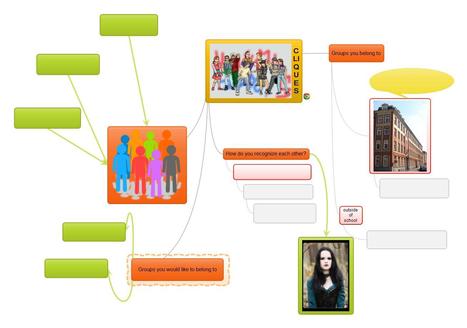
a really nice and cool way of creating effective mindmaps. Easily include pictures and links.
Scoop.it!

Suite de notre discussion commencée la semaine dernière : comment passer de l’idée à l’action ? De toutes les chozafaires que je stocke dans mon compte Evernote, certaines ne passent pas directemen... Via FrancoisMagnan, rthibert
Scoop.it!

We are pleased to finally introduce the new official cross-platform Moodle Mobile app!Our Moodle Mobile app is a HTML5-based client that connects to an installed Mo...
Scoop.it!
Slidebean is a new presentation tool that lets you focus on the content, and does everything else automatically. We just launched our beta today. Via Baiba Svenca, Rui Guimarães Lima 
Luís Cálix's curator insight,
November 23, 2013 5:03 PM
Entre no site, carregue o conteúdo que desejar, escolha um template...e já está! Pronto a usar e partilhar. 
Louise Robinson-Lay's curator insight,
December 1, 2013 12:44 AM
Newly launched, Slidebean seems to be trying to do what haiku deck does. Login is with Facebook, not my favorite way of doing things, but there are some nice effects here and it produces clean slide shows.
Scoop.it!

You Might Also Be Interested In These ArticlesSocial Media InfluenceGoogle+ Hangouts for SchoolsFlickr for Education – 18 Ways to Use Flickr in SchoolsTelling the Time – Online Resources RoundupFree Online Photo Editors ReviewMoving to the Cloud for... Via Patty Ball 
Chloe Nicholson's curator insight,
September 29, 2015 1:53 AM
This article really helped me to understand how Pinterest can be a great tool for use in education. It demonstrated how it is effective for organizing vast quantities of information and brainstorming ideas though a visual nature making it particularly suited to engaging learners.
Scoop.it!

A multiple-choice quiz designed for use in a face-to-face lesson.
Teachers can review the answers, once the quiz is finished, to identify any areas that need to be covered again. Via Miloš Bajčetić
Scoop.it!
PDF Shaper est une collection d'outils PDF gratuits pour fusionner, fractionner, crypter et décrypter les fichiers PDF, extraire le texte et les images... Via Freewares&Tutos, Marie-Hélène Fasquel-Erhart
Daniel Morgenstern's curator insight,
December 4, 2013 3:46 PM
Bilan : La durée du processus dépend en grande partie de vos documents, mais le programme est plutôt rapide et consomme d’ailleurs très peu de ressources. Un must-have si vous travaillez souvent avec le format PDF.
Scoop.it!

Quizzes within Moodle are a great way of helping both teachers and students measure progress within a course. Quizzes can be marked automatically, giving students a quick way of gauging their performance and allowing teachers to give them feedback, either as a whole at the end of the quiz, or for each question individually.
Quizzes within Moodle are very flexible, with plenty of different questions types, grading criteria and feedback options.
There are also several other types which are provided by 3rd parties, such as: - Drag & Drop onto text - Drag & Drop onto an image - Pattern matching - Variable numeric questions - Algebra questions
Question Bank
The question bank allows all quiz questions to be stored and organised by categories which you can set up in the question bank. This makes creating quizzes much faster and easier once you have built up a good collection of questions. Giving you the option to select random questions to build a quiz with and helping to keep all your questions well organised. Via Miloš Bajčetić
Scoop.it!
Referent: Mag Dr. Thomas Strasser (PH Wien)
Via Shona Whyte |