


This is the presentation that goes alongside my 2 day Moodle Bootstrap Themes Masterclass. I
Via Gisele Brugger

 Your new post is loading...
 Scoop.it! This is the presentation that goes alongside my 2 day Moodle Bootstrap Themes Masterclass. I Via Gisele Brugger No comment yet.
Sign up to comment
Scoop.it!

OneNote oder Evernote sind Programme der neueren Generation und erleichtern das Arbeiten resp. Vorbereiten einer Lehrperson sehr. Mein Post handelt sich vor allem um OneNote jedoch gelten alle Vorzüge dieses Programmes auch für Evernote. Via Guido Knaus
Scoop.it!

We’re continuing to build the list of integration resources that we provide for Moodle, so that schools, TAFEs and universities can integrate their Moodle platforms more securely with the rest of their existing infrastructure. This is a common goal for central IT teams, where they want to ensure their users (both staff and students) are able to move seamlessly between their different systems, and their data isn’t locked into a single platform. For example, rather than having learning resources locked away within their Learning Management System it’s possible to use the content management of SharePoint, and storage space of OneDrive (the new name for SkyDrive), to ensure that users have access even when they are not using Moodle directly, or to provide content management such as version control for staff. In the past I’ve written about the SkyDrive/OneDrive plugin for Moodle and the Moodle kit for Windows Azure.
The latest plugin from Microsoft integrates Moodle with Office 365 and OneDrive. This allows teachers to create courses and assignments in Moodle that can be read, edited, and submitted by students in SharePoint.
Via Miloš Bajčetić 
KJ Honkonen's curator insight,
February 24, 2014 2:58 AM
Tarpeeseen, nopeasti tästä tähän... "Viimeisin lisäosa Microsoftilta integroi Off365:n ja OneDriven. Tämä mahdollistaa opettajien luoda kursseja ja tehtäviä Moodlessa, joita opiskelijat voivat lukea, käsitellä ja lähettää opettajalle SharePointissa..." ...
Scoop.it!
Cette vidéo nous explique comment déposer un fichier dans un cours en ligne par simple cliquer-glisser grâce à la plateforme Moodle.
Scoop.it!

If you're like us, the keys to your life are kept within Gmail's walls. Make sure they're safe by following a few simple guidelines. The web apps experts at Stack Exchange offer a few must-follow tips. Via Luísa Lima
Scoop.it!

Grâce à ce site, il est tres facile , en ligne, de créer vos gif animés, et ce, en quelques clics, a partir de 2 images ou plus (Creation en ligne de gif anime | @scoopit http://t.co/tqh4Docwzq)...
Scoop.it!
qr codes can make your life better if you have to face huge audience or group. Distribute the qr code that would take them to information page or url. Small... Via Adelina Moura
Scoop.it!

There is a time when only Power Point was used for creating presentations and slides. But now there are so many advanced sites and wonderful Apps are easily available in the internet. If you are planning to create an eye-catching and outstanding presentation then have a look at this collection. In this collection you will find 40+ superb sites and Apps that surely help you to creating your masterpiece and most important is they all are easy to use. With these sites and Apps you can make your presentation more stunning and eye-catching. Enjoy and stay creative everyone. Via Edumorfosis, Rui Guimarães Lima, Lynnette Van Dyke, Melissa Marshall, John Purificati
Scoop.it!
The planning stage of your presentation is crucial but too often presenters don’t know where to start and don’t follow a clear process. This planning checkli... Via Baiba Svenca 
Beatriz Olivares's curator insight,
March 20, 2014 12:07 PM
Hace unos días en mi blog, hablaba de la necesidad de considerar ciertos aspectos para crear presentaciones y obviamente la planeación es fundamental. Les comparto la entrada de mi blog: http://bettyolivares.blogspot.mx/ 
Marisa Maiocchi's curator insight,
March 25, 2014 6:51 AM
Muy buen resumen de las cosas que hay que tener en cuenta a hora de hacer una presentación efectiva, para un auditorio sin ojos cerrados ni bostezos! 
Kamian's curator insight,
April 9, 2014 10:24 AM
Documento recomendado para hacer presentaciones decentes (Muy buenos tips).
Scoop.it!

Moodle blocks can be very useful, adding productive features to any page or course. With each block you can specify its location and its intended audience. One of the most versatile blocks is the HTML block. You can add text, images, web links, audio and video files, YouTube films and flash files.
The HTML Block can be used to add information, activities or resources that you may want accessible to your students longer than a course or that may be of interest to your students but does not really relate to a particular course. Because blocks can appear on any page or course your students will find it easily without being signposted there. It is a different way to engage with your students or to get them to engage with each other. Via Miloš Bajčetić |
Scoop.it!

Source Via Rafael Scapin, Ph.D.
Scoop.it!

Picture from the 9/13/13 article, “The Post-Lecture Classroom: How Will Students Fare?” in The Atlantic. Via AgileBelma
Scoop.it!

List of new presentation tools for teachers and students to create awesome presentations. Via Joyce Valenza, Sharon Murdoch 
Sandra Carswell's curator insight,
February 22, 2014 11:06 AM
Lists 3 presentation tools, Haiku Deck, Projeqt, and Present.me and their features. Present.me would be great for adding your audio to go with your ppt to place on your website. 
Ludmila Smirnova's curator insight,
March 6, 2014 10:17 AM
From my Ukrainian friend! Web 2.0 tools travel all over the world 
Claudia Estrada's curator insight,
March 7, 2014 4:30 PM
For the innovatite teacher whio wants to try something new.
Scoop.it!

E-Learning Heroes: Step-by-step tutorials for building better courses, fast answers to your e-learning questions, free downloads for your e-learning projects. Via Ana Cristina Pratas, Renee Maufroid, Amélie Silvert 
Sieg Holle's curator insight,
February 28, 2014 10:09 AM
Will try to use this to make a government cancer treatment game.

Alison Hewett's curator insight,
February 28, 2014 3:51 PM
Interesting ideas for presenting questions in a board game format.
Scoop.it!

Juergen Wagner's curator insight,
February 22, 2014 2:30 PM
Contrary to the above announcement SHONA WHYTE - Université de Nice will be our host(ess) Thanks Shona!
Scoop.it!

ys to get students interested in the creative writing process is to have them create comic strips ..." © Via Leona Ungerer, John Purificati
Scoop.it!

Did you know that Moodle provides teachers with the possibility of using filters to enhance the appearance of their courses? Just like you can do with digital photos, Moodle gives you the chance of applying filters to change course content. For example, by enabling filters you can allow the system to create shortcuts automatically, embed images and flash content, display mathematical expressions, sensor inappropriate words, and much more.
Scoop.it!
Want to make a splash with your presentations, but don’t want to splash out any money on a program? Forget PowerPoint, we’ve got some totally gratis... Via Baiba Svenca, Petra Pollum, juandoming, Javier Sánchez Bolado 
Solange Giardino's curator insight,
March 21, 2014 4:54 PM
Ótimas alternativas para variar nas apresentações. 
Alfredo Corell's curator insight,
March 23, 2014 3:22 PM
A new compilation of free software to prepare digital presentations. Of course... alternatives to Power-point or Keynote. Have a look, and if you're not into any of them, give them a try!!! 
Ingrid B's curator insight,
April 2, 2014 8:34 AM
Algunos programas gratuitos para hacer presentaciones, como nuevas y más completas alternativas al ppt.
Scoop.it!

So… you’ve read all the blogs and articles you can find telling you what you should do when designing Moodle courses, but you’re still not 100% happy with what you’ve developed? Well, welcome to the post that tells you what not to do. Typically, I wouldn’t use negative examples to express how to implement best practices in Moodle course design, but sometimes we all just need a clear and concise ‘what not to do’ list, don’t we? For today’s blog, I’m going to share with you my personal, top ten “Moodle course design no-no’s”! Via Donna Thompson 
Barbara Macfarlan's curator insight,
February 27, 2014 7:04 PM
This list might help avoid some of those pitfalls when designing for online delivery.
Scoop.it!
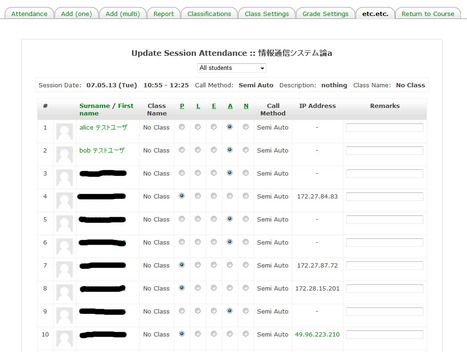
These Auto Attendance block and module are modification of the Attendance block/module of Mr. Dmitry Pupinin (v1.0.8, 2007). Via Miloš Bajčetić
Scoop.it!
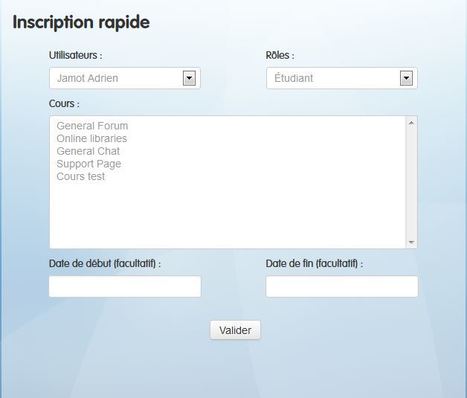
With this plugin you can quickly enroll users to many courses. Via Miloš Bajčetić |






