Just in case you haven't heard about this already. -JL
All schools can now use the YouTube educational video site, youtube.com/education, without having to jump over Internet filtering hurdles.
For schools that choose to opt in to the YouTube for Schools Program, YouTube will redirect Web users who go to the site straight over to youtube.com/education. On this portion of the site, all comments are disabled and the only related videos are those that can be found in the Education portal of the site.
The option has been created for parents, teachers, and administrators who fear children will be exposed to inappropriate materials on the site.
Some of your secondary school students have read The Help and many more will have seen this summer's film adaptation. This creates a critical teachable moment for educators.
This section contains charts and Excel data files of a selection of the Pew Internet Project's latest findings about internet and technology use among American adults (age 18+). For similar trends among American teens (ages 12-17), please see our teen trend charts.
Includes topics such as user demographics, device ownership, what Internet users do online, home broadband adoption, and more.
When it comes to social media, there is not that much hidden about how it all works. The issue is that sometimes the information is hard to find in one place. So in this post, we are going to unearth some commonly unanswered questions in standard Twitter how to posts when it comes to getting the most out of your Twitter experience.
What is the New Twitter Activity Stream? You may not have noticed it yet because you spend a lot of time in a Twitter management tool instead of on Twitter itself. But one of the new additions to Twitter is the Activity feed. You can find it when you log in to Twitter as a tab underneath your What’s happening box...
For many years technology was treated as a discrete subjectto be taught by a technology teacher. Classroom teachers, administrators, and parents expected that students would learn any and all relevant technology skills (usually related to word processing) in those classes. However, over the past decade or so, technology has moved out of the computer lab and into the classroom as a more fundamental tool for demonstrating student creativity and understanding.CC image by Billie Joe's Entourage
Now the expectation is that classroom teachers will authentically and appropriately embed technology into the learning experience. In an ideal world, this integration would happen seamlessly, but the fact is that due to the rapid pace of change with technology, teachers’ varying comfort levels with technology, frequent turnover in international schools, and classroom teachers’ already extensive list of responsibilities, the majority of teachers could benefit from the support of a technology facilitator or coach.
Bringing together the pedagogical expertise of the classroom teacher and the technological understanding of the coach not only provides consistent embedded professional development, but also makes the most of the extensive resources most international schools have to offer in a way that effectively meets the needs of today’s students.
Winners announced in the 2011 Edublog awards. Top vote getters along with the next 4 runners up. Great place to start if you want to pick some blogs to follow. Don't miss "Most Influential Post" category.
Educreations is a new iPad app that turns your iPad into a whiteboard. You can use the app to illustrate concepts and narrate what you're doing on the screen. You can draw images from scratch on the Educreations iPad app or you can upload images and draw on them. Your completed lesson can be shared directly to others or made public on the Educreations website.
The # symbol, called a hashtag, is used to mark keyword or topic in a Tweet.
Any Twitter user can categorize or follow topics with hashtags.Those hashtags (usually) mean something and are a great way to get a tweet to appear in search results or discussion monitoring.
This is the last of three posts on 13 Resources, 13 Tools, and 13 Mobile Apps for Blended Learning. If you haven't checked out Mobile Learning Design or 8 Ways to Jumpstart Mobile Learning, you may find some helpful tips there as you begin to explore the exciting world of mobile learning. Here also is an infographic of iPad apps using Bloom's Taxonomy I found recently.
BolderImage recently announced the release of the company’s first iOS app, iDashboard for iPad. The $1.99 app turns the tablet into a complete information center and ties together calendar notifications, RSS newsfeeds, local weather, Facebook, Twitter, and music, all on a single screen.
PDFBinder is a simple tool that lets you merge any number of PDF documents into one, without having to resort to slow, user-unfriendly, expensive software.
With a good PDF printer, like PDFCreator, and PDFBinder installed on your workstation, you are able to do anything in PDF. Example: attach a "print" of a website and a scanned pile of vouchers to your meeting agenda, before you e-mail it as one single PDF document.
With the recent popularity of iOS gadgets in education, you might be asking yourself this question, just as others have asked, “How do I connect my pages on my iPad to my Google Docs account?” This quick tutorial walks you through the process in a few easy steps.
A series of blog posts edited by Larry Ferlazzo, with comments to reader question by education notables. This is part one of a multi-part series on Classroom Management. See newer updates in the Recent Columns area to the right of the page.
A really great blog post can bring a flood of visitors to your website when people who read your post share it with the world.
The best way to create a potentially viral blog post is to experiment with lots of different types of blog posts and to observe what has worked for other blogs.
Below I’m going to share 11 blog post ideas you can use to get more traffic. These ideas each came by examining popular posts from some of my favorite blogs. These posts became some of the most popular posts on some incredibly popular blogs. There’s no guarantee they’ll work the same for you, but try several of them and you might just make a breakthrough...
Caution: there is a very strong word or two in here. Reader discretion is advised. -JL
Voted Best Individual Blog of 2011 by Edublog awards
I’m Kieran Donaghy, an English teacher at UAB Idiomes Barcelona, Universitat Autónoma de Barcelona, and I set up Film English in March 2010. Film English is a site which promotes the use of film in the language classroom. There are lesson plans, a glossary, links and videos to help both teachers and students. The three main objectives of Film English are:
-promote the critical and creative use of film in the language classroom
-promote cineliteracy, the ability to read critically and evaluate moving images, in the language classroom.
-promote creativity amongst both teachers and students.
It’s not everyday you find the head of a school willing to share just about everything with the world. It’s even more rare to find a school administrator who wants to proactively share his or her thoughts on a regular basis. Whether it’s through Twitter, blogs, or another channel, communication from the heads of schools is becoming quite important.In fact, many school districts are lucky enough to have a principal or leader who is on Twitter (@bhsprincipal and @gcouros are some big names that spring to mind) and actively responding to any and all questions.
But they’re not alone. There are dozens of terrific blogs run by education administrators that you should start following right now. The following list is via the Edublogs awards so be sure to head over there and vote for your favorite!
This is an interesting workshop presentation given at #converge11 by Joyce Seitzinger. It has a focus on curation in EduTech but is generic as well in a lot of aspects.
In particular, I love the distinction she makes from slide 22 onward between all types of "curators": a fun way of showing what curation best practices should be all about.
I've been exploring the idea of 'the social media classroom' and how I view teachers with an emerging role as curators, but also teaching student the skills of curation so they can get the right resources in an age of ubiquitous information. I'll have to keep in touch.
Nice one thanks for this. I have been following your Scoops. You can also set up and share your scoops on Internet Billboards, it's very easy to set up and do and there is no extra effort just a couple clicks. Like this http://t.co/63g5ViEq Also do you have a blog? Just curious.
"After the Deadline is a simple, easy-to-use editing program that checks grammar, style, spelling, and punctuation. To start using the add-on, simply select "download" from the homepage. Then select the platform for which you would like to use After the Deadline, from a list that includes Chrome, Firefox, WordPress, and a number of other options. Once activated, the program underlines suspect words and phrases in red (for spelling errors), green (for grammatical errors), and blue (for style suggestions), offering suggestions along the way."
Curatr is a curation platform geared to learning and educational settings. By adopting a rich, visual interface and a hide-and-reveal approach of information-objects it encourages users to explore learning following their own path, creating personal journeys and doing it at the pace that best suits them.
The learner gradually "exposes" the parts of a curated collection that he/she has visited, painting a fuller picture as she progresses through it. Curatr also integrates multi-level assignment of info-objects (so that you can't see info-objects at level 2 if you have not checked out all of those at level1) and "rewards" such as badges which can be assigned to learners who have achieved specific scores.
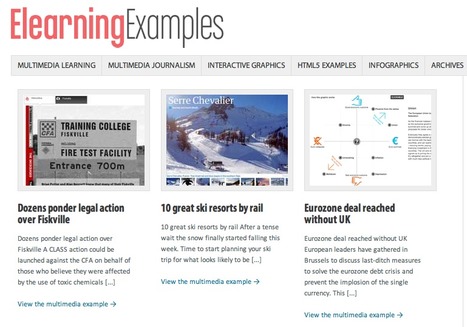
If you are looking for inspiration when it comes to content curation, here is a great example at work. ElearningExamples is a curated collection of "examples" from the real world of online communications in the areas of "multimedia journalism", "infographics" and "html5" among others.
For each one of these categories the author has written and edited a specific information card containing relevant information, images and links to the work being referenced. The design of the site and the quality of the work "examples" being showcased make this a good example of what good "content curation" is.
Clearly, the work produced by this site, produces no noise or regurgitation of information, but rather offers a better way to make sense and discover the communication areas being curated on the site.
Thanks to David Anderson, an e-learning designer & community manager at Articulate for having created this excellent curated set of galleries.
To get content containing either thought or leadership enter:
To get content containing both thought and leadership enter:
To get content containing the expression thought leadership enter:
You can enter several keywords and you can refine them whenever you want. Our suggestion engine uses more signals but entering a few keywords here will rapidly give you great content to curate.


 Your new post is loading...