




Article explaining how to use PowerPoint's Presenter View to improve presentations.
Via Baiba Svenca

 Your new post is loading...
 Scoop.it! Article explaining how to use PowerPoint's Presenter View to improve presentations. Via Baiba Svenca No comment yet.
Sign up to comment
Scoop.it!

The digital divide is no longer an issue of access. Instead, there is a widening gap between those who use technology to be entertained and those who are empowered by it. Via tom jackson
Scoop.it!
Learn how to analyze Da Vinci's famous painting. Evidence that Da Vinci used Sacred Geometry (specifically, the ancient geometry used in the planning and construction of religious structures as well as for sacred spaces) to lay out his painting BEFORE he started to paint in order to align his model while using a camera obscura or camera lucida as suggested by David Hockney. An animated geometric analysis of the Mona Lisa based upon a modification of the original analysis done by Robert diCurcio. As a primer, I recommend "Sacred Geometry: Philosophy and Practice" by Robert Lawlor, ISBN-10: 0500810303. Also see www.goldennumber.net/body.htm PowerPoint presentation was made using INSERT Circle and line and ANIMATIONS Fade and Wipe commands. Zoom to 200% and hold down the Alt key to "fine tune" the placements. Via Alfonso Noriega, juandoming
Scoop.it!

Are you looking to get into data visualization, but don't quite know where to begin?
With all of the available tools to help you visualize data, it can be confusing where to start. The good news is, well, that there are a lot of (free) available tools out there to help you get started. It's just a matter of deciding which one suits you best. This is a guide to help you figure that out.
But before we get into what you should use, a couple of questions...
Scoop.it!

FlowingData explores how designers, statisticians, and computer scientists are using data to understand ourselves better - mainly through data visualization. Money spent, reps at the gym, time you waste, and personal information you enter online are all forms of data. How can we understand these data flows? Data visualization lets non-experts make sense of it all.
Scoop.it!

As one of my personal goals this year is to further explore coaching and mentoring with our teachers, my first step towards achieving this is to look at what the research says about different types of coaching. Today I’ve been reading the October issue of Educational Leadership where Bob and Megan Tschannen-Moran write about the importance of making a clear distinction between the coach and the evaluator. Via Ana Cristina Pratas, juandoming
Scoop.it!

This site was created for instruction on using Google sites with a core purpose being eportfolio use.
Well worth a look, as it includes instructional videos. This is a sub-site of a much larger collection of educational technology tutorials. Do give it a try. Very well put together. Via Heath Sawyer, michel verstrepen
Scoop.it!

This lengthy article is about storytelling, from a renowned multi-media storyteller. Many say that story is the essential motivator in nearly all human endeavor, and certainly it is most powerful in education. When students ask, "Why do we have to study this?" we must have compelling, storified narratives to tell, otherwise we lose them. -JL
To be most effective as storytellers, especially in the digital age, we have to remember to maintain a single powerful message, a message born of the Grand Narrative, but infused even a bit with your personal sensibilities, that is then projected out to people. You’ve got to keep it basic, because the method of story telling has grown more complex. You need to hit people right between the eyes with something alluring and provocative if you’re going to invite them to move across these screens, across these platforms, to enjoy the narrative. They have to want to come with you..
They understood that I was listening to them and that I was integrating, what I heard, and seeding the narrative with their interests. In essence I was writing them into the mythology.
This is what is possible now on a colossal scale, on a global level. What I created was the Land of Corondor, a fantasy world, and I would tour these friends of mine, then later my college classmates, through this world. I made it feel real and relevant and I allowed them to explore every nook and cranny of it. There would be a dozen or more people sitting around the table playing roles like fighters and wizards and elves and participating in this narrative. It became a kind of communal narrative that was actually shared by multiple groups because it had become so popular. That made me a tiny bit popular, at least among the nerd elite at college. I ran games every other day so there would be two or more entirely separate groups of players who were exploring different parts of this fantasy world. There would be dozens of separate plot threads, and then there would be that big epic story line (usually right before finals) where all of the groups met one another and clashed, and then had to band together against a common enemy…and it was amazing! Climactic battles, old rivalries settled, romances meeting tragic ends – it was really cool. Via The Digital Rocking Chair
Scoop.it!

Nice collection of upper elementary class ideas for integrating technology. Covers Language Arts, Math, Social Studies, and Science. -JL
Scoop.it!

Montessori Activities for iPad and iPhone.
The Montessori method is easily the best-known system of self-directed learning in formal education. This year, Montessoriumput the 100-year-old educational tradition at the fingertips of today’s children with two simple yet brilliantly executed mobile apps that let kids learn the basics of language and mathematics. Minimalist yet engaging, the sleekly designed app makes self-directed learning what it should be: Fun, simple, yet effective.
Montessorium comes in three varieties — math, letters and writing — each available for $4.99.
Scoop.it!

WordLens is a new real-time translation app that turns your iPhone into “the dictionary of the future,” using optical character recognition and augmented reality to translate text captured with the phone’s camera. From t-shirt slogans to street signage, its applications for globe-trotters are astounding and its implications for the future of language learning and cross-cultural communication remarkable. Internet connection not needed.
Scoop.it!

When Volume 1 of The Online Learning Idea Book appeared in 2007, reviewers praised it for its focus on practical, innovative, tried-and-tested ideas from practitioners in the field. Volume 2 is, in my opinion, even better.
Scoop.it!

Get great ideas to use with your class, or download and present it to staff that may be interested in Facebook for education. The Prezi provides an engaging walk-through of ways you can use Facebook to enhance communication, networking and keep the classroom fun and relevant. |
Scoop.it!

Edward De Bono would have a ball with these; you and your students can too. The idea is to get people thinking, asking questions, and trying out hypotheses and possible scernarios. Technology not necessary, but it might be fun to do some of these via a Skype-type arrangement or using a collaborative online whiteboard space. -JL
Scoop.it!

David Warlick raises an interesting question: What if a target objective in classrooms was to have kids talk at home about what they learned in school? If getting kids in touch with their learning, being aware of what they're learning, interested in it, and able to talk about it were what we were aiming at in classrooms, school would be quite different, right?
So Warlick asked his blog readers to suggest ways to structure classrooms with these goals in mind. Their 12 ideas, paraphrased here, offer a view of classrooms where exploration, experimentation, discovery, and sharing are high on the learning agenda. -JL
Scoop.it!

One of the most frequent questions I get is, "What software do you use to visualize data?" A lot of people are excited to play with their data, but don't know how to go about doing it or even start. Here are the tools I use or have used and resources that I own or found helpful for data visualization, starting with organizing the data, to graphs and charts, and lastly, animation and interaction.
Scoop.it!

Charts and graphs have found their way into news, presentations, and comics, with users from art to design to statistics. The design principles for these data graphics will vary depending on what you're using it for. Making something for a presentation? You'll want to keep it extremely simple and avoid using a lot of text. Designing a graphic for a newspaper? You'll have to deal with size constraints and try to explain the important parts of your graphic.
However, whatever you're making your charts and graphs for, whether it be for a report, an infographic online, or a piece of data art, there are a few basic rules that you should follow.
There's wiggle room with all of them, and you should think of what follows as more of a framework than a hard set of rules, but this is a good place to start for those just getting into data graphics.
Scoop.it!

Fascinating chart of human development versus corruption in numerous nations worldwide. -JL
Comparing the corruption index with the UN's Human Development Index (a measure combining health, wealth and education), demonstrates an interesting connection. When the corruption index is between approximately 2.0 and 4.0 there appears to be little relationship with the human development index, but as it rises beyond 4.0 a stronger connection can be seen. Outliers include small but well-run poorer countries such as Bhutan and Cape Verde, while Greece and Italy stand out among the richer countries.
Scoop.it!
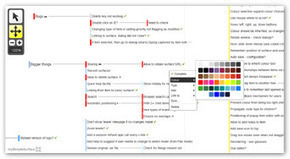
Create as many surfaces as you need and link them together. Manage large projects with inter-related surfaces. Organise them in the way that makes sense to you. Share with team members for viewing or editing. Via Baiba Svenca, Gust MEES, juandoming
Scoop.it!

Watch videos and more simultaneously with friends and chat at the same time. More to come. Sign up for alpha invite. Via Ana Cristina Pratas, michel verstrepen
Scoop.it!

Scoop.it!
Awesome Screenshot is a super-useful Chrome extension I have just discovered and which does everything I expect from a screen-grabbing utility.
Awesome Screenshot can in fact grab either a full web page or a specific part of the screen that you select, while offering the additional treat of letting you save the captured image to your disk or to the cloud, so that you can share its url immediately.
Awesome Screenshot also lets you annotate and markup your just-captured images and it provides a useful "blur" tool, to make unreadable any part of a document or text that you may want not to show publicly.
Key features summarized: 1. Capture or clip selected area, or all visible portion, or entire page 2. Support PNG format 3. Support horizontal scroll when capturing 4. Annotate it with rectangles, circles, arrows, lines and text 5. Crop and scroll & Show crop area dimension 6. Use eraser to hide sensitive information 7. Copy the screenshot and paste it to gmail etc. 8. Save to local or one-click to upload to awesomescreenshot.com and get a shareable link 9. Save very large image, bypass the 2MB limit.
Very useful. 9/10
Find out more and install: https://chrome.google.com/webstore/detail/alelhddbbhepgpmgidjdcjakblofbmce
(Reviewed by Robin Good) Via Robin Good 
Baiba Svenca's comment,
December 26, 2011 3:43 AM
I've been using it for a while, it's a super simple and therefore quick tool, I feel no need for a more complex one. Thanks!

Robin Good's comment,
December 26, 2011 3:53 AM
Thank YOU(!) Baiba for your excellent scouting and discovery work. If I had to list a curator that I am thankful for the many discoveries she has helped me make, it is definitely you.
Keep up your great work.
Scoop.it!
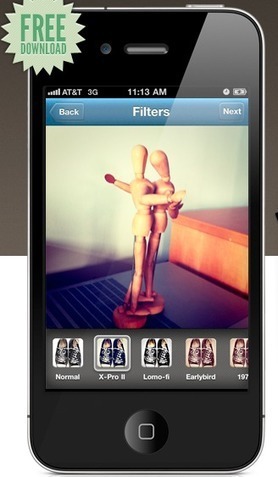
Visual lifestreaming is one of the most rapidly growing branches of new media storytelling. Instagram takes your hum-drum iPhone photos, runs them through some retrotastic filters, and churns out gorgeous images oozing Lomo charisma and vintage goodness. What makes the app interesting is that it comes with a built-in mobile-only social network: You get to follow friends and interesting users on Instagram, much like you would on Twitter, with the option of liking or commenting on images, but there’s no web version whatsoever — you can only engage with your stream within the app. (Though you can, of course, share instagr.am links to individual images on Twitter, Facebook and elsewhere.)
Scoop.it!

Creative visual "Bloomin' Digital Peacock" that aligns to Bloom’s Taxonomy. Terrific set of links to web 2.0 resources that align with each of the 6 levels of Bloom. -JL Via Yael Even-Levy, PhD (Second Life: JoelleYalin) 
Andrea Holck's curator insight,
March 25, 2015 2:46 PM
This is awesome. I should put this up in the classroom--the other peacock is skills based peacock. 
Crystal Stephens's curator insight,
October 20, 2017 10:51 PM
See how tech will help you achieve higher levels of Bloom’s! #
Scoop.it!

We eLearning developers are used to the question, “Which is better, eLearning or classroom instruction?” The answer is, “It depends.” It’s the same answer if one asks, “Which are better, multiple-choice or essay questions?” Either question type is useful for assessing a variety of levels of thinking, depending on how well the designer crafts the questions. Designing multiple-choice questions is not as daunting a task as one might think. |






