

"Mattering" examines the idea of relevance and real world learning in education. Through examples from his own work with schools, such as his InStill LIfe project, Nikos invites us to consider how we can move learning towards a more meaningful experience for students and teachers alike, and to a day where students stop asking "What does school have to do with anything?"

Into the Driver's Seat
486.8K views |
+0 today
Filter by date
Tags
Building learners' independence through thoughtful technology use
Curated by
Jim Lerman
 Your new post is loading...
 Scoop.it! 
For schools that have trouble finding volunteers willing to visit, newly designed software is allowing tutors to meet with beginning readers online.
Scoop.it!

Looking for a few great, free apps to beef up your Mac? We've got you covered with our annual Lifehacker Pack for Mac. Here are the best OS X downloads for better productivity, communication, media management, and more. 2011 edition (August 2011).
Scoop.it!

WatchMe has been around for a while, but it's one of the best programs available to keep track of multiple timers and multiple alerts on your desktop. If you, for example, are a fan of the Pomodoro productivity method and want a timer that's set to help you focus during those intense working sessions, but you also want a timer to remind yourself that its time to get up and go to lunch, and another to remind you that you should really pack up to leave t night, WatchMe is the app that can do all of that without having to reset the timer for every task. Best of all, it's completely free. (Windows only)
Scoop.it!

Earlier in the week, we asked you which services you used to store your files online, or to at least make your data available so you could get at it anywhere you went. You responded with tons of great suggestions, and while we expected you to highlight Dropbox, we knew it isn't the only service out there that you use. Here's a look at the top five, based on your nominations.
Scoop.it!

By Steven Sands
TUAW's Erica Sadun and I are ebook publishers. Late last year, we started up an ebook publishing company -- Sand Dune Books -- and were fortunate to hit a publishing home run right off the bat with our book "Talking to Siri." Since we're familiar with the tools used to create documents for publishing on both the Amazon Kindle bookstore and iBookstore, we were both curious to see what Apple was going to announce on Thursday. The free creation tool, iBooks Author, wasn't a surprise to us, and now that I've had an opportunity to work with the app I thought I'd pass along my thoughts on how it works and why it may not be the publishing tool for everyone.
Scoop.it!

A very thorough explanation and exploration of the flipped classroom, complete with numerous links and references. Author Jackie Gerstein accurately points out that teachers need to have a very clear idea about what they will be doing with classroom time when lectures/content are shifted outside of traditional classroom time. She proposes a "cycle of learning" model patterned after Experiential Learning Cycles and Bernice McCarthy's 4MAT. -JL
Scoop.it!

Beginning in the 2010-2011 school year, our school went through a number of transformations and changes, all aimed at enhancing the quality of the learning and teaching within our building. We adapted a 5 x 3 trimester schedule providing longer class periods and a lower student-to-teacher ratio. We added a house system separating the student body into six different houses mixed by age. Through a partnership with Apple, we implemented a 1:1 laptop program with our students receiving MacBooks. Below are five lessons we learned and the two biggest struggles we continue to face.
Scoop.it!

By Kevin Jarrett
I first blogged about BBC Bitesize way back in May of 2009. Since then, BBC Learning‘s commitment to education as only increased, and it is evident by the substantial growth and development of this site.As I mention in my blog post above, if you are outside the UK, you’ll want to familiarize yourself with Key Stage terminology, the system used by the UK’s state educational administration to classify students (like K-12 here in the USA). Since my last visit, this site has added significant depth and breadth, while maintaining the quality of its graphics and the simplicity of its interface. I like to profile resources that are good enough to be used by students alone if need be, or with some guidance (for the youngest learners). BBC Bitesize fits the bill nicely.
Scoop.it!

StoryBird is a web tool that allows students to use artists’ artwork to create a story book. I have used this tool in the classroom to help reluctant 4th and 5th grade writers find motivation for creative writing. There are many applications for use, for example: creative writing, using art with spelling words to create a story, illustrating content areas in creative ways… the possibilities are endless!
Scoop.it!

From
edte

Great ideas for the blended and online classroom. This crowdsourced creative commons licensed slide show will help you think out side of the box when it comes to Google Forms. Would it help to think of this product as Google Surveys? The Interesting Ways series of resources continue to grow as the community add ideas from the classroom..
Scoop.it!

Get our easy-to-print guides that include useful tips for teachers, parents, and school administrators. 8 helpful guides from Edutopia: Six Tips for Brain-Based Learning Ten Tips for Classroom Management Ten Tips for Teaching with New Media Summer Rejuvenation Guiide Top Ten Tips for Assessing Project-Based Learning Home-to-School Resource Guide Think Green Guide
Scoop.it!

We just got our first opportunity to get our hands on one of Apple's new interactive textbooks and we have to say, they're as good as they looked during the live event. We tried a few titles, ranging from steady textbooks to more exotic stuffs, but by far the best is the selection from E.O. Wilson called Life on Earth. Join us for full details and video demonstration of the future of learning. |
Scoop.it!
|


|
Scooped by
Jim Lerman
January 24, 2012 12:19 AM
|
Scoop.it!

Whether you've just reinstalled Windows or you need to fill some holes on your software collection, we've got everything you need in our annual Lifehacker Pack. (August 2011)
|
|
Scooped by
Jim Lerman
January 24, 2012 12:08 AM
|
Scoop.it!

When you need to crop, cut, or otherwise edit an image, Windows' built-in Paint isn't quite enough, while a full-fledged Photoshop or GIMP installation is probably too much. Paint.NET is just about perfect for the graphic design needs of a non-graphic-designer (For Windows). -Lifehacker
|
|
Scooped by
Jim Lerman
January 23, 2012 11:55 PM
|
Scoop.it!
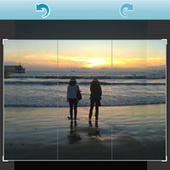
You've probably heard about content-aware fills before, which remove blemishes from photos by using information from elsewhere in the picture. AntiCrop uses that same technique to "uncrop" your photo from the edges out, so you can get a bit more of that beautiful sunset in the photo, even if you didn't get it in the original shot. It also lets you straighten the photo without having to crop it down. (For PCs)
|
|
Scooped by
Jim Lerman
January 23, 2012 11:34 PM
|
Scoop.it!

A couple of years ago I was asked to participate in a brainstorming conference call with some folks from the Maine International Center for Digital Learning. On that day we constructed a list of important things teachers should know when they start teaching in a 1:1 classroom. I just came across the list again and thought it was worth posting again.
|
|
Scooped by
Jim Lerman
January 23, 2012 7:05 PM
|
Scoop.it!

Great ideas from Jackie Gerstein about how to develop relationships in classes using mobile technology. Use at the start of the year/term or after vacation time. Students want to know about the people they are learning with; why not get them to know each other better using the devices they love.? - JL
|
|
Scooped by
Jim Lerman
January 23, 2012 10:15 AM
|
Scoop.it!

The edWeb is a professional social networking site for the education community...
It's FREE!Share information and resources with an extended community of educatorsConnect and stay in touch with peers and colleaguesCreate professional learning communitiesCreate communities to collaborate on initiatives and projectsProvide professional developmentGain experience with Web 2.0 technology
|
|
Scooped by
Jim Lerman
January 23, 2012 12:46 AM
|
Scoop.it!

By Kevin Jarrett
I offer you one of the very, very best of interactive resources I’ve EVER found: the TESiboard collection, “a purpose built library of visual, dynamic, interactive resources”:
What’s so special about this site?Several things…
The interactives are extremely high quality. The graphics are crisp and clean, the user interface is simple and logical, and the sound effects are pleasing and well thought out. I love how the site makes it easy for you to copy the URL of the activity you are interested in, even offering a thumbnail image for saving to disk. Handy!
Its depth and breadth are spectacular. You will find activities for math (numeracy), literacy (language arts), phonics, science, ICT (technology – my world), geography, history, and more … for students in preschool (EYFS in the UK), Grades K-2 (Key Stage 1 in the UK) and Grades 3-6 (Key Stage 2 in the UK). [Click here for background on the UK's Key Stage education classification system.]
The site is completely free and there are no ads. Enough said!
|
|
Scooped by
Jim Lerman
January 22, 2012 11:56 PM
|
Scoop.it!

I use YouTube to host most of my tutorials. Up until now, I have always used a Google Site, or a Google Presentation to lay out all of those step-by-step instructions. However, I’ve stumbled across a site that focuses strictly on step-by-step.
|
|
Rescooped by
Jim Lerman
from Mobile Education: Schools of the Future
January 22, 2012 11:48 PM
|
Scoop.it!

While they may not all come to pass, it's certainly fun to think about a world where interaction with technology for education could be so seamless, accessible, and maybe even fun. ... Voice recognition technology isn't only an asset in schools.
Via Miguel Rodriguez
|
|
Scooped by
Jim Lerman
January 22, 2012 8:20 PM
|
Scoop.it!

As we predicted, on Thursday, Apple introduced a new toolset for publishers and authors to create and distribute digital textbooks. That wasn’t too much of a surprise. But what’s become more clear after hearing Apple’s pitch, which is aimed at K-12 school teachers, school districts, homeschooling parents, publishers and students themselves, is that the future of textbooks isn’t a book at all.
|
|
Rescooped by
Jim Lerman
from gpmt
January 22, 2012 7:37 PM
|
Scoop.it!

Here's a chart that explains the differences between personalization, differentiation, and individualization. After some research on these terms, Barbara Bray and I were able to determine the differences between these terms in relationship to teaching and learning.
Via Barbara Bray, Kathleen McClaskey, michel verstrepen

Barbara Bray's comment,
January 23, 2012 2:00 PM
Thank you for your comment. Kathleen and I are looking for feedback on how educators are using this chart.

rwteam's comment January 23, 2012 2:07 PM
I am in Wisconsin and we are part of CESA 1 NxGL. I team teach with 42 kindergarten kids and we are using personalized learning. We are working through the tangles of being able to personalize with kids who are just learning to read, write and compute. It has always been a struggle to be able to differentiate the difference between true personalized learning vs. differentiation and individualization. You have done a beautiful job of creating a chart that makes this clearer for all stakeholders. This chart will be useful for helping colleagues, administration and parents see the true definition of personalized learning and the potential that it holds.

Kathleen McClaskey's comment,
January 23, 2012 4:18 PM
Hello rwteam in WI,
Thank you for your comments on this chart that Barbara and I created. We would be glad to have you share this with your colleagues in WI and elsewhere. We commend you and your teams in CESA 1 NxGL on the hard work that you are doing to make personalized learning a realty for your students.
Kathleen
Thank you for your comments on this chart that Barbara and I created. We would be glad to have you share this with your colleagues in WI and elsewhere. We commend you and your teams in CESA 1 NxGL on the hard work that you are doing to make personalized learning a realty for your students.
Kathleen




