Your new post is loading...

|
Scooped by
Jim Lerman
January 30, 2012 12:55 AM
|
From the website Google forms are fabulous for gathering information, but sometimes, the data in the spreadsheet can be difficult to view. In this post, I’ll share a simple-to-implement formula and a bonus tip that will make it much easier to deal with (and even print) form-fed data!
|
|
Scooped by
Jim Lerman
January 28, 2012 12:26 AM
|
The founders of the personalized-learning model School of One now are launching New Classrooms, a nonprofit aimed at scaling up the model to reach more schools. Joel Rose and Chris Rush are creating a series of products that can be used at all types of schools. The first release will be "Teach to One: Math," which will offer adaptive lessons that can be learned one-to-one, in small groups or independently by students.
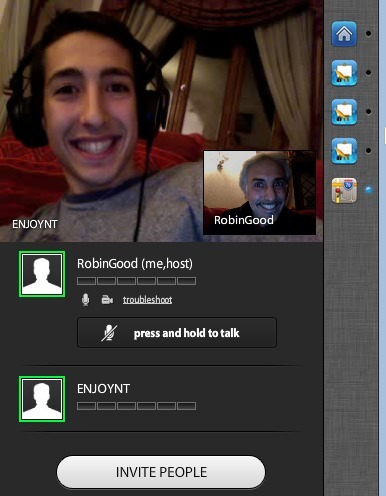
LiveMinutes is a new innovative and easy-to-use free web conferencing tool which allows you to easily share documents, images and video clips while talking live with your connected participants via an integrated Skype facility. LiveMintues integrates also a whiteboard, the ability integrate and annotate maps, auto-creation of meeting minutes, a text chat area and a full attendees list. Last but not least the host can choose between multiple simultaneous open microphones or two-at-a-time modality.
Recommended.
Via Robin Good, Kristi Grande
|
|
Scooped by
Jim Lerman
January 27, 2012 2:36 AM
|
From All My Faves: 2011 brought us tons of amazing new sites and saw many others grow incredibly fast (Twitter being the prime example). But for the average person using the Internet, most of these sites at often inaccessible (or just downright annoying!). And that’s where Grovo – a vibrant hub of online video tutorials – comes to the rescue. Designed to help you make the most out of sites like Twitter, Facebook, Google, Amazon, Ebay and a whole lot more, Grovo is a terrific service. If you sign up for their free, trial version, you can access the majority of their content (including professional video courses for Google Analytics & AdWords, Facebook Pages & Ads, and Basecamp). For full, unlimited access to Grovo’s courses, they charge $9/month or $99/year. But hey, All My Faves users have voted in their droves to crown their favorite education site of the year, so they would agree that it’s worth every cent!
|
|
Scooped by
Jim Lerman
January 27, 2012 1:46 AM
|
One teacher learned the hard way that just bringing iPads into the classroom won't truly change things—you also have to redefine your practice. The problem, I began to realize, was my own understanding of how the iPads should be utilized in the classroom. I had seen them as a supplement to my pre-existing curriculum, trying to fit them into the structure of what I’d always done. This was the wrong approach: To truly change how my classroom worked, I needed a technology-based redefinition of my practice. Five lessons learned.
|
|
Rescooped by
Jim Lerman
from Digital Presentations in Education
January 26, 2012 2:04 PM
|
PowerPoint can be used to create all sort of presentations, this also includes interactive presentations in which we want the user to click images or rollover a certain image and then we want some image or an information box to pop out.
Via Baiba Svenca
|
|
Rescooped by
Jim Lerman
from Online Collaboration Tools
January 26, 2012 1:45 PM
|
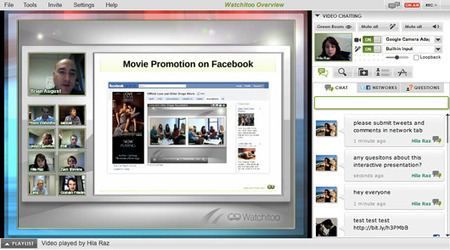
If you are looking for a browsable round-up of web conferencing platforms and their main key characteristics and traits, you can take a pick at this article-report from Social Business Today.
It lists 15 web conferencing services while providing some useful complementary information for each one, including key features, availability of a trial, and pricing.
Consider this a basic reference to get an idea about differences between major services, but do not rely too heavily on it as my impression is that it is not fully updated and some of the info there contained is actually not correct or incomplete (pricing without correspondent information on what relative capacity it affords is useless) (I am also a bit skeptical in relying on sites that do not provide clear author info). Still, if I had someone just ask me now where he could find a basic reference for some of the available web conferencing solutions I would suggest them to take a peek at this article. ...and if I had to make my recommendations among those listed, these are the three services I woud suggest you to consider:
a) GotoWebinar - my choice and favorite (yes, it's too expensive) b) Adobe Connect Pro - good price and good tools
c) Yugma - free for up to 20 people To see ALL of the best online collaboration tools please check: www.mindmeister.com/12213323 Full article: http://www.socialbusinesstoday.net/2012/01/15-top-web-conferencing-services.html (Reviewed by Robin Good)
Via Robin Good
|
|
Rescooped by
Jim Lerman
from Online Collaboration Tools
January 26, 2012 1:43 PM
|
Robin Good: Idroo is a real-time collaborative whiteboard (for Windows PCs only) that allows 10 or more people to annotate, highight, draw and markup over any image they want to.
Idroo integrates perfectly with Skype allowing you to invite through Skype your meeting attendants and to talk to them while working together on the shared whiteboard. Key features include: FREE for non-commercial use 10 or more simultaneous participants Vector drawing tools Import images Skype integration Supports digital tablets (such as Wacom) Download (Windows only): http://www.idroo.com/download Getting started guide: http://www.idroo.com/documentation/inviting-users Find out more: http://www.idroo.com/
Via Robin Good
|
|
Scooped by
Jim Lerman
January 26, 2012 1:22 PM
|
Robert J. Marzano has emerged as one of the leading researchers and interpreters of research in the field of education today. This page includes links to webinar recordings and PDFs of slide presentations on the following topics: Marzano Evaluation Model The Highly Engaged Classroom Teaching and Assessing 21st Century Skills Coaching Teachers Using the Arts and Science of Teaching Designing Teaching and Learning Goals and Objectives Supervision of Instruction Using the Art and Science of Teaching Leading the Implementation of a Schoolwide Vocabulary Program Formative Assessment and Standards-Based Grading
|
|
Scooped by
Jim Lerman
January 24, 2012 1:02 PM
|
Interesting piece published by Edutopia's Audrey Watters in December 2011, well before Apple's blockbuster announcement last week. -JL Teachers can customize textbooks using available digital and open educational resources, writes journalist Audrey Watters. Having teachers help build digital textbooks allows them to deliver relevant instruction and align textbooks with lesson plans, Watters writes. She suggests resources to help teachers create their own texts.
|
|
Scooped by
Jim Lerman
January 24, 2012 12:45 PM
|
Handwriting still has a place in the digital age, its proponents say, and they hoped that what they billed as a "summit" on the subject this week would spotlight their case for the enduring value of handwriting in the learning process. The Washington conference was designed to draw together research from psychology, occupational therapy, education, and neuroscience to demonstrate handwriting's role in students' physical and cognitive development, states' learning standards, and the classroom. - Education Week
|
|
Scooped by
Jim Lerman
January 24, 2012 10:23 AM
|
By Lisa Nielsen We want to share the ways you can start using cell phones to enhance learning. To follow are 12 of the most useful ways to support learning as adapted from the newly released book on the topic Teaching Generation Text (www.TeachingGenerationText.com). These ideas will help adults discover how to engage youth with fun, free, safe, and easy methods using nothing more than a basic, text-enabled cell phone.
|
|
|
Scooped by
Jim Lerman
January 29, 2012 11:49 PM
|
By Anita Swigart I'm not suggesting that teachers yell at their students or make them do drills repeatedly. What I am suggesting is that teachers have to give feedback at every step of writing...and give it as soon as possible and as clearly. I know teachers in high school who don't put one mark on a composition except a grade. What does that tell a student? Unless the paper is perfect, it tells them nothing and gives them no opportunity to improve. That is not teaching. That is scoring. I know that we are all overworked: too many students, too little prep and grading time, etc. but if we fail to give our students feedback we are simply not doing our jobs and we have no reason to wonder why our students can't write. We are the reason they can't write.
Do you love Android apps and are interested in testing them on your PC ? You can now try them out on your computer using Bluestacks. Bluestacks is a web tool that will let you run Android apps right from your desktop. This service is completely free and above all very simple and easy to use. Runs on Office 7 or Vista.
Via Educatorstechnology, Yael Even-Levy, PhD (Second Life: JoelleYalin)
|
|
Scooped by
Jim Lerman
January 27, 2012 3:16 AM
|
A growing collection of (currently) over 800 simple black-and-wide graphic icons designed to communicate as simply and effectively as possible. Each icon may be downloaded for free, although donations are encouraged. Site also has a very interesting blog. Useful for illustrations and prompts for writing and speaking in any language. -JL
|
|
Scooped by
Jim Lerman
January 27, 2012 2:02 AM
|
Works on the iPhone 4, iPhone 4S, iPad 2, and Android devices. Aurasma, an "augmented reality platform" for 3G and 4G devices, uses a smart device's camera to see and recognize images in the real world and can overlay this view with an interactive layer of a virtual world. Do-it-yourself augmented reality. Very, very cool. This is going to be really big. -JL
|
|
Scooped by
Jim Lerman
January 27, 2012 1:36 AM
|
From the website: Educreations transforms your iPad into a recordable whiteboard that captures your voice and handwriting to produce amazing video lessons that you can share online. It's as simple as touching, tapping and talking. Our handwriting technology renders beautiful digital ink that looks even better than the real thing. Make a mistake? No problem, you can always undo and redo any of your actions. Snap a photo with the iPad camera or choose one from your Photo Library or Dropbox. Sketch your ideas in 10 beautiful colors as you talk through your lesson. Need more space? Add as many pages as you like. You'll never run out of room. Create amazing animations by touching your photos to move and resize them. Explain a math formula, comment on a famous work of art or diagram some football plays. Whatever it is that you want to teach, now you can do it from anywhere. Finished lessons are hosted on educreations.com, where you can choose who is able to watch them. Send your lessons to friends, students or colleagues, or share them publicly on educreations.com and teach the world!
|
|
Scooped by
Jim Lerman
January 26, 2012 1:59 PM
|
Over the years, I have read hundreds of license agreements, looking for little gotchas and clear descriptions of rights. I have never seen a EULA as mind-bogglingly greedy and evil as Apple’s EULA for its new ebook authoring program. The nightmare scenario under this agreement? You create a great work of staggering literary genius that you think you can sell for 5 or 10 bucks per copy. You craft it carefully in iBooks Author. You submit it to Apple. They reject it. Under this license agreement, you are out of luck. They won’t sell it, and you can’t legally sell it elsewhere. You can give it away, but you can’t sell it. Updated to add: By “it,” I am referring to the book, not the content. The program allows you to export your work as plain text, with all formatting stripped. So you do have the option to take the formatting work you did in iBooks Author, throw it away, and start over. That is a devastating potential limitation for an author/publisher. Outputting as PDF would preserve the formatting, but again the license would appear to prohibit you from selling that work, because it was generated by iBooks Author. - Ed Bott
|
|
Rescooped by
Jim Lerman
from Online Collaboration Tools
January 26, 2012 1:44 PM
|
If you were waiting for Google to release a screen-sharing feature inside the Hangout real-time collaboration platform, that time has come. In the next 48 hours Google will be rolling out to all Google+ users the ability to screen-share during any hangout session. From Christopher Johnson G+ post: "When we launched Hangouts with Extras last September, we wanted to test new features and get feedback from users. We’ve learned a lot over the past few months, and today we’re rolling out a new Hangouts look and feel that incorporates some of the “extras,” and better reflects Google’s overall design ( http://goo.gl/gG1NA ). Highlights include: - Screensharing: share what’s on your computer screen with everyone in the hangout. This is the first of many extras we’re graduating to Hangouts proper. - Bigger video: we’ve put more emphasis on the live video itself by optimizing white space and other screen elements."
Source: https://plus.google.com/115570939558790629700/posts/h9HHTRBK7CJ
Via Robin Good
|
|
Scooped by
Jim Lerman
January 26, 2012 1:25 PM
|
What is a stump speech, and what makes one effective? In this lesson, students analyze the stump speeches of presidential candidates, then write the stump speech they would use if they were running for president. From the New York Times Learning Network.
|
|
Scooped by
Jim Lerman
January 25, 2012 5:25 PM
|
Bernajean Porter was named ISTE's Consultant of the Year not long ago for her national leadership in promoting story making through the use of digital media. Her website, DigiTales.us, provides ideas, resources and inspiration for families, individuals, schools, organizations, corporations, churches and everyone else ready to discover the power and magic of merging the art of storytelling with the enchantment of using digital tools.
|
|
Scooped by
Jim Lerman
January 24, 2012 12:48 PM
|
Students in an iPad tablet computer pilot program in a Riverside, Calif., middle school achieved math test scores that were 20% higher than the scores of those using traditional textbooks. The yearlong program, sponsored by publisher Houghton Mifflin Harcourt, used the Fuse program, the first algebra curriculum designed exclusively for the iPad. -ASCD Smartbrief
|
|
Scooped by
Jim Lerman
January 24, 2012 12:39 PM
|
The site has so much to offer to teachers and students. Filled with interesting, engaging and graphically dynamic content, students can not only follow the candidates but also the election as a whole. It offers a fantastic deeper look into the election, its candidates and issues. With the 2012 election season heating up, educators are looking for reliable Web sites to help students read about what’s happening in politics so that they can discuss and improve their understanding of the political process. Politico 2012 Live offers the perfect mix of clean design, good content and useful tools. -From Education World
|