Your new post is loading...

|
Scooped by
Jim Lerman
February 24, 2012 5:05 PM
|
Focus Pocus, a new wizard-themed video game by NeuroSky, allows users to control play using their brain waves, aiming to help improve concentration among children ages 7 to 13. Researchers at the University of Wollongong in Australia who studied the game found that it helped minimize distractions and improve concentration and behavior among children with attention-deficit/hyperactivity disorder.
|
|
Scooped by
Jim Lerman
February 24, 2012 3:34 PM
|
Spotlight covers the intersections of technology and education, going behind the research to show how digital media is used in and out of classrooms to expand learning. Nearly 60 videos (as of Feb. 2010) that detail way in which high levels of technology are being used in learning situations...often to amazing effect. From pre-school to college. -JL
|
|
Scooped by
Jim Lerman
February 24, 2012 3:11 PM
|
Published by UNESCO, authored by Forest Woody Horton. Just like it says: an effective and well though out introduction to the important field of information literacy. -JL
|
|
Rescooped by
Jim Lerman
from :: The 4th Era ::
February 24, 2012 3:03 PM
|
"When we published the Debunking Handbook, I have to admit, we completely underestimated the impact it would make. A few days after the launch, it suddenly went viral with over 150,000 downloads in a single day. This week, it just ticked over 400,000 downloads. We always planned that the Handbook would be useful not just for climate myths but for communicators having to deal with any type of misinformation."
|
|
Scooped by
Jim Lerman
February 24, 2012 1:26 AM
|
A project-based learning handbook from the Ministry of Education in Malaysia. Good introduction to PBL for beginners. -JL
Even though there is an array of music available on YouTube, up until recently you could only enjoy listening to it while watching the video at the same time. This significantly limits how and where you can listen to the exclusive music on YouTube. Now you can quickly and simply rip the music from any YouTube video with the free converter from YouTubeMP3.tv. By downloading just the mp3 from your favorite music video, you can play it on your home PC, on your portable listening device or your smartphone giving you the possibility to listen to it on the road, at the gym, or even at the beach.
Via Ana Cristina Pratas, kostasgeorgioy, ABroaderView
|
|
Scooped by
Jim Lerman
February 23, 2012 4:54 PM
|
Evernote is a tool for keeping track of, well, everything. At least everything as far as digital information goes, or information that can be digitized. Evernote comprises a Web-based service and clients for Windows, Mac OS X, mobile devices, and extensions for Web browsers. It's a service I've been using for years, and over that time I've picked up a few tips and tricks for getting the most out of the tool.
|
|
Scooped by
Jim Lerman
February 23, 2012 4:19 PM
|
Tasha Bergson-Michelson, a member of the Google Search Education Team, offers tips in this blog post for helping students identify search terms to yield the best results. Students first should identify the most important words in their research question. Students also can utilize an exercise -- known as a rebus -- in which students replace nouns, verbs and adjectives in their question with drawings to help them determine which words to include or leave out in their online queries.
|
|
Scooped by
Jim Lerman
February 22, 2012 7:13 PM
|
According to the Girl Scout Research Institute study Generation STEM: What Girls Say about Science, Technology, Engineering, and Math,though a majority of today's girls have a clear interest in STEM, they don't prioritize STEM fields when thinking about their future careers.
|
|
Rescooped by
Jim Lerman
from :: The 4th Era ::
February 22, 2012 9:57 AM
|
People who constantly reach into a pocket to check a smartphone for bits of information will soon have another option: a pair of Google-made glasses that will be able to stream information to the wearer’s eyeballs in real time. According to several Google employees familiar with the project who asked not to be named, the glasses will go on sale to the public by the end of the year. These people said they are expected “to cost around the price of current smartphones,” or $250 to $600.
|
|
Scooped by
Jim Lerman
February 21, 2012 10:12 PM
|
A charter school in Clark County, Nev., has become the state's first iSchool, in which all students and staff use iPad tablet computers to learn across the curriculum. The school uses the devices to complement project-based and blended-learning methods, and educators say the devices help students -- who are grouped by ability rather than age -- learn at their own pace.
|
|
Scooped by
Jim Lerman
February 21, 2012 6:59 PM
|
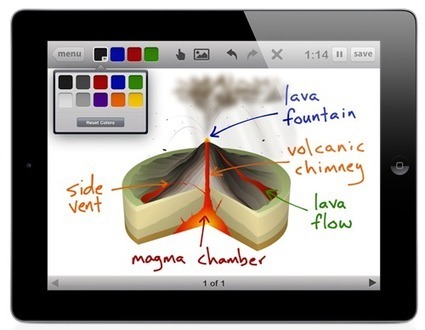
The Educreations iPad app, which launched this week as a free download in the App Store (iTunes link), transforms the tablet into an interactive whiteboard that records a teacher’s voice and handwriting as they explain a concept or work through an example problem. Teachers can add photos to their lessons from the iPad’s Photo Library or camera, or a Dropbox account, and they can animate the photos by tapping and dragging. Finished lessons are hosted on educreations.com, where they can be shared privately with a class of students or publicly with everyone.
|
|
Scooped by
Jim Lerman
February 21, 2012 6:49 PM
|
The GoogleDocs Form is an efficient way for teachers to collect small pieces of information because it automatically displays the information in a spreadsheet. Teachers can add formulas to those spreadsheets to create multiple-choice quizzes that grade themselves. Since a form can be linked or embedded into a website, wiki or blog, students do not need email accounts to take a quiz. The form works well on any portable computing device or full-blown computer which makes it perfect for use as an Exit Ticket at the end of a lesson. One simple 3-5 question Exit Ticket Quiz has at least three great uses.
|
|
|
Scooped by
Jim Lerman
February 24, 2012 5:03 PM
|
When Explore Knowledge Academy has its grand opening celebration in March, it will become the first "iSchool" in Nevada with a 1-to-1 ratio of iPad tablets to students. Here are the 10 iPad applications used by educators at the public charter school.
|
|
Scooped by
Jim Lerman
February 24, 2012 3:19 PM
|
The most effective memorization techniques draw on physical and emotional engagement as much as they do pure brain power...
|
|
Rescooped by
Jim Lerman
from Learning & Technology News
February 24, 2012 3:04 PM
|
Diigo stands for “Digest of Internet Information, Groups and Other stuff.” It is a social bookmarking program that allows you to save your ‘favorites’ online, so that they can be accessible from any computer with an internet connection. However, Diigo does much more than this.
Via Nik Peachey
|
|
Scooped by
Jim Lerman
February 24, 2012 1:36 AM
|
From Kevin Jarrett Bouncing around the web this morning, randomly looking for Microsoft Office tutorials, I came across a real gem I’d never seen before – GCFLearnFree.org, an absolutely fabulous collection of over 750 lessons containing extremely high-quality interactives, videos, and printable worksheets suitable for developing an entire instructional curriculum around. AND IT’S ALL FREE, brought to us by Goodwill Industries of Eastern NC. Let’s take a closer look…
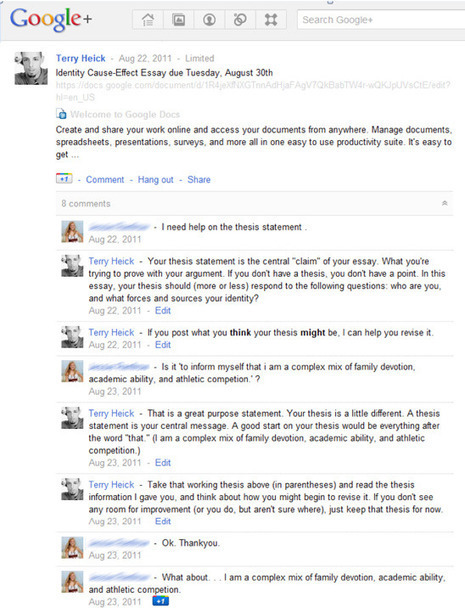
Blogger Terry Heick unravels the mysteries of Google+ and suggests how this emerging social media tool can become a valuable teaching aid.
Via Gust MEES
|
|
Rescooped by
Jim Lerman
from WEBOLUTION!
February 23, 2012 10:14 PM
|
Adopting a new communication tool is not easy. Figuring out the best way YOU can use Twitter is even harder. Luckily you are not going it alone. We have culled the following resources from an array of websites that try to help anyone understand and better use Twitter. Gust MEES: A MUST READ! All information on one place!
Via Gust MEES, Jenny Pesina, Jimi Paradise
|
|
Rescooped by
Jim Lerman
from :: The 4th Era ::
February 23, 2012 4:50 PM
|
If you want to get to the top in any field, whether it’s business, science, or even construction, you have to have some pretty solid leadership skills. Unfortunately, these kinds of skills often aren’t the sort of thing you’ll find being taught in your college courses, and may take some extra effort to learn and apply outside of your classes. While there is little substitute for leadership experience through campus organizations, hearing from experts on psychology, leadership, and business can also be a big help in giving you a basic leadership education. TED is one of the best places to find all of these diverse subjects in one place, and here we’ve collected some of the best videos for anyone, young or old, hoping to hone their leadership abilities.
|
|
Scooped by
Jim Lerman
February 22, 2012 7:16 PM
|
Apple's new desktop update, Mountain Lion, arrived without the addition of the iPhone's most popular new feature, Siri. The voice-activated assistant was not added to other Apple devices for several reasons. For one, the microphones on iPads and notebooks aren't advanced enough or positioned correctly to make them effective with Siri. Also, Siri thrives on having access to GPS, which MacBooks do not include.
|
|
Scooped by
Jim Lerman
February 22, 2012 7:07 PM
|
Whether you’re a classroom teacher or home educating family, you and the young people around you can collaborate with and connect to the world using Google tools. I’ve used numerous Google tools to connect to help myself and others connect to the world. I love using tools like Docs, Hangout, Goggles, Translate, Earth and more!
To learn more, watch this video overview and share with others who are interested in using Google’s free tools to connect with the world. Then read about my fave five with a description of how to use each.
|
|
Rescooped by
Jim Lerman
from Video for Learning
February 21, 2012 11:41 PM
|
EmbedPlus is a significant tool for educators, because it lets you easily edit, watch, and share videoclips from YouTube with enhance playback and annotations as listed below. Tools include: Chapter Marking Chapter buttons, click these to skip to marked times. Use the wizard to mark notable parts like game highlights, changing performers, and lecture sections. Crop Crop, Cut, Splice, Chop. Play the interesting part of a video you decide. Instant Replay / Loop
Replay an event soon after it happens. Also double-click to loop the replay. Sweet Spot Marking Helps you catch the best parts of a video by revealing the scenes that are generating the most buzz by other viewers. You can also use it for your creative/marketing efforts or just for your curiosity. Slow Motion On-Demand
Instantly watch videos at a slower rate to more clearly see what happens. Use it for videos with sports highlights, demos, tricks, and raw footage. Movable Zoom
Added accessibility. Dynamically magnifies an area of the video as it plays. Use it to get a close look at objects, writing, and things like moving athletes. Real-time Reactions Discussions about a video occur in many places. Optionally enable this button to show viewers the latest Internet reactions, right inside the player. Third Party Annotations Add your own timed annotations to any video. Use it to display titles, captions, scene labels, and side comments during playback. EmbedPlus could be a game-changer because the tools offer affordances that can add learning opportunities in to almost any video clip. (See also the Dial-e framework for further discussion). The tools are straightforward to use, simply copy and paste the embed code on your (Wordpress), site, blog or post as directed. More info: http://www.embedplus.com/ Post adapted from the original by @robingood - thanks!
Via Robin Good, Let's Learn IT, theo kuechel
|
|
Scooped by
Jim Lerman
February 21, 2012 7:13 PM
|
Introducing the first-ever monthly iPad magazine dedicated to education and technology! From the editors at Edudemic.com, the Edudemic Magazine features a monthly look at what's happening in the edtech world. The magazine features interviews, case studies, guides, and news for everyone from kindergarten to medical school. What's Edudemic? Edudemic.com was founded 18 months ago as a way to discuss, share, and try out the latest education technology. It is now a 200,000-strong community of teachers, education administrators, and technology buffs looking to learn about and try the next big thing. Why An iPad Magazine? It’s impossible to talk about education technology without mentioning the Apple iPad. At least half of the articles and discussions on Edudemic involve the iPad in some way. That’s why editors Jeff Dunn and Terry Heick as well as 6 authors created the first-ever monthly education technology iPad magazine. Subscription Information You have the option to buy individual monthly issues for $1.99 anytime or to subscribe for 6 months or 1 year. The cost of a 6-month subscription (6 issues) is $10.99. A 1 year subscription (12 issues) is $21.99. Payment will be charged to your iTunes Account at confirmation of purchase.
|
|
Scooped by
Jim Lerman
February 21, 2012 6:54 PM
|
By Susan Oxnevad Technology is a tool that can be used to help teachers facilitate learning experiences that address the diverse learning needs of all students and help them develop 21st Century Skills. At it's most basic level, digital tools can be used to help students find, understand and use information. When combined with student-driven learning experiences fueled by Essential Questions offering flexible learning paths, it can be the ticket to success. Here is a closer look at three components of effectively using technology as a tool for digital differentiation. Be sure to mouse over the diagrams below the first one to see how the author effectively incorporates the use of ThingLink -JL
|