Your new post is loading...

|
Scooped by
Jim Lerman
July 4, 2012 9:34 PM
|
See the comments for many excellent suggestions of sites that support global connections for schools. -JL
|
|
Scooped by
Jim Lerman
July 4, 2012 4:44 PM
|
By Diana V. Faustmann "I write this post for my father — beloved 86-year-old owner of a brand new iPad 2 — who unfortunately lives half a world away. If you — like Dad — are struggling with how and where to begin using a new iDevice, then you’ll appreciate the Apple and third-party resources that I’ve listed for him here. They’ll provide you with great “training wheel” iPad and iPhone instructions and make an iWhiz out of you in no time."
|
|
Scooped by
Jim Lerman
July 4, 2012 4:17 PM
|
by Glenda Anderson "It is easy to get lost in the app world. To provide specific apps is somewhat crazy as the world of apps changes daily. How do I find the best apps for education, for my classroom, for my program, for my child? This is always the first question I'm asked. I am the proud owner of hundreds of apps and there are so many, I cannot honestly keep up. There are many sites out there which provide app resources. If this is an area you will be exploring for classroom use, I strongly recommend that you begin with a purpose: -What do you want to accomplish? -What are your needs?"
|
|
Scooped by
Jim Lerman
July 4, 2012 12:20 AM
|
By David Sabek "Dr. Joyce Juntune, professor at Texas A&M University, shared a wonderful story during her TEDxWoodlands presentation last year. The message of her story was simple and to the point: What year are you teaching for?
"Dr. Juntune reminds us that we do not teach for today, we do not teach for next year, we teach for the future. What we have to ask ourselves, like Dr. Juntune's principal asked her so many years ago, is what are you teaching today that will matter in 30 years?"
|
|
Rescooped by
Jim Lerman
from Scriveners' Trappings
July 4, 2012 12:11 AM
|
At ISTE, I had the pleasure of presenting in the Google theatre on Writing with Google Docs. It was a short presentation aimed at demonstrating how educators can use Google Docs to foster writing in its various stages.
Via kathymcdonough, Jim Lerman
|
|
Scooped by
Jim Lerman
July 3, 2012 5:22 PM
|
Display your iPhone 4S, iPad 2 or the new iPad to any Mac or PC, wirelessly. $14.99. -JL
|
|
Rescooped by
Jim Lerman
from :: The 4th Era ::
July 3, 2012 10:20 AM
|
by Shira Lee Katz "What your kids look for in a snack might be different than what you look for as a parent. While they focus on taste, you focus on nutrition. Same goes for games. Glitzy, big-name games can be enticing, just like junk food. Some are flashy and addictive but do little to feed kids' curiosity or help them develop. "But truly great video games can help your kids grow in ways you never thought possible -- just like delicious, healthful food. So how can you avoid the sugar-cereal equivalents in the game world? Read these 10 tips to find out." via The Committed Sardine
|
|
Scooped by
Jim Lerman
July 3, 2012 12:13 AM
|
By Diana Graber "The secret of Wikipedia is this: groups are remarkably smart. In fact, they are usually smarter than the smartest person in them. Nowhere is this explained better than in the book "The Wisdom of Crowds" by James Surowiecki. He opens the book with a story about British scientist Francis Galton who, in 1906, attended the West of England Fat Stock and Poultry Exhibition where he watched 800 people attempt to guess the weight of a fat ox. Out of curiosity, Galton set out to figure out the statistical mean of the group's guesses and discovered that the crowd guessed that the ox weighed 1,197 pounds. It's actual weight? 1,198 pounds. In other words, the crowd was pretty much spot on. Versions of this experiment have been conducted time and again, with results confirming that the crowd will almost always come up with a better answer than the smartest person in that crowd. "For kids who have never heard of Encyclopedia Britannica and who readily turn to Wikipedia as a quick and easy reference for their schoolwork, learning how Wikipedia works, and understanding its strengths and weaknesses, is an important lesson in 21st century literacy. So we spent a couple weeks focusing on this topic during our 7th gradeCyberCivics classes at Journey School in Southern California."
|
|
Scooped by
Jim Lerman
July 3, 2012 10:22 AM
|
by Caroline Knorr "These tips can help you: Decide whether your kid is ready for a cell phone Teach basic cell-phone safety Explain responsible cell phone rules Set limits"
|
|
Rescooped by
Jim Lerman
from Online Video Publishing
July 2, 2012 7:04 PM
|
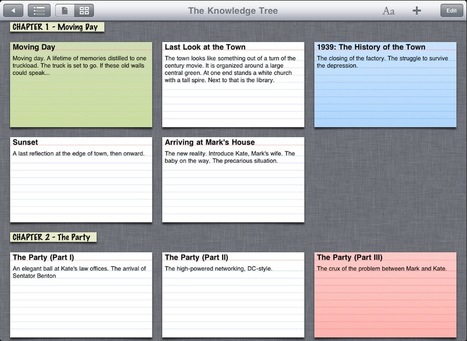
Robin Good: Storyist is a Mac app designed to produce submission-ready manuscripts and screenplays that is now available also as an iPad app. "Storyist provides a rich text editor with support for comments, images, headers, footers, and style sheets so you can create properly formatted manuscripts and screenplays. And Storyist comes with manuscript and screenplay templates so you can focus on the writing, not the formatting." Key features: -> Automatic manuscript and screenplay formatting. -> Text Inspector for quick editing of formatting, style, and page settings. -> Wireless printing with AirPrint. -> Index card view with support for color-coding. -> Customizable plot, character, and setting sheets. -> Works great with the Apple iPad Keyboard Dock and Bluetooth wireless keyboards. -> One-tap Dropbox sync. -> Files compatible with Storyist for Mac. -> Easy import and export of Storyist, RTF, Plain Text, and Final Draft v8 files via iTunes, Dropbox, and the Open In menu.
Download software and guides: http://www.storyist.com/downloads/ ; More info: http://storyist.com/ipad/ ;
Available in the App Store here: http://itunes.apple.com/us/app/storyist/id438008294 ; ($9.99)
Via Robin Good
|
|
Rescooped by
Jim Lerman
from :: The 4th Era ::
July 2, 2012 6:57 PM
|
By Matt Levinson "For schools that are about to deploy the iPad as their main mobile learning device, there’s wisdom to be learned from others who’ve gone down that road. Here are some tips to help smooth the transition."
|
|
Scooped by
Jim Lerman
July 2, 2012 6:50 PM
|
By Angela Alcorn "In Audacity, recording voice or another instrument with a microphone is as simple as ensuring the microphone input is correct, pressing record and later pressing stop. This will record a single channel which shows as a wave form and can be edited individually." via Tom D'amico
|
|
Scooped by
Jim Lerman
July 2, 2012 10:18 AM
|
(Map above is based on population) From the website "Did you know that Africa is 14 times larger than Greenland? Or that the continental U.S. is actually smaller than Brazil? If you didn’t it’s with good reason—most of us learned our geography from a map that was designed for navigation, not for area accuracy. "Every map is out of proportion in some way—it’s impossible to transfer a sphere to two dimensions without distortion—and each mapmaker chooses what to portray, depending on their agenda. ODT Maps’ mission is to teach people to see the world from a broader, more inclusive perspective, resulting in maps that show countries for their true size, and others with Australia up top—and why not? "ODT Maps provides maps and resources to help people see that there are many ways to see the world—and a need for many maps!"
|
|
|
Scooped by
Jim Lerman
July 4, 2012 9:28 PM
|
By Carolina Nugent "Just because we have an ideal [for apps] doesn’t mean there isn’t value in the other experiences. To help me make sense of the different kinds of apps I have reviewed and the different values they offer, I created 10 overlapping categories. Sounds like a lot? It is. It gets even more complicated because many apps fit into two or three different categories. There are just so many different kinds of educational apps. We would be remiss to overlook how each gives something a little different to a child’s learning experience."
|
|
Scooped by
Jim Lerman
July 4, 2012 4:40 PM
|
By Nwando Nwafor "Class projects should show a user-centered approach to using web 2.0 and other computer technology applications to deliver multimedia learning solutions. These are engaging, educational, customizable, collaborative and meet teachers’ instructional goals of maximizing students’ learning outcomes. My current students design and create their own content, resulting in their confident participation in today’s 21st century digital climate. Here are some tools that we use."
|
|
Scooped by
Jim Lerman
July 4, 2012 12:31 AM
|
By David Sebek "Students I taught were very productive using the Osborn Model. But you can structure your students creativity in other ways. By changing your academic lens or perspective you can take your content area objectives and revise student output using the structures of literature. "My sixth graders work on a lengthy creative writing project. Before we start I give them a map to help them find their way; avoiding the pitfall of "I don't know what to write next." The structure of the Hero's Journey allows students to remain productive while creating."
|
|
Rescooped by
Jim Lerman
from Teaching Writing
July 4, 2012 12:13 AM
|
"Collecting student feedback has never been easier. With the advancement of Web 2.0 polling tools, collecting organized data is a few mouse clicks away. Here are 7 tools you can add to your digital toolbox:"
Via tom jackson, Louise Robinson-Lay, kathymcdonough
|
|
Scooped by
Jim Lerman
July 3, 2012 5:33 PM
|
By Chris Smith "On the iPad we are spoilt for choice, many are free ... if you are looking for a suggestion on where to start then download Educreation (free) ... it is similar to having a single interactive whiteboard screen that you can put images on, draw, type and talk ... with it all being recorded for use later .. often the resulting video can be uploaded to e.g. YouTube. "Another of the Apps in my collection below that deserves extra attention is Coach's Eye ($4.99) this App is designed for P.E./Sports staff to video sports actions and then play video back immediately with the option of writing on the screen and annotating the action ... a MUST for your P.E. colleagues. "But here is now a new guy (app) on the block ... Display Recorder ($1.99) ... this does something that no App has done before (unless you had a jail broken iPad/iPhone) ... and that is to record anything that is happening on your iPad ... with no restriction that it needs to stay on one screen."
|
|
Scooped by
Jim Lerman
July 3, 2012 1:35 PM
|
Via MiddleWeb SmartBrief "MiddleWeb is hosting our first-ever webinar at 3 p.m. Eastern/noon Pacific on July 30, co-sponsored by Stenhouse Publishers, Eye on Education and Powerful Learning Practice. The 90-minute session will feature some great guests: author and middle-grades teaching expert Rick Wormeli; author, blogger (Edutopia, Tweenteacher) and eighth-grade English/language arts teacher Heather Wolpert-Gawron; and Education Week contributor and middle-grades literacy and special-education teacher Elizabeth Stein. Registration is limited."
|
|
Rescooped by
Jim Lerman
from :: The 4th Era ::
July 3, 2012 10:13 AM
|
Infographic providing a snapshot of social media use as of 5/15/12. -JL via The Committed Sardine
|
|
Scooped by
Jim Lerman
July 3, 2012 12:08 AM
|
From the website "We believe that the New Media Literacies need to be integrated across the curriculum - not as an added-on subject, but as a paradigm shift in how we teach and think about traditional school content. Each discipline needs to take ownership of those skills which are central to doing research in their area: science may want to take up issues of visualization and simulation; literature issues of appropriation. To offer a model for how these skills might be better integrated into the curriculum, we are developing a series of teacher strategy guides which we hope will inform and inspire teachers working in that field, sparking further experimentation and innovation." Outstanding collection of resources, readings, videos, and more. -JL
|
|
Scooped by
Jim Lerman
July 3, 2012 12:01 AM
|
By Steven Anderson "I've recently returned from a trip out to San Diego for #ISTE12. While there you could definitely sense several themes with the participants, sessions, and vendors. STEM was one. iPad and other Tablet cases, charging stations and protection plans was another. But overall the biggest topic that people wanted to talk about was Flipping the classroom.
"I am very skeptical of flipping. Mostly because of the fact that kids leave school to do more school and that just isn't right. (But that is a post for another time...) "I do believe that there is a more practical application of the flip that doesn't involve the classroom. "Faculty meetings."
|
|
Rescooped by
Jim Lerman
from :: The 4th Era ::
July 2, 2012 6:59 PM
|
ISTE 2012... Keep your learning alive post-conference. Choose some or all of the methods below for accessing ISTE 2012 content year round! Video on Demand
Executive Summaries
Presenter Handouts & Papers
"You probably saw the title of this post and thought ‘okay there’s no friggin’ way he’s going to assemble a list of the best 50,000 education apps. But thanks to a partnership between Edudemic and FindTheBest, we’ve done just that. We’ve been working hard behind the scenes to build a robust directory of, as of this writing, about 56,000 education apps. But it’s not just a list… it’s a finely tuned directory capable of sorting out all the apps in ways not even available in the iTunes or Android stores." Head over to http://apps.edudemic.com/ and start exploring!
Via Anne Whaits
|
|
Scooped by
Jim Lerman
July 2, 2012 6:33 PM
|
From the website "Ever wanted to make presentations a more interactive, Web 2.0 experience? The PowerPoint Twitter Tools prototypes are now available. "The PowerPoint Twitter Tools prototypes are now available. Created using SAP BusinessObjects Xcelsius (but requiring only PowerPoint for Windows and Adobe Flash to run), the twitter tools allow presenters to see and react to tweets in real-time, embedded directly within their presentations, either as a ticker or refreshable comment page.>
|