By Alison Fromme, Jennifer Cutraro and Katherine Schulten
Summary by Accomplished Teacher
"Lessons in English and science can go hand in hand through the genre of "lab lit," offer the writers of this blog post. In one suggested exercise, students would discuss recent science topics and determine how they might be used as the basis for a novel or movie. In another exercise, students examine the novel "Frankenstein," which is cited in an accompanying article as probably one of the earliest examples of "lab lit," and the authors also suggest studying scientists' blogs."
I really liked this product when I read about it on Ross LeBrun's new Scoop.it site and was able to get in touch with company Founder and CEO Ruchit Garg. After a little encouragement, Mr. Garg agreed to make a special offer to readers of my Scoop.it sites. -JL
2- Select Yearly option. Coupon only works on Yearly option not on monthly option
3- Use coupon code j1000 , which will bring price down to $0
4- Use credit card for authentication and finalize $0 purchase.
This is a limited time offer, and coupon is only available to first 1000 who sign up. Please note the subscription will renew automatically at the end of one year, unless you cancel.
Here is the beginning of an article about 9Slides from TechCrunch
By Ryan Lawler
"When we talk about online presentations, most are limited just to sharing a slide deck with other users. But slides aren’t great for telling a story. So what happens when you add video? That’s what 9Slides does. 9Slides is a cloud-based service that marries slides with video, allowing its users to create hosted multimedia presentations. Once published, these presentations are available for viewing on almost any connected device with a web browser.
"9Slides is all about accessibility, and being able to playback any presentation on any device. The 9Slides player is built-in HTML5, so that presentations and video can be viewed on a wide range of mobile and tablet devices. In addition to traditional web browsers on your PC or Mac, you can also access them on the iPhone, iPad, and most Android devices."
To read rest of article, click on the title of this post, or the image, above. -JL
"Apple's trying to create a new market with the iPad mini: premium small tablets. Its chief tools are the mini's spectacular, nearly surreal build quality and its amazing array of apps. But unlike other Apple products, the mini isn't necessarily a slam-dunk because of its high price and odd ergonomics. I spent a little while with it at the launch event; here's what I think."
This Learnist board is intended to help high school teachers with ideas for how to integrate Learnist into their classroom. In addition to doing this quite well, Casey also shares numerous ideas and demonstrates examples of use that will be of interest to educators at all levels. -JL
"Leading Edge Certification (LEC), a national Alliance of nonprofits, universities and educational agencies, today announced that Digital Educator will be the next certification program to be developed. Leading Edge Certification for the Digital Educator is currently being developed under the leadership of Burt Lo, Chair. A pilot program is planned for early 2013, and the final certification program will be available in July 2013."
With the wake of "Sandy" slowly receding from New York and New Jersey, and with the discussion of global warming effects raging in and out of the classroom, here is a blog from Scientific American with SUPER SCIENCE reading recommendations.
Twiddla is a free, no-setup, web-based meeting playground. Mark up websites, graphics, and photos, or start brainstorming on a blank canvas. Voice and Text chat too!
I am pretty sure as you introduce the idea to your students everyone will want to have a say in their next e-magazine. There is nothing much more rewarding to students then to have a proof of their hard work recognized in a publication of some sort.
Most of the tools cited here are easy to use and have user friendly interface and they will let you create your own e-magazine or newspaper in few simple steps. Yet I would recommend your discretion as you use them with your students.
Love this great post from the folks at Always Prepared entitled: ‘The 7 Habits of Highly Effective Teachers Who Use Technology‘ and the infographic it inspired from Mark Bates. Both highlight “The Habitudes” of educators who are effectively using technology to enhance and impact teaching and learning. Hat tip to Shawn McCusker for this awesome Twitter find!
"Blogging for Powerful Learning Practice, tech-savvy educator Jennifer Carey discusses the following benefits of smartphones in the classroom, acknowledging that because all students may not have a personal smartphone, many of the activities she presents can be done in groups with just one smartphone per group:
-Support for in-class lessons and activities, such as reading, polling, quizzing, and backchanneling
-Research, via tools such as Google Search, Genius Scan+, Google Docs, Dropbox, and Evernote"
"This rather fine website, a collaboration with New York University Libraries, complements the recent publication of "Undercover Reporting: The Truth About Deception." This work argues that "much of the valuable journalism since before the U.S. Civil War has emerged from investigations that employed subterfuge to expose wrong." The fascinating material here has been gathered into clusters, highlighting award-winning series, exemplary proponents of the practice, or recurring themes, including prison infiltrations, shadowing migrants, work, and gender, class, or ethnic impersonation, and dozens more. The stories here include the Chiquita Banana expose from the Cincinnati Enquirer, a close look into the world of nursing homes, and several classic pieces of reportage from the Depression on the plight of people thrown into poverty. Visitors can use the Browse tab to get started, and additional instruction can be found under the How to Use area"
"Skype in the Classroom has grown since its 2011 launch to include 43,000 teachers and 2,400 suggested lesson plans that include the use of the free, Internet video-chatting program. Teachers interviewed say they recently used Skype to communicate with students stuck at home during the aftermath of Superstorm Sandy and to conduct virtual chats worldwide. "You're able to give an experience to a student that you could never possibly provide otherwise," said Allison Holland, an eLearning coach in Indiana's Plymouth Community Schools, where students have chatted on Skype with Indiana Secretary of State Connie Lawson and basketball star Shaquille O'Neal."
"Adobe has partnered with Sir Ken Robinson, the internationally known author and creativity expert, to develop an exclusive five-part video series outlining his thoughts on the importance and power of creativity in education. You may be familiar with this gifted speaker as he has done several Ted Talks. This is an amazing clip and the fact that Adobe partners with Sir Ken Robinson and showcases his take on, how do you define creativity, really puts this topic in the forefront. Sir Ken Robinson’s chat about changing educational paradigms, and how schools are killing creativity goes hand-in-hand with our recent focus on apps and creativity."
I knew about the OCR in photos. I did not know about the OCR .pdf function. Awesome!
Ken
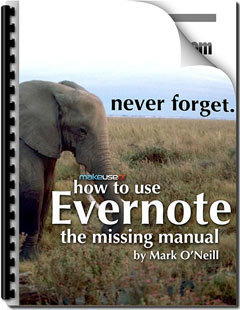
Are you a digital packrat? Are you in need of a searchable repository for everything you want to recall later? Does the idea of automatic OCR (Optical Character Recognition) for all your scanned PDFs get you excited in a way only seriously organised people could ever understand? If so, Evernote is the tool you need right now – and we’ve got the perfect manual to get you started using it like a professional.
Downloads are free from MakeUseOf - just tweet about the product you want. -JL
From Apple Distinguished Educator Andy Losik: "At an extra table in the library we set up a Genius Bar. Yep Apple, I am not even disguising it and am blatantly using one of the anchors of your retail stores. Every Apple store has a Genius Bar and offers how-to and fixit advice for all of their products. Now, every major project in Infotech has a Genius Bar where students that are finished with the project can serve as the how-to guides for those still working."
Wes Freyer's awesome interactive resource for product-based learning.
=============================================
Gust MEES
Great examples how one can use 21st Century tools in the classroom while every part is well described with "Definition", *Workflow", *Tools", "Workshop Description"... This is how it should be, take it as a very good practice example!
¿No estaremos hablando de una Educación Transmedia? De mejorar la experiencia del usuario universitario, combinar conocimientos y TIC`s en la construcción del conocimiento en el aula...
"Como educadores do século 21, devemos oferecer oportunidades para que os alunos demonstrem o domínio e compreensão do currículo, não só com texto, mas também com imagens, áudio e vídeo".Wesley Fryer.
Website muito interessante que disponibiliza : definições, video exemplos, WORKFLOW, Ferramentas e tutoriais (Mapa de médias para o currículo)
"Many school districts and even colleges have shown improvement when blended learning is implemented, with some underperforming schools even performing complete turnarounds. This year, Education Dive has already compiled case collections of iPad classroom projects and flipped learning uses. Today, we break down 13 examples of how blended learning’s proliferation has made an impact at various levels nationwide:"
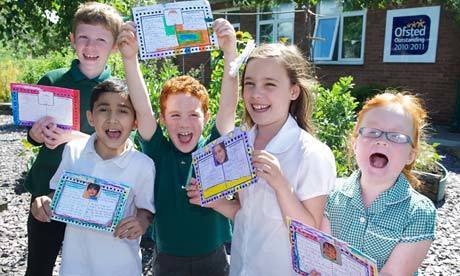
"A one-page profile is exactly what it says on the tin. It's one page of information which has three questions. What do others like and admire about you? What is important to you? And what support do you need? We started using one-page profiles at our school four years ago because we had a year 3 class that wasn't gelling well and I wanted to find a way for the children to get to know one another, and to learn more about themselves, too. The children gather information for the answer to the first question on the profile from their friends and families. It's fun and very good for self-esteem. The other two questions are completed by children and parents, working as a team.
"The pilot worked so well that we soon found ourselves introducing one page profiles across whole year groups and then across the whole school. Then we introduced them for staff, too, as an aid to career development. The idea for one-page profiles actually came from one of our parents here in Stockport. Helen Sanderson is a former government advisor and expert on person-centred thinking. Helen had been developing detailed personal profiles for use in health and social care. She recognised that these profiles would help teachers get to know children, too, but they would need to be much simpler to work in schools – hence they became one-page profiles."
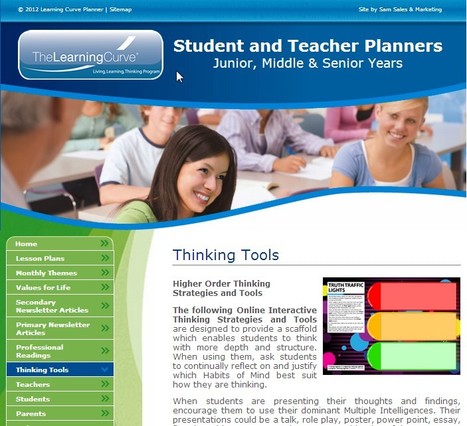
The following Online Interactive Thinking Strategies and Tools are designed to provide a scaffold which enables students to think with more depth and structure.
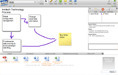
Robin Good: Ve.rbatim.com is a free web-based co-browsing tool which allows you to co-navigate with one or more people any web page, while being able to see the mouse cursor of your partner when desired.
The web app is very easy to use. You just click on "Start a sesson" on this page http://ve.rbatim.com/ and the new page that opens up has a URL that you can share with anyone you want to cobrowse with.
On this page you have an additional address bar in which you can input any url you want to cobrowse. An integrated text chat area is made visible by clicking on the large down arrow visibile on the top right side of your screen.
With over 10 million users, Pinterest has rocketed to pop-culture fame since its launch in beta in March 2010. This rapid growth makes it the fastest growing social media site of the past year. Educators have caught on to Pinterest in a big way. From kindergarten to college, teachers, professors and students are using Pinterest creatively to organize and share ideas from all around the Web and even in their own classrooms and campuses.
How-to video for creating digital storybooks using custom animations in PowerPoint. For more resources from Nancye Blair, visit www.EngagingEducation.net.
A thorough and informative descriptive analysis of the pros and cons of these two very helpful apps; along with links to a number of resources and tutorials on screencasting in general.
Not mentioned in the article is that Explain Everything added a supplementary rendering app in Oct. 2012 that enables much faster processing of video recordings made on the iPad. -JL
"MiddleWeb co-editor Susan B. Curtis is back with another of her in-depth Resource Roundup articles. Student motivation has been an especially hot topic among educators in 2012, and she's pulled together blog posts, interviews and studies centering on some of the year's best commentary about intrinsic and extrinsic sources of motivation. You'll find plenty of solid research and advice that will serve you well in 2013 and beyond."
To get content containing either thought or leadership enter:
To get content containing both thought and leadership enter:
To get content containing the expression thought leadership enter:
You can enter several keywords and you can refine them whenever you want. Our suggestion engine uses more signals but entering a few keywords here will rapidly give you great content to curate.


 Your new post is loading...