Your new post is loading...

|
Scooped by
Jim Lerman
March 19, 2013 3:52 PM
|
App of the Week from Powerful Learning Practice "Everest helps you live your dreams and achieve personal goals. From traveling the world to getting in shape to learning Italian – Everest is a place to capture all your dreams, big and small, and focus on a few. Break goals into small steps, build step streaks, learn from others, and beautifully capture your journey from dreaming to doing.
FEATURES
☆ Capture an unlimited number of dreams and goals
☆ Focus on up to three goals at a time
☆ Plan steps within your dreams and goals
☆ Set individual or repeating reminders to help build habits
☆ Use notes to record thoughts, quotes, tips and progress
☆ Capture moments with photos
☆ Stay motivated with step streaks
☆ Never get stuck; learn from others with similar goals
☆ Copy other people’s steps into your dreams
☆ Receive suggestions and encouragement through comments
☆ Follow your friends and heroes
☆ Accept challenges that take your dreams to the next level with guidance from pros
☆ Beautifully track and capture each dream’s journey
☆ Control whether your dreams are public or private
☆ Share your dreams and progress on Facebook and Twitter to inspire others"
|
|
Scooped by
Jim Lerman
March 19, 2013 3:42 PM
|
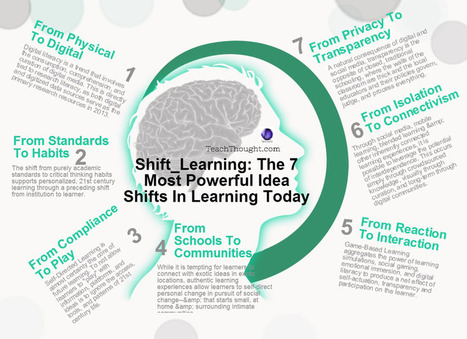
By Terry Heick 1. Digital and Research Literacy 2. Shift from Standards to Habits 3. Game-Based Learning & Gamification 4. Connectivism 5. Transparency 6. Place-Based Educa;tion 7. Self-Directed Learning & Play
|
|
Scooped by
Jim Lerman
March 19, 2013 3:37 PM
|
By Terry heick "Digital learning is different than non-digital learning from the moment an experience starts. That's not to say it's better or worse--just different. 1. Constant Connectivity & Access 2. The Potential Is Literally Visible 3. The Processes & Products Are Easily Curated"
|
|
Scooped by
Jim Lerman
March 19, 2013 10:21 AM
|
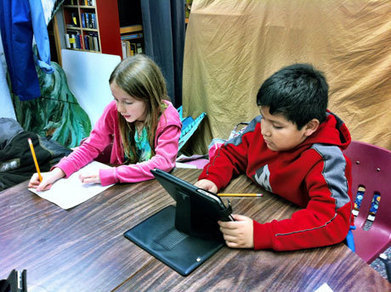
If you're learning a language or trying to organize your learning, check out this second grader sharing how she uses Evernote for fluency and organization.
|
|
Rescooped by
Jim Lerman
from Content Curation World
March 17, 2013 11:52 PM
|
So the really big news yesterday, outstripping that of a new Pope is the news that Google is Powering Down Google Reader, which for many people is a total disaster.
Via Robin Good
|
|
Rescooped by
Jim Lerman
from college and career ready
March 17, 2013 6:58 PM
|
|
|
Rescooped by
Jim Lerman
from college and career ready
March 17, 2013 6:45 PM
|
"New users flock to the RSS reader app in the two days after Google announced it would retire its own RSS service." Feedly is reaping the benefits of Google's decision to ax Reader. The RSS app picked up more than 500,000 new users in the two days after the Web giant announced last week that it would retire its RSS app, the company said in a recent blog post. Google's decision to sunset the service on July 1 disappointed many on the Internet, leading to the creation of a handful of online petitions at Change.org that begged Google to reconsider. "We have been working on a project called Normandy, which is a Feedly clone of the Google Reader API - running on Google App Engine," the company wrote in its blog. "When Google Reader shuts down, Feedly will seamlessly transition to the Normandy back end. So if you are a Google Reader user and using Feedly, you are covered: the transition will be seamless."
Via Miloš Bajčetić, Lynnette Van Dyke
|
|
Scooped by
Jim Lerman
March 17, 2013 11:36 AM
|
"MyHistro is a service that allows you to create location-based stories. The best way to describe it is as a timeline builder and map creation tool rolled into one nice package. On myHistro you can build a personal timeline or build a timeline about a theme or event in history. On the free MyHistro iOS app(not optimized for iPad screens, but it works) you can create stories that include pictures, text, locations, and dates. "If you’re creating a personal story you can take pictures with the MyHistro app, use your current location to automatically add locations to your story, and edit the timestamp for each event. If you’re creating stories about historical events, disable location-based services and you can set each event and timestamp individually."
|
|
Scooped by
Jim Lerman
March 17, 2013 10:49 AM
|
By David Leonhardt "Most low-income students who have top test scores and grades do not even apply to the nation’s best colleges, which contributes to widening economic inequality, economists say. "The pattern contributes to widening economic inequality and low levels of mobility in this country, economists say, because college graduates earn so much more on average than nongraduates do. Low-income students who excel in high school often do not graduate from the less selective colleges they attend."
|
|
Scooped by
Jim Lerman
March 17, 2013 1:22 AM
|
By Adam Dachis "Managing your files on iOS has never been particularly easy, but Files actually turns it into a fun process that's easy to understand as it follows existing paradigms in the operating systems. You manage photos, videos, music, documents, and more just like you would apps on your home screen. Images and videos generate previews so you can now more about what you're going to open. You can even create folders inside of folders. If you don't like the iOS-style interface, you can swap it out for a more traditional list view."
|
|
Rescooped by
Jim Lerman
from :: The 4th Era ::
March 17, 2013 12:52 AM
|
From the website "Our friends at Creative Commons teamed up with P2PU to launch the newly minted School of Open, a free service that offers “courses on the meaning, application, and impact of “openness” in the digital age and its benefit to creative endeavors, education, research, and beyond.” "If you’re interested in learning how to find and adapt free, useful resources & activities focused on teaching digital world skills to students, their facilitated course, Creative Commons for K-12 Educators, was created with you in mind."
|
|
Scooped by
Jim Lerman
March 16, 2013 6:57 PM
|
Build an open and engaging classroom environment by talking about the Common Core with your students. Here are a few ways to let your students know what the Common Core goals are, and how you will be teaching to it.
Think PowerPoint presentations, and you probably think of a never-ending series of slides and the urge to doze off... If you need to create a snazzy, animated presentation that captures attention, then you need business presentation software that’s designed to do the job. Here are 6 PowerPoint alternatives to consider.
Via Baiba Svenca
|
|
|
Scooped by
Jim Lerman
March 19, 2013 3:48 PM
|
by Jennifer Rita Nichols, summarizing the work of Tony Wagner 7 Survival Skills of the 21st Century 1. Critical Thinking and Problem Solving 2. Collaboration Across Networks and Leading by Influence 3. Agility and Adaptability 4. Initiative and Entrepreneurship 5. Effective Oral and Written Communication 6. Accessing and Analyzing Information 7. Curiosity and Imagination
|
|
Scooped by
Jim Lerman
March 19, 2013 3:39 PM
|
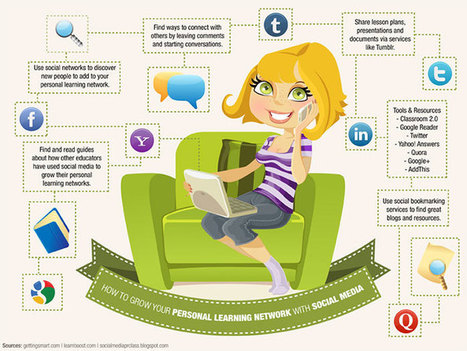
By Terry Heick "Personal learning networks are a great way for educators to get connected with learning opportunities, access professional development resources, and to build camaraderie with other education professionals. Although PLNs have been around for years, in recent years social media has made it possible for these networks to grow exponentially. Now, it’s possible to expand and connect your network around the world anytime, anywhere. But how exactly do you go about doing that? Check out our guide to growing your personal learning network with social media, full of more than 30 different tips, ideas, useful resources, and social media tools that can make it all possible."
|
|
Scooped by
Jim Lerman
March 19, 2013 10:27 AM
|
By Andrew Marcinek Summary by ASCD SmartBrief "While back-to-school shopping season is still months away, instructional technology specialist Andrew Marcinek suggests that many traditional items can be replaced by purchasing an iPad for students. He suggests that note-taking be done on the Notability application, and that students use Haiku Deck to help build presentations. Other recommended applications include Edmodo, ShowMe and Google Drive, which helps students archive their work. "
|
|
Rescooped by
Jim Lerman
from :: The 4th Era ::
March 19, 2013 10:11 AM
|
From the website "This is a handbook designed to be used by people who want to create a space for youth cultural production. It is based on our exploration that began in June 2012, which included the launch of our first open studio class at Yollocalli Arts Reach called Experimental Sound Open Studio. Our primary inquiry was focused on how to take a model of an existing drop-in teen technology program and modify it to create open studio art courses. We wanted to invent a program where teaching artists became collaborative learning partners with youth. This was perhaps our greatest challenge. During the course of our investigation we found that we were heavily influenced by our experience as traditional classroom art teachers, but we were strongly motivated by our mutual belief in the power of youth as public intellectuals. "HOMAGO (Hang Out, Mess Around & Geek Out) is an experiential learning theory based on research by Mimi Ito on how youth learn in new and social media environments. Our goal was to explore how HOMAGO could be applied within a space of cultural production and how we could translate it into a method that would be useable by our teaching artists."
|
|
Rescooped by
Jim Lerman
from college and career ready
March 17, 2013 7:09 PM
|
These experiential, brain-based, active dialogue activities are a great way to build community, facilitate reflection, and explore and review academic or training content..
Via Lynnette Van Dyke
|
|
Rescooped by
Jim Lerman
from college and career ready
March 17, 2013 6:46 PM
|
Encourage Students to Observe, Reflect and Question The interactive Primary Source Analysis Tool from the Library of Congress allows users to choose the format of their document, artifact or other source from a pull-down menu and, depending on that choice, offers a series of contextual prompts for closer reading and analysis. Students can use the tool to record their responses to a primary source, and if they need guidance, they can use the sample questions. In addition, they can go back and forth between the columns; there is no correct order to analyze the source. Click Here to Access Free Tool
Via Lynnette Van Dyke
|
|
Scooped by
Jim Lerman
March 17, 2013 6:19 PM
|
By Seth Rosenblatt Google Reader will be shut down as of July 1, but never fear. Here are eight desktop and laptop alternatives to keep track of your favorite Web site updates. Read this post by Seth Rosenblatt on News & RSS. "For all of them, we recommend you set them up to sync with Google Reader, and then disable sync and switch over when you've found the one you like best."
|
|
Scooped by
Jim Lerman
March 17, 2013 11:33 AM
|
"Ask3 is a free iPad app from TechSmith. TechSmith is probably best known as being the company that produces Jing and Camtasia screen capture software. Ask3 is a tool that teachers can use to create short instructional videos that are shared directly to their students’ iPads. Students can use Ask3 to ask questions about the video, mark the video with drawing tools, and create their own audio comments about the video. You share Ask3 videos to your students through a virtual workspace room. When you register as a teacher you are given a room number to share with your students. Students then open the Ask3 app on their iPads, enter their names, create a password for themselves, and enter the room number that you gave them. Students do not have to have email addresses to use Ask3. Anytime students enter your Ask3 room they can access the videos you’ve posted to the bulletin board in that room.
|
|
Scooped by
Jim Lerman
March 17, 2013 1:25 AM
|
By Leslie Meredith "Adobe this week released Photoshop Touch for iPhone and Android — a big step up from its stripped-down Photoshop Elements app and leagues ahead of simple Instagram filters. Photoshop Touch will set you back $5, but it's worth the cost of skipping your latte for a day."
|
|
Scooped by
Jim Lerman
March 17, 2013 1:14 AM
|
By Med Kharbach "iPad has made such a radical change in education with more and more school districts adopting it as a learning tool inside the classroom. Educational Technology and Mobile Learning has been helping teachers all along the way with reviews and tutorials on how to get started using iPad in education. We have reviewed more than 500 apps and we are planning to do more reviews this year.
"Having accumulated a modest experience in dealing with educational iPad apps, we deem it important that we share with you some of the learning goals you should keep in mind when using iPad with your students. We have particularly associated sets of educational iPad apps with each learning goal to make it easier for you to achieve the targeted goal."
|
|
Scooped by
Jim Lerman
March 15, 2013 10:10 PM
|
By Ahley Naranjo "For some time now, the education community has discussed and explored how to get out of the standardized-testing rut and make learning enjoyable again. Online games and challenges, real-world work, and point systems have been a few of the ideas kicked around by educators and tech-enthusiasts alike. Earlier this school year, a New York Times article highlighted the benefits of using digital badges to enable students, including those writing their college-admission essays, to demonstrate their knowledge and skills.
"A new online program from the Smithsonian called Smithsonian Quests gives K-12 students the opportunity to earn digital badges just by learning more about topics that already interest them. Educators at the Smithsonian have considered all of the points on teachers’ instructional checklists while offering a fun learning experience for students. See if the program corresponds to your own checklist:"
|