Common Sense Media, as I have mentioned previously on this site, is a reliable source of information on contemporary media. This app should prove to be very useful to parents and educators.
"Do you want to get more out of your iPhone? Check out the second part of our in-depth guide to Apple’s premier phone. The second of a three part series from author Tim Brookes, this 12-lesson guide outlines everything from the camera to the App Store. Lesson-by-lesson, we’ll take you through your phone’s many functions, from the very basics to more advanced operations and features you might not have even been aware of.
"The iPhone is a revolutionary device thanks to its user-friendly interface and sleek minimalist design – but that doesn’t mean it’s always straightforward. Many of the iPhone’s advanced or lesser-used features are hidden away and Apple don’t always do the greatest job of filling you in."
"Tweak Gmail to work exactly the way you want it to. Whether you want to integrate social media icons in your signature, see more information about your contacts, or deal with an email later instead of now, Chrome’s seemingly endless collection of extensions has you covered.
"If you’re looking to get the most out of Gmail, you’ve come to the right place.
"We take great pride in our list of the best Chrome extensions, and try to update it regularly. There are more than a few Gmail-related extensions to be found there, but they’re not all there – and there is no way to filter to only Gmail-specific plugins. This list is an attempt to remedy that.
"Some of these extensions I use; some I hear about constantly from friends and colleagues. Everyone’s workflow is different, so not every extension will work for everyone. If you love Gmail, however, at least one of these tools is bound to make you happy."
Mind mapping is a great way to brainstorm, make a plan, or turn ideas into the steps needed to make it real. Thankfully, there are great tools out there to help you build mind maps, organize them, and save them for later.
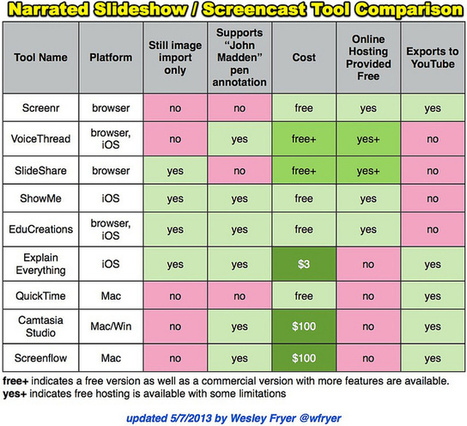
A screencast is a digital recording of a computer screen with audio narration. Screencasts can include telestrator (‘John Madden pen’) annotations. Narrated slideshows include audio recordings synchronized to images without hand-drawn annotations.
Screencasts and narrated slideshows can be created with two kinds of tools:
1. Browser-based: Create an account on the website and use a modern web browser like Google Chrome or FireFox to record, save and share it.
2. Client-based: Download and install software on a computing device to record and save.
This looks like it would be something that could be really handy for prodjects for class. that way we could not only have all of the information in front of us to see, but also hear whats going on as well.
When I ask people at what age they feel they were (or are) the sharpest, it is shocking to me that no matter their current age – 20s, 50s, 80s – they always say their peak performance was 10, and often 20, years earlier. It does not have to be that way.
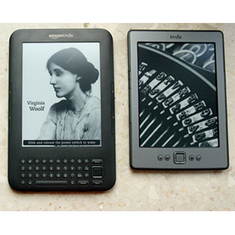
E-readers and tablets are becoming more popular as such technologies improve, but research suggests that reading on paper still boasts unique advantages
Teachers need to find a way to take advantage of the different modes of reading for different purposes in order to reap the benefits of each (and to teach our students to do so). Thanks, Adele!
This article does a great job and helping us realize the real and perceived reasons why people feel that reading on paper is more benefitial for them. At this point in history, people do tend to remember more if they read from paper. We can often remember which region of a page we learned something even if we read it several weeks ago. We like the transition of one side of the book being heavier than the other as we progress through the pages. Book designers take great efforts to design how books look, feel and smell. Digital books are disrupting our experience and interaction with the written text. Many people are in a mental state before reading a printed text that it is more serious and meaningful. This mindset may be changing how we engage the brain and thus how much we remember.
But why, one could ask, are we working so hard to make reading with new technologies like tablets and e-readers so similar to the experience of reading on the very ancient technology that is paper? Why not keep paper and evolve screen-based reading into something else entirely? Screens obviously offer readers experiences that paper cannot. Scrolling may not be the ideal way to navigate a text as long and dense as Moby Dick, but the New York Times, Washington Post, ESPN and other media outlets have created beautiful, highly visual articles that depend entirely on scrolling and could not appear in print in the same way. Some Web comics andinfographics turn scrolling into a strength rather than a weakness. Similarly, Robin Sloan has pioneered the tap essay for mobile devices. The immensely popular interactive Scale of the Universe tool could not have been made on paper in any practical way. New e-publishing companies like Atavist offer tablet readers long-form journalism with embedded interactive graphics, maps, timelines, animations and sound tracks. And some writers are pairing up with computer programmers to produce ever more sophisticated interactive fiction and nonfiction in which one's choices determine what one reads, hears and sees next.
When it comes to intensively reading long pieces of plain text, paper and ink may still have the advantage. But text is not the only way to read.
"As in past years, the 2013 fellows are weighted severely towards guys--only four women among them. They are a bit more international than they have been previously, with participants from Canada, Britain, India, China, and Singapore. One of them founded India’s answer to Airbnb, another has been doing research at MIT since he was 13, and Maddy Maxey is the Thiel Fellows’ first fashion designer. In addition, two of the fellows are working on education-related projects, which seems to be a personal favorite of Thiel’s. "If you focus on solving your own problems, you know your company will always have at least one customer," Jonathan Cain, president of the Thiel Foundation, told Fast Company. "Since young people are the ones currently suffering through school, they are well-equipped to identify what’s broken in education."
"Tech Tip: Cool Tools for Enhancing Your Blog PostsSue Waters shares a variety of tools for embedding polls, presentations, quizzes, and videos into blog posts. Included are step-by-step instructions for adding embed codes. "
"Stephanie Hedge provides quick tips for introducing blogs in a classroom, including a description of blogging platforms and how to incorporate blogging into assignments."
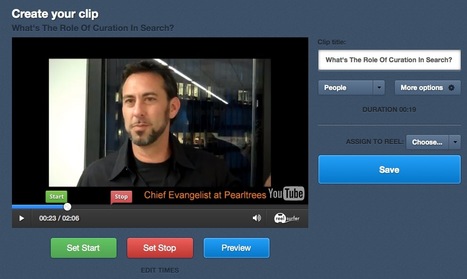
Will do! We are also in a private beta to allow our clips to link back to promote a site or a product. Would love to invite anyone from this thread to take part. Please email neil@reelsurfer.com if you want more info.
"The Cincinnati school district has improved both test scores and graduation rates since 2003 while -- unlike Atlanta and Washington -- transparently pursuing highly collaborative reform strategies that, counter to the current trend, don't rely on rigid hierarchy and punitive accountability. Because Cincinnati has implemented proven instructional approaches while nurturing a culture in which administrators, teachers, parents, and community groups closely communicate and work together as teams, the case serves as an important counterweight to the public school stories that have been dominating the news in the past few years. It also can serve as a roadmap for reversing course from the high-pressure tactics that gave rise to the cheating scandals and led to little progress elsewhere."
"Technology has expanded the meaning of “classroom” to include any physical or virtual space for formal learning. For educators and designers trained and experienced with the physical classroom, however, virtual classrooms can be daunting. How do you engage students you can’t see? What if someone’s network or Internet connection drops or is slow? How do you select the appropriate virtual-classroom (or virtual-world) platform?
"In this eBook, experts provide 129 tips for educators and designers who want to make the best use of these technologies. Whether you are brand new to virtual classrooms and virtual worlds or have been working with them for a while, you should find something in here for you, in areas including:
Using virtual-classroom and virtual-world features effectivelyInstructional design and presentation skills for the classroomPros and cons of virtual classrooms and virtual worldsPros and cons of physical and blended classroomsGames for the classroomMobile and social learning for the classroom
"...it is inherently difficult for designers to explain and ultimately sell an idea to an analytically minded client. After all, with money on the line it is probably not reassuring if you, the client, hear from a designer that a design will work because it “elicits warmth” “feels positive” or “conforms to human nature.” These abstractions may correctly describe a design but they did not communicate, in concrete terms, its potential value well.
"In a recent exchange Michael explained how embodiment might provide a new vocabulary with two examples. One involved a premium home goods project, in which he and his team gathered from consumer interviews that certain production details like hand sewn contrast stitching (as opposed to laser-welded seams) created impressions of authenticity and longevity. They converged on the product direction, “materials that wear in instead of wearing out” and used leather because scuffs and creases communicated personalization and durability.
"In the second project Michael and his team wanted to design a product that communicated healthiness. He knew that taut, plump corners suggested “healthy” while ruffled corners suggested “wrinkled” and “old” but needed to show clients why. To do this Michael and his team juxtaposed a freshly picked apple with a withered apple and asked the client which one they would like to eat. The entire boardroom chose the fresh apple and the capital expenditure was approved for design production."
"Google Maps Engine makes it easy for you to create beautiful maps, share them with others, and reach your audience no matter where they are. It's built on the same platform that provides Google services to millions of people worldwide, so your users have a consistent and familiar experience wherever they are."
"Today while I was reading a short article on the importance of videos in education, it dawned on me to compile a list of some of the best video creation tools to share with you here. I do have a separate section here in Educational Technology and Mobile Learning where I have been featuring a plethora of video tools . But today's collection is somehow different not only because it contains the cream of the crop but also because these tools are all web based.
"All of the web tools below do not require any software installation and you can work on them right from your browser. I am pretty sure you will find them very useful particularly when working on video projects with your students. Please have a look and share with us if we have missed any important title. Enjoy"
This is a complete overview of all the aspects you'll want to know, including... Your home page and content Live stream event to calendar Click on a dropdown...
Student blogging is a wonderful way to get into the world of online writing and learning. These iPhone apps for student bloggers will enhance their skills.
Description by Karen Fraker
"Twila Berkley describes five apps which give students “on the go” access to a variety of blogging tools including: Pinterest, Evernote, WordPress, Analytics, and Hootsuite."
"Sue Waters’ site is rich with resources that provide a comprehensive look into student blogs, including the development of effective commenting skills as well as building an audience"
To get content containing either thought or leadership enter:
To get content containing both thought and leadership enter:
To get content containing the expression thought leadership enter:
You can enter several keywords and you can refine them whenever you want. Our suggestion engine uses more signals but entering a few keywords here will rapidly give you great content to curate.


 Your new post is loading...


















Common Sense Media, as I have mentioned previously on this site, is a reliable source of information on contemporary media. This app should prove to be very useful to parents and educators.