Your new post is loading...

|
Scooped by
Jim Lerman
June 2, 2013 7:56 PM
|
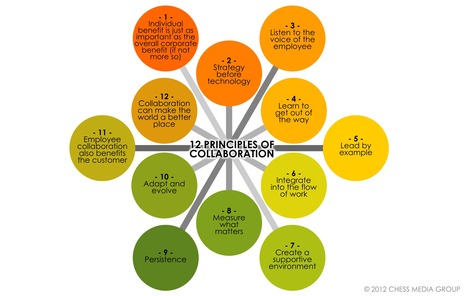
By Grant Wiggins "We had a delightful visit to The School of the Future in New York City the other day. Lots of engaged kids, a great blend of instruction and constructivist work, and an obvious intellectual culture. And as the picture illustrates, everywhere we went we also saw helpful visual reminders of the big ideas and essential questions framing the work we were watching: "School of the Future staff have long been users of UbD tools and ideas. But far too often over the years I have seen plenty of good stuff posted like this – but no deep embedding of the Essential Question (EQ) into the unit design and lessons that make it up. Merely posting the EQs and occasionally reminding kids of it is pointless: the aim is to use the question to frame specific activities, to provide perspective and focus, to prioritize the course, and to signal to students that, eventually, THEY must – on their own – pose this and other key questions. (Note: I am not criticizing what we saw and heard at SoF, rather using this teachable moment to raise an issue that needs addressing by almost all faculty using our work.) "Let’s start with a simple example from my own teaching. The EQ for the unit: Who sees and who is blind? The readings: The Emperor’s New Clothes, Plato’s Allegory of the Cave, Oedipus the King. Students are instructed to take notes around the EQ and other questions that arise related to it (e.g. Why do people deceive themselves?). We alternate between small-group discussions of the previous night’s reading, Socratic Seminar on the readings with the whole class, some mini-lessons on reading and note-taking skills, and a teacher-led de-briefing of what worked, what didn’t in Seminar as well as a discussion of confusing points in the texts. The final assessment? An essay on the EQ. "At every turn, in other words, the EQ looms large in the unit. Students are not only encouraged to keep pondering it across each reading, but they take notes on the question and routinely remind one another that this question is the focus. "This is far different than what we typically see in walk-throughs where EQs are being used. The only person that keeps referring to the EQ is the teacher; the main use of the question is by teachers in which they point out “answers” to the EQ. Rarely is the EQ central to the assessment – in part, because all too often the EQ is too convergent and has a right answer that the teacher wants learned. Almost never does there appear to be a plan whereby the question goes from the teacher’s control to the students’ control."
|
|
Scooped by
Jim Lerman
June 2, 2013 7:43 PM
|
By Med Kharbach "Evernote is a great web service and software application that we can use in education. A lot of ink has been shed on this topic and just one click in a search engine is enough to get hundreds of links to guides and tutorials about Evernote. I have been going through so many of these resources and have collected ideas, videos, notes and many more. If you are a loyal reader to my blog ( I am glad most of you are ) you would clearly notice that guides I write here are different in that they are simple. to the point, address teachers and students direct need, and most of all written in an easy and simple language. In this regard, I am working on an ebook that will contain all the guides I have posted here so far but will be available for free only to my subscribers. Without any further ado, let us get back to our guide."
|
|
Scooped by
Jim Lerman
June 2, 2013 2:09 AM
|
Abstract from website "Emerging technologies allow users to connect to classroom projection systems from mobile devices, including tablets and some smartphones. Such tools can change the character of interaction in the classroom by allowing multiple users to easily access the projector and by enabling projection of mobile-device features such as free-hand drawing. Freeing an instructor or student presenters from a lectern or other fixed projection station can increase engagement and collaboration in an educational setting."
|
|
Scooped by
Jim Lerman
June 2, 2013 2:02 AM
|
Abstract from the website "Group texting is an easy means of sending one brief missive to many people by means of cell phone text messaging. Instructors create a group, or “cell,” for each class or learning team. Each group has its own messaging channel, which students can access from any mobile device, by e-mail, or on the web. Group texting provides a surprisingly flexible platform for learning, and a number of colleges and universities areexperimenting with group texting products as part of bring-your-own-device initiatives. In the future, these services might see greater integration with social media services and the campus LMS."
|
|
Scooped by
Jim Lerman
June 2, 2013 1:55 AM
|
Abstract from the website "A growing list of communication tools takes advantage of the proliferation of personal computing devicesthat feature video cameras, allowing users to easily engage in synchronous video. These applications allow users to easily have video calls, share documents and other resources, and, in some cases, record those conversations for later playback. These video tools enable classroom activities that previously were typically only feasible at considerable expense and logistical coordination, including video office hours, live interaction with instructors or other participants in a course, and engaging with remote guests. These kinds ofsynchronous video interactions can make learning more personal by providing a close approximation of the human, one-on-one experience, increasing engagement and introducing a new dynamic into certain kinds of education."
|
|
Scooped by
Jim Lerman
June 2, 2013 1:08 AM
|
Video beyond the box. Popcorn Maker makes it easy to enhance, remix and share web video.
Via Laura Spencer
Passing out iPads to students on the first day of school was like celebrating Christmas (or in this case Hanukkah) with thirty antsy kids sitting around the tree, attempting to hide their impatience. Once the iPads had been handed out, students were instantly excited, engaged and enchanted with the new learning device in their hands. At first, everyone was confused about where to find work, where to save and store their products – and which app to use for what purpose. As with every pilot, these issues worked themselves out and soon classes were running pretty smoothly. Once they all learned what a “hard reset” was we were on our way. After an exciting year chalked full of learning lessons and changes in our learning landscape here are my takeaways:'
Via John Evans
|
|
Rescooped by
Jim Lerman
from Alive and Learning
June 1, 2013 6:01 PM
|
|
|
Rescooped by
Jim Lerman
from Instructional Technology Tools
June 1, 2013 5:57 PM
|
Visual recording is similar to audio recording: they both use the same concept that is : recording. One uses voice and the other uses visual cues like diagrams, charts, lines, arrows...etc. Think...
Via Rob Furman
|
|
Scooped by
Jim Lerman
June 1, 2013 4:35 PM
|
By Tim Brookes "The iPhone is a revolutionary device thanks to its user-friendly interface and sleek minimalist design – but that doesn’t mean it’s always straightforward. Many of the iPhone’s advanced or lesser-used features are hidden away and Apple don’t always do the greatest job of filling you in. "This advanced hopes to help point these features out, and is follow-up to ourIntermediate iPhone guide (also available for iOS5)"
|
|
Scooped by
Jim Lerman
June 1, 2013 3:38 PM
|
By Ozge Karaoglu "There are hundreds of web tools and apps that are available for digital storytelling. Picture A Story is one them and this tool can be added to your favorites list. This is a tool to create your own digital stories by adding different elements and recording your voice over it.
"First, you start by choosing your genre from adventure, fairy tales, comedy, horror, western .., then choose your background, drag and drop your characters on the scene, add as many props as you like. You can also play with their sizes. When you are done with this, you writer your story and then record your voice by clicking on “record story” button. Here, you need to allow the tool to use the computer’s microphone. If you are happy with your story, now you are ready to share it via mail"
|
|
Scooped by
Jim Lerman
June 1, 2013 3:32 PM
|
By Ozge Karaoglu "There are many web tools around that you can create online newsletters and share them with others. Tackk is one of them.
"It is pretty easy to use. After signing up, choose a theme, then use the editor widget to change the fonts, colours, backgrounds, add features such as contacts, items for sale, maps or a comment button. When you are done, just share your Tackk with others using a link or any social media platforms.
"By clicking on the theme, add pictures, text, lists, buttons, embed videos, songs or pictures from the web. You can also create your own buttons and link them anywhere. You can place the buttons wherever you like."
|
We're all excited about Twitter's new bigger and better "Lists" functionality. Here's how to get creating your own.
Via Dr. Tom D'Amico (@TDOttawa)
By Med Kharbach Mashable calls it a second brain, Evernote is a powerful productivity app that, I believe, every teacher should be using. I know you probably have heard and read a lot about it but that elephant logo is still sitting there lonely and unused. It is about time to tap into to and discover its marvels. Evernote is definitely one of the apps I use everyday. It helps me stay organized and scales up my productivity. However, the app has even more to offer when used with other partner apps. These apps are particularly useful in expanding Evernote functionality and in providing you with a richer and organized experience. Here is a round-up of the apps I curated for you and which you can use with your Evernote to tap into its education potential.
Via Dr. Tom D'Amico (@TDOttawa)
|
|
Scooped by
Jim Lerman
June 2, 2013 2:05 AM
|
Abstract from the website "An emerging class of online tools, including Pinterest, Scoop.it, EduClipper, and others, allows users to quickly and easily gather, organize, and share collections of online resources, particularly visual content. These applications make it easy to collect and post disparate bits of content, providing visual groupings at a glance that can reveal important patterns. In academic settings, they can facilitate more visual thinking and discussion among students while providing a means to share collections of online content."
|
|
Scooped by
Jim Lerman
June 2, 2013 2:00 AM
|
Abstract from the website "A new breed of tools is emerging that allow faster and easier creation of infographics, enabling users without deep skills in graphic design or the software that supports it. These tools provide templates, examples, and drag-and-drop functionality that allow creators to focus their efforts on the concept rather than also having to worry about creating the graphic. The nature of these tools encourages fast prototyping, allowing students to create, assess, and revise many versions of a graphic in a short amount of time. These tools also offer the opportunity to expand visual learning and thinking into fields where visual aspects of communication are not always included."
|
|
Scooped by
Jim Lerman
June 2, 2013 1:51 AM
|
Abstract from the website "A makerspace is a physical location where people gather to share resources and knowledge, work on projects, network, and build. Makerspaces provide tools and working room in a community environment—a library, community center, private organization, or campus. Many are primarily used for technological experimentation, hardware development, and idea prototyping, but increasingly, self-directed individual inventors and creative teams are using makerspaces to build projects in fields other than engineering and technology. Makerspaces are zones of self-directed learning, providing a physical laboratory for inquiry-based learning and validating the drive for discovery that defines the researcher and the scholar."
|
|
Rescooped by
Jim Lerman
from Wepyirang
June 1, 2013 6:12 PM
|
Need to create online assessments for a flipped classroom or for a blended learning environment? Here are 26 tools to get you started.
Via Jimun Gimm
From Web-enhanced face-to-face courses to MOOCs, flipped, blended, and fully online courses, videos are an integral component of today’s educational landscape—from kindergarten all the way through higher education.
Via Kathleen Cercone
|
|
Scooped by
Jim Lerman
June 1, 2013 4:59 PM
|
Project Based Learning for the 21st Century
|
|
Scooped by
Jim Lerman
June 1, 2013 4:28 PM
|
A clever idea from Cynthia Morris With a little thought (and elimination of the $20 entry fee), educators can adapt this activity to a very nifty beginning, ending, or middle of the year project with their students...and contribute in a meaningful way to developing their creativity skills (as well as elevating their motivation).
|
|
Rescooped by
Jim Lerman
from Scriveners' Trappings
June 1, 2013 3:36 PM
|
By Ozge Karakoglu "Secret messages have been used since the ancient times. Today, I would like to introduce you a new web tool that you can create secret codes. "Mozaiq is a new web tool that you can hide messages in a plain site inside of pictures that you can, then safely share. And, none will be able to read or share the message without the secret code and knowing the way how to do it. "What you do is pretty simple. Go to the website, write your message and choose a picture that you want the message to hide. If you don’t have, the website finds a picture for you. Add a password, but this is optional. To retrieve the hidden message, you should go to the decryption page. Be sure to share the decryption page with your intended recipient separately from the message."
|