Your new post is loading...

|
Scooped by
Jim Lerman
June 21, 2013 1:02 PM
|
discription by Internet Scout Project "Some young scholars may ask the question: "What time do I need to be at general chemistry?" or "When does my review group meet?" Keeping track of such matters is a snap with My Study Life, a free online planner. Visitors can color-code each activity for easy visual recognition and insert various tasks that might be due on any given day. Unlike more conventional calendars, this one integrates classes, tasks, and exams to give students and teachers a full picture of what remains to be done. This program is available for Chrome, Windows 8, Windows Phone, and Android, and will soon be available for iOS."
|
|
Scooped by
Jim Lerman
June 20, 2013 5:26 PM
|
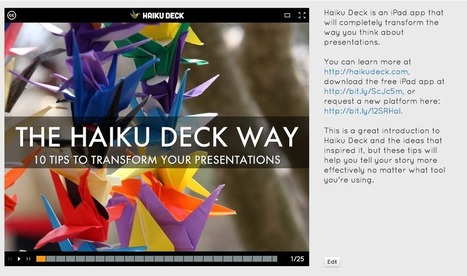
by George Williams Pros "Radical simplicity: It’s just about impossible to create a cluttered, confusing slide with this app. You are restricted to two lines of text or a bullet list of no more than 5 items. From within the app you can search Flick for Creative Commons images to use as a fullscreen background for each slide or choose from a short selection of solid background colors. Ease of use: The interface for creating and playing presentations is also radically simple. As such, it’s a snap to figure out how to use this app. One especially nice feature is how easy it is to search Flickr from within the app. Presentation flexibility: If you can’t or don’t want to present a Haiku Deck slide deck from your iPad, you may export the presentation in a format compatible with either PowerPoint or Keynote. Alternatively, if you’ve uploaded your presentation to the Haiku Deck server, you may present the web-based version. And finally, from the web-based version of your presentation, you may export to Slideshare.
|
|
Scooped by
Jim Lerman
June 20, 2013 4:08 PM
|
A teacher in Windsor, Ont., is teaching her first and second grade students to tweet, blog and Skype as part of the elementary curriculum.
|
|
Scooped by
Jim Lerman
June 20, 2013 3:03 PM
|
description by EdSurge "One of the most frequent requests we hear these days is for "leveled texts," or content written to the level appropriate for a specific reader. East coast-based startup Newsela is doing exactly that: creating texts that have five different levels of reading complexity. All the text is build around the news. (Newsela has crafted a partnership with long-time publisher, McClatchy Company. ) Newspaper writers take a story from a McClatchy paper and rewrite it four times, corresponding to a total of five Lexile levels of difficulty."
|
|
Rescooped by
Jim Lerman
from Top sites for journalists
June 20, 2013 8:36 AM
|
From the site: "Booktype is a free, open source platform that produces beautiful, engaging books formatted for print, Amazon, iBooks and almost any ereader within minutes. Create books on your own or with others via an easy-to-use web interface. Build a community around your content with social tools and use the reach of mobile, tablet and ebook technology to engage new audiences."
Via helpingmedia
We’ve all endured “death by PowerPoint.” It’s a painful experience for the audience and probably not all that fun for the presenter either. To help my students deliver effective presentations—free of those deadly bullet points—I have my go-to applications.
Via Baiba Svenca
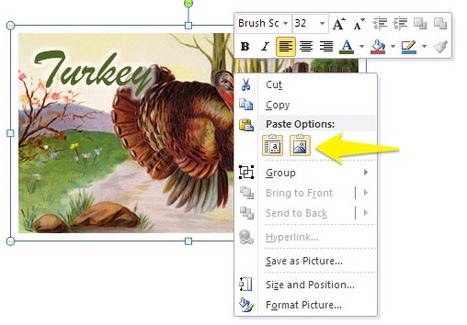
PowerPoint has some amazing drawing tools that lets you create all kinds of illustrations. But sometimes it can be frustrating when you group text with an object to create an image because when you...
Via Baiba Svenca
Presentations are a powerful medium that can quickly disseminate information and help teach people new ideas. Unfortunately not every slide deck is effective at
Via Baiba Svenca
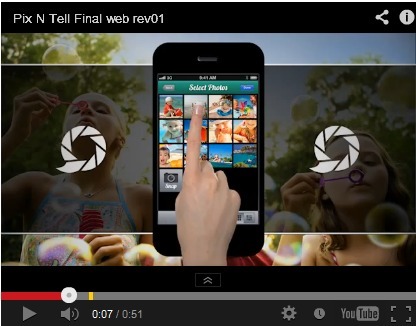
Pixntell adds your voice to your pictures and creates a personalized video you can share on Dropbox, Facebook, YouTube, FocusTrain or email. Features:
● Simple and easy to use
● (NEW) upload videos directly to Dropbox with auto email link.
● Upload videos directly to Facebook
● Upload videos directly to YouTube with auto email link
● Intuitive controls similar to top selling apps
● Creates .m4v movies out of your voice and pictures
● Create a great time capsule
Via Baiba Svenca
A compilation of proven distinctions on what makes a World-Class Presenter. Written by Eric Feng, Presentation Coach ( http://ericfeng.com ) and Designed by Sli
Via Baiba Svenca
These fun, mostly free tools can help educators easily create their own Infographics, and bring a very modern twist to instruction. “A picture is worth
Via Gust MEES
Possible instructions for educators on how they can work together with the learners… Knowing the tools for 21st Century Learning is primordial to give ===> quality courses. <=== Read more: http://gustmees.wordpress.com
Via Gust MEES
|
|
Scooped by
Jim Lerman
June 20, 2013 12:10 AM
|
A quick guide and challenge to curate with Scoop.it
|
|
|
Rescooped by
Jim Lerman
from Presentation Tools
June 20, 2013 6:17 PM
|
|
|
Rescooped by
Jim Lerman
from Presentation Tools
June 20, 2013 5:11 PM
|
|
|
Scooped by
Jim Lerman
June 20, 2013 3:10 PM
|
description by EdSurge "Presefy is a brand-spanking way to broadcast presentations using your mobile device. You upload your presentation to the Presefy cloud. When you're ready to share it, you'll receive a unique URL that you can share (or not) with anyone else. As the presenter, you control the presentation from your mobile device. Presefy launched in March and has about 7,000 users so far; it's free for now (with premium features launching later this summer"
|
|
Rescooped by
Jim Lerman
from Scriveners' Trappings
June 20, 2013 8:40 AM
|
From the site. "TrustMedia has a variety of training materials for journalists, from those who are new to the profession to veterans who want to expand or refresh their skills. Our collection of digital training manuals ranges from basic skills like reporting, writing and cultivating sources to new-media training, such as our guide for citizen journalists.These manuals provide information, case studies and tools to learn the basics or advanced skills of journalism."
Via helpingmedia, Jim Lerman
Did you know modern statistics state that you have 60 seconds or less to capture your audience’s attention? You’ve might have heard it before, but maybe not
Via Baiba Svenca
It’s time to share your presentation! Whether you’re delivering a business proposal to a client, an academic presentation to your professor, or even showing a personal photo slide to your grandmother, you have to ensure that your visuals can be clearly seen by your audience.
Via Baiba Svenca
Convert video free between 300+ formats & 100+ devices with Freemake! Any video to MP3. Best free video converter by PCMag & PCWorld.
Via Baiba Svenca
Whether you’re a Haiku Deck master or you’re just checking it out, I hope you’re getting the picture that we have a point of view about presentations. Does the world need more lame clip art and bullet points? We say no. Does it need more inspiration, more simplicity and beauty? That’s why we’re here...
Via Baiba Svenca
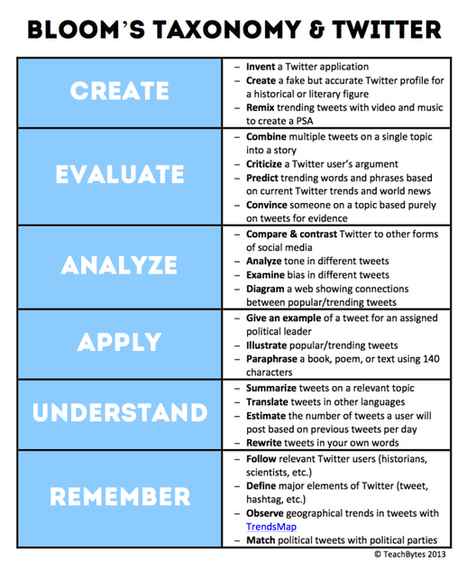
You can actually use Twitter in the classroom with Bloom's Taxonomy thanks to this awesome table that details nearly two dozen different ways to integrate the pair!
Via Gust MEES
Anyone who has used the Prezi platform would know that creating a Prezi and uploading it to Prezi.com is easy enough, however when it comes to converting it to a YouTube video, there seems to be no native method of doing so...
Via Baiba Svenca, PuertoTICs, juandoming, Gust MEES
|
|
Rescooped by
Jim Lerman
from :: The 4th Era ::
June 20, 2013 12:13 AM
|
April 10, 2013 | By Devon Glenn-- Released today in the iTunes store, the app matches readers to relevant content using an interest graph compiled from its community of curators on Scoop.it. In addition to discovering and downloading articles, Read.it users can also share what they find on social networks including Twitter…
|