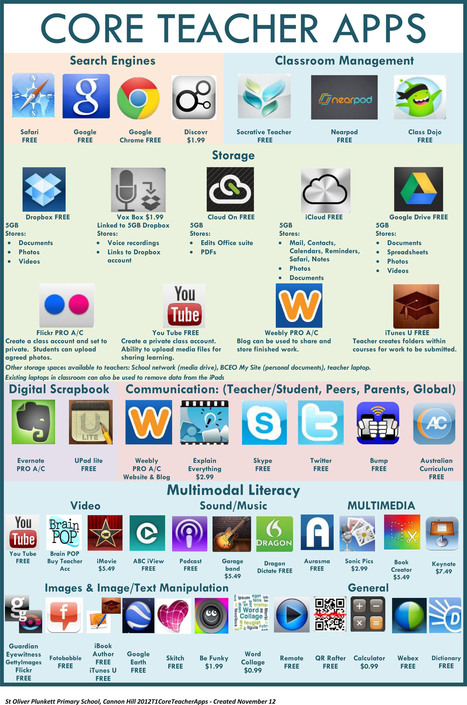
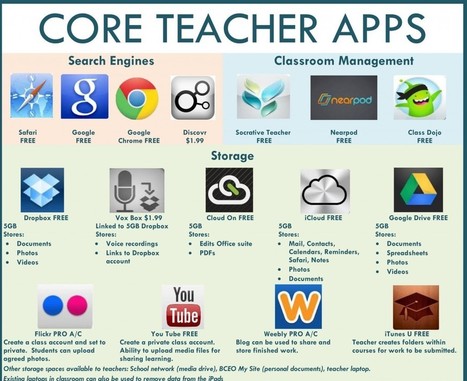
THE STARTING POINT? It is interesting to reflect how this simplification of iPad key tools has changed in a relatively short space of time. iWork suite aside, you could purchase the above apps for ...
Via Jon Samuelson
Your new post is loading...
From
dedwards
THE STARTING POINT? It is interesting to reflect how this simplification of iPad key tools has changed in a relatively short space of time. iWork suite aside, you could purchase the above apps for ... Via Jon Samuelson
by Joyce Valenza
"The team confirmed several of my personal favorites: Pinterest, Smore, Easel.ly, TED Ed, and DPLA, for instance. But I learned about so many truly useful new tools this morning, my mind was racing with plans for both personal use and serious fall implementation. Here is a list of some of those new-to-me discoveries:
-Workflowy: for planning an organizing -FlipSnack: for digitally publishing professional looking flip books. I’ll check this out as an alternative to Issuu. -LitPick: a global network that offers free books to preteen and teen book reviewers in exchange for book reviews -Socrative: a smart student response system that empowers teachers to engage their classrooms through a series of educational exercises and games via smartphones, laptops, and tablets. -QuadBlogging: allows four schools to blog together and share student writing -Biblionasium:, a Goodreads alternative for young readers (look for a full post on this one later this week) -Marqueed: a collaborative platform for annotating images and PDFs -Inklewriter: a platform for writing interactive, branching stories (ala choose your own adventures) Stories can be published to Kindle. -myHistro: allows stories to be created and shared as mashed-up maps -19 Pencils: a library/search tool for locating, sharing and using K-6 educational resources -iCivics: founded by Justice Sandra Day O’Connor, the site includes 18 educational video games, teaching materials, and a comprehensive, standards-aligned civics curriculum, -Wonderopolis: the National Center for Family Literacy celebrates the learning moments in everyday life—ones that fit in with dinner preparations, carpool responsibilities, a stolen moment between breakfast and the bus, or within school curriculum and education programs. -Youngzine: child-centered zine by and for kids in grades 8 through 12 where they can learn about current events around and events shaping their world using fun trivia, visuals and videos. -Seriously Amazing: The Smithsonian presents seven quirky characters who symbolize the questions the Smithsonian asks and answers every day. -Codeacademy: teaches kids to code interactively in a variety of languages
Jim Lerman's insight:
Go to the original article by clicking on the title or image above to locate links to all the above sites, as well as numerous others.
1947marga@gmail.com's curator insight,
November 22, 2022 8:58 PM
El señor Valenza comparte varias plataformas virtuales o recursos educativos que nos ayudarán en la enseñanza aprendizaje de nuestros estudiantes, entre ellas tenemos: 19 Pencils, Litpick, Youngzine, entre otras.
109 Common Core Resources For Teachers By Content Area The transition to the Common Core Standards is likely the single most significant change in the last 10 years in American public education. While the English-Language... Via Susan Grigsby @sksgrigsby
|
|
|
Rescooped by
Jim Lerman
from Tools for Teachers & Learners
July 5, 2013 3:15 AM
|
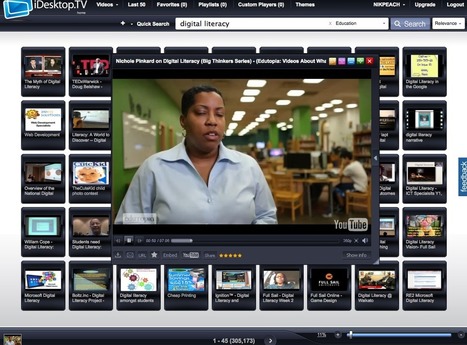
iDesktop.tv provides a really useful and user friendly service for anyone who wants to use video clips from sources like YouTube, but doesn't want their students looking around at anything unsuitable, or for anyone who has ever found a really useful clip, only to go back later and find it has moved or been removed.
The future of learning requires us to have the tools and the skills of connectivity and collaboration whereby we maintain streaming sources of very relevant and rapidly processable information. This appears to be one of these tools...
A great way to download videos from youtube... have a try with some of our training videos! http://www.youtube.com/watch?v=gRqKz70lAgo
|
|
Rescooped by
Jim Lerman
from e-learning
July 5, 2013 3:00 AM
|
Name: Alexandra Samuel Evernote Ambassador: Research Location: Vancouver, BC Profession: Vice President of Social Media, Vision Critical Website: http://www.alexandrasamuel.com/ Twitter:...
Thinking this may be an electronic support for our Action Research class.
Thanks for the Scoop - very practical blog with info to help work and research smarter. I personally like Evernote as it works across platforms, syncs up from desktop to mobile (no hassles) and provides an arsenal of tools embedded in the app!
We just talked about Evernote today at my Loyola session on Social Media for Accouting Students - some great tips here.
|
|
Rescooped by
Jim Lerman
from e-learning
July 5, 2013 2:58 AM
|
PublishME enables you to create, edit, and share vibrant presentations. Upload existing presentations, PDFs, Word or Excel documents or create a new presentation from scratch, using the canvas.
|
|
Rescooped by
Jim Lerman
from e-learning
July 5, 2013 2:53 AM
|
I love it when I come across such educators curated lists of apps because I know since these apps are reviewed by fellow teachers then there is a high possibility that they will work for other...
|
|
Scooped by
Jim Lerman
July 4, 2013 5:56 PM
|
"The most important thing for leaders to know to develop a creative culture is that everyone isn’t creative in the same way, and they may not be creative in the same way you are. For example, group brainstorming isn’t for everyone; some people come up with their best ideas later while reflecting during the drive home. Leaving a channel open for them to contribute their ideas afterwards could benefit everyone. Furthermore, some creative types prefer to be conceptual, solving anticipated problems and designing products to enter future markets – other types prefer solving actual immediate problems that exploit today’s opportunities. Obviously these “creative differences” are both important, and a leader who is receptive to this can maximize the creative culture."
|
|
Scooped by
Jim Lerman
July 4, 2013 3:34 AM
|
by Michael Trucano
"While videogames are played all around the world, most recent research into videogames and learning has a strong OECD (and especially U.S.) bias, looking largely at learning contexts in industrialized country settings. The Gates Foundation has been funding lots of notable activities and research in this area, including a newly-released report by SRI (part of the Games Learning and Assessment Lab, or 'GlassLab', initiative) on Digital Games for Learning: A Systematic Review and Meta-Analysis, which summarizes and analyzes findings from 77 experimental or quasi-experimental studies published in peer-reviewed journals between 2000 and 2012. According to the paper, "With increasing access to computers, consoles, and cell phones, young people encounter opportunities for gaming everywhere. Given the extensive reach and saturation of game playing in modern youth culture, there is an untapped potential for increased learning if games can be successfully designed .... These preliminary findings will help GlassLab and other educational game designers make appropriate, research-based decisions in developing new digital games for students."
|
|
Rescooped by
Jim Lerman
from Educational iPad User Group
July 4, 2013 3:25 AM
|
As intuitive as the iPad's user interface is, there are still some occasions on which students and teachers might get stuck. That's when a free iBook like The Student Guide to iPads & iOS 6 is ...
Great reminder at the beginning of a new school year!
|
|
Rescooped by
Jim Lerman
from Engage Your Audience - Get Organized
July 4, 2013 2:48 AM
|
"Many services allow you to register and use their services by logging-in with your Facebook, Twitter, or Google credentials. If you use that option a lot, you might forgot just how many services have access to your Facebook, Twitter, and Google accounts. MyPermissions is a handy tool that will show you all of the services that you have authorized to access your social media accounts. The service can be used in your web browser or you can download the free MyPermissions iOS and Android apps."
Quite a valuable service
|
|
Rescooped by
Jim Lerman
from Scriveners' Trappings
July 5, 2013 9:18 PM
|
Resume Designer, the useful app which allows users to create, edit, and share resumes while on the go, has received an important update.
|
|
Rescooped by
Jim Lerman
from K-12 School Libraries
July 5, 2013 12:29 PM
|
by Kiera Parrott
"The list included a few of my own tried and true favorites like Toontastic (a fun and funny content creation app for elementary students) and Evernote (as one committee member noted, “I run my life on Evernote”). There were a few surprises as well. The following are apps that looked so exciting that I downloaded them as they were announced by the selection committee:
"Shakespeare in Bits—Hamlet: Where was this when I was in ninth grade? Full-cast narration, animated scenes and character webs help students visualize and further explore the Bard’s famous creation. The original play can also be purchased in-app.
"Tinkerbox: This is what great STEM apps can be. Combining engineering, puzzles, and design, children are encouraged to problem solve, apply new skills, and use their imaginations. They can invent crazy machines and share them with friends or with the app developer.
"Videolicious: There are a ton of video creation apps, but very few are simple enough for most kids to use successfully and powerful enough to produce high-quality creations. This one hits both marks. Kids can choose photo or video content already saved on their device, record a narration, and select a copyright-free song from the in-app library.
|
|
Rescooped by
Jim Lerman
from Technology in Education
July 5, 2013 3:27 AM
|
"Creating picture stories can be a very effective activity in unleashing students creativity. There are now some great apps that students can use to create and narrate their stories on iPad. I have picked for you two of the most popular apps in this regard. To create a picture story, students will either use the pictures they have in their camera roll or take new ones and do some customization to them then add audio narration and text before sharing them with others via emails or through social media sites like Facebook and Twitter. Here are the titles I have for you today:"
|
|
Rescooped by
Jim Lerman
from Tools for Teachers & Learners
July 5, 2013 3:16 AM
|
An app in which you can take or add some photos, attached some audio or record some sounds, edit the audio to your liking then share it with your own network of followers!
Nice tool for creating a multimedia dictionary or just to get students speaking about images.
|
|
Rescooped by
Jim Lerman
from Educational Technology
July 5, 2013 3:04 AM
|
Slate Magazine
Get Rich Quick: Become a Teacher
Slate Magazine
Victor Bastos has made close to half a million dollars teaching classes on Udemy, an online learning startup. Courtesy of ...
|
|
Rescooped by
Jim Lerman
from e-learning
July 5, 2013 2:59 AM
|
"If you’ve ever run into a .zip file on an iPhone, iPod touch, or iPad you will probably have discovered it’s a bit of a dead-end initially, because by default there isn’t much you can do with zips or any other archive format. That doesn’t mean you can’t open ZIP files though, and in fact these archives can be viewed, unzipped, and opened in iOS with relative ease, but you will need to download a free third party app before you’ll have the function included on your device. This will allow you view all of the contents of any zip file quickly, and also decompress the entire archive, or just extract a single file from a larger archive, providing quick access to the zip contents which can be saved locally or opened in another application of choice."
It is great to have an app that allows you to unzip files on the iPad.
I use it and its' been a lifesaver on my iPad.
|
|
Scooped by
Jim Lerman
July 5, 2013 2:56 AM
|
"I am delighted to bring this post to you today! I have had the good fortune this past year of getting to know the teachers whose icons you see to the left. These teachers are passionate about their subject areas, they are innovative, they are inspiring, and they represent some of the best of the teaching profession. Not only are these educators amazing instructors, but they are some of the sweetest and kindest people out there. These teachers represent a wide range of subject areas, from English Language Arts and Foreign Language, all the way to Math, Science and Art! I follow each and every one of these teachers on Pinterest and I thought you might like to, too. Their ideas are simply amazing!! Let me introduce them to you:"
|
|
Scooped by
Jim Lerman
July 4, 2013 6:05 PM
|
This page explains a wide range of techniques which can help you generate creative solutions to your problems.
More than 25 tools and techniques to generate ideas via brainstorming (yes, it can be done well!), idea-generation, and creativity processes. Developed for business situations, most can be used directly, or modified easily, for educational settings.
|
|
Scooped by
Jim Lerman
July 4, 2013 5:51 PM
|
by Mike Brown
"Whether creating social media content for yourself or for an organization you support, here’s an easy-to-use strategic thinking exercise for generating relevant topic ideas. Consider three vital areas:
-What do you Think?
-What do you Know?
-What do you Do?
"Consider your target audience’s needs and interests as a backdrop. Then use Think, Know, and Do as starters for three mind maps to help explore a range of social media content ideas."
- See more at: http://brainzooming.com/social-media-content-ideation-think-know-do/5705/#sthash.qBp3YO7N.dpuf
Great way to develop ideas for projects, writing assignments, interviews, etc. Best done in groups, but will work ok for individuals too.
|
|
Rescooped by
Jim Lerman
from Educational iPad User Group
July 4, 2013 3:26 AM
|
"Using the iPad in a 1:1 environment requires not only some ground rules, but a bit of common language.
Since every student has their own iPad, and teachers likely do as well, this common tool necessitates some universal understanding:"
Wellicht kunnen leraren deze zomer in de digitale wereld inspiratie opdoen, nu 'flipping the classroom' in opkomst is. (zie de Volkskrant: 'De nieuwe leraar is videomeester'.
En snabb blick ger att detta är en bra översikt över bra appar att ha för elever på gymnasiet (funkar säkert bra på högstadiet och på högskolan med...)
Excellent resource for teachers who just received iPads!
|
|
Scooped by
Jim Lerman
July 4, 2013 3:04 AM
|
Jane Hart's annual survey is a great way to see a snapshkot of popular sites and apps for learning. It'a always interesting to see what rises and falls in popularity, and especially what is new and upcoming. Results are announced each October. Voting for the 2013 poll is currently open (July 4, 2013)
Your new post is loading...
Work flow graphic showing how to teach with apps- best I've seen.