Your new post is loading...

|
Scooped by
Dr. Tom D'Amico (@TDOttawa)
October 15, 2019 12:00 PM
|
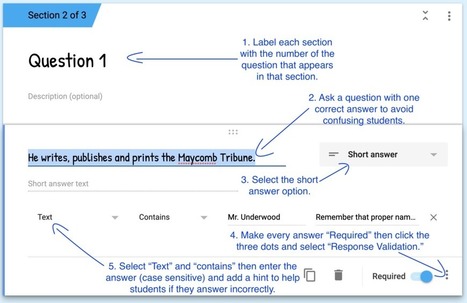
Auto-graded quizzes have their pro’s and con’s. They cut back on teacher grading time and provide students with quick feedback. But they don’t show what students can do with what they’re learned and limit 21st century skills (communication, collaboration, creativity, critical thinking). Should we use auto-graded quizzes? That’s a question I wrestled with in this […]
|
|
Scooped by
Dr. Tom D'Amico (@TDOttawa)
September 24, 2019 10:00 PM
|
Google Forms gives educators a powerful data collection tool. Check out these 20 ways to harness its power in school.
|
|
Scooped by
Dr. Tom D'Amico (@TDOttawa)
July 22, 2019 1:30 PM
|
Tracy Clement 8:59 AM The thing I implemented this week is “clicker” type formative questions in google slides using GForm. I have a multiple choice question in my class slides. Students answer the question in the form. The next slide is a linked chart from the response GSheet that is updated with their answers, and …
|
|
Scooped by
Dr. Tom D'Amico (@TDOttawa)
July 13, 2019 6:00 PM
|
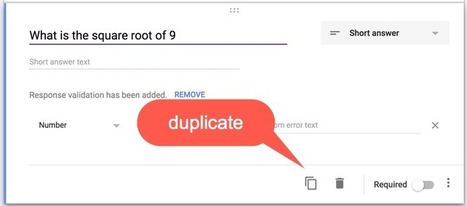
Use Google Forms for a Question Bank A new feature in Google Forms is the ability to import questions from another Form. This feature is well designed and easy to use. Take advantage of this to create a question bank for creating new Forms. Create a Form Per Topic Suggestion, create a FOLDER in Google …
|
|
Scooped by
Dr. Tom D'Amico (@TDOttawa)
July 5, 2019 10:00 PM
|
|
|
Scooped by
Dr. Tom D'Amico (@TDOttawa)
June 7, 2019 2:00 PM
|
|
|
Scooped by
Dr. Tom D'Amico (@TDOttawa)
April 29, 2019 4:00 PM
|
Kids enjoy games! One way to create a collaborative challenge that feels more like a game than work is to use Google Forms to create a lockbox activity. When coaching a group of teachers this month, we created a transitional
|
|
Scooped by
Dr. Tom D'Amico (@TDOttawa)
April 2, 2019 2:00 PM
|
Free resource of educational web tools, 21st century skills, tips and tutorials on how teachers and students integrate technology into education
|
|
Scooped by
Dr. Tom D'Amico (@TDOttawa)
March 20, 2019 12:00 PM
|
|
|
Scooped by
Dr. Tom D'Amico (@TDOttawa)
January 23, 2019 2:00 PM
|
|
|
Scooped by
Dr. Tom D'Amico (@TDOttawa)
December 14, 2018 6:00 PM
|
|
|
Scooped by
Dr. Tom D'Amico (@TDOttawa)
December 14, 2018 10:00 AM
|
|
|
Scooped by
Dr. Tom D'Amico (@TDOttawa)
October 20, 2018 8:01 AM
|
Do Not Make Copies The paradigm shift of using Google Apps is you do not make copies. Having multiple documents with the same name makes a mess of your Google Drive. You manage versions. However, with Google Forms there is no version history. If you are a teacher of multiple class sections, you do not …
|
|
|
Scooped by
Dr. Tom D'Amico (@TDOttawa)
October 3, 2019 10:00 PM
|
After Google Earth, Google Forms is the Google product that I get the most excited about helping other teachers use. From gatherin
|
|
Scooped by
Dr. Tom D'Amico (@TDOttawa)
July 23, 2019 12:00 PM
|
Free resource of educational web tools, 21st century skills, tips and tutorials on how teachers and students integrate technology into education
|
|
Scooped by
Dr. Tom D'Amico (@TDOttawa)
July 21, 2019 2:01 PM
|
Free resource of educational web tools, 21st century skills, tips and tutorials on how teachers and students integrate technology into education
|
|
Scooped by
Dr. Tom D'Amico (@TDOttawa)
July 8, 2019 4:00 PM
|
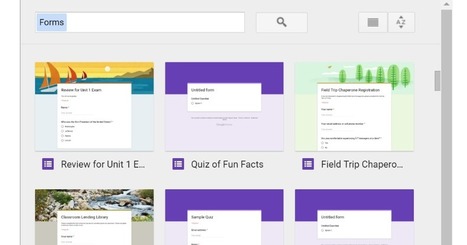
Import from Other Google Forms How awesome is Google Forms. Can’t live without it. And as usual, the Google peeps are always working to add new features to make it even better. Now you can easily grab questions from other Google Forms you have. Choose Which Form This really could not be easier. Click on …
|
|
Scooped by
Dr. Tom D'Amico (@TDOttawa)
July 2, 2019 4:00 PM
|
What’s changing We’re adding the ability to import questions from your existing Google Forms and forms shared with you into a new form
|
|
Scooped by
Dr. Tom D'Amico (@TDOttawa)
May 21, 2019 6:00 PM
|
Install Google Forms Add-ons I always say… Google Forms is the best thing since sliced bread. BUT… what if it could be EVEN BETTER!!! 3 Dots Menu Use the 3 dots menu in the upper right to choose the puzzle piece “Add-ons.” This is 3rd party apps that make Google Forms EVEN BETTER! Certify’em When …
|
|
Scooped by
Dr. Tom D'Amico (@TDOttawa)
April 3, 2019 10:00 PM
|
Free resource of educational web tools, 21st century skills, tips and tutorials on how teachers and students integrate technology into education
|
|
Scooped by
Dr. Tom D'Amico (@TDOttawa)
April 1, 2019 8:00 PM
|
|
|
Scooped by
Dr. Tom D'Amico (@TDOttawa)
March 13, 2019 9:00 AM
|
Google Forms is a marvelous tool in the classroom. Get even more value out of form by applying these five tips that go beyond the basics.
|
|
Scooped by
Dr. Tom D'Amico (@TDOttawa)
December 16, 2018 8:00 AM
|
Sort Your Google Forms Results Automatically Google Forms is amazing, however it can be challenging to read Google Forms submission in a spreadsheet sometimes. You may need to make the columns wider, set word wrap, hide some columns, etc… The problem is that when you format your spreadsheet or sort your data any new form …
|
|
Scooped by
Dr. Tom D'Amico (@TDOttawa)
December 14, 2018 2:00 PM
|
Get started with easy ways to use Forms and Quizzes in the Classroom.
|
|
Scooped by
Dr. Tom D'Amico (@TDOttawa)
November 10, 2018 12:00 PM
|
|