



"Through the Free Technology for Teachers Facebook page I recently received a request for some suggested online chart creation tools..."
Via Baiba Svenca

 Your new post is loading...
 Scoop.it! "Through the Free Technology for Teachers Facebook page I recently received a request for some suggested online chart creation tools..." Via Baiba Svenca 
Scoop.it!

ThingLink lets users add interactive links to any photo and turn them into fun web experiences that drive engagement.
Scoop.it!

Storytelling is such an important skill and there are plenty of ways to turn your students into storytellers using a mobile device. These apps are perfect for kids of all ages and can be tailored ...
Scoop.it!

The iPad has fundamentally changed how and what I teach in my Spanish classes. First of all, I no longer use textbooks. Ever. Why would I when everything I need and more is available online or through an app? As educators, we are often told to teach students “21st century skills”, but let’s be honest, …
Scoop.it!
Scoop.it!

Dewey - is a Chrome extension which adds custom tags, screenshots, and smarter search to your Chrome bookmarks. Your bookmarks are given thumbnails for easier browsing (which can be disabled), and those bookmarks can also be edited and filtered. [bigthumb]http://deweyapp.io/[/bigthumb] Build A Bird - The Flappy Bird game was removed from the Apple store, and…
Scoop.it!

Let's imagine you’re not toting a dedicated video camera or DSLR, but rather are using the the ever-present smartphone camera in your pocket. While you can
Scoop.it!

Teachers who are fighting for stronger tech integration in their schools often come against opposition from people who believe technology not have a positive effect on student learning. This is particularly true with iPads, devices that many people see as a device for content consumption, not creation. Below is a list of studies into iPads and learning, with dot points about what students the study relates to, the subjects involved and the results.
Via Cyndi Danner-Kuhn

Dean Mantz's curator insight,
April 15, 2014 1:31 PM
It is always interesting to see what folks include in their research to determine the effectiveness of trends and tactics. 
Jennifer Snapp's curator insight,
August 1, 2015 11:43 AM
I chose this article because it focuses on the positive aspects of using technology, iPads, in the classroom to improve learning. Six studies found improvement in students ranging from kindergarten through the college level. Various apps were used in control groups in some of the studies and they did better than students without iPads.
I hope others will use iPads as support tools, blended learning, assessment, and to differentiate instruction in the classroom. |
Scoop.it!

We’re very excited that from today anyone with an Android tablet can create, share and publish their own beautiful ebooks.
Scoop.it!

EdTechTeacher provides professional development services to teachers, schools, districts, and administrators.
Scoop.it!

With Elena children between 4 and 8 from border regions learn to speak their neighbouring languages. In a powerful, authentic learning environment they acquire the basics of German, French and Dutch.
Scoop.it!

These Fun, Free Web Applications Make it Quick and Easy to Create Cool Learning Content (Watch out Though, Other Teachers Will be Banging Down Your Door Looking (5 Tech Savvy Teaching Tools Students Will Love (& Peers Will Envy): Via AgileBelma
Scoop.it!
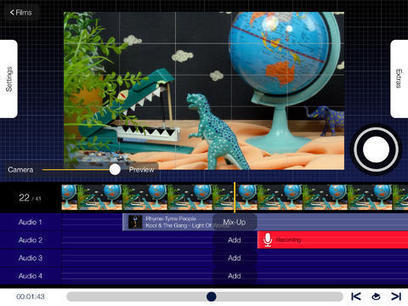
The National Film Board of Canada recently released a fantastic new iPad app for creating stop-motion videos. NFB StopMo Studio allows you to take a series of pictures and stitch them together to c...
Scoop.it!

Duolingo - Duolingo is changing the way people learn languages. Before, it used to be a tedious process of learning grammar and verbs. Now Duolingo is making learning a language fun. Earn points as you advance levels, and challenge your friends. [bigthumb]http://play.google.com/store/apps/details?id=com.duolingo[/bigthumb] Soundslice - makes sheet music and guitar tablature interactive, to help you learn…
Scoop.it!

Knowmia is a free educational website for students and teachers to watch video lessons on any topic for any class.
Scoop.it!

Part 9 of my series on Chrome Extensions for Teachers. The Chrome web store has apps and it has extensions. Extensions are add on's that that increase your functionality in the Google Chrome brows...
|










Lucidchart is an easy tool to use to create flowcharts, mindmaps, and graphic organizers. Lucidchart offers a simple drag and drop interface for creating flow charts, organizational charts, mind maps, and other types of diagrams. To create with Lucidchart just select elements from the menus and drag them to the canvas. You can re-size any element and type text within elements on your chart. Arrows and connecting lines can be re-sized, repositioned, and labeled to bring clarity to your diagrams.
Find out more tools by visiting the article...
I always struggle with graphics.
#tecnicas