


DIGITAL LEARNING
20.7K views |
+1 today
 Your new post is loading...
 Scoop.it! 
If you spend lots of time conducting tutorials, it can get a bit frustrating when you have difficulty in getting your point across to your audience. After all, certain things just can’t be explained through images and text. Sometimes, what you need is to record the sequence of actions in ... Continue reading » Via Timo Ilomäki 
Scoop.it!
This is the presentation from my workshop on using tablet computers in a one to one context. Via Nik Peachey

Fiona Harvey's curator insight,
August 11, 2014 4:06 PM
Yet another superb collection of ideas, tools and apps for education 
Patricia Daniels's curator insight,
August 26, 2014 7:28 AM
Slides from Nik Peachey concerning iPad use in the context of one-to-one teaching. As well as providing some practical tips there are some useful links to tools that will enable students to practise diverse literacy skills. 
Melissa Marshall's curator insight,
August 27, 2014 12:10 AM
Here is a great presentation filled to the brim with simple ideas for using iPads - from Tellagami (recorded animation) to TodaysMeet (backchannel) to Fotobabble (recording voice over a picture). Some of these are ones we have used at school before, others open up new channels we are yet to explore!
Scoop.it!

My students are working on an author study unit in school and I recently taught them how to make QR codes using Delivr. The students are adding the QR codes to their 3D timelines and having the QR codes link to different websites and videos about their author’s life. Here is a link to a … Via R.Conrath, Ed.D., Juergen Wagner, En Français - Alix Creuzé
Scoop.it!

Get Slingshot - Wireless Mirroring and Video Conferencing on the App Store. See screenshots and ratings, and read customer reviews. Via Jon Samuelson
Scoop.it!
Scoop.it!

When students use tool technologies to create content, their engagement is largely based on how successfully teachers craft the learning assignments, rather than on the technology itself. This is dif Via Kathleen Cercone

Fátima Hernández's curator insight,
May 11, 2014 4:58 AM
Dear students, remember that you have to read this text an do a summary for next Monday. Have a nice weekend!
Scoop.it!

- iPa"Adobe Voice is a new iPad app that makes it easy to create beautiful picture stories. Like other picture story apps, Adobe Voice allows you to record your voice, import pictures, and write text to create a short video. What makes Adobe Voice better than a lot of apps similar to it is the huge gallery of more than 25,000 images, icons, and music tracks that you can use if you don’t have media of your own to use in your story." Via John Evans
Scoop.it!
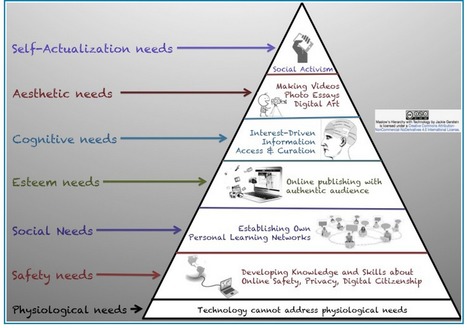
"Technology is obviously an essential element in our instructional toolkit. Knowing how and when and for what purposes to use this technology is much more important than the technology itself... An important step in the process of effective integration of technology in education is having a pedagogical approach supported by a theoretical framework to ground your technology practices inside the classroom." Via Beth Dichter

Beth Dichter's curator insight,
May 6, 2014 8:14 PM
Technology is a tool. When to use, how to use it, why you use...these are some of the questions that each of us must consider. To help us effectively integrate technology it is helpful to have a pedogogical background or framework. This post explores three approaches: * SAMR Model - Substitution, Augmentation, Modification, and Redefintion * TPACK - Content Knowledge, Pedagogical Knowledge, Technological Knowledge and the overlapping knowledges that occur: TP Knowledge which helps us understand how to make content more accessible; TC Knowledge which helps us pair or combine appropriate technology to content; and PC Knowledge which allows us to pair pedagogy with content. * Maslow's Hierarchy of Needs paired with Technology This article presents a great overview of all three of these pedagogical approaches, and all have been covered in this Scoop.it so if you are looking for additional information do a search here.
Scoop.it!

Marie Clement's curator insight,
April 23, 2014 5:11 AM
This is a great list of tools for anyone who is serious about online marketing. 
Lee Werrell's curator insight,
April 24, 2014 5:31 AM
Saving time is key if you are working and selling online - these tools help save you time and effort and make life easier. Check them out today! 
Sergey Bessonov's curator insight,
April 24, 2014 11:03 AM
Unbelievebly useul link for those who go online! check it out!
Scoop.it!
""Students need a voice. By voice, I mean the ability to recognize their own beliefs, practice articulating them in a variety of forms, and then find the confidence — and the platform — to express them." Via Beth Dichter

Dr. Helen Teague's curator insight,
May 3, 2014 9:18 AM
Beth Dichter's insight:Technology comes into play in that it provides students with a wide range of options to find and show their voice. This post looks at five areas: * Writing * Multimedia * Speaking * Performing and/or Direction * Artistic Expression Within each area there is a strategy listed, a number of tools suggested in four areas a short look at "terms of success." Helping students find their voice through technology also provides opportunities for students to be creative and to connect with an authentic audience, helping to build 21st century skills as defined through the Partnership for 21st Century Skills and Common Core.

Chris Carter's comment,
May 3, 2014 7:55 PM
I appreciate the breadth of options suggested here. This is not, "just use tech!"
|
Scoop.it!
|


|
Rescooped by
Bhushan Thapliyal
from School Leaders on iPads & Tablets
May 15, 2014 3:13 AM
|
Scoop.it!

Resources by Topic:
Favorite Apps
Best Practices
Engaging Activities
If you’re a high school teacher looking for iPad resources targeting your needs, you’ve come to the right place. Students
Via Mel Riddile

|
|
Rescooped by
Bhushan Thapliyal
from Android and iPad apps for language teachers
May 15, 2014 3:05 AM
|
Scoop.it!
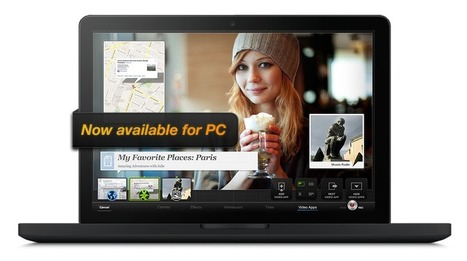
TouchCast for Desktop brings powerful new features to video producers, including a more robust compositing engine, multi-camera support, video import, and Hot Spot creation.
Via Baiba Svenca, Juergen Wagner


Pierre Cyborgjeff Martin's curator insight,
May 27, 2014 3:35 AM
A première, un concept intéressant pour dynamiser et rendre interactives des productions vidéos... A voir ce qu'il est réellement possible de faire avec une App iPad pour importer de bonnes séquences vidéo et éditer un produit efficacement.

elearning at eCampus ULg's curator insight,
May 27, 2014 4:53 AM
A l'heure où les vidéos prennent de plus en plus de place dans le paysage "eLearning", voici un outil qui pourrait s'avérer intéressant. Merci Béa ;-)

|
|
Rescooped by
Bhushan Thapliyal
from 21st Century Learning and Teaching
May 12, 2014 9:59 AM
|
Scoop.it!

Welcome to a post I always have fun writing. Last year I attempted finding ways to use Word Clouds (Wordle) in education. When I concluded writing that post I was at 108 possible ways. More than a...
Gust MEES: I created the above "Wordle Logo" with "Word Clouds" as example. You may use it for non-commercial use by giving credit to my blog ===> http://gustmees.wordpress.com/ <===
Check the free service here:
Via Gust MEES


Russell Taylor's curator insight,
May 16, 2014 4:00 AM
I use Word Clouds regularly on my VLE (Moodle) courses. They do need explaining sometimes, which makes me think they are less valuable than some other graphics, but there are lots of ideas here I am going to try.

Mayra.Loves.Books's curator insight,
November 30, 2014 8:14 PM
Great ideas presented here! I have used Wordle before, but I had not thought of using it in the ways listed. Can't wait to try them.

|
|
Rescooped by
Bhushan Thapliyal
from iPads, MakerEd and More in Education
May 11, 2014 1:36 AM
|
Scoop.it!

As I move in to a role where I will be working with other colleagues on a more formal basis when it comes to e-learning, I have been reflecting upon different Apps. I was thinking about SAMR and which Apps can have transformative learning linked to them, if used properly. The list started growing quite …
Via John Evans


|
|
Rescooped by
Bhushan Thapliyal
from Tech in the Classroom- Laptops, iPads & MORE
May 9, 2014 2:11 AM
|
Scoop.it!

As I near finished my first year having 1 to 1 iPads with my 5th graders, here are twelve resources my class will be using regularly next year.
Via Cyndi Danner-Kuhn
|
|
Rescooped by
Bhushan Thapliyal
from Learning and Teaching in an Online Environment
May 6, 2014 2:54 AM
|
Scoop.it!

New Compilation of Articles on the Flipped ClassroomApril 16, 2014
Inside Higher Ed is today releasing a free compilation of articles and essays -- in print-on-demand format -- about the flipped classroom. The articles and essays reflect key discussions about pedagogy, technology and the role of faculty members. Download the booklet here.
This booklet is part of a series of such compilations that Inside Higher Ed is publishing on a range of topics.
Via Kim Flintoff, Peter Mellow
|
|
Rescooped by
Bhushan Thapliyal
from Rapid eLearning
May 5, 2014 3:22 AM
|
Scoop.it!

With a little bit of effort you can create your own animated clipart in PowerPoint.
Via FPPT, michel verstrepen





100 Search Engines for Academic Research