Your new post is loading...
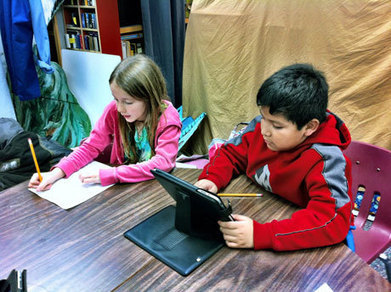
"A co-worker and I attended an iPad conference yesterday. My co-worker called it “iPad School.” I like that term, so I adopted it. There was so much information to soak up! My biggest take away was a greater understanding of all of the ways we can take the ipad to the next level, and use it to create, not just play games. My favorite part of the conference was at the end of the day, when after introducing us to all sorts of student oriented creating apps, the conference leader set us free to spend some time building our own presentation on the ipad. We were able to create our product, and then look at the products that our classmates had created."
Via John Evans
Get Bamboo Loop on the App Store. See screenshots and ratings, and read customer reviews.
Via Ana Cristina Pratas
Ever since I was a kid, I loathed back to school commercials. They always showed parents gleefully skipping through aisles of pencils and notebooks as the kids, sullen and dejected, sluggishly follow
Via CGagliolo
"Reading stories, watching videos, and listening to podcasts is one way to learn with an iPad. But a more fun way to learn with an iPad is to create things. Here are five iPad apps that elementary school students can use to create stories."
Via John Evans

|
Scooped by
Bhushan Thapliyal
May 23, 2013 10:59 AM
|
Practical ideas for teachers on using the iPad in the classroom, including specially selected education apps.
|
|
Scooped by
Bhushan Thapliyal
May 23, 2013 10:58 AM
|
Resources and videos about how to use iPads in the classroom.
"Practice your Ipad typing. One of the toughest things to get used to on the iPad is typing on a digital keyboard. It feels weird for most people to start, but you can get used to it with practice. Sit down for a few minutes every day and just type in your favorite word processing program. Soon you’ll feel at home."
Via John Evans
|
|
Rescooped by
Bhushan Thapliyal
from iPads in High School
May 22, 2013 11:22 AM
|
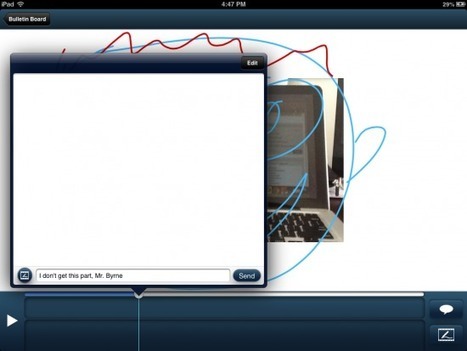
Ask3 is a free iPad app from TechSmith. TechSmith is probably best known as being the company that produces Jing and Camtasia screen capture software. Ask3 is a tool that teachers can use to create...
Via Timo Ilomäki
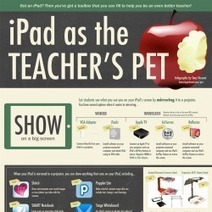
The infographic is all about verbs, that is, the things you can do with an iPad. Those actions include showing your screen on a projector, managing th
Via Ana Cristina Pratas, Tom Perran
Touch-screen tablets for young students have become all the rage. Some districts are even buying iPads for every kindergartner, a move sparking both celebration and consternation.
Via Jon Samuelson
"APP GROUPS, BOOKMARK FAVORITE WEBSITES TO THE HOME PAGE, CAPS LOCK, CHANGE NOTES FONT, CREATE A TOUGHER PASSWORD and so many more tips!
Via John Evans
|
It's a tool, it's a tool, it's a tool. The iPad is not going to replace teachers or 'fix' education. There is a cost implication that must be taken into account and only an educator will know if it...
Via Ana Cristina Pratas, Tom Perran
Find education news, teaching strategies, lesson plans, activity ideas and more on the WeAreTeachers blog. Featuring posts by guest bloggers and teachers as well as WeAreTeachers editors.
Via John Evans
|
|
Scooped by
Bhushan Thapliyal
May 24, 2013 5:33 AM
|
|
|
Scooped by
Bhushan Thapliyal
May 23, 2013 10:59 AM
|
"Last week I spent a day working with teachers at Bridgton Academy in Bridgton, Maine. Bridgton Academy is a private boarding school serving male students who have completed high school, but are spending a year gaining more skills and knowledge before going to college. I was invited to spend the day consulting with teachers to develop ideas and strategies for using iPads with their students. There was a healthy mix teachers’ needs and desires for the day. In no particular order, the list below contains the apps that we ended up spending the most time exploring."
Via John Evans
"In order to implement the iPads successfully you will need to: * Connection checklist * Pedagogical checklist * Logistical checklist"
Via John Evans
|
|
Scooped by
Bhushan Thapliyal
May 23, 2013 12:30 AM
|
Le Sommet sur le iPad en éducation du 1er mai a été riche en partage d’expérience et de bonnes pratiques, s’appliquant bien souvent à plusieurs technologies.
"Digital immigrants are still trying to come to grips with all the digital innovations that are unfolding in today's world. And even for those who have succeeded in making the digital transition, they still have an urge for the old days of pen and paper practices. That is probably why even with the prevalence of touch screen devices, some people still prefer to use a stylus when working on their tablets. While stylus does satisfy the craving for holding a pen in your hand, it still does not function as expected."
Via John Evans
"By definition, a screencast is a recording of your computer screen accompanied by audio narration.In the past, screencasting tools used to cost a fortune and only tech savvy people were able to use them but thanks to web 2.0 technologies, there are now dozens of easy to use and simple platforms to record your screencast. Educational Technology and Mobile Learning has already featured several of these tools in previous posts. Today, however, I am going to share with you some of the best iPad apps to create screencasts and tutorials. Check them out below and let us know what you think of them. Enjoy"
Via John Evans
|
|
Rescooped by
Bhushan Thapliyal
from Courants technos
May 21, 2013 12:50 PM
|
« MOS Player for iPad», lecteur de contenu eLearning en mode déconnecté, idéal pour les populations nomades
Via Thot - Cursus
|