


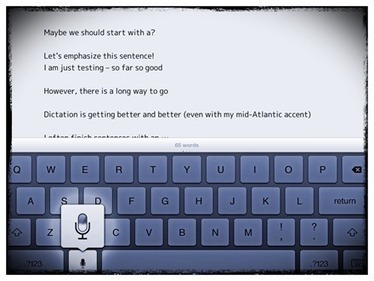

If you haven’t tried out dictation on the iPad you really should give it a go. It can be much faster than typing at times. Here are a few little tips and some common commands you can use to get even more out of dictation:

 Your new post is loading...
 Scoop.it! If you haven’t tried out dictation on the iPad you really should give it a go. It can be much faster than typing at times. Here are a few little tips and some common commands you can use to get even more out of dictation: 
No comment yet.
Sign up to comment
Scoop.it!

Polk Street Press, publisher of the well-received kids edu-app Goodnight Safari, want to team up with NYTimes bestselling author Deborah Underwood, and artist Luciana Powell to create Spatter & Spark, a children’s story book for iPad.
Scoop.it!

If you haven’t downloaded iOS 6 yet, now is the time to do it. The operating system comes with a slew of enhancements, including Apple’s much anticipated Passbook.
Scoop.it!

The Twitter app for iPad has received a makeover, featuring a new profile look and an increased prominence for pictures to enhance the visual experience.
Scoop.it!
A quick overview of iOS 6's new features in video form.
Scoop.it!
Fifth Graders reflect on the many ways that 8 weeks of iPad use are impacting their learning.
Scoop.it!

Complete guide for how to manage storage on iPad and iPhone. Reclaim lost space and optimize the storage on your iOS device.
Scoop.it!

For the rest of us who may not have $20 to spend on an app as handy as Printopia, I'm compelled to compile a list of ways to gather student work off iPads. This is the resulting blog entry (albeit rough-hewn)! If you have some ideas about how to accomplish this, please share in the comments or your own blog with a linkback.
Scoop.it!
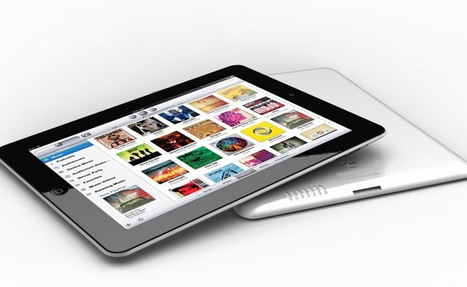
Back in July we told you about the murmurings of small revisions to the third-generation iPad that would essentially be a part of the fourth-generation launch next spring. An iPad 3S, if you will. Last month, DisplaySearch claimed that Apple will be launching three new products in the second half of 2012. The iPhone 5, which no one disputes, the iPad mini, which has not been made official, but we are all rooting for it, and an iPad “refresh.”
Scoop.it!

Before even discussing the wealth of resources that can be read in iBooks, just think about the capabilities that it brings to the act of reading. The native features include the ability to highlight text, to take, save, and share notes, to search, to look up any word in a dictionary or online, as well as to leverage text-to-speech. For students and teachers, this means that it is now possible to…..
Scoop.it!

Hands on learning with iPad...The introduction of iPad and select apps has opened up many new learning opportunities. Thanks to AirPlay technology built into the iPad, auto technology students now watch video demonstrations of repair techniques streamed wirelessly by their instructors from iPad to a large flat-panel display connected to an Apple TV.
Scoop.it!

Langwitches is one of my trusted resources that I visit frequently for tips about the use of iPad in education. Today I found out that Silvia has posted some great slides about iPad in Education and upon checking them I found them extremely useful .
Scoop.it!
Using this app, you can create basic multimedia files and complete SMART Notebook lesson activities. You can use the app for individual and collaborative learning with an iPad, and you can use SMART Notebook software with a SMART Board interactive whiteboard for small group and class learning.
|
Scoop.it!

Guided Access is a new feature in iOS 6 that helps users with hearing, learning, vision, and mobility disabilities use iOS devices.
Scoop.it!

Sure, everybody is talking about the new iPhone. Maybe you’ve already pre-ordered yours and are line-sitting at your own front door, waiting for it to be delivered. But what about the iPad? Today, at approximately 10:00 a.m.
Scoop.it!

Now it's much easier to attach a photo to an email on the iPad in iOS 6.
Scoop.it!

Today Wacom launched a new addition to its stylus line, the Bamboo Stylus pocket. The new stylus is designed for ultimate portability by expanding, extending and contracting to meet varying needs such as writing, sketching or navigating.
Scoop.it!

For most people in university and college, the ability to annotate PDF files is one of the main reasons for buying an iPad. There are hundreds of apps out there that let you annotate PDFs: how do you know which one is the best one for you?
Scoop.it!

Sure, car chargers are a dime-a-dozen, but you don’t want to buy the dime store kind. Cheap device chargers can do more harm than good. Instead, let us show you some of the best the industry has to offer. They may be a little on the pricey side, but at least you can be sure they won’t ruin your iPad’s battery.
Scoop.it!

PaperHelper is an interesting and impressive iPad app from a pair of teenage developers. It offers a writing app and web browser app rolled into one and seems to be aimed primarily at students writing essays.
Scoop.it!
As part of our reading program, Mr. Colosi's First Grade class read the book "The Dot," by Peter Reynolds. Students were so inspired by the book's message of uniqueness that they decided to create art in a brand new way. Using the classroom iPad, each student sketched their own "dot" using the Drawing App app. Using this unique app, students were able to draw with crayons, paints, and markers to make original artwork that could be shared with the world!
Scoop.it!

As a stylus aficionado, I want to let everyone in on a little secret. When it comes to styluses, the tip is almost entirely unimportant – you are going to get the same writing results with almost any stylus.
Scoop.it!
The following is a video presentation of the Eanes ISD Middle School iPad Student Orientation.
Scoop.it!

The popularity of tablets cannot be denied. Our infographic compares Apple's three tablet offerings: the original iPad, the iPad 2, and the New iPad. Find out more about the typical iPad and tablet user, and which one is right for you. Also interesting are the amazing initial figures from sales of the New iPad.
Scoop.it!

Voice Dictation on the iPad has steadily grown on me and is now one of my favorite features on the new iPad. I’ve always felt that it was a more interesting and useful feature than Siri, but when it first came to the new iPad I just didn’t remember to use it often enough to get great benefit from it.
|




