Your new post is loading...

|
Scooped by
Beth Dichter
November 26, 2012 10:52 PM
|
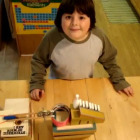
Check out this post (and the embedded YouTube video) where a 7 year old (who wants" to study robotics at MIT and become a theoretical theorist") designs a Rube Goldberg machine to trap a monster. His description of a Rube Goldberg machine is "a machine that creates a complicated chain reaction to do a simple task." Using a wide variety of materials, including marbles, tubing, pencils, a toaster, books, balls, a paper roll and more he shows us his creativity and ingenuity...as well as resilience. He also shows an understanding of the scientific method, sharing his hypothesis and more. I suspect that many will share this video with others in their schools.
|
|
Scooped by
Beth Dichter
November 26, 2012 10:02 PM
|
Are you looking for ways to foster creativity in your classroom? This post provides some history about the nature of creativity and shares how beliefs have shifted over time. If innovation and creativty is a key component of what students need to learn then how can we go about doing a better job teaching it. A few of the suggestions are below (quoted from the article, although each has additional information). * Embrace creativity as part of learning. * Participate in or create a program to develop creative skills. * Use a creativity model. (Note - one is suggested that has six steps). * See creativity in a positive light. * Explore different cultures. An additional 25 suggestions may be found in the post as well as links to many resources.
|
|
Scooped by
Beth Dichter
November 25, 2012 10:04 PM
|
Popular neuromyths about how we learn are creating confusion in the classroom, write Christopher Chabris and Daniel Simons. This post starts with a pop quiz: Which of these statements is false? 1. We use only 10% of our brain. 2. Environments rich in stimuli improve the brains of preschool children. 3. Individuals learn better when they receive information in their preferred learning style, whether auditory, visual or kinesthetic. It then continues to explain a number of "neuromyths" and it includes a video interview with a Pyschology professor who discusses recent findings.
|
|
Scooped by
Beth Dichter
November 24, 2012 9:51 PM
|
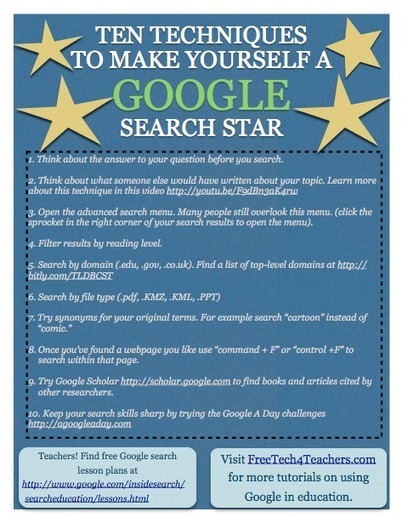
Richard Byrne shares ten techniques to help students become better searchers with Google. Some of his suggestions may be new to you and a number provide links to additional information. You can download a copy of the pdf from Scribd (free of charge).
|
|
Scooped by
Beth Dichter
November 24, 2012 4:41 PM
|
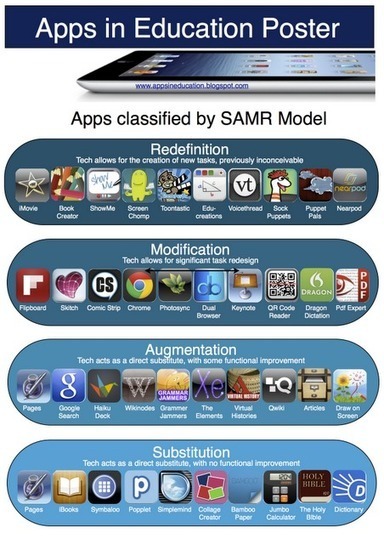
If the SAMR model is new to you here is a brief explanation of the four letters that make it up: S- Substitution - Tech acts as a direct tool substitute, with no functional change.
A - Augmentation - Tech acts as a direct tool substitute, with functional improvement.
M- Modification - Tech allows for significant task redesign.
R - Redefinition - Tech allows for the creation of new tasks, previously inconceivable. The SAMR Model begins with Substitution (as in read the poster from the bottom up to more clearly understand the model), moving to Augmentation, then Modification and finishing with Redefinition. The SAMR model is the work of Ruben R. Puentedura, Ph.D. from M.I.T. For more information on the SAMR model check out his website at http://hippasus.com/rrpweblog/. For an indepth look you may want to check out the presentation from August 23, 2012 with the title "The SAMR Model: Background and Exemplars."
|
|
Scooped by
Beth Dichter
November 22, 2012 11:23 PM
|
Why have your students work collaboratively? "Collaborative learning teams are said to attain higher levels of thinking and preserve information for longer times that students working individually." This post provides 20 suggestions to help collaborative groups work more effectively. A few are: * Establish group goals. * Keep groups mid-sized. * Build trust and promote open communication. * Consider the learning process asa part of the assessment. The post includes links to a variety of resources and each point has an explantion with additional information.
|
|
Scooped by
Beth Dichter
November 21, 2012 11:10 PM
|
An elementary school teacher shares how she downloads "books that are currently free at Amazon" and loads them on iPads for her students to read. She provides the details to know how she makes it work. The website she uses to find the free books is One Hundred Free Books. The link is http://onehundredfreebooks.com/. This site publishes names of free books across many genres including Free Fiction, Non-Fiction, Romance, Mystery, Thrillers, Young Adult, and Cooking Books.
|
|
Scooped by
Beth Dichter
November 20, 2012 10:06 PM
|
Have you wondered what it means when people talk about adaptive testing? This post helps answer this question. After a short introducation on "the Olden Days" of testing (as in paper and pencils) you quickly find out that adpative testing will be coming to us as we move to testing on computers. Specically adaptive testing allows learners to be challenged based on their knowledge. Easier questions happen at the beginning, and based on learners answers the questions will become more difficult if answered correctly, or easier if answered incorrectly. There is a short video that explains this in more detail.
|
|
Scooped by
Beth Dichter
November 19, 2012 10:07 PM
|
This post begins with a quote from President Obama: "“The quality of math and science teachers is the most important single factor influencing whether students will succeed or fail in science, technology, engineering and math.” From this point it veers in a different direction, noting that the issue is that teachers "are not given the freedom to support children in ways that will produce the scientists and innovators our country needs." If we look to our past (and our present) we will find that we are not listening to the advice that "our nation's historic inventors, scientists, and physicists (whom have shared) their advice and experiences." Read the article to learn the experiences of Albert Einstein, Thomas Edison, Richard Feyman, Michio Kaku (which includes a video where he explains "that exams are crushing curiousity out of the next generation..."), as well as individuals around today such as Aaron Iba and Jack Andraka (the student who at the age of 15 created a test for pancreatic cancer). Perhaps the question we need to ask is how do we change the system to support the necessary learning?
|
|
Scooped by
Beth Dichter
November 19, 2012 8:27 PM
|
Should We Teach Keyboarding, or Just Digital Literacy? This post rasied the question "Do we need to teach keyboarding?", specifically the QWERTY keyboard. Today students have access to digital devices that do not necessarily have keyboards attached. The author explores these issues and shares how his school is dealing with this issue. He also includes a video, 'Digital Natives', that provides a look at how students use technology today. This may be a question that is being asked at your school, and with the Common Core requiring that students be able to sit and type a document (beginning in Grade 4 with a single page in one sitting and moving to 3 pages in one sitting by Grade 6) it is a question that we may need to explore.
|
|
Scooped by
Beth Dichter
November 18, 2012 9:30 PM
|
How would ou go about visualizing the "exact location of every star in the galaxy? The Google Chrome Blog defines this as a problem of "galactic proportions" but they have taken a step (which they define as small) by "plotting the location of the stars closest to our sun." With over 200 billion stars this "experiment" of 100,000 stars is amazing. You can zoom in on stars (and on the "prominent stars close to our sun - click each the name to learn more information and see a digital rendition" or zoon out to the Milky Way. To go directly to this interactive graphic: http://workshop.chromeexperiments.com/stars/.
|
|
Scooped by
Beth Dichter
November 18, 2012 3:50 PM
|
Understanding fractions are critical to future math and algebra success. What simple things can be done to help young learners today for their success tomorrow? A look at a recent study on how "humans naturally develop numerical concepts" which hypothesized "that an early understanding of fractions could predict how well a student would perform in algebra and general mathematics later on." The post provides four suggestions on how to put this into practice: * Make it visual * Make it reflective * Make it practical * Make it ubiquitous For additional information and some links to other related readings click through to the post.
|
|
Scooped by
Beth Dichter
November 17, 2012 9:00 PM
|
Now more than ever, students need to understand the basics of social media and how it can affect their future both negatively and positively. What are some of the issues students need to be aware of when it comes to social media? This post recommends six area: * Your online reputation * The concept of privacy and having a "professional public appearance online" * The value of connections (as in your personal network) * Helping student establish their expertise (blogging, etc.) * Internet savvy (as in "find the cheapest textbooks online") * Staying updated As the article states "social media will drive the upcoming generation" so teaching them how to use the Internet and "manage" their online identity is critical.
|
|
|
Scooped by
Beth Dichter
November 26, 2012 10:27 PM
|
If you are looking for free and open source materials one great place to check out periodically is Open Culture. Richard Bryne shared that "they launched a new collection of more than 200 free video lessons, apps, ebooks, and website for K-12students and teachers...which includes...items that were new to me...like this Shakespeare app and this Google Earth for science teacher resource." Links to a number of resources are embedded in his post.
|
|
Scooped by
Beth Dichter
November 26, 2012 7:46 PM
|
Great links to tips, tricks and shortcuts for the iPad from Julie Greller. As she states, there may be some duplicates, but all are selected by a media specialist. As well as links to many sites there are also some videos including one on Setting up Shortcuts for iPhone and iPad and Seven iPad Keyboard Tricks.
|
|
Scooped by
Beth Dichter
November 25, 2012 8:52 PM
|
How do we prepare out students for Web 3.0 learning? This slide show by Judy O'Connell provides us an opportunity to look back in time, from what we might refer to as Web 0 and the journey to where we are today and where we are heading. Many define Web 2.0 as the social web. Web 3.0 will be defined by data, and the ability to link data in new ways. Many excellent resources are embedded within this slide show, so find some time to pull up your chair and learn more about what the future may hold.
|
|
Scooped by
Beth Dichter
November 24, 2012 9:11 PM
|
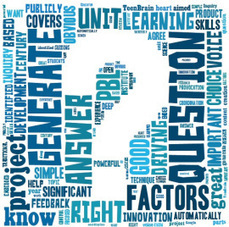
What is the most important element in PBL unit? There are8 elements to choose from: * Significant Content * A Need to Know * A Driving Question * Student Voice and Choice * 21st Century Skills * Inquiry and Innovation * Feedback and Revision * Publicly Presented Product This post states that a driving question is most important. "If you find the right questions then most of the other factors identified are covered automatically." The question then becomes "How do you generate a great question and who is the right person to generate that question?" To this the answer would be the students. If this is an area where you are not sure how to work with students then look into the the work of the Right Question Institute (RQI) and their Question Formation Technique (QFT). To help you better understand this they provide a look at "how question generation was embedded at the heart of a PBL unit."
|
|
Scooped by
Beth Dichter
November 23, 2012 11:00 PM
|
An in-depth study that took place in Scotland, looking at "issues associated with the deployment of personal mobile devices as tools for teaching and learning."
Four themes were identified: * How tablet devices impacted teaching and learning? * Leadership and management issues * Parental engagement * Professional development and learning for teachers The post lists six headlines from the study, including (quoting): * The adoption of mobile technologies on a personal basis significantly increases access to technology for students, both inside and beyond school, with many attendant benefits for learning which include greater motivation, engagement, parental involvement, and understanding of complex ideas. * Teachers are equally engaged by the use of a device like the iPad which has a low learning curve enabling them to use it immediately as a teaching tool and a learning tool for themselves. For more information click through to the article. To download the report you will need to go a link at the end of the articles "iPad Scotland Evaluation."
|
|
Scooped by
Beth Dichter
November 22, 2012 9:54 PM
|
A look at the importance of teaching students how to search. Do your students (or faculty) know how to find information online? Do they have use appropriate search words, understand how results are generated, use multiple resources, to assess the information (quality and accuracy), recognize bias? This post focuses on some of the information from the recent Pew Report that looked at "How Teens Do Research in the Digital World." The author also provides links to articles he has written on how to use Google to teach search to students in K-2, 3-5, 6-8, and 9-12.
I would also suggest teaching with search engines beyond Google. If you are concerned with tracking check out DuckDuckGo or Blekko. A great metasearch engine is Carrot2. And you can use want to compare websites side-by-side check out Slikk.
|
|
Scooped by
Beth Dichter
November 21, 2012 2:59 PM
|
If you are looking for a browser that provides accessible features check out Google Chrome, specifically the "many add-ons available to facilitate access, as well as websites that have been designed to take advantage of features built into Chrome." Once again Paul Hamilton has pulled together a variety of add-ons, both Chrome extensions and apps. All are free from the Chrome Web Store. Some examples of extensions and apps discussed include SpeakIt!, which provides text-to-speech for reading web content; Voice Search, which allows you to speak your search terms (and works with multiple search engines); and Chrome Vis, which allows you do magnify and change the color of text as well as view the text selected inside a separate lens. An additional five add-ons are listed with links to the add-ons and in some cases additional information. Please note "You need a Google (GMail) acccount to install an app."
|
|
Scooped by
Beth Dichter
November 20, 2012 9:49 PM
|
This post shares a robust list of "Online Interactive Thinking Strategies and Tools...designed to provide a scaffold which enables students to think with more depth and structure." Each tool (and over 35 are provided) has a brief description which explains how the student would use the tool, often referring to Habits of Mind or Multiple Intelligences. Links to all are provided.
|
|
Scooped by
Beth Dichter
November 19, 2012 9:36 PM
|
Check out this periodic table that looks at Communities of Practice, Connectivism and Personal Learning Networks. The author, Gretal Patch, also provides links to references she used to create this table. An interesting view at how social media and social networks interact with our professional lives.
|
|
Scooped by
Beth Dichter
November 19, 2012 7:52 PM
|
A look at why you might want to connect your students with students in other parts of the world (by two educators whom do this) as well as three resources to help you start on global collaboration. Five reasons with explanations are provided for the why, such as: * Working with students from different culture motivates students * It's easy to incorporate core curriculum lessons into global collaborations * It encourages problem solving For more information click through to the post.
|
|
Scooped by
Beth Dichter
November 18, 2012 9:15 PM
|
When you look at digital and online texts there are a number of skills that our students will encounter. This post discusses four areas: * Finding and reading appropriate materials * Determining the best approach for reading digital materials * Synthesizing multiple sources * Integrating multimodal resources Each of these areas is discussed in detail. In each case there is a discussion of the subject, an example to provide more information and then a discussion of an effective practice to use in your classroom.
|
|
Scooped by
Beth Dichter
November 17, 2012 9:50 PM
|
© 2012 Some people with autism have difficulty processing intense, multiple sensory experiences at once. "This animation give the viewer a glimpse into sensory overload, and how often our sensory experiences intertwine in everyday life."
A video that will move you and you may want to share with teachers, students, parents and staff.
|