

|
Scooped by
Ana Cristina Pratas
onto Digital Delights for Learners September 17, 2015 2:21 AM
|
 Scoop.it!
Ana Cristina Pratas's insight:


|
|
Scooped by
Ana Cristina Pratas
onto Digital Delights for Learners September 17, 2015 2:21 AM
|
Scoop.it!
 Your new post is loading...
 Your new post is loading...
Your new post is loading...
Scoop.it!
A Padlet with some of the most popular tools to generate lessons, quizzes, rubrics.
Do you have a favourite?
Any other recommendations to share?
Regularly updated.
Scoop.it!

Build a real website by dragging blocks. Edit the words. Click publish. 90+ ready made designs, a free plan, and your own domain. No coding required.
Scoop.it!

From
www

Read books with AI guidance, vocabulary support, and interactive quizzes to improve learning retention.
Scoop.it!

From
tvexplorer
Watch over 10,000 free live TV channels from around the world, right in your browser. No signup, no apps, no tracking. Explore free TV by language, country, and category.
Scoop.it!
From
revise
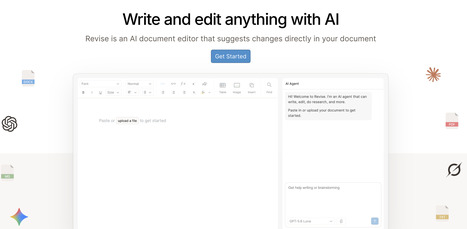
Revise is a free AI document editor for Word files. Import DOCX documents, edit them with GPT, Claude, or Gemini, review every change, and export back to Word.
Scoop.it!
Paradigm Study is an AI-powered personal tutoring platform. Get personalized tutoring for any subject with adaptive learning, real-time progress tracking, and instant feedback. Start learning today!
Scoop.it!

What music producers taught me about Baudrillard, and what it asks of educators
Scoop.it!
Scoop.it!

What is the difference between a fact and an opinion? Check out Fact vs. Opinion, a free digital literacy and citizenship lesson plan by Common Sense Media. Teach students in 1 about responsible and healthy media and tech use.
Scoop.it!

From
mindspase
Your mind, beautifully organized - Save everything, Manage nothing.
Scoop.it!

Learn how teaching AI literacy helps students use AI as a writing assistant rather than a substitute, improving revision, critical thinking, and ethical AI use.
Scoop.it!
From
teacherforge
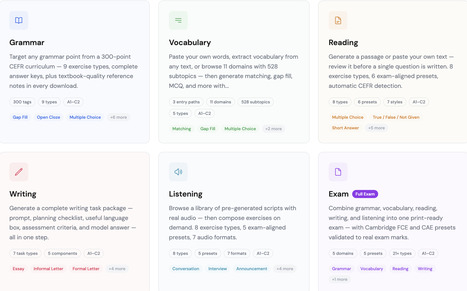
Generate ESL and EFL worksheets and exams with AI. Grammar, vocabulary, reading, writing, and listening — 21+ question types, A1 to C2, with answer keys. Free to start.
Scoop.it!

From
fileflip
FileFlip is the best offline file converter for Windows & Mac. Convert 70+ formats (HEIC, PDF, MP4, DOCX) 100% offline - files never uploaded. Better than Zamzar, CloudConvert & Convertio. One-time $12.99, no subscription. The private file converter for security-conscious users. |
Scoop.it!

Practice German with free interactive games. Build vocabulary, master verb conjugations, learn noun genders, and improve grammar — no signup needed. Perfect for beginners and intermediate learners.
Scoop.it!

From
livingpage
Turn any PDF into a fast, page-turning reader you can share with a link or embed anywhere. Branded, trackable and hosted for you — no code. Free to start.
Scoop.it!

From
blablapal
BlablaPal: Faster to fluency. Overcome the intermediate plateau by speaking, reading and listening to content that is relevant to you.
Scoop.it!

From
globetv
Watch live TV channels, browse live webcams and follow global news, regional stories and culture updates in one place.
Scoop.it!
From
flipquiz
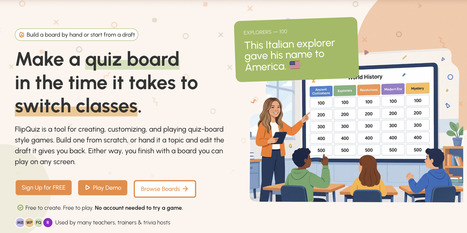
Build a board by hand or start from a draft Make a quiz board in the time it takes tobrew coffeeswitch classeswrite a hall pass. FlipQuiz is a tool for creating, customizing, and playing quiz‑board style games. Build one from scratch, or hand it a topic and edit the draft it gives you back.
Scoop.it!
From
speechify
Create lifelike speech in seconds with our AI voice generator. 1000+ AI voices in 60+ languages for videos, podcasts, or scripts. Try free - no signup required.
Scoop.it!
From
flowspeech
FlowSpeech is a context-aware text to speech tool converting text to human-like audio. Featuring emotion and pause control, and 30+ voices for superior TTS results.
Scoop.it!

From
www
Free AI Course Creator which helps you build your online course in minutes. Automate assessment, course authoring and convert files to eLearning. Click to try Coursebox AI, the best AI course generator.
Scoop.it!

From
yapyapgo
Classroom speaking practice tool for ESL teachers. Pair students, display graded questions, manage timers. 35,000+ questions. Free to start.
Scoop.it!

From
readpdfaloud
Read PDF aloud for free with natural AI voices! Convert any PDF, including scanned files via OCR, into natural speech. Supports 142+ languages.
Scoop.it!

From
sketchapedia
An infinite visual browser generated entirely on demand in real time 
Nik Peachey's curator insight,
May 27, 5:28 AM
This is a really fascinating site that allows you to browse through and explore areas of knowledge by generating infographic type images in your browser https://www.sketchapedia.com Really great for learers who are more visual.
Scoop.it!

From
megaconvert
Free online file converter supporting 500+ formats. No signup required. Fast, secure, and private. |







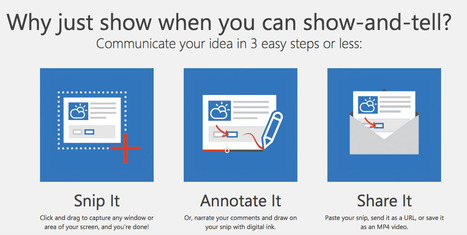
Snip, on the other hand, is a free tool developed through a Microsoft Garage project that allows users to capture screenshots and then annotate them. With the Snip app, users can draw on their captured screenshots using a software pen, which is available in various colors and sizes.