Your new post is loading...

|
Scooped by
William delmas
October 19, 2013 5:17 AM
|
Thanks to StreamContent class, creating basic file download service in ASP.NET Web API is a relatively straightforward task. Let’s start by implementing a basic scenario, where files are served from a directory.
Instead of dealing with file system access directly in controllers I usually like to encapsulate this functionality in a dedicated object, which makes unit testing/mocking easier and makes code tidier. For our examples we will createIFileProvider interface that exposes three operations:

|
Suggested by
Jan Hesse
October 15, 2013 3:22 AM
|
MVC4Bootstrap3Sample is an Asp.NET MVC4 project using Bootstrap3 as its theme. To use it download the project file from my Github repository and open the solution in Visual Studio.NET 2012. This repository's bootstrap3 is not added by using Nuget.
|
|
Scooped by
William delmas
October 4, 2013 10:11 AM
|
Knockout JS as we know is a highly versatile JavaScript library that helps us implement the MVVM pattern on the client by providing us with two way data binding and templating capabilities. Today we will use Knockout JS and ASP.NET Web API to build an application that represents data in a tabular format with AJAX based sorting and paging capabilities. Representing Tabular data in a table is as old as web itself and today end users expect a certain amount of features and functionality built in. These include fast access, sorting, paging and filtering. There are well established libraries like Datatables.net that already do these for us. However, knowing how something is implemented, helps us tweak things to our advantage, because no two requirements are the same, ever.
|
|
Scooped by
William delmas
October 2, 2013 9:17 AM
|
This tutorial shows how to use ASP.NET SignalR to create a real-time chat applicationYou will add SignalR to an MVC 4 application and create a chat view to send and display messages
|
|
Scooped by
William delmas
October 2, 2013 9:10 AM
|
Routing is how Web API matches a URI to an action. Web API 2 supports a new type of routing, called attribute routing. As the name implies, attribute routing uses attributes to define routes. Attribute routing gives you more control over the URIs in your web API. For example, you can easily create URIs that describe hierarchies of resources. The earlier style of routing, called convention-based routing, is still fully supported. In fact, you can combine both techniques in the same project. This topic shows how to enable attribute routing and describes the various options for attribute routing. For an end-to-end tutorial that uses attribute routing, see Create a REST API with Attribute Routing in Web API 2.
|
|
Scooped by
William delmas
August 22, 2013 4:38 AM
|
In this blog post I am going to show how to provide Basic HTTP authentication in a Web API project by extending framework’s AuthotrizeAttribute. ASP.NET Web API is a great tool to create lightweight, HTTP-based APIs for your internet and mobile applications. In most scenarios you will need to provide some kind of authentication and authorization mechanism to restrict and isolate resources exposed by your services. Security in ASP.NET Web API is deferred to the hosting infrastructure. When running within IIS, authorization mechanism runs on top of an existing ASP.NET security system, meaning you can leverage existing features like … good ‘ol membership and role providers.
|
|
Scooped by
William delmas
August 10, 2013 4:38 AM
|
Why Shouldn't I use MembershipProvider? Ah the million dollar question: "Why shouldn't I use the MembershipProvider that comes with ASP.NET?" Well I have a quick list here, and you can work around some of these issues by using other providers and writing your own providers, but at that point why not just build your own? -SQL Server Dependency -Lots of Useless Tables -Separation of User and Profile -Inverted table design (think Dictionary but with SQL, bleech :P). -Ultimately a generic implementation. Generic is not always good. -Old Old Old (10+ years); a lot has changed in 10 years.
|
|
Scooped by
William delmas
July 19, 2013 2:04 PM
|
In today's article we'll have a look at controlling your Spotify client remotely over HTTP using a small API toolset we'll create using self-hosted ASP.NET Web API. On top of that, we'll push current the current player status to the client in real time with SignalR (self-hosted too). In the process, we will explore several other interesting technologies, such as OWIN, to provide smooth coexistence of Web API and SignalR.
|
|
Scooped by
William delmas
July 9, 2013 4:06 PM
|
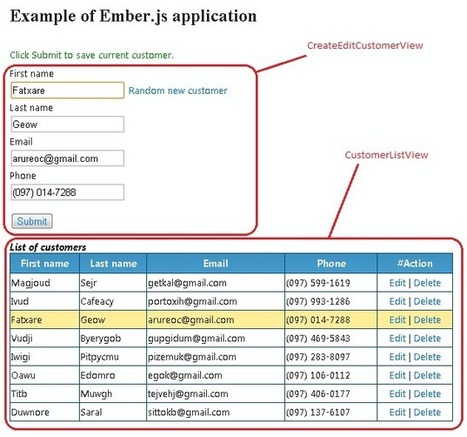
Ember.js is a powerful JavaScript MVC framework to create complex web applications that eliminates boilerplate and provides a standard application architecture, it supports UI Bindings, Composed Views, Web Presentation Layers, and plays nicely with others. In order to create a real-time interaction web application, I add a SignalR hub and REST service with ASP.NET MVC.
|
|
Scooped by
William delmas
July 6, 2013 7:08 AM
|
In our sample scenario, we have a Web API service that returns paged list of Posts where a Post is a simple entity with Title, Text and Author. The Web Service fetches data from the repository and serves up 5 pages at a time and stops when there is no more data to fetch.
|
|
Scooped by
William delmas
June 26, 2013 1:59 PM
|
Some say that to make links nice means to make 100% REST compliant API. Indeed, it’s not true, and REST (was mentioned for the first time in a dissertation of one of the one intelligent fellow), is not as simple as it seems to be. Construction rules for REST-services refer to some limits that also define the architecture, so, you would have to take that into consideration, and either agree or disagree with it.
|
|
Scooped by
William delmas
June 20, 2013 6:28 AM
|
Bandwidth performance is one of the critical requirements for every website. In today’s time, a major cost of the website is not hard disk space but its bandwidth. So transferring maximum amount of data over the available bandwidth becomes very critical. In this article we will see how we can use IIS compression to increase bandwidth performance.
|
|
Scooped by
William delmas
June 13, 2013 4:30 AM
|
In modern applications the end users want to get their data. They want it now, they want it up-to date. In fact it does not matter whether these are pure web application, native desktop installations or mobile apps: everybody wants his data now! For .NET-minded developers there are a numbers of options to implement near-real-time push style communication from the server/the services to the clients/consumers. You can choose plain HTTP or the super-new WebSockets features available in .NET 4.5 together with Windows 8 and Windows Server 2012. But the coolest and increasingly popular approach is to use a new framework: ASP.NET SignalR.
|
|
|
Scooped by
William delmas
October 18, 2013 3:17 AM
|
If you are reading this article then very likely you already know what Redis is. If you are an experienced Redis user interested in ASP.NET Web API integration you can safely jump to the next part. In order to use Redis efficiently and avoid potential pitfalls one needs to understand a little bit about how it works and how different it is from relational databases.I strongly recommend reading one of books or online materials available on the topic.
|
|
Scooped by
William delmas
October 8, 2013 5:51 AM
|
We will use the jQuery UI Date Picker to provide a nice calendar for picking the dates and as a final twist in the tale, we’ll use a Custom Date format in the Picker. There is a nasty bug in jQuery UI’s date picker, so we’ll see how we can fix that as well using another JavaScript library Moment.js.
|
|
Scooped by
William delmas
October 3, 2013 3:40 AM
|
If you are familiar with MVC routing you are wondering, err… routing is a server side thing, how does it matter to a client side framework. Well you are not alone, even I had the same thoughts when I heard of Routing in JS frameworks. But as you will see, routing is real and it works rather nicely on Angular JS.
|
|
Scooped by
William delmas
October 2, 2013 9:12 AM
|
There is the old saying: no pain, no gain. Well congratulations reader, my pain is your gain in this week's post. I will be showing you the steps it takes to purchase, sign, and install a SSL certificate on Windows Azure. I am a big fan and customer of DNSimple, which is a domain hosting provider. If you aren't using them, then you will need to figure out the initial steps for your hosting provider.
This project is an application skeleton for a simple AngularJS app. You can use it to bootstrap you AngularJS web application projects in Visual Studio environment. This seed contains AngularJS libraries, test libraries and a bunch of scripts all preconfigured for instant web development gratification. Just clone the repo (or download the zip/tarball), open it in Visual Studio 2012 and you are ready to develop and test your web application. This seed doesn't do much, just shows how to write two controllers and views together. You can check it out by running App project in Visual Studio. Technologies: * AngularJS MV* family JavaScript Framework
* ASP.NET Web Api library for building RESTful services
* ASP.NET Web Pages adds Razor syntax to your HTML views
* ASP.NET Web Optimization Framework bundles and minifies JavaScript/CSS files
* TypeScript adds static typing to JavaScript and better IDE goodies
* LESS CSS extends CSS with dynamic behavior
Via Jan Hesse
|
|
Scooped by
William delmas
August 22, 2013 4:33 AM
|
About a week ago, I set out to add authentication to an API for a small project I was working on. I didn't need the complexity of something like OAuth and for an API, Forms Authentication doesn't make much sense. I figured the easiest would be to just enable Basic Authentication in IIS and I'd be on my way. Well, the first problem with using Basic Authentication as it comes in IIS is that it only connects to Windows accounts, which in my case wouldn't work; I needed to authenticate against a database.
Today we’ll see how to use a feature called Directives in Angular JS. Directives allow you to encapsulate custom behavior in an HTML element, attribute, classes and even comments. For example, the ng-app attribute that we use to define the scope of our Angular App is in fact a Directive, because there are no HTML5 attributes by that name! It’s Angular who interprets the attribute at runtime. Apart from helping add custom attributes, directives can also be used to create the server side equivalent of ‘tag-libraries’ on the client. Those familiar with WebForms or JSP development will remember you could create server side components with custom Tags like <asp:GridView>…</asp:GridView> where the GridView rendering logic was encapsulated in a server component. Well, Directives allow you build such components, but on the client.
Via Jan Hesse
|
|
Scooped by
William delmas
July 18, 2013 2:30 PM
|
OWIN stands for Open Web Interface for .NET. Now if you are thinking, .NET already has ASP.NET and MVC and Web API, how does this OWIN thing fit in? Is it a new tool/library/web framework, and then what is Katana? Well OWIN is an open, industry standard or a specification and is primarily authored by two members of the ASP.NET Team - Benjamin Vanderveen and Louis Dejardin. You can compare OWIN with RACK in Ruby and WSGI from the Python world. For now let’s call it as a specification of interoperability between webhosts and frameworks, that outlines ‘some’ rules for building ‘certain’ types of .NET applications. The Katana project by Microsoft picks up these rules and has created an implementation of the specification. So OWIN is like the blueprint whereas the Katana project uses the blueprint to create increasingly useful set of modules that adhere to the OWIN rules. Don’t worry about what those Modules do, we’ll see that soon, for now, imprint this much, OWIN is a blueprint and Katana in as implementation.
|
|
Scooped by
William delmas
July 6, 2013 7:11 AM
|
Forms authentication uses an application ticket that represents user's identity and keeps it inside user agent's cookie. When user first accesses a resource requiring authorization, it will redirect user to login page. After the user provides credentials, your application code will validate the user name and password and build user claims including user's name, roles, etc. After passing claims to the Forms authentication middleware, it will convert it to an application ticket and serialize, encrypt and encode it into a ticket token. Then, send it out as a cookie. When the next time user sends request with the cookie, the middleware will validate it and convert the ticket token back to claims principal and save it in HttpContext.User, which will shared across ASP.NET pipeline.
|
|
Scooped by
William delmas
June 30, 2013 5:57 AM
|
SignalR started off as an OSS side project by Damien Edwards and David Fowler at Microsoft but soon it snowballed into a popular abstraction for persistent connections in .NET. With the release of Visual Studio Web Update 2012.2, SignalR was formally rolled into a part of ASP.NET and is now an open source component that is fully supported by Microsoft.In the past, we have explored interesting ways to use SignalR here on DotNetCurry. Our first SignalR post demonstrated how to use SignalR with the excellent Diff-Patch-Match library by Neil Fraser and build a collaborative ‘Review’ functionality where two people or more people can review the same post and view changes made by each other, in real time.With the release of Windows 8 and Office 2013 came One Note that had similar real-time ‘review’ functionality.
|
|
Scooped by
William delmas
June 21, 2013 3:41 PM
|
When a user accesses an ASP.NET site using Forms Authentication, ASP.NET generates a cookie that stipulates the user is authenticated. The browser will continue to send that cookie on every subsequent request to the site, no matter from where that request originates. This opens your site to CSRF attacks, as does any authentication scheme where the browser automatically sends authentication information previously received. If, after your site provides the browser with the security cookie, the user visits some malicious site, then that site can send requests to your service, piggy-backing on the authentication cookie the browser received earlier.
|
|
Scooped by
William delmas
June 14, 2013 4:57 AM
|
In this post we are going to learn how we can easily create PDF from ASP.Net application with the help of Razor PDF NuGet package. About Razor PDF: This NuGet package is created by Al Nyveldt It internally uses ITextSharp an open source PDF convertor library. RazorPDF uses Razor View engine to create iTextXML which is in tern used to produce PDF file. You can get more information about that at below link.
https://www.nuget.org/packages/RazorPDF
|