


Who are elearning program final users? Final users are: students, employees or job-seekers. In this post I will list the top 8 types of learner that immediately comes to mind:


 Your new post is loading...
 Scoop.it! Who are elearning program final users? Final users are: students, employees or job-seekers. In this post I will list the top 8 types of learner that immediately comes to mind: 
No comment yet.
Sign up to comment
Scoop.it!

Why You Should Adopt HTML5 In Corporate eLearning. Check 7 Powerful Reminders To Finally Adopt HTML5 In Corporate eLearning.
Scoop.it!

Bring the power of Digital Storytelling to your English Language Arts class. Common core aligned activities from Shakespeare, to Plot Diagrams and more!
Scoop.it!

By studying one school, High Tech High, documentary Most Likely To Succeed offers a compelling look at the future of education. Via John Evans
Scoop.it!

Does your gut (and your assessment) tell you some students didn't get it the first time you taught it? Would you like to give students remediation exclusively for concepts they don't understand? Is...
Scoop.it!

Con tantos avances de la tecnología, el panorama de la educación está cambiando para siempre y a mejor. Esta infografía muestra cómo el futuro puede ser brillante tanto para los educadores como para los estudiantes, mediante la incorporación de tecnologías y técnicas avanzadas.
Scoop.it!

“ Taking photos and uploading them to the web has never been easier. The best sites to store those photos keep them backed up, make them easy to share, showcase them in good-looking galleries, and offer you tons of space and editing tools. This week, we're looking at five of the best image hosting sites, based on your nominations.” Via Marc Wachtfogel, Ph.D., Mark E. Deschaine, PhD, NikolaosKourakos
Scoop.it!

Researcher looks to empirical evidence to determine why teaching online courses seems to take more time than face-to-face courses.
Does the development, and teaching, of online courses really take longer than for face-to-face courses? One researcher recently set out to discover if these existing beliefs can be supported empirically, rather than anecdotally.
And though Lee A. Freeman, associate professor of MIS and Information Technology at the College of Business at the University of Michigan-Dearborn, did find these beliefs to have empirical support, the reasons why developing and teaching online courses take longer may be different than those propagated by “trade press and qualitative perceptions.” For example, one key finding of Freeman’s study, “Instructor Time Requirements to Develop and Teach Online Courses” found that the widespread belief that a technology learning curve leads to increased time spent for developing online courses is incorrect. Often, it’s the pedagogical learning curve that hinders progress for professors teaching online courses.
Another finding indicates that after initial online course creation and delivery, professors see a notable decline in time needed for teaching, with time spent per course equaling that of a face-to-face course. “Instructors, department chairs, deans, and program administrators have long believed that teaching online is more time-consuming than teaching face-to-face,” explained Freeman. “Many research studies and practitioner articles indicate instructor time commitment as a major inhibitor to developing and teaching online courses. However, while they identify the issue and provide possible solutions, they do not empirically measure actual time commitments or instructor perceptions when comparing online to face-to-face delivery and when comparing multiple iterations of delivery.” Via Peter Mellow, Miloš Bajčetić, Mark E. Deschaine, PhD
Scoop.it!

When you're ready to move beyond basic placemarks there are more robust mapping tools than Google Maps. One of those tools is ESRI's ArcGIS Online.
Scoop.it!

Online learners aren't all the same. They have varying levels of experience & skill. A one size fits all approach is faulty, so here's how to avoid it.
Scoop.it!

I have shared, in a number of places, a diagram of Modern Workplace Learning (MWL) , which I believes visualise all the main ways we learn at work. However, I have recently added a few P words that...
|
Scoop.it!

For this week's Top Picks List Friday, we are featuring websites and apps for making videos and animations. Teachers know that video making is a tried and true way to get kids engaged in building, demonstrating, and sharing knowledge. These apps and sites feature user-friendly tools and features...
Scoop.it!

In far too many countries around the world, an education is not a given for girls. These moving talks are from those facing great risk to change that.
Scoop.it!
Google tips and tricks presentation to educators on Nov. 6, 2014 at BIT14 (ECOO) in Niagara Falls Ontario Canada.
Scoop.it!


Sarah johnstone's curator insight,
May 19, 2015 4:57 AM
Great infographic - clear and helpful rules for CC Licences for photo sharing on the net. �� Check it out!
Scoop.it!

Last week the Senate Health, Education, Labor, and Pensions Committee unanimously approved the Every Child Achieves Act, a bill that would comprehensively overhaul the No Child Left Behind Act, which has been in place since 2002. The original version of the bill considered by the Committee would have completely eliminated the Math and Science Partnerships Program at the Department of Education, consolidating this widely supported program into a larger state block grant proposal.
Scoop.it!
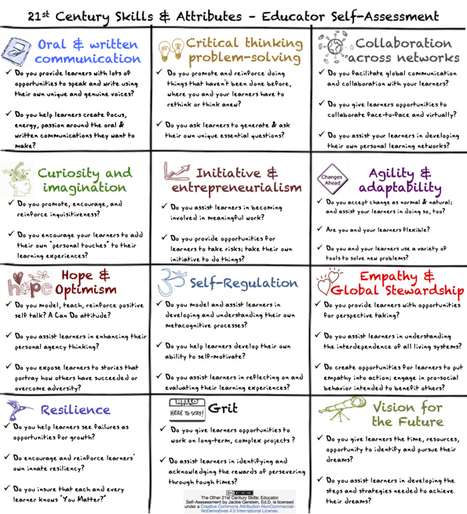
“I've posted about The Other 21st Skills and Attributes. This post provides links and resources about these skills as well as an educator self-assessment. This assessment contains questions to ass...” Via Ana Cristina Pratas, NikolaosKourakos
Scoop.it!

Welcome to a post where I focus on some simple ways you can begin to blend your learning. I call them starter ideas. I also want to invite you to a very special webinar on Tuesday, December 9, 2014... Via WebTeachers
Scoop.it!

An overview of the CCAF Model as well as some tips for eLearning professionals! Using The CCAF Model To Design Effective Interactions For eLearning.
Scoop.it!

Occasionally you come across a kind of theological divide in EdTech around whether to focus on learning through the iPad or via the laptop. Which is like wondering whether to have fish or vegetables for your dinner. Both are fine, but they don’t fill the same need. The problem with seeing the laptop/iPad issue as an either or is that they can complement each other, not replace them. Effectively, you should see one as an instrument of consumption and one as an instrument of creation. So, budget allowing (and recognizing that is not a trivial issue), schools should look at how the iPad can encourage the consumption of content, especially that which is ‘native’ to the hardware – content which encourages an almost physical interaction – using the fingers to zoom in on detail or to rotate or swipe. It’s that tactile element which is especially important for younger pupils.
Scoop.it!

A Graduate Center program pursues a loftier and, its founders insist, more practical goal than simple "work-force readiness."
|






