21st Century Learning and Teaching
791.6K views | +3 today
21st Century Learning and Teaching
Related articles to 21st Century Learning and Teaching as also tools...
Curated by Gust MEES
Your new post is loading...

Popular Tags

Current selected tag: 'Creativity'. Clear
Scooped by Gust MEES
February 24, 2018 8:27 AM
Scoop.it!

7 skills your child needs to survive the changing world of work | #ModernEDU #ModernLEARNing

7 skills your child needs to survive the changing world of work | #ModernEDU #ModernLEARNing | 21st Century Learning and Teaching | Scoop.it

Education may be the passport to the future, but for all the good teaching out there, it would seem that schools are failing to impart some of the most important life skills, according to one educational expert.

Dr. Tony Wagner, co-director of Harvard's Change Leadership Group, argues that today’s school children are facing a “global achievement gap”, which is the gap between what even the best schools are teaching and the skills young people need to learn.

This has been exacerbated by two colliding trends: firstly, the global shift from an industrial economy to a knowledge economy, and secondly, the way in which today’s school children – brought up with the internet – are motivated to learn.

In his book The Global Achievement Gap, Wagner identifies seven core competencies every child needs in order to survive in the coming world of work.

1. Critical thinking and problem-solving


2. Collaboration across networks and leading by influence


3. Agility and adaptability


4. Initiative and entrepreneurialism


5. Effective oral and written communication


6. Accessing and analysing information


7. Curiosity and imagination


Learn more / En savoir plus / Mehr erfahren:


https://gustmees.wordpress.com


Gust MEES's insight:

Education may be the passport to the future, but for all the good teaching out there, it would seem that schools are failing to impart some of the most important life skills, according to one educational expert.

Dr. Tony Wagner, co-director of Harvard's Change Leadership Group, argues that today’s school children are facing a “global achievement gap”, which is the gap between what even the best schools are teaching and the skills young people need to learn.

This has been exacerbated by two colliding trends: firstly, the global shift from an industrial economy to a knowledge economy, and secondly, the way in which today’s school children – brought up with the internet – are motivated to learn.

In his book The Global Achievement Gap, Wagner identifies seven core competencies every child needs in order to survive in the coming world of work.

1. Critical thinking and problem-solving


2. Collaboration across networks and leading by influence


3. Agility and adaptability


4. Initiative and entrepreneurialism


5. Effective oral and written communication


6. Accessing and analysing information


7. Curiosity and imagination


Learn more / En savoir plus / Mehr erfahren:


https://gustmees.wordpress.com
 

Kim Flintoff's curator insight, February 24, 2018 9:02 PM
In his book The Global Achievement Gap, Wagner identifies seven core competencies every child needs in order to survive in the coming world of work. 1. Critical thinking and problem-solving 2. Collaboration across networks and leading by influence 3. Agility and adaptability 4. Initiative and entrepreneurialism 5. Effective oral and written communication 6. Accessing and analysing information 7. Curiosity and imagination
Koen Mattheeuws's curator insight, February 25, 2018 5:07 AM
Share your insight
Pablo Peñalver's curator insight, March 2, 2018 1:17 AM

Education may be the passport to the future, but for all the good teaching out there, it would seem that schools are failing to impart some of the most important life skills, according to one educational expert.

Dr. Tony Wagner, co-director of Harvard's Change Leadership Group, argues that today’s school children are facing a “global achievement gap”, which is the gap between what even the best schools are teaching and the skills young people need to learn.

This has been exacerbated by two colliding trends: firstly, the global shift from an industrial economy to a knowledge economy, and secondly, the way in which today’s school children – brought up with the internet – are motivated to learn.

In his book The Global Achievement Gap, Wagner identifies seven core competencies every child needs in order to survive in the coming world of work.

1. Critical thinking and problem-solving


2. Collaboration across networks and leading by influence


3. Agility and adaptability


4. Initiative and entrepreneurialism


5. Effective oral and written communication


6. Accessing and analysing information


7. Curiosity and imagination


Learn more / En savoir plus / Mehr erfahren:


https://gustmees.wordpress.com


Scooped by Gust MEES
February 22, 2018 4:23 PM
Scoop.it!

Comment j’utilise les médias sociaux dans mes cours à l’université | #SocialMedia #PierreLÉVY #ModernPedagogy #ModernLEARNing #Curation #Blogs #PLN #PKM #IntelligenceCollective #Communication

Comment j’utilise les médias sociaux dans mes cours à l’université | #SocialMedia #PierreLÉVY #ModernPedagogy #ModernLEARNing #Curation #Blogs #PLN #PKM #IntelligenceCollective #Communication | 21st Century Learning and Teaching | Scoop.it

Pierre Lévy Professeur à l’Université d’Ottawa. Ce travail est la pré-impression d’un article dans le numéro 58 de RED. Il sera publié en tant que contribution d’invité, dans le genre «histoire personnelle comme recherche éducative» (Personal History as Educational Research).   Cet article n’a d’autre but que de raconter mon expérience...


Learn more / En savoir plus / Mehr erfahren:


https://gustmees.wordpress.com/?s=curation


https://gustmees.wordpress.com/?s=blogging


https://globaleducationandsocialmedia.wordpress.com/2014/01/19/pkm-personal-professional-knowledge-management/


Gust MEES's insight:

Pierre Lévy Professeur à l’Université d’Ottawa. Ce travail est la pré-impression d’un article dans le numéro 58 de RED. Il sera publié en tant que contribution d’invité, dans le genre «histoire personnelle comme recherche éducative» (Personal History as Educational Research).   Cet article n’a d’autre but que de raconter mon expérience...


Learn more / En savoir plus / Mehr erfahren:


https://gustmees.wordpress.com/?s=curation


https://gustmees.wordpress.com/?s=blogging


https://globaleducationandsocialmedia.wordpress.com/2014/01/19/pkm-personal-professional-knowledge-management/


Yasmina BADE's curator insight, February 22, 2018 5:18 PM
Share your insight
Scooped by Gust MEES
February 22, 2018 8:25 AM
Scoop.it!

javl/image2cpp | image2cpp is a simple tool to change images into byte arrays to use with (monochrome) displays suchs as OLEDs | #Coding #Arduino #Maker #MakerED #MakerSpaces

javl/image2cpp | image2cpp is a simple tool to change images into byte arrays to use with (monochrome) displays suchs as OLEDs | #Coding #Arduino #Maker #MakerED #MakerSpaces | 21st Century Learning and Teaching | Scoop.it

image2cpp is a simple tool to change images into byte arrays to use with (monochrome) displays suchs as OLEDs, like those from Adafruit or Sparkfun.


While searching for a way to generate these arrays, I mostly found links to a piece of Windows software. Both the flakey results and the hassle of having to boot a virtual machine just to convert an image lead to me writing this pure html + javascript solution.

Alternatively you can also enter a byte array as input to turn it back into an image. This might be useful for debugging, or when you want to write the byte array yourself. I don't know.

Running the tool

You don't need any special dependencies / internet connection; all the necessary parts sit in a single .html file. So just open this index.html page in a (recent) browser to run the tool.


Or you can use the online version at:  


http://javl.github.io/image2cpp/


Learn more / En savoir plus / Mehr erfahren:


https://www.scoop.it/t/21st-century-learning-and-teaching/?&tag=ARDUINO


BTW: Above shown image is my "MAUSI", which was the "Mascot" for my Cyber-Security courses in Luxembourg EDUcation in 2003-2007. Those courses were mandatory for students up from 12 years old (7èmes).


Learn more about Cyber-Security in Luxembourg (Europe):


https://gustmees.wordpress.com/2017/11/22/luxembourg-and-cyber-security-how-did-it-start/


Gust MEES's insight:

image2cpp is a simple tool to change images into byte arrays to use with (monochrome) displays suchs as OLEDs, like those from Adafruit or Sparkfun.


While searching for a way to generate these arrays, I mostly found links to a piece of Windows software. Both the flakey results and the hassle of having to boot a virtual machine just to convert an image lead to me writing this pure html + javascript solution.

Alternatively you can also enter a byte array as input to turn it back into an image. This might be useful for debugging, or when you want to write the byte array yourself. I don't know.

Running the tool

You don't need any special dependencies / internet connection; all the necessary parts sit in a single .html file. So just open this index.html page in a (recent) browser to run the tool.


Or you can use the online version at:  


http://javl.github.io/image2cpp/


Learn more / En savoir plus / Mehr erfahren:


https://www.scoop.it/t/21st-century-learning-and-teaching/?&tag=ARDUINO


BTW: Above shown image is my "MAUSI", which was the "Mascot" for my Cyber-Security courses in Luxembourg EDUcation in 2003-2007. Those courses were mandatory for students up from 12 years old (7èmes).


Learn more about Cyber-Security in Luxembourg (Europe):


https://gustmees.wordpress.com/2017/11/22/luxembourg-and-cyber-security-how-did-it-start/


No comment yet.
Scooped by Gust MEES
February 17, 2018 11:45 AM
Scoop.it!

Visual programming language - Wikipedia | #Coding #Maker #MakerED #MakerSpaces #Creativity #LEARNingByDoing 

Visual programming language - Wikipedia

In computing, a visual programming language ( VPL) is any programming language that lets users create programs by manipulating program elements graphically rather than by specifying them textually. A VPL allows programming with visual expressions, spatial arrangements of text and graphic symbols, used either as elements of syntax or secondary notation.

Learn more / En savoir plus / Mehr erfahren:


https://www.scoop.it/t/21st-century-learning-and-teaching/?&tag=Visual+programming


https://www.scoop.it/t/21st-century-learning-and-teaching/?&tag=Visuino


Gust MEES's insight:

Learn more / En savoir plus / Mehr erfahren:


https://www.scoop.it/t/21st-century-learning-and-teaching/?&tag=Visual+programming


https://www.scoop.it/t/21st-century-learning-and-teaching/?&tag=Visuino


No comment yet.
Scooped by Gust MEES
February 17, 2018 8:26 AM
Scoop.it!

DIYODE Magazine is a print and digital publication supporting electronics enthusiasts and makers | #Coding #MakerED #MakerSpaces

DIYODE Magazine is a print and digital publication supporting electronics enthusiasts and makers | #Coding #MakerED #MakerSpaces | 21st Century Learning and Teaching | Scoop.it

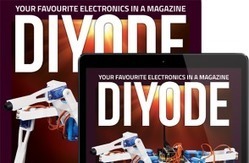
DIYODE Magazine is a print and digital publication supporting electronics enthusiasts and makers.


Learn more / En savoir plus / Mehr erfahren:


https://www.scoop.it/t/21st-century-learning-and-teaching/?&tag=Coding


https://www.scoop.it/t/21st-century-learning-and-teaching/?&tag=makerspace


Gust MEES's insight:

DIYODE Magazine is a print and digital publication supporting electronics enthusiasts and makers.


Learn more / En savoir plus / Mehr erfahren:


https://www.scoop.it/t/21st-century-learning-and-teaching/?&tag=Coding


https://www.scoop.it/t/21st-century-learning-and-teaching/?&tag=makerspace


No comment yet.
Scooped by Gust MEES
February 16, 2018 9:31 PM
Scoop.it!

Visual Programming | Visuino Arduino tutorials - YouTube | #VideoTutorials #Coding #Maker #MakerED #MakerSpaces #PracTICE 

In computing, a visual programming language (VPL) is any programming language that lets users create programs by manipulating program elements graphically rather than by specifying them textually.[1][2] A VPL allows programming with visual expressions, spatial arrangements of text and graphic symbols, used either as elements of syntax or secondary notation.


For example, many VPLs (known as dataflow or diagrammatic programming)[3] are based on the idea of "boxes and arrows", where boxes or other screen objects are treated as entities, connected by arrows, lines or arcs which represent relations.


Learn more / En savoir plus / Mehr erfahren:


https://www.scoop.it/t/21st-century-learning-and-teaching/?&tag=Visual+programming


https://en.wikipedia.org/wiki/Visual_programming_language


No comment yet.
Scooped by Gust MEES
February 16, 2018 9:41 AM
Scoop.it!

Arduino: Connect 4D Systems ViSi Genie Smart Display | #Coding #Maker #MakerED #MakerSpaces 

Arduino: Connect 4D Systems ViSi Genie Smart Display | #Coding #Maker #MakerED #MakerSpaces  | 21st Century Learning and Teaching | Scoop.it
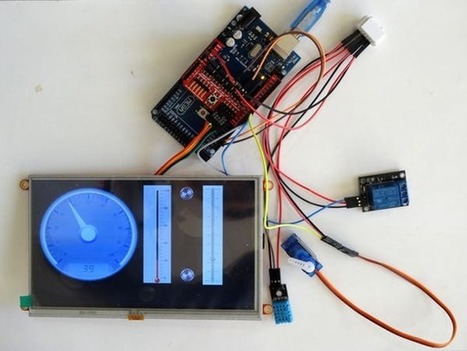
Connect 4D Systems ViSi Genie smart Touch Screen Display to Arduino, and program it - Quick and Easy!. Find this and other hardware projects on Hackster.io.


Learn more / En savoir plus / Mehr erfahren:


https://www.scoop.it/t/21st-century-learning-and-teaching/?&tag=ARDUINO


https://www.scoop.it/t/21st-century-learning-and-teaching/?&tag=Visuino+-+Visual+Development+for+Arduino


Gust MEES's insight:
Connect 4D Systems ViSi Genie smart Touch Screen Display to Arduino, and program it - Quick and Easy!. Find this and other hardware projects on Hackster.io.


Learn more / En savoir plus / Mehr erfahren:


https://www.scoop.it/t/21st-century-learning-and-teaching/?&tag=ARDUINO


https://www.scoop.it/t/21st-century-learning-and-teaching/?&tag=Visuino+-+Visual+Development+for+Arduino


No comment yet.
Scooped by Gust MEES
February 9, 2018 7:33 AM
Scoop.it!

Hacking STEM: Activity Library | #Microsoft #EDUcation #Coding #Arduino #Maker #MakerED #MakerSpaces #LEARNingByDoing #Creativity 

Hacking STEM: Activity Library | #Microsoft #EDUcation #Coding #Arduino #Maker #MakerED #MakerSpaces #LEARNingByDoing #Creativity  | 21st Century Learning and Teaching | Scoop.it
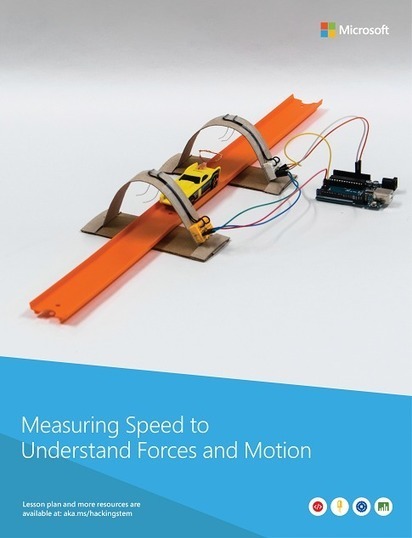
Microsoft offers STEM resources to help educators engage students with project-based lessons that compliment current STEM curriculum. A small incubation team inside of Microsoft focuses on developing next generation hardware, software, and services for K-12 education. Our goal is to support teachers in building inquiry and project-based activities that embed computational and design thinking into existing middle school curriculum.


We want to democratize STEM for 21st century learners and demonstrate how all schools can provide affordable opportunities to bring science in the classroom.


Learn more / En savoir plus / Mehr erfahren:


https://www.scoop.it/t/21st-century-learning-and-teaching/?&tag=Coding


https://www.scoop.it/t/21st-century-learning-and-teaching/?&tag=makerspace


Gust MEES's insight:
Microsoft offers STEM resources to help educators engage students with project-based lessons that compliment current STEM curriculum. A small incubation team inside of Microsoft focuses on developing next generation hardware, software, and services for K-12 education. Our goal is to support teachers in building inquiry and project-based activities that embed computational and design thinking into existing middle school curriculum.


We want to democratize STEM for 21st century learners and demonstrate how all schools can provide affordable opportunities to bring science in the classroom.


Learn more / En savoir plus / Mehr erfahren:


https://www.scoop.it/t/21st-century-learning-and-teaching/?&tag=Coding


https://www.scoop.it/t/21st-century-learning-and-teaching/?&tag=makerspace


No comment yet.
Scooped by Gust MEES
February 6, 2018 11:02 AM
Scoop.it!

First Steps with the Arduino-UNO R3 | Maker, MakerED, Coding | SMART V3.0 ROBOT CAR Kit | #MakerSpaces #PracTICE 

First Steps with the Arduino-UNO R3 | Maker, MakerED, Coding | SMART V3.0 ROBOT CAR Kit | #MakerSpaces #PracTICE  | 21st Century Learning and Teaching | Scoop.it

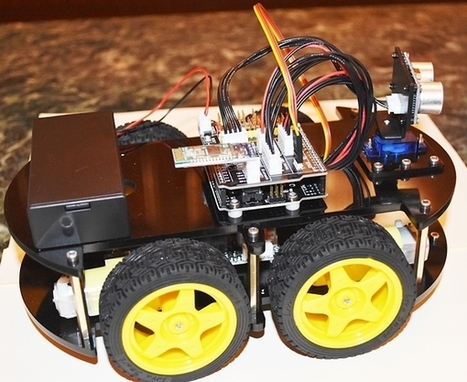
First impressions . . The Kit is delivered in a well organized plastic box with a poster inside of all the parts with description and a CD with the PDF Manual, Code and Libraries. The manual in PDF format is actually very well documented an nobody should have problems to follow the instructions.…


Learn more / En savoir plus / Mehr erfahren:


https://www.scoop.it/t/21st-century-learning-and-teaching/?&tag=ARDUINO


https://gustmees.wordpress.com/?s=arduino


Gust MEES's insight:

First impressions . . The Kit is delivered in a well organized plastic box with a poster inside of all the parts with description and a CD with the PDF Manual, Code and Libraries. The manual in PDF format is actually very well documented an nobody should have problems to follow the instructions.…


Learn more / En savoir plus / Mehr erfahren:


https://www.scoop.it/t/21st-century-learning-and-teaching/?&tag=ARDUINO


https://gustmees.wordpress.com/?s=arduino


No comment yet.
Scooped by Gust MEES
January 23, 2018 8:23 PM
Scoop.it!

First Steps with the Arduino-UNO R3 | Maker, MakerED, Coding | Super Starter Kit UNO R3 Project | LCD and Sensors Project

First Steps with the Arduino-UNO R3 | Maker, MakerED, Coding | Super Starter Kit UNO R3 Project | LCD and Sensors Project | 21st Century Learning and Teaching | Scoop.it

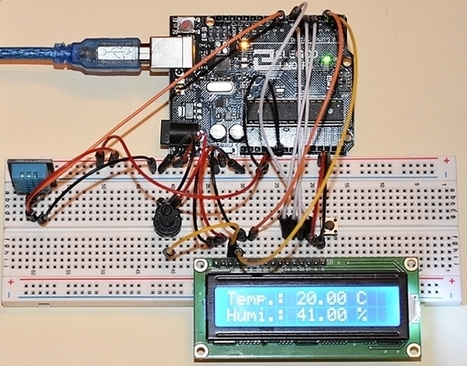
SO, as I got my new Super Starter Kit UNO R3 Project I am playing around a bit with it. In my previous post WE were wiring and testing a LCD-Display and coding to display a bit text on the LCD. That was actually very easy, so lets try out now some “Sensors“, e.g. a Temperature/Humidity Sensor and a Ultrasonic Sensor to measure distances. The measured values of those sensors will get displayed on the LCD-Display.


Learn more / En savoir plus / Mehr erfahren:


https://gustmees.wordpress.com/?s=maker


https://www.scoop.it/t/21st-century-learning-and-teaching/?&tag=ARDUINO


Gust MEES's insight:

SO, as I got my new Super Starter Kit UNO R3 Project I am playing around a bit with it. In my previous post WE were wiring and testing a LCD-Display and coding to display a bit text on the LCD. That was actually very easy, so lets try out now some “Sensors“, e.g. a Temperature/Humidity Sensor and a Ultrasonic Sensor to measure distances. The measured values of those sensors will get displayed on the LCD-Display.


Learn more / En savoir plus / Mehr erfahren:


https://gustmees.wordpress.com/?s=maker


https://www.scoop.it/t/21st-century-learning-and-teaching/?&tag=ARDUINO


Vivalist's curator insight, January 25, 2018 3:13 AM
Temperature and Humidity monitoring
Scooped by Gust MEES
January 19, 2018 7:43 PM
Scoop.it!

KinderLab Robotics | #KIBO #LEARNingByDoing #LEARNing2LEARN #Kids #STEM

KinderLab Robotics | #KIBO #LEARNingByDoing #LEARNing2LEARN #Kids #STEM | 21st Century Learning and Teaching | Scoop.it
Toys for learning about technology. Playfully!

Play the video above to learn more about KIBO


With KIBO, 4- to 7-year-olds create, design, decorate and bring their own robot to life! KIBO lets kids' imaginations soar - all without requiring screen time on PCs, tablets, or smartphones.


Learn more / En savoir plus / Mehr erfahren:


https://gustmees.wordpress.com/2014/08/24/coding-a-new-trend-in-education-and-a-big-responsibility/


Gust MEES's insight:
Toys for learning about technology. Playfully!

Play the video above to learn more about KIBO


With KIBO, 4- to 7-year-olds create, design, decorate and bring their own robot to life! KIBO lets kids' imaginations soar - all without requiring screen time on PCs, tablets, or smartphones.


Learn more / En savoir plus / Mehr erfahren:


https://gustmees.wordpress.com/2014/08/24/coding-a-new-trend-in-education-and-a-big-responsibility/


No comment yet.
Scooped by Gust MEES
January 11, 2018 3:46 PM
Scoop.it!

How Creative Teaching Improves Students’ Executive Function Skills | #Creativity

How Creative Teaching Improves Students’ Executive Function Skills | #Creativity | 21st Century Learning and Teaching | Scoop.it
Synopsis
Teaching creatively, no matter the age group, grade level, or subject matter, not only improves the students’ creativity skills but also enhances their executive function networks.

… To be ready for college, the workforce, and a life in a technological society, students need the ability to gather, comprehend, evaluate, synthesize, and analyze an overwhelming volume of information … Executive Functions plus a strong base of core knowledge are the essential skills for success in today’s world. For students to think critically, collaboratively, and communicate effectively, these must be strengthened.


To adequately prepare for success in careers or higher education, students need guided opportunities to construct strong networks of executive functions. Without this preparation to develop executive functions during the school years, students can fall short. They may lack requirements for higher education and the competitive job market including the skill sets needed for cognitive flexibility, successful communication, collaboration, or creative innovation.


Learn more / En savoir plus / Mehr erfahren:


https://www.scoop.it/t/21st-century-learning-and-teaching/?&tag=Creative-Thinking


Gust MEES's insight:
Synopsis
Teaching creatively, no matter the age group, grade level, or subject matter, not only improves the students’ creativity skills but also enhances their executive function networks.

… To be ready for college, the workforce, and a life in a technological society, students need the ability to gather, comprehend, evaluate, synthesize, and analyze an overwhelming volume of information … Executive Functions plus a strong base of core knowledge are the essential skills for success in today’s world. For students to think critically, collaboratively, and communicate effectively, these must be strengthened.


To adequately prepare for success in careers or higher education, students need guided opportunities to construct strong networks of executive functions. Without this preparation to develop executive functions during the school years, students can fall short. They may lack requirements for higher education and the competitive job market including the skill sets needed for cognitive flexibility, successful communication, collaboration, or creative innovation.


Learn more / En savoir plus / Mehr erfahren:


https://www.scoop.it/t/21st-century-learning-and-teaching/?&tag=Creative-Thinking


Benjamin Boorman's curator insight, January 14, 2018 9:41 PM
Synopsis
Teaching creatively, no matter the age group, grade level, or subject matter, not only improves the students’ creativity skills but also enhances their executive function networks.

… To be ready for college, the workforce, and a life in a technological society, students need the ability to gather, comprehend, evaluate, synthesize, and analyze an overwhelming volume of information … Executive Functions plus a strong base of core knowledge are the essential skills for success in today’s world. For students to think critically, collaboratively, and communicate effectively, these must be strengthened.


To adequately prepare for success in careers or higher education, students need guided opportunities to construct strong networks of executive functions. Without this preparation to develop executive functions during the school years, students can fall short. They may lack requirements for higher education and the competitive job market including the skill sets needed for cognitive flexibility, successful communication, collaboration, or creative innovation.


Learn more / En savoir plus / Mehr erfahren:


https://www.scoop.it/t/21st-century-learning-and-teaching/?&tag=Creative-Thinking


Scooped by Gust MEES
January 9, 2018 11:14 AM
Scoop.it!

XOD - A visual programming language for microcontrollers | #Arduino #Coding #Maker #MakerED #MakerSpaces

XOD - A visual programming language for microcontrollers | #Arduino #Coding #Maker #MakerED #MakerSpaces | 21st Century Learning and Teaching | Scoop.it

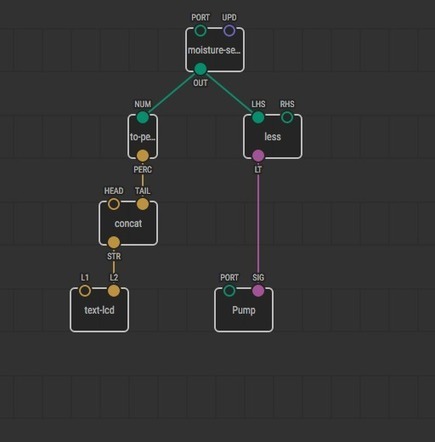
A VISUAL PROGRAMMING LANGUAGE  FOR MICROCONTROLLERS, LIKE CODE, BUT BETTER


Learn more / En savoir plus / Mehr erfahren:


https://www.scoop.it/t/21st-century-learning-and-teaching/?&tag=Coding


Gust MEES's insight:

A VISUAL PROGRAMMING LANGUAGE  FOR MICROCONTROLLERS, LIKE CODE, BUT BETTER


Learn more / En savoir plus / Mehr erfahren:


https://www.scoop.it/t/21st-century-learning-and-teaching/?&tag=Coding


Vivalist's curator insight, January 11, 2018 8:46 AM
Their tagline is "like code, but better" and even though I don't question the importance of learning code in various languages, it is clear that a nodal approach is easing the process of learning and doing some "controls".

Looking forward to using this on a future project in the greenhouse... or building rolbots with the kiddos.

Visuino is another software solution designed to ease the coding of Arduino micro-controllers through a visual interface:
Scooped by Gust MEES
February 22, 2018 7:42 PM
Scoop.it!

Drawing a Bitmap in #Coding with #Arduino for OLED and LCD Displays| userreference · olikraus/u8glib Wiki 

Drawing a Bitmap in #Coding with #Arduino for OLED and LCD Displays| userreference · olikraus/u8glib Wiki  | 21st Century Learning and Teaching | Scoop.it

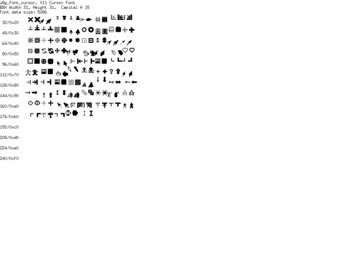
u8glib - Arduino Monochrom Graphics Library for LCDs and OLEDs


Learn more / En savoir plus / Mehr erfahren:


https://www.scoop.it/t/21st-century-learning-and-teaching/?&tag=ARDUINO


Gust MEES's insight:

u8glib - Arduino Monochrom Graphics Library for LCDs and OLEDs


Learn more / En savoir plus / Mehr erfahren:


https://www.scoop.it/t/21st-century-learning-and-teaching/?&tag=ARDUINO


No comment yet.
Scooped by Gust MEES
February 22, 2018 3:22 PM
Scoop.it!

Makerspace gesucht im deutschsprachigen Raum? Diese Karte hilft weiter | #Luxembourg #Europe #InteractiveMap

Makerspace gesucht im deutschsprachigen Raum? Diese Karte hilft weiter | #Luxembourg #Europe #InteractiveMap | 21st Century Learning and Teaching | Scoop.it

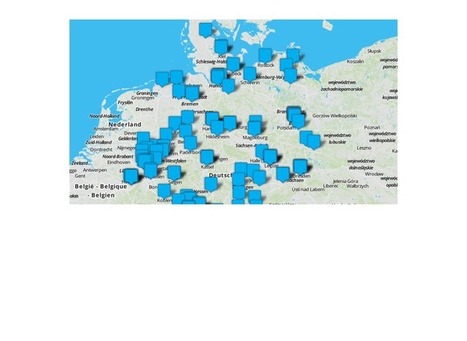
Sie suchen Hilfe beim Selbstbau, Zugang zu 3D-Drucker, Lasercutter oder anderen Maschinen? In Fablabs, Makerspaces und offenen Werkstätten wird Ihnen geholfen. Die Makerspacekarte zeigt Ihnen, wo Sie in Ihrer Nähe Unterstützung finden.

Auch wer gerne allein im stillen Kämmerlein werkelt, darf sich Maker nennen. Oft macht es aber gemeinsam mehr Spaß. Im deutschsprachigen Raum gibt es aktuell über 200 Orte, an denen sich die Maker-Community trifft. Diese haben wir in einer Online-Karte zusammengefasst, damit Sie einfach mal nachschauen können, wo in Ihrer Region oder Stadt Gleichgesinnte zusammenkommen.

Von der Grundausstattung mit Werkzeug bis zur Open-Source-Software: alles Wichtige zum Einstieg ins Elektronik-Basteln vermittelt das Make-Sonderheft "Richtig loslegen".

In der Karte finden Sie Makerspaces, Hackerspaces, FabLabs, offene Werkstätten und andere vergleichbare Orte für Maker. Jeder dieser Treffpunkte ist anders ausgestattet und organisiert und setzt unterschiedliche Schwerpunkte. Vom Einraum-Hackspace mit Couch und 3D-Drucker bis zum geförderten Riesen-FabLab mit Dutzenden Profi-Maschinen ist alles dabei.


Learn more / En savoir plus / Mehr erfahren:


https://www.scoop.it/t/21st-century-learning-and-teaching/?&tag=makerspace


https://gustmees.wordpress.com/?s=makerspaces+luxembourg


Gust MEES's insight:

Sie suchen Hilfe beim Selbstbau, Zugang zu 3D-Drucker, Lasercutter oder anderen Maschinen? In Fablabs, Makerspaces und offenen Werkstätten wird Ihnen geholfen. Die Makerspacekarte zeigt Ihnen, wo Sie in Ihrer Nähe Unterstützung finden.

Auch wer gerne allein im stillen Kämmerlein werkelt, darf sich Maker nennen. Oft macht es aber gemeinsam mehr Spaß. Im deutschsprachigen Raum gibt es aktuell über 200 Orte, an denen sich die Maker-Community trifft. Diese haben wir in einer Online-Karte zusammengefasst, damit Sie einfach mal nachschauen können, wo in Ihrer Region oder Stadt Gleichgesinnte zusammenkommen.

Von der Grundausstattung mit Werkzeug bis zur Open-Source-Software: alles Wichtige zum Einstieg ins Elektronik-Basteln vermittelt das Make-Sonderheft "Richtig loslegen".

In der Karte finden Sie Makerspaces, Hackerspaces, FabLabs, offene Werkstätten und andere vergleichbare Orte für Maker. Jeder dieser Treffpunkte ist anders ausgestattet und organisiert und setzt unterschiedliche Schwerpunkte. Vom Einraum-Hackspace mit Couch und 3D-Drucker bis zum geförderten Riesen-FabLab mit Dutzenden Profi-Maschinen ist alles dabei.


Learn more / En savoir plus / Mehr erfahren:


https://www.scoop.it/t/21st-century-learning-and-teaching/?&tag=makerspace


https://gustmees.wordpress.com/?s=makerspaces+luxembourg


No comment yet.
Scooped by Gust MEES
February 19, 2018 8:49 AM
Scoop.it!

Microsoft MakeCode is a free, open-source Block and JavaScript learn-to-code editor | #Coding #Maker #MakerED #MakerSpaces 

Microsoft MakeCode is a free, open-source Block and JavaScript learn-to-code editor | #Coding #Maker #MakerED #MakerSpaces  | 21st Century Learning and Teaching | Scoop.it
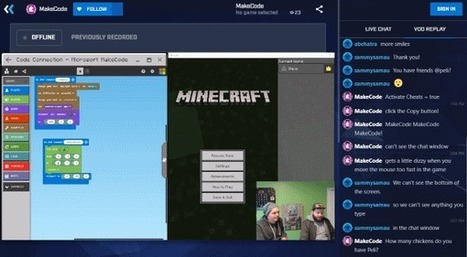
Microsoft MakeCode is a free, open-source Block and JavaScript learn-to-code editor that promotes a more inclusive approach to computing education.


Learn more / En savoir plus / Mehr erfahren:


https://www.scoop.it/t/21st-century-learning-and-teaching/?&tag=Coding


https://www.scoop.it/t/21st-century-learning-and-teaching/?&tag=makerspace


Gust MEES's insight:
Microsoft MakeCode is a free, open-source Block and JavaScript learn-to-code editor that promotes a more inclusive approach to computing education.


Learn more / En savoir plus / Mehr erfahren:


https://www.scoop.it/t/21st-century-learning-and-teaching/?&tag=Coding


https://www.scoop.it/t/21st-century-learning-and-teaching/?&tag=makerspace


Graphics Design's curator insight, February 20, 2018 2:27 AM

Just Kool Design Maker can give your custom letterhead Design a little promoting and publicizing touch, so you can get a decent presentation and consideration from your business clients.

Graphics Design's curator insight, February 20, 2018 2:36 AM

Just Kool Design Maker can give your custom letterhead Design a little promoting and publicizing touch, so you can get a decent presentation and consideration from your business clients.

Scooped by Gust MEES
February 17, 2018 11:08 AM
Scoop.it!

Arduino Comparison Guide - learn.sparkfun.com | #Coding #Maker #MakerED #MakerSpaces #Creativity #LEARNingByDoing 

Arduino Comparison Guide - learn.sparkfun.com | #Coding #Maker #MakerED #MakerSpaces #Creativity #LEARNingByDoing  | 21st Century Learning and Teaching | Scoop.it

Introduction
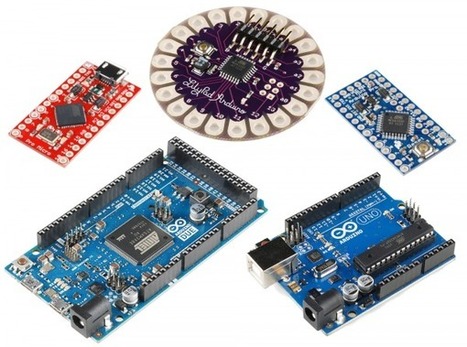
Let’s face it, there are a a lot of different Arduino boards out there. How do you decide which one you need for your project? In this tutorial, we’ll take a look at the diverse world of Arduino boards. We’ll begin with a tabular overview of the features each board has. Then we’ll delve deeper into each board, examining the pros, cons, and example use-cases.

Arduino is an open-source electronics prototyping platform based on flexible, easy-to-use hardware and software. It’s intended for artists, designers, hobbyists, and anyone interested in creating interactive objects or environments. Or more simply, you load on some code and it can read sensors, perform actions based on inputs from buttons, control motors, and accept shields to further expand it’s capabilities. Really, you can do almost anything.

All Arduino boards have one thing in common: they are programmed through the Arduino IDE. This is the software that allows you to write and upload code. Beyond that, there can be a lot of differences. The number of inputs and outputs (how many sensors, LEDs, and buttons you can use on a single board), speed, operating voltage, and form factor are just a few of the variables. Some boards are designed to be embedded and have no programming interface (hardware) which you would need to buy separately. Some can run directly from a 3.7V battery, others need at least 5V. Check the chart on the next page to find the right Arduino for your project.

Learn more / En savoir plus / Mehr erfahren:


https://www.scoop.it/t/21st-century-learning-and-teaching/?&tag=Coding


https://www.scoop.it/t/21st-century-learning-and-teaching/?&tag=makerspace


Gust MEES's insight:

Introduction
Let’s face it, there are a a lot of different Arduino boards out there. How do you decide which one you need for your project? In this tutorial, we’ll take a look at the diverse world of Arduino boards. We’ll begin with a tabular overview of the features each board has. Then we’ll delve deeper into each board, examining the pros, cons, and example use-cases.

Arduino is an open-source electronics prototyping platform based on flexible, easy-to-use hardware and software. It’s intended for artists, designers, hobbyists, and anyone interested in creating interactive objects or environments. Or more simply, you load on some code and it can read sensors, perform actions based on inputs from buttons, control motors, and accept shields to further expand it’s capabilities. Really, you can do almost anything.

All Arduino boards have one thing in common: they are programmed through the Arduino IDE. This is the software that allows you to write and upload code. Beyond that, there can be a lot of differences. The number of inputs and outputs (how many sensors, LEDs, and buttons you can use on a single board), speed, operating voltage, and form factor are just a few of the variables. Some boards are designed to be embedded and have no programming interface (hardware) which you would need to buy separately. Some can run directly from a 3.7V battery, others need at least 5V. Check the chart on the next page to find the right Arduino for your project.

Learn more / En savoir plus / Mehr erfahren:


https://www.scoop.it/t/21st-century-learning-and-teaching/?&tag=Coding


https://www.scoop.it/t/21st-century-learning-and-teaching/?&tag=makerspace


No comment yet.
Scooped by Gust MEES
February 17, 2018 8:09 AM
Scoop.it!

Gamasutra - Alt.Ctrl.GDC Showcase: Mark Wars | #Coding #Maker #MakerED #MakerSpaces #LEARNingByDoing #Robots

Gamasutra - Alt.Ctrl.GDC Showcase: Mark Wars | #Coding #Maker #MakerED #MakerSpaces #LEARNingByDoing #Robots | 21st Century Learning and Teaching | Scoop.it

The 2018 Game Developer's Conference will feature an exhibition called Alt.Ctrl.GDC dedicated to games that use alternative control schemes and interactions. Gamasutra will be talking to the developers of each of the games that have been selected for the showcase. You can find all of the interviews here.

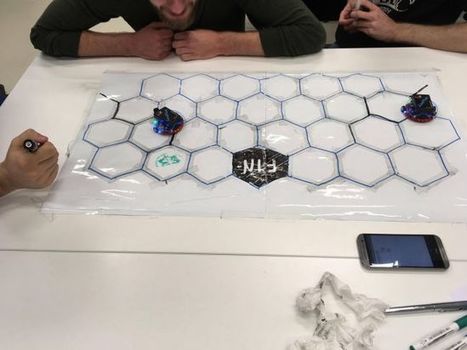
Mark Wars will have players drawing lines with markers in order to guide their ever-moving robot to a goal before their opponent can. However, as they take turns drawing lines, there is nothing stopping them from drawing a line that will mislead their opponent's robot, creating a constant sabotage between players as well.


Learn more / En savoir plus / Mehr erfahren:


https://www.scoop.it/t/21st-century-learning-and-teaching/?&tag=Coding


https://www.scoop.it/t/21st-century-learning-and-teaching/?&tag=makerspace


Gust MEES's insight:

The 2018 Game Developer's Conference will feature an exhibition called Alt.Ctrl.GDC dedicated to games that use alternative control schemes and interactions. Gamasutra will be talking to the developers of each of the games that have been selected for the showcase. You can find all of the interviews here.

Mark Wars will have players drawing lines with markers in order to guide their ever-moving robot to a goal before their opponent can. However, as they take turns drawing lines, there is nothing stopping them from drawing a line that will mislead their opponent's robot, creating a constant sabotage between players as well.


Learn more / En savoir plus / Mehr erfahren:


https://www.scoop.it/t/21st-century-learning-and-teaching/?&tag=Coding


https://www.scoop.it/t/21st-century-learning-and-teaching/?&tag=makerspace


No comment yet.
Scooped by Gust MEES
February 16, 2018 1:02 PM
Scoop.it!

4D Systems | 4D-Workshop-4-IDE | #Coding #Maker #MakerED #MakerSpaces 

Introducing 4D Systems' All New Workshop4 IDE Supports multiple development environments, to cater for different user requirements and skill level. Workshop4 is a comprehensive software IDE for Microsoft Windows that provides an integrated software development platform for all of the 4D family of processors and modules.


The IDE combines the Editor, Compiler, Linker and Downloader to develop complete 4DGL application code. All user application code is developed within the Workshop4 IDE. Workshop4 includes four development environments, for the user to choose based on application requirements or even user skill level. Designer This environment enables the user to write 4DGL code in its natural form to program the display module. ViSi - Genie An advanced environment that doesn’t require any 4DGL coding at all, it is all done automatically for you.


Simply lay the display out with the objects you want (similar to ViSi), set the events to drive them and the code is written for you automatically. ViSi -Genie provides the latest rapid development experience from 4D Systems. ViSi A visual programming experience that enables drag-and-drop type placement of objects to assist with 4DGL code generation and allows the user to visualise how the display will look while being developed.


Serial This environment is also provided to transform the display module into a slave serial display module, allowing the user to control the display from any host microcontroller or device with a serial port. 


Learn more / En savoir plus / Mehr erfahren:


https://www.scoop.it/t/21st-century-learning-and-teaching/?&tag=ARDUINO


https://www.scoop.it/t/21st-century-learning-and-teaching/?&tag=Visuino+-+Visual+Development+for+Arduino


https://www.scoop.it/t/21st-century-learning-and-teaching/?&tag=4D+Systems


Gust MEES's insight:
Introducing 4D Systems' All New Workshop4 IDE Supports multiple development environments, to cater for different user requirements and skill level. Workshop4 is a comprehensive software IDE for Microsoft Windows that provides an integrated software development platform for all of the 4D family of processors and modules.


The IDE combines the Editor, Compiler, Linker and Downloader to develop complete 4DGL application code. All user application code is developed within the Workshop4 IDE. Workshop4 includes four development environments, for the user to choose based on application requirements or even user skill level. Designer This environment enables the user to write 4DGL code in its natural form to program the display module. ViSi - Genie An advanced environment that doesn’t require any 4DGL coding at all, it is all done automatically for you.


Simply lay the display out with the objects you want (similar to ViSi), set the events to drive them and the code is written for you automatically. ViSi -Genie provides the latest rapid development experience from 4D Systems. ViSi A visual programming experience that enables drag-and-drop type placement of objects to assist with 4DGL code generation and allows the user to visualise how the display will look while being developed.


Serial This environment is also provided to transform the display module into a slave serial display module, allowing the user to control the display from any host microcontroller or device with a serial port. 


Learn more / En savoir plus / Mehr erfahren:


https://www.scoop.it/t/21st-century-learning-and-teaching/?&tag=ARDUINO


https://www.scoop.it/t/21st-century-learning-and-teaching/?&tag=Visuino+-+Visual+Development+for+Arduino


https://www.scoop.it/t/21st-century-learning-and-teaching/?&tag=4D+Systems


No comment yet.
Scooped by Gust MEES
February 11, 2018 11:54 AM
Scoop.it!

200+ Arduino Projects List For Final Year Students | #Coding #Maker #MakerED #MakerSpaces #LEARNingByDoing

200+ Arduino Projects List For Final Year Students | #Coding #Maker #MakerED #MakerSpaces #LEARNingByDoing | 21st Century Learning and Teaching | Scoop.it
Best list of arduino project ideas along with sources we have published here. It includes arduino based battery charger, arduino based thermostat and etc..


Learn more / En savoir plus / Mehr erfahren:


https://www.scoop.it/t/21st-century-learning-and-teaching/?&tag=ARDUINO


Gust MEES's insight:
Best list of arduino project ideas along with sources we have published here. It includes arduino based battery charger, arduino based thermostat and etc..


GREAT place to find nearly everything and well documented...


Learn more / En savoir plus / Mehr erfahren:


https://www.scoop.it/t/21st-century-learning-and-teaching/?&tag=ARDUINO


Beatrice J. P. Vasconcelos's curator insight, February 12, 2018 12:42 PM
Achei interessante apesar de não ser minha área...IoT tai né gente...
Scooped by Gust MEES
February 8, 2018 3:16 PM
Scoop.it!

LEGO: Roboterbausatz Boost im Test |  #Coding #Maker #MakerED #PracTICE #MakerSpaces 

LEGO: Roboterbausatz Boost im Test |  #Coding #Maker #MakerED #PracTICE #MakerSpaces  | 21st Century Learning and Teaching | Scoop.it
Bisher waren Legos Roboterbausätze teuer und lockten mit ihrem Ingenieurs-Charme bestenfalls Erstsemester an. Boost soll nun auch die Jüngsten an das Programmieren heranführen.

Lust auf Lego? Das Set 17101 – Code-Name „Boost“ – hat einiges zu bieten. Herzstück ist der Move-Hub – ein per Bluetooth LE ansprechbarer Controller, an den sich bis zu zwei zusätzliche Aktoren/Sensoren anschließen lassen; er wird mit sechs AAA-Batterien bestückt. Zwei Motoren, ein Gyrosensor und eine RGB-LED sind im Move-Hub bereits integriert. Ein weiterer Motor und ein kombinierter Farb-/Entfernungssensor sind im Set enthalten. Der Move-Hub bildet die Basis für fünf spannende Grundmodelle vom klassischen Roboter über eine Technokatze bis zur Legofabrik. Die Modelle lassen sich per App in Bewegung setzen und programmieren.


Learn more / En savoir plus / Mehr erfahren:


https://www.scoop.it/t/21st-century-learning-and-teaching/?&tag=LEGO


Gust MEES's insight:
Bisher waren Legos Roboterbausätze teuer und lockten mit ihrem Ingenieurs-Charme bestenfalls Erstsemester an. Boost soll nun auch die Jüngsten an das Programmieren heranführen.

Lust auf Lego? Das Set 17101 – Code-Name „Boost“ – hat einiges zu bieten. Herzstück ist der Move-Hub – ein per Bluetooth LE ansprechbarer Controller, an den sich bis zu zwei zusätzliche Aktoren/Sensoren anschließen lassen; er wird mit sechs AAA-Batterien bestückt. Zwei Motoren, ein Gyrosensor und eine RGB-LED sind im Move-Hub bereits integriert. Ein weiterer Motor und ein kombinierter Farb-/Entfernungssensor sind im Set enthalten. Der Move-Hub bildet die Basis für fünf spannende Grundmodelle vom klassischen Roboter über eine Technokatze bis zur Legofabrik. Die Modelle lassen sich per App in Bewegung setzen und programmieren.


Learn more / En savoir plus / Mehr erfahren:


https://www.scoop.it/t/21st-century-learning-and-teaching/?&tag=LEGO


No comment yet.
Scooped by Gust MEES
February 5, 2018 11:20 AM
Scoop.it!

25 Makerspace (STEM / STEAM) Projects For Kids | Makerspaces.com | #Maker #MakerED #Creativity #MakerSpaces #LEARNingByDoing 

25 Makerspace (STEM / STEAM) Projects For Kids | Makerspaces.com | #Maker #MakerED #Creativity #MakerSpaces #LEARNingByDoing  | 21st Century Learning and Teaching | Scoop.it
Makerspace or STEM projects for kids don’t have to be complicated or expensive.  In fact, some of the best projects use recycled or repurposed items like cardboard or soda bottles which means nothing to buy.

Below, we’ve compiled some of our favorite projects that are great for makerspaces.

Learn how to make a boat out of a soda bottle, create a car from cardboard and many more.


Learn more / En savoir plus / Mehr erfahren:


https://www.scoop.it/t/21st-century-learning-and-teaching/?&tag=makerspace


https://gustmees.wordpress.com/?s=maker


Gust MEES's insight:
Makerspace or STEM projects for kids don’t have to be complicated or expensive.  In fact, some of the best projects use recycled or repurposed items like cardboard or soda bottles which means nothing to buy.

Below, we’ve compiled some of our favorite projects that are great for makerspaces.

Learn how to make a boat out of a soda bottle, create a car from cardboard and many more.


Learn more / En savoir plus / Mehr erfahren:


https://www.scoop.it/t/21st-century-learning-and-teaching/?&tag=makerspace


https://gustmees.wordpress.com/?s=maker


Scooped by Gust MEES
January 21, 2018 11:18 AM
Scoop.it!

Digital Sandbox Experiment Guide | #Arduino #Coding #VisualProgramming #Maker #MakerED #MakerSpaces 

Digital Sandbox Experiment Guide | #Arduino #Coding #VisualProgramming #Maker #MakerED #MakerSpaces  | 21st Century Learning and Teaching | Scoop.it
Welcome to the Digital Sandbox!


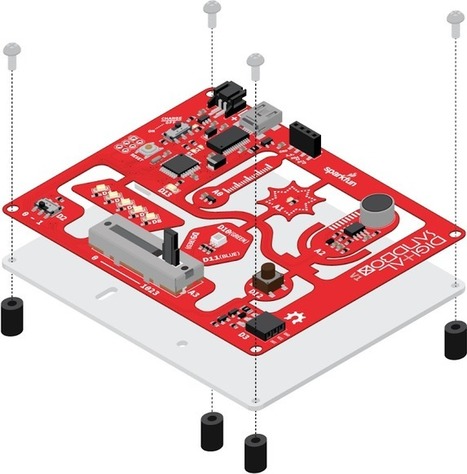
The Digital Sandbox is a learning platform that engages both the software and hardware worlds. It’s powered by a microcontroller that can interact with real-world inputs – like light or temperature sensors – while at the same time controlling LEDs, motors, and other outputs. The Digital Sandbox is equipped with everything, on board, that you will need to complete 13 experiments including controlling an LED, measuring how loud things are, detecting the temperature is, and more.


Learn more / En savoir plus / Mehr erfahren:


https://www.scoop.it/t/21st-century-learning-and-teaching/?&tag=ARDUINO


Gust MEES's insight:
Welcome to the Digital Sandbox!


The Digital Sandbox is a learning platform that engages both the software and hardware worlds. It’s powered by a microcontroller that can interact with real-world inputs – like light or temperature sensors – while at the same time controlling LEDs, motors, and other outputs. The Digital Sandbox is equipped with everything, on board, that you will need to complete 13 experiments including controlling an LED, measuring how loud things are, detecting the temperature is, and more.


Learn more / En savoir plus / Mehr erfahren:


https://www.scoop.it/t/21st-century-learning-and-teaching/?&tag=ARDUINO


No comment yet.
Scooped by Gust MEES
January 15, 2018 9:13 AM
Scoop.it!

The EduBlocks Project | #Coding #Python #RaspBerryPi #LEARNingByDoing 

The EduBlocks Project | #Coding #Python #RaspBerryPi #LEARNingByDoing  | 21st Century Learning and Teaching | Scoop.it
Build Python 3 Code


EduBlocks is an easy way to learn the Python 3 syntax. It states the actual python code on the blocks.


Learn more / En savoir plus / Mehr erfahren:


https://www.scoop.it/t/21st-century-learning-and-teaching/?&tag=Coding


https://www.scoop.it/t/21st-century-learning-and-teaching/?&tag=Raspberry+Pi


Gust MEES's insight:
Build Python 3 Code


EduBlocks is an easy way to learn the Python 3 syntax. It states the actual python code on the blocks.


Learn more / En savoir plus / Mehr erfahren:


https://www.scoop.it/t/21st-century-learning-and-teaching/?&tag=Coding


https://www.scoop.it/t/21st-century-learning-and-teaching/?&tag=Raspberry+Pi


demiunique's comment, January 18, 2018 4:58 AM
nice
Scooped by Gust MEES
January 9, 2018 11:35 AM
Scoop.it!

Arduino and Servos: How to Make a Laser Turret with XOD | Fun with electronics! | #Coding #Maker #MakerED #MakerSpaces

Arduino and Servos: How to Make a Laser Turret with XOD | Fun with electronics! | #Coding #Maker #MakerED #MakerSpaces | 21st Century Learning and Teaching | Scoop.it

A tutorial on what servos are, how they work, and how to use them. Then I build a laser turret using a pan-tilt servo kit and an Arduino Uno.


Learn more / En savoir plus / Mehr erfahren:


https://www.scoop.it/t/21st-century-learning-and-teaching/?&tag=Coding


Gust MEES's insight:

A tutorial on what servos are, how they work, and how to use them. Then I build a laser turret using a pan-tilt servo kit and an Arduino Uno.


Learn more / En savoir plus / Mehr erfahren:


https://www.scoop.it/t/21st-century-learning-and-teaching/?&tag=Coding


No comment yet.