21st Century Learning and Teaching
751.6K views | +1 today
Follow
21st Century Learning and Teaching
Related articles to 21st Century Learning and Teaching as also tools...
Curated by Gust MEES
Your new post is loading...

Popular Tags

Current selected tag: 'Maker'. Clear
Scooped by Gust MEES
March 15, 2018 6:43 PM
Scoop.it!

Repl.it lets you program in your browser | #Programming #Maker #MakerED #MakerSpaces 

Repl.it lets you program in your browser | #Programming #Maker #MakerED #MakerSpaces  | 21st Century Learning and Teaching | Scoop.it

No matter whether you are a seasoned programmer or you simply want to take your first steps in writing code, Repl.it wants to help you get from idea to result as fast as possible — without complicated installs and setup procedures getting in your way.

The Y Combinator-funded project, which released version 1.0 of its service this week, gives you an easy to use programming environment in the browser, which slowly reveals its complexity as you write your code.


The acronym REPL stands for read-eval-print loop and basically provides a programmer with an interactive programming environment. Unsurprisingly, that’s exactly what Repl.it gives you, too, and with 200,000 weekly active developers on the platform already, there is clearly a demand for this service.


Repl.it  already supports virtually every programming language you can think of, no matter whether that’s JavaScript, Python, PHP or QBasic, as well as popular frameworks like Django, Ruby on Rails and Sinatra. And if you want to hurt yourself and write in Brainfuck, you can do that, too.


Learn more / En savoir plus / Mehr erfahren:


https://www.scoop.it/t/21st-century-learning-and-teaching/?&tag=Programming...


Gust MEES's insight:

No matter whether you are a seasoned programmer or you simply want to take your first steps in writing code, Repl.it wants to help you get from idea to result as fast as possible — without complicated installs and setup procedures getting in your way.

The Y Combinator-funded project, which released version 1.0 of its service this week, gives you an easy to use programming environment in the browser, which slowly reveals its complexity as you write your code.


The acronym REPL stands for read-eval-print loop and basically provides a programmer with an interactive programming environment. Unsurprisingly, that’s exactly what Repl.it gives you, too, and with 200,000 weekly active developers on the platform already, there is clearly a demand for this service.


Repl.it  already supports virtually every programming language you can think of, no matter whether that’s JavaScript, Python, PHP or QBasic, as well as popular frameworks like Django, Ruby on Rails and Sinatra. And if you want to hurt yourself and write in Brainfuck, you can do that, too.


Learn more / En savoir plus / Mehr erfahren:


https://www.scoop.it/t/21st-century-learning-and-teaching/?&tag=Programming...
 

No comment yet.
Scooped by Gust MEES
March 15, 2018 1:04 PM
Scoop.it!

Raspberry Pi powered by Arduino: Now you can program the Pi using Arduino Sketches

Raspberry Pi powered by Arduino: Now you can program the Pi using Arduino Sketches | 21st Century Learning and Teaching | Scoop.it

The new feature will allow Pi owners to write Arduino Sketches to interact with sensors, motors, electronic boards and other hardware attached to the Pi's GPIO pins.

Arduino Sketches can now be used to program the Raspberry Pi, marking a moving together of two of the biggest maker platforms.
The cloud-based Arduino Create platform is designed to simplify the creation of Internet of Things applications.
Want to use the $35 Raspberry Pi computer to build your own hardware but only ever used Arduino boards? Well you're in luck.

If you know how to write programs to control hardware using Arduino boards you can now use the same language to control hardware attached to the Pi, the co-founder of the Arduino Project Massimo Banzi announced yesterday.

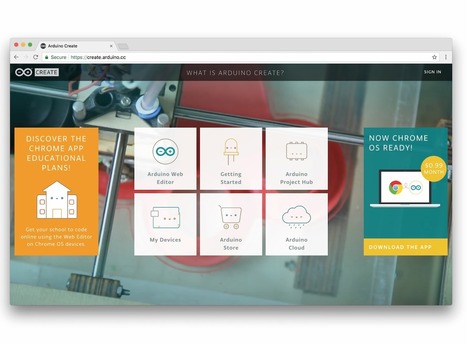
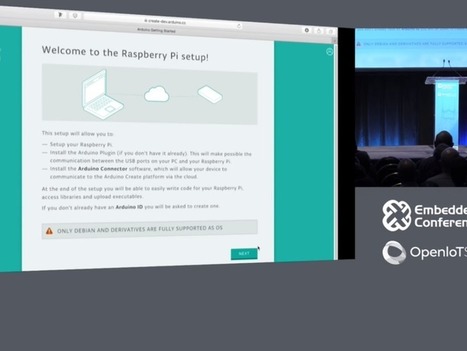
Banzi revealed a new feature in the cloud-based Arduino Create service that will compile Arduino Sketches — programs typically used to interact with Arduino boards and attached hardware — into a form that can be run on a Raspberry Pi.

The feature will allow Pi owners to write Arduino Sketches to interact with sensors, motors, electronic boards and other hardware attached to the Pi's GPIO pins.

"The idea is there's a tonne of people that know how to use Arduino and they can take their knowledge and apply it to this," Banzi told the Embedded Linux Conference 2018 in Portland in the US.


Learn more / En savoir plus / Mehr erfahren:


https://www.scoop.it/t/21st-century-learning-and-teaching/?&tag=Raspberry+Pi


https://www.scoop.it/t/21st-century-learning-and-teaching/?&tag=ARDUINO


Gust MEES's insight:

The new feature will allow Pi owners to write Arduino Sketches to interact with sensors, motors, electronic boards and other hardware attached to the Pi's GPIO pins.

Arduino Sketches can now be used to program the Raspberry Pi, marking a moving together of two of the biggest maker platforms.
The cloud-based Arduino Create platform is designed to simplify the creation of Internet of Things applications.
Want to use the $35 Raspberry Pi computer to build your own hardware but only ever used Arduino boards? Well you're in luck.

If you know how to write programs to control hardware using Arduino boards you can now use the same language to control hardware attached to the Pi, the co-founder of the Arduino Project Massimo Banzi announced yesterday.

Banzi revealed a new feature in the cloud-based Arduino Create service that will compile Arduino Sketches — programs typically used to interact with Arduino boards and attached hardware — into a form that can be run on a Raspberry Pi.

The feature will allow Pi owners to write Arduino Sketches to interact with sensors, motors, electronic boards and other hardware attached to the Pi's GPIO pins.

"The idea is there's a tonne of people that know how to use Arduino and they can take their knowledge and apply it to this," Banzi told the Embedded Linux Conference 2018 in Portland in the US.


Learn more / En savoir plus / Mehr erfahren:


https://www.scoop.it/t/21st-century-learning-and-teaching/?&tag=Raspberry+Pi


https://www.scoop.it/t/21st-century-learning-and-teaching/?&tag=ARDUINO


No comment yet.
Scooped by Gust MEES
March 14, 2018 5:47 PM
Scoop.it!

Raspberry Pi 3B+: Bastelplatine ist flotter und hat GBit-LAN | #Maker #MakerED #MakerSpaces #Coding #RaspBerryPI 

Raspberry Pi 3B+: Bastelplatine ist flotter und hat GBit-LAN | #Maker #MakerED #MakerSpaces #Coding #RaspBerryPI  | 21st Century Learning and Teaching | Scoop.it

Bastelplatine ist flotter und hat GBit-LAN
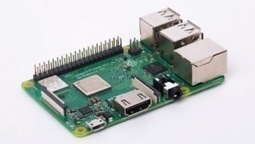
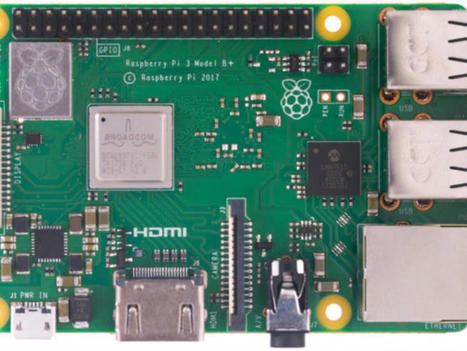
Der Raspberry Pi 3B+ hat schnellere ARM-Prozessorkerne, es gibt ac-WLAN für das 5-GHz-Frequenzband und Gigabit-Ethernet. Der Preis der Bastelplatine beträgt 40 US-Dollar.

Pünktlich zum Pi-Tag erscheint der Raspberry Pi 3B+ der Rasperry Pi Foundation. Die Bastelplatine folgt auf den Raspberry Pi 3B und hat trotz der vermeintlich kleinen Namensänderung mehr Neuerungen integriert, als die Bezeichnung Raspberry Pi 3B+ impliziert.


Learn more / En savoir plus / Mehr erfahren:


https://www.scoop.it/t/21st-century-learning-and-teaching/?&tag=Raspberry+Pi


Gust MEES's insight:

Bastelplatine ist flotter und hat GBit-LAN
Der Raspberry Pi 3B+ hat schnellere ARM-Prozessorkerne, es gibt ac-WLAN für das 5-GHz-Frequenzband und Gigabit-Ethernet. Der Preis der Bastelplatine beträgt 40 US-Dollar.

Pünktlich zum Pi-Tag erscheint der Raspberry Pi 3B+ der Rasperry Pi Foundation. Die Bastelplatine folgt auf den Raspberry Pi 3B und hat trotz der vermeintlich kleinen Namensänderung mehr Neuerungen integriert, als die Bezeichnung Raspberry Pi 3B+ impliziert.


Learn more / En savoir plus / Mehr erfahren:


https://www.scoop.it/t/21st-century-learning-and-teaching/?&tag=Raspberry+Pi


No comment yet.
Scooped by Gust MEES
March 13, 2018 1:42 PM
Scoop.it!

Arduino Blog » You can now use Arduino to program Linux IoT devices | #Coding #Maker #MakerED #MakerSpaces #PracTICE #LEARNingByDoing 

Arduino Blog » You can now use Arduino to program Linux IoT devices | #Coding #Maker #MakerED #MakerSpaces #PracTICE #LEARNingByDoing  | 21st Century Learning and Teaching | Scoop.it

Today, at Embedded Linux Conference 2018, Arduino announced the expansion of the number of architectures supported by its Arduino Create platform for the development of IoT applications. With this new release, Arduino Create users can manage and program a wide range of popular Linux® single-board computers like the AAEON® UP² board, Raspberry Pi® and BeagleBone® as if they were regular Arduino boards. Multiple Arduino programs can run simultaneously on a Linux-based board and interact and communicate with each other, leveraging the capabilities provided by the new Arduino Connector. Moreover, IoT devices can be managed and updated remotely, independently from where they are located.

To further simplify the user journey, Arduino has also developed a novel out-of-the-box experience for Raspberry Pi and BeagleBone boards, in addition to Intel®  SBCs, which enables anyone to set up a new device from scratch via the cloud without any previous knowledge by following an intuitive web-based wizard. Arduino plans to continue enriching and expanding the set of features of Arduino Create in the coming months.


Learn more / En savoir plus / Mehr erfahren:


https://www.scoop.it/t/21st-century-learning-and-teaching/?&tag=ARDUINO


Gust MEES's insight:

Today, at Embedded Linux Conference 2018, Arduino announced the expansion of the number of architectures supported by its Arduino Create platform for the development of IoT applications. With this new release, Arduino Create users can manage and program a wide range of popular Linux® single-board computers like the AAEON® UP² board, Raspberry Pi® and BeagleBone® as if they were regular Arduino boards. Multiple Arduino programs can run simultaneously on a Linux-based board and interact and communicate with each other, leveraging the capabilities provided by the new Arduino Connector. Moreover, IoT devices can be managed and updated remotely, independently from where they are located.

To further simplify the user journey, Arduino has also developed a novel out-of-the-box experience for Raspberry Pi and BeagleBone boards, in addition to Intel®  SBCs, which enables anyone to set up a new device from scratch via the cloud without any previous knowledge by following an intuitive web-based wizard. Arduino plans to continue enriching and expanding the set of features of Arduino Create in the coming months.


Learn more / En savoir plus / Mehr erfahren:


https://www.scoop.it/t/21st-century-learning-and-teaching/?&tag=ARDUINO


No comment yet.
Scooped by Gust MEES
March 12, 2018 4:09 PM
Scoop.it!

Magnet Levitation with Arduino | #Maker #MakerED #MakerSpaces #Coding #LEARNingByDoing 

Magnet Levitation with Arduino | #Maker #MakerED #MakerSpaces #Coding #LEARNingByDoing  | 21st Century Learning and Teaching | Scoop.it

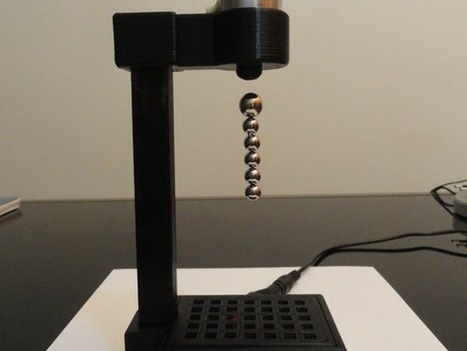
Magnet levitation toy using Arduino. Cheap and easy to make!.


Learn more / En savoir plus / Mehr erfahren:


https://www.scoop.it/t/21st-century-learning-and-teaching/?&tag=ARDUINO


Gust MEES's insight:

Magnet levitation toy using Arduino. Cheap and easy to make!.


Learn more / En savoir plus / Mehr erfahren:


https://www.scoop.it/t/21st-century-learning-and-teaching/?&tag=ARDUINO


No comment yet.
Scooped by Gust MEES
March 3, 2018 4:25 AM
Scoop.it!

Arduino Projects with DIY Step by Step Tutorials

Arduino Projects with DIY Step by Step Tutorials | 21st Century Learning and Teaching | Scoop.it

Each of the following DIY Arduino projects is covered with detailed step by step tutorial on how to do it yourself and includes circuit schematics, source codes and videos.

This collection of Arduino Projects features:

Wireless control
Automation
Motors control
Robotics
LEDs
and more.


Learn more / En savoir plus / Mehr erfahren:


https://www.scoop.it/t/21st-century-learning-and-teaching/?&tag=makerspace


https://www.scoop.it/t/21st-century-learning-and-teaching/?&tag=ARDUINO


Gust MEES's insight:

Each of the following DIY Arduino projects is covered with detailed step by step tutorial on how to do it yourself and includes circuit schematics, source codes and videos.

This collection of Arduino Projects features:

Wireless control
Automation
Motors control
Robotics
LEDs
and more.


Learn more / En savoir plus / Mehr erfahren:


https://www.scoop.it/t/21st-century-learning-and-teaching/?&tag=makerspace


https://www.scoop.it/t/21st-century-learning-and-teaching/?&tag=ARDUINO


No comment yet.
Scooped by Gust MEES
March 1, 2018 12:50 PM
Scoop.it!

Hackster.io - The community dedicated to learning hardware | #Maker #MakerED #MakerSpaces #PracTICE #LEARNingByDoing #Creativity

Hackster.io - The community dedicated to learning hardware | #Maker #MakerED #MakerSpaces #PracTICE #LEARNingByDoing #Creativity | 21st Century Learning and Teaching | Scoop.it

Learn to design, create, and program electronics
11,116 open-source project tutorials shared by 408,637 developers


Learn more / En savoir plus / Mehr erfahren:


https://gustmees.wordpress.com/?s=maker


https://www.scoop.it/t/21st-century-learning-and-teaching/?&tag=makerspace


Gust MEES's insight:

Learn to design, create, and program electronics
11,116 open-source project tutorials shared by 408,637 developers


Learn more / En savoir plus / Mehr erfahren:


https://gustmees.wordpress.com/?s=maker


https://www.scoop.it/t/21st-century-learning-and-teaching/?&tag=makerspace


No comment yet.
Scooped by Gust MEES
February 22, 2018 7:42 PM
Scoop.it!

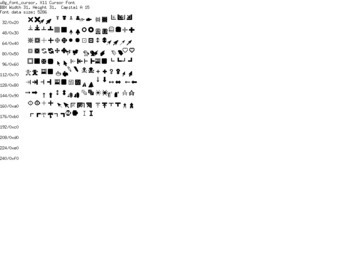
Drawing a Bitmap in #Coding with #Arduino for OLED and LCD Displays| userreference · olikraus/u8glib Wiki 

Drawing a Bitmap in #Coding with #Arduino for OLED and LCD Displays| userreference · olikraus/u8glib Wiki  | 21st Century Learning and Teaching | Scoop.it

u8glib - Arduino Monochrom Graphics Library for LCDs and OLEDs


Learn more / En savoir plus / Mehr erfahren:


https://www.scoop.it/t/21st-century-learning-and-teaching/?&tag=ARDUINO


Gust MEES's insight:

u8glib - Arduino Monochrom Graphics Library for LCDs and OLEDs


Learn more / En savoir plus / Mehr erfahren:


https://www.scoop.it/t/21st-century-learning-and-teaching/?&tag=ARDUINO


No comment yet.
Scooped by Gust MEES
February 22, 2018 8:25 AM
Scoop.it!

javl/image2cpp | image2cpp is a simple tool to change images into byte arrays to use with (monochrome) displays suchs as OLEDs | #Coding #Arduino #Maker #MakerED #MakerSpaces

javl/image2cpp | image2cpp is a simple tool to change images into byte arrays to use with (monochrome) displays suchs as OLEDs | #Coding #Arduino #Maker #MakerED #MakerSpaces | 21st Century Learning and Teaching | Scoop.it

image2cpp is a simple tool to change images into byte arrays to use with (monochrome) displays suchs as OLEDs, like those from Adafruit or Sparkfun.


While searching for a way to generate these arrays, I mostly found links to a piece of Windows software. Both the flakey results and the hassle of having to boot a virtual machine just to convert an image lead to me writing this pure html + javascript solution.

Alternatively you can also enter a byte array as input to turn it back into an image. This might be useful for debugging, or when you want to write the byte array yourself. I don't know.

Running the tool

You don't need any special dependencies / internet connection; all the necessary parts sit in a single .html file. So just open this index.html page in a (recent) browser to run the tool.


Or you can use the online version at:  


http://javl.github.io/image2cpp/


Learn more / En savoir plus / Mehr erfahren:


https://www.scoop.it/t/21st-century-learning-and-teaching/?&tag=ARDUINO


BTW: Above shown image is my "MAUSI", which was the "Mascot" for my Cyber-Security courses in Luxembourg EDUcation in 2003-2007. Those courses were mandatory for students up from 12 years old (7èmes).


Learn more about Cyber-Security in Luxembourg (Europe):


https://gustmees.wordpress.com/2017/11/22/luxembourg-and-cyber-security-how-did-it-start/


Gust MEES's insight:

image2cpp is a simple tool to change images into byte arrays to use with (monochrome) displays suchs as OLEDs, like those from Adafruit or Sparkfun.


While searching for a way to generate these arrays, I mostly found links to a piece of Windows software. Both the flakey results and the hassle of having to boot a virtual machine just to convert an image lead to me writing this pure html + javascript solution.

Alternatively you can also enter a byte array as input to turn it back into an image. This might be useful for debugging, or when you want to write the byte array yourself. I don't know.

Running the tool

You don't need any special dependencies / internet connection; all the necessary parts sit in a single .html file. So just open this index.html page in a (recent) browser to run the tool.


Or you can use the online version at:  


http://javl.github.io/image2cpp/


Learn more / En savoir plus / Mehr erfahren:


https://www.scoop.it/t/21st-century-learning-and-teaching/?&tag=ARDUINO


BTW: Above shown image is my "MAUSI", which was the "Mascot" for my Cyber-Security courses in Luxembourg EDUcation in 2003-2007. Those courses were mandatory for students up from 12 years old (7èmes).


Learn more about Cyber-Security in Luxembourg (Europe):


https://gustmees.wordpress.com/2017/11/22/luxembourg-and-cyber-security-how-did-it-start/


No comment yet.
Scooped by Gust MEES
February 19, 2018 8:15 AM
Scoop.it!

Touchscreen Function Generator | #Electronics #Arduino #Coding #Maker #MakerED #MakerSpaces #LEARNingByDoing 

Touchscreen Function Generator | #Electronics #Arduino #Coding #Maker #MakerED #MakerSpaces #LEARNingByDoing  | 21st Century Learning and Teaching | Scoop.it

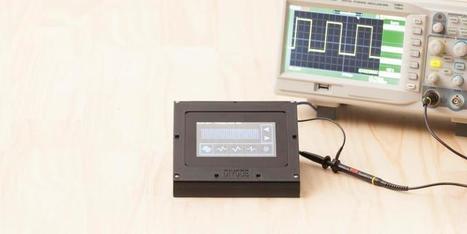
Create a useful function generator using a 4D Systems touchscreen display and an Arduino.


Learn more / En savoir plus / Mehr erfahren:


https://www.scoop.it/t/21st-century-learning-and-teaching/?&tag=ARDUINO


https://www.scoop.it/t/21st-century-learning-and-teaching/?&tag=4D+Systems


https://www.scoop.it/t/21st-century-learning-and-teaching/?&tag=makerspace


Gust MEES's insight:

Create a useful function generator using a 4D Systems touchscreen display and an Arduino.


Learn more / En savoir plus / Mehr erfahren:


https://www.scoop.it/t/21st-century-learning-and-teaching/?&tag=ARDUINO


https://www.scoop.it/t/21st-century-learning-and-teaching/?&tag=4D+Systems


https://www.scoop.it/t/21st-century-learning-and-teaching/?&tag=makerspace


No comment yet.
Scooped by Gust MEES
February 17, 2018 8:26 AM
Scoop.it!

DIYODE Magazine is a print and digital publication supporting electronics enthusiasts and makers | #Coding #MakerED #MakerSpaces

DIYODE Magazine is a print and digital publication supporting electronics enthusiasts and makers | #Coding #MakerED #MakerSpaces | 21st Century Learning and Teaching | Scoop.it

DIYODE Magazine is a print and digital publication supporting electronics enthusiasts and makers.


Learn more / En savoir plus / Mehr erfahren:


https://www.scoop.it/t/21st-century-learning-and-teaching/?&tag=Coding


https://www.scoop.it/t/21st-century-learning-and-teaching/?&tag=makerspace


Gust MEES's insight:

DIYODE Magazine is a print and digital publication supporting electronics enthusiasts and makers.


Learn more / En savoir plus / Mehr erfahren:


https://www.scoop.it/t/21st-century-learning-and-teaching/?&tag=Coding


https://www.scoop.it/t/21st-century-learning-and-teaching/?&tag=makerspace


No comment yet.
Scooped by Gust MEES
February 16, 2018 9:31 PM
Scoop.it!

Visual Programming | Visuino Arduino tutorials - YouTube | #VideoTutorials #Coding #Maker #MakerED #MakerSpaces #PracTICE 

In computing, a visual programming language (VPL) is any programming language that lets users create programs by manipulating program elements graphically rather than by specifying them textually.[1][2] A VPL allows programming with visual expressions, spatial arrangements of text and graphic symbols, used either as elements of syntax or secondary notation.


For example, many VPLs (known as dataflow or diagrammatic programming)[3] are based on the idea of "boxes and arrows", where boxes or other screen objects are treated as entities, connected by arrows, lines or arcs which represent relations.


Learn more / En savoir plus / Mehr erfahren:


https://www.scoop.it/t/21st-century-learning-and-teaching/?&tag=Visual+programming


https://en.wikipedia.org/wiki/Visual_programming_language


No comment yet.
Scooped by Gust MEES
February 16, 2018 9:41 AM
Scoop.it!

Arduino: Connect 4D Systems ViSi Genie Smart Display | #Coding #Maker #MakerED #MakerSpaces 

Arduino: Connect 4D Systems ViSi Genie Smart Display | #Coding #Maker #MakerED #MakerSpaces  | 21st Century Learning and Teaching | Scoop.it
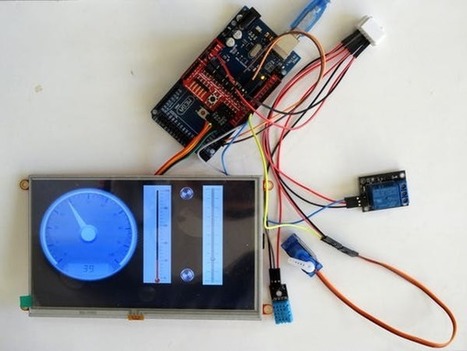
Connect 4D Systems ViSi Genie smart Touch Screen Display to Arduino, and program it - Quick and Easy!. Find this and other hardware projects on Hackster.io.


Learn more / En savoir plus / Mehr erfahren:


https://www.scoop.it/t/21st-century-learning-and-teaching/?&tag=ARDUINO


https://www.scoop.it/t/21st-century-learning-and-teaching/?&tag=Visuino+-+Visual+Development+for+Arduino


Gust MEES's insight:
Connect 4D Systems ViSi Genie smart Touch Screen Display to Arduino, and program it - Quick and Easy!. Find this and other hardware projects on Hackster.io.


Learn more / En savoir plus / Mehr erfahren:


https://www.scoop.it/t/21st-century-learning-and-teaching/?&tag=ARDUINO


https://www.scoop.it/t/21st-century-learning-and-teaching/?&tag=Visuino+-+Visual+Development+for+Arduino


No comment yet.
Scooped by Gust MEES
March 15, 2018 1:19 PM
Scoop.it!

Good to know when using different Arduino boards | Arduino - Wire | #Coding #Maker #MakerED #MakerSpaces #LEARNingByDoing

Wire Library

This library allows you to communicate with I2C / TWI devices. On the Arduino boards with the R3 layout (1.0 pinout), the SDA (data line) and SCL (clock line) are on the pin headers close to the AREF pin. The Arduino Due has two I2C / TWI interfaces SDA1 and SCL1 are near to the AREF pin and the additional one is on pins 20 and 21.

As a reference the table below shows where TWI pins are located on various Arduino boards.


BoardI2C / TWI pinsUno, EthernetA4 (SDA), A5 (SCL)Mega256020 (SDA), 21 (SCL)Leonardo2 (SDA), 3 (SCL)Due20 (SDA), 21 (SCL), SDA1SCL1


As of Arduino 1.0, the library inherits from the Stream functions, making it consistent with other read/write libraries. Because of this, send() and receive() have been replaced with read() and write().


Gust MEES's insight:

This library allows you to communicate with I2C / TWI devices. On the Arduino boards with the R3 layout (1.0 pinout), the SDA (data line) and SCL (clock line) are on the pin headers close to the AREF pin. The Arduino Due has two I2C / TWI interfaces SDA1 and SCL1 are near to the AREF pin and the additional one is on pins 20 and 21.

As a reference the table below shows where TWI pins are located on various Arduino boards.


BoardI2C / TWI pinsUno, EthernetA4 (SDA), A5 (SCL)Mega256020 (SDA), 21 (SCL)Leonardo2 (SDA), 3 (SCL)Due20 (SDA), 21 (SCL), SDA1SCL1


As of Arduino 1.0, the library inherits from the Stream functions, making it consistent with other read/write libraries. Because of this, send() and receive() have been replaced with read() and write().


No comment yet.
Scooped by Gust MEES
March 15, 2018 7:04 AM
Scoop.it!

Raspberry Pi 3 Model B+ arrives: Faster CPU, Wi-Fi, 300Mbps Ethernet | #Maker #MakerED #MakerSpaces #Coding #LEARNingByDoing

Raspberry Pi 3 Model B+ arrives: Faster CPU, Wi-Fi, 300Mbps Ethernet | #Maker #MakerED #MakerSpaces #Coding #LEARNingByDoing | 21st Century Learning and Teaching | Scoop.it

The Raspberry Pi Foundation has launched the Raspberry Pi 3 Model B+, offering a faster CPU and faster wireless throughput than its predecessor, the Raspberry Pi 3 Model B.

Raspberry Pi 3 Model B+ comes exactly two years after the launch of the Raspberry Pi 3 Model B and is in line with Raspberry Pi Foundation's two-year B+ 'evolution' upgrade.

In other words, the changes don't warrant calling it a Raspberry Pi 4, but there are noticeable improvements, including a faster processor, higher Wi-Fi speeds, and faster Ethernet.


Learn more / En savoir plus / Mehr erfahren:


https://www.scoop.it/t/21st-century-learning-and-teaching/?&tag=Raspberry+Pi


Gust MEES's insight:

The Raspberry Pi Foundation has launched the Raspberry Pi 3 Model B+, offering a faster CPU and faster wireless throughput than its predecessor, the Raspberry Pi 3 Model B.

Raspberry Pi 3 Model B+ comes exactly two years after the launch of the Raspberry Pi 3 Model B and is in line with Raspberry Pi Foundation's two-year B+ 'evolution' upgrade.

In other words, the changes don't warrant calling it a Raspberry Pi 4, but there are noticeable improvements, including a faster processor, higher Wi-Fi speeds, and faster Ethernet.


Learn more / En savoir plus / Mehr erfahren:


https://www.scoop.it/t/21st-century-learning-and-teaching/?&tag=Raspberry+Pi


No comment yet.
Scooped by Gust MEES
March 13, 2018 4:38 PM
Scoop.it!

RandA, Combining Raspberry Pi & Arduino | #Coding #Maker #MakerED #MakerSpaces #PracTICE #LEARNingByDoing

RandA, Combining Raspberry Pi & Arduino | #Coding #Maker #MakerED #MakerSpaces #PracTICE #LEARNingByDoing | 21st Century Learning and Teaching | Scoop.it

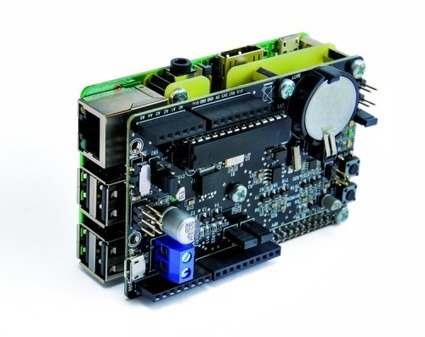
Two years ago, open electronics had produced “RandA“, an Atmega328-based board for Raspberry Pi to deliver the advantages of both, Raspberry Pi and Arduino. Earlier this month, an updated version of RandA has been released to be compatible with Raspberry Pi 3.

RandA is a development board that leverages the hardware equipment and the computing power of Arduino with its shields, and the enormous potential of the Raspberry Pi. It features Atmega328 microcontroller, has RTC (Real Time Clock) module, power button and sleep timer, connectors for 5 volts and connectors for mounting Arduino shield.


Learn more / En savoir plus / Mehr erfahren:


https://www.scoop.it/t/21st-century-learning-and-teaching/?&tag=ARDUINO


https://www.scoop.it/t/21st-century-learning-and-teaching/?&tag=Raspberry+Pi


Gust MEES's insight:

Two years ago, open electronics had produced “RandA“, an Atmega328-based board for Raspberry Pi to deliver the advantages of both, Raspberry Pi and Arduino. Earlier this month, an updated version of RandA has been released to be compatible with Raspberry Pi 3.

RandA is a development board that leverages the hardware equipment and the computing power of Arduino with its shields, and the enormous potential of the Raspberry Pi. It features Atmega328 microcontroller, has RTC (Real Time Clock) module, power button and sleep timer, connectors for 5 volts and connectors for mounting Arduino shield.


Learn more / En savoir plus / Mehr erfahren:


https://www.scoop.it/t/21st-century-learning-and-teaching/?&tag=ARDUINO


https://www.scoop.it/t/21st-century-learning-and-teaching/?&tag=Raspberry+Pi


No comment yet.
Scooped by Gust MEES
March 13, 2018 11:35 AM
Scoop.it!

Lego train level crossing 7835 fully automated by Arduino - YouTube | #Maker #MakerED #MakerSpaces #Coding #PracTICE #LEARNingByDoing #Creativity

Lego train level crossing automated by Arduino. Another lego train crash at the lego train level crossing! It turns out that the guy working there just wants to relax all day long. Only one solution: automating the thing!


Learn more / En savoir plus / Mehr erfahren:


https://www.scoop.it/t/21st-century-learning-and-teaching/?&tag=ARDUINO


Gust MEES's insight:

Lego train level crossing automated by Arduino. Another lego train crash at the lego train level crossing! It turns out that the guy working there just wants to relax all day long. Only one solution: automating the thing!


Learn more / En savoir plus / Mehr erfahren:


https://www.scoop.it/t/21st-century-learning-and-teaching/?&tag=ARDUINO


No comment yet.
Scooped by Gust MEES
March 12, 2018 10:41 AM
Scoop.it!

Making an Arduino Touch Sensitive LED Sign | #Maker #MakerED #MakerSpaces #Coding #PracTICE #LEARNingByDoing

Making an Arduino Touch Sensitive LED Sign | #Maker #MakerED #MakerSpaces #Coding #PracTICE #LEARNingByDoing | 21st Century Learning and Teaching | Scoop.it

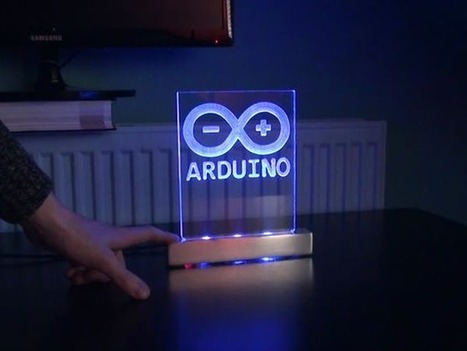
An Arduino logo engraved in acrylic with a touch sensitive aluminum LED stand.


Learn more / En savoir plus / Mehr erfahren:


https://www.scoop.it/t/21st-century-learning-and-teaching/?&tag=ARDUINO


Gust MEES's insight:

An Arduino logo engraved in acrylic with a touch sensitive aluminum LED stand.


Learn more / En savoir plus / Mehr erfahren:


https://www.scoop.it/t/21st-century-learning-and-teaching/?&tag=ARDUINO


No comment yet.
Scooped by Gust MEES
March 2, 2018 4:42 AM
Scoop.it!

This 3D Printed Arduino-Based Hexapod Robot Can Bust a Move! | #3DPrinting #Maker #MakerED #MakerSpaces #Coding #Vorpal #Creativity #3DPrinting

This 3D Printed Arduino-Based Hexapod Robot Can Bust a Move! | #3DPrinting #Maker #MakerED #MakerSpaces #Coding #Vorpal #Creativity #3DPrinting | 21st Century Learning and Teaching | Scoop.it

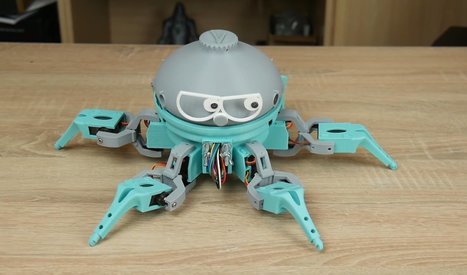
I have often mentioned the wisdom of robot maker and Make: contributor I-Wei Huang who says that you can get away with a lot in a robot creation if you make it cute, characterful, and funny. This comes across in spades with Vorpal, a 3D-printable hexapod with real character and presence. You’ll laugh, you’ll cry, you’ll fall in love.


Learn more / En savoir plus / Mehr erfahren:


https://www.scoop.it/t/21st-century-learning-and-teaching/?&tag=makerspace


https://www.scoop.it/t/21st-century-learning-and-teaching/?&tag=ARDUINO


Gust MEES's insight:

I have often mentioned the wisdom of robot maker and Make: contributor I-Wei Huang who says that you can get away with a lot in a robot creation if you make it cute, characterful, and funny. This comes across in spades with Vorpal, a 3D-printable hexapod with real character and presence. You’ll laugh, you’ll cry, you’ll fall in love.


Learn more / En savoir plus / Mehr erfahren:


https://www.scoop.it/t/21st-century-learning-and-teaching/?&tag=makerspace


https://www.scoop.it/t/21st-century-learning-and-teaching/?&tag=ARDUINO


No comment yet.
Scooped by Gust MEES
February 23, 2018 12:25 PM
Scoop.it!

Arduino Tutorial - Touch Screen TFT LCD Tutorial | #Coding #Maker #MakerED #MakerSpaces #LEARNingByDoing #PracTICE

Arduino Tutorial - Touch Screen TFT LCD Tutorial | #Coding #Maker #MakerED #MakerSpaces #LEARNingByDoing #PracTICE | 21st Century Learning and Teaching | Scoop.it

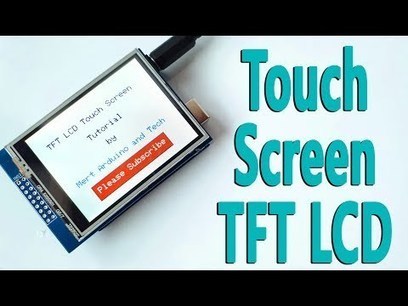
In this tutorial we will learn how to programming the TFT LCD Touch Screen. I used 2.8" TFT Touch Display ILI9325 Module and Arduino Uno for this tutorial.


The topics we will view in this tutorial, Required Libraries, Add Text, Text Color, Font Size, Print Text, Create Button, Button Click, Add Frame, Draw Rectangle and Background Color. 


Learn more / En savoir plus / Mehr erfahren:


https://www.scoop.it/t/21st-century-learning-and-teaching/?&tag=ARDUINO


https://www.scoop.it/t/21st-century-learning-and-teaching/?&tag=TFT+Display+with+buttons


Gust MEES's insight:

In this tutorial we will learn how to programming the TFT LCD Touch Screen. I used 2.8" TFT Touch Display ILI9325 Module and Arduino Uno for this tutorial.


The topics we will view in this tutorial, Required Libraries, Add Text, Text Color, Font Size, Print Text, Create Button, Button Click, Add Frame, Draw Rectangle and Background Color. 


Learn more / En savoir plus / Mehr erfahren:


https://www.scoop.it/t/21st-century-learning-and-teaching/?&tag=ARDUINO


https://www.scoop.it/t/21st-century-learning-and-teaching/?&tag=TFT+Display+with+buttons


No comment yet.
Scooped by Gust MEES
February 22, 2018 3:22 PM
Scoop.it!

Makerspace gesucht im deutschsprachigen Raum? Diese Karte hilft weiter | #Luxembourg #Europe #InteractiveMap

Makerspace gesucht im deutschsprachigen Raum? Diese Karte hilft weiter | #Luxembourg #Europe #InteractiveMap | 21st Century Learning and Teaching | Scoop.it

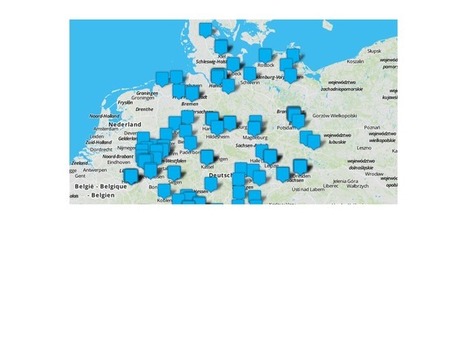
Sie suchen Hilfe beim Selbstbau, Zugang zu 3D-Drucker, Lasercutter oder anderen Maschinen? In Fablabs, Makerspaces und offenen Werkstätten wird Ihnen geholfen. Die Makerspacekarte zeigt Ihnen, wo Sie in Ihrer Nähe Unterstützung finden.

Auch wer gerne allein im stillen Kämmerlein werkelt, darf sich Maker nennen. Oft macht es aber gemeinsam mehr Spaß. Im deutschsprachigen Raum gibt es aktuell über 200 Orte, an denen sich die Maker-Community trifft. Diese haben wir in einer Online-Karte zusammengefasst, damit Sie einfach mal nachschauen können, wo in Ihrer Region oder Stadt Gleichgesinnte zusammenkommen.

Von der Grundausstattung mit Werkzeug bis zur Open-Source-Software: alles Wichtige zum Einstieg ins Elektronik-Basteln vermittelt das Make-Sonderheft "Richtig loslegen".

In der Karte finden Sie Makerspaces, Hackerspaces, FabLabs, offene Werkstätten und andere vergleichbare Orte für Maker. Jeder dieser Treffpunkte ist anders ausgestattet und organisiert und setzt unterschiedliche Schwerpunkte. Vom Einraum-Hackspace mit Couch und 3D-Drucker bis zum geförderten Riesen-FabLab mit Dutzenden Profi-Maschinen ist alles dabei.


Learn more / En savoir plus / Mehr erfahren:


https://www.scoop.it/t/21st-century-learning-and-teaching/?&tag=makerspace


https://gustmees.wordpress.com/?s=makerspaces+luxembourg


Gust MEES's insight:

Sie suchen Hilfe beim Selbstbau, Zugang zu 3D-Drucker, Lasercutter oder anderen Maschinen? In Fablabs, Makerspaces und offenen Werkstätten wird Ihnen geholfen. Die Makerspacekarte zeigt Ihnen, wo Sie in Ihrer Nähe Unterstützung finden.

Auch wer gerne allein im stillen Kämmerlein werkelt, darf sich Maker nennen. Oft macht es aber gemeinsam mehr Spaß. Im deutschsprachigen Raum gibt es aktuell über 200 Orte, an denen sich die Maker-Community trifft. Diese haben wir in einer Online-Karte zusammengefasst, damit Sie einfach mal nachschauen können, wo in Ihrer Region oder Stadt Gleichgesinnte zusammenkommen.

Von der Grundausstattung mit Werkzeug bis zur Open-Source-Software: alles Wichtige zum Einstieg ins Elektronik-Basteln vermittelt das Make-Sonderheft "Richtig loslegen".

In der Karte finden Sie Makerspaces, Hackerspaces, FabLabs, offene Werkstätten und andere vergleichbare Orte für Maker. Jeder dieser Treffpunkte ist anders ausgestattet und organisiert und setzt unterschiedliche Schwerpunkte. Vom Einraum-Hackspace mit Couch und 3D-Drucker bis zum geförderten Riesen-FabLab mit Dutzenden Profi-Maschinen ist alles dabei.


Learn more / En savoir plus / Mehr erfahren:


https://www.scoop.it/t/21st-century-learning-and-teaching/?&tag=makerspace


https://gustmees.wordpress.com/?s=makerspaces+luxembourg


No comment yet.
Scooped by Gust MEES
February 19, 2018 8:49 AM
Scoop.it!

Microsoft MakeCode is a free, open-source Block and JavaScript learn-to-code editor | #Coding #Maker #MakerED #MakerSpaces 

Microsoft MakeCode is a free, open-source Block and JavaScript learn-to-code editor | #Coding #Maker #MakerED #MakerSpaces  | 21st Century Learning and Teaching | Scoop.it
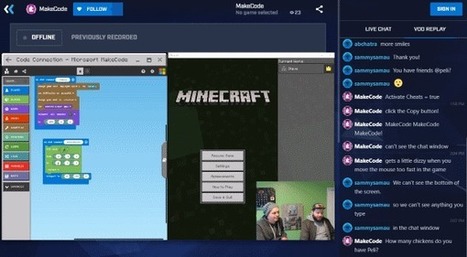
Microsoft MakeCode is a free, open-source Block and JavaScript learn-to-code editor that promotes a more inclusive approach to computing education.


Learn more / En savoir plus / Mehr erfahren:


https://www.scoop.it/t/21st-century-learning-and-teaching/?&tag=Coding


https://www.scoop.it/t/21st-century-learning-and-teaching/?&tag=makerspace


Gust MEES's insight:
Microsoft MakeCode is a free, open-source Block and JavaScript learn-to-code editor that promotes a more inclusive approach to computing education.


Learn more / En savoir plus / Mehr erfahren:


https://www.scoop.it/t/21st-century-learning-and-teaching/?&tag=Coding


https://www.scoop.it/t/21st-century-learning-and-teaching/?&tag=makerspace


Graphics Design's curator insight, February 20, 2018 2:27 AM

Just Kool Design Maker can give your custom letterhead Design a little promoting and publicizing touch, so you can get a decent presentation and consideration from your business clients.

Graphics Design's curator insight, February 20, 2018 2:36 AM

Just Kool Design Maker can give your custom letterhead Design a little promoting and publicizing touch, so you can get a decent presentation and consideration from your business clients.

Scooped by Gust MEES
February 17, 2018 11:08 AM
Scoop.it!

Arduino Comparison Guide - learn.sparkfun.com | #Coding #Maker #MakerED #MakerSpaces #Creativity #LEARNingByDoing 

Arduino Comparison Guide - learn.sparkfun.com | #Coding #Maker #MakerED #MakerSpaces #Creativity #LEARNingByDoing  | 21st Century Learning and Teaching | Scoop.it

Introduction
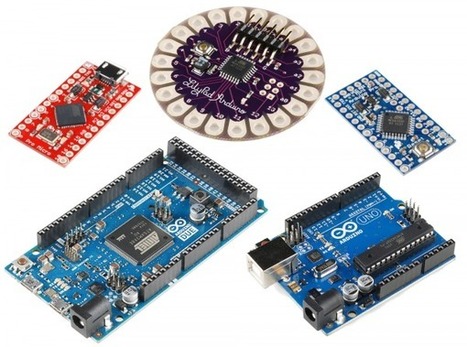
Let’s face it, there are a a lot of different Arduino boards out there. How do you decide which one you need for your project? In this tutorial, we’ll take a look at the diverse world of Arduino boards. We’ll begin with a tabular overview of the features each board has. Then we’ll delve deeper into each board, examining the pros, cons, and example use-cases.

Arduino is an open-source electronics prototyping platform based on flexible, easy-to-use hardware and software. It’s intended for artists, designers, hobbyists, and anyone interested in creating interactive objects or environments. Or more simply, you load on some code and it can read sensors, perform actions based on inputs from buttons, control motors, and accept shields to further expand it’s capabilities. Really, you can do almost anything.

All Arduino boards have one thing in common: they are programmed through the Arduino IDE. This is the software that allows you to write and upload code. Beyond that, there can be a lot of differences. The number of inputs and outputs (how many sensors, LEDs, and buttons you can use on a single board), speed, operating voltage, and form factor are just a few of the variables. Some boards are designed to be embedded and have no programming interface (hardware) which you would need to buy separately. Some can run directly from a 3.7V battery, others need at least 5V. Check the chart on the next page to find the right Arduino for your project.

Learn more / En savoir plus / Mehr erfahren:


https://www.scoop.it/t/21st-century-learning-and-teaching/?&tag=Coding


https://www.scoop.it/t/21st-century-learning-and-teaching/?&tag=makerspace


Gust MEES's insight:

Introduction
Let’s face it, there are a a lot of different Arduino boards out there. How do you decide which one you need for your project? In this tutorial, we’ll take a look at the diverse world of Arduino boards. We’ll begin with a tabular overview of the features each board has. Then we’ll delve deeper into each board, examining the pros, cons, and example use-cases.

Arduino is an open-source electronics prototyping platform based on flexible, easy-to-use hardware and software. It’s intended for artists, designers, hobbyists, and anyone interested in creating interactive objects or environments. Or more simply, you load on some code and it can read sensors, perform actions based on inputs from buttons, control motors, and accept shields to further expand it’s capabilities. Really, you can do almost anything.

All Arduino boards have one thing in common: they are programmed through the Arduino IDE. This is the software that allows you to write and upload code. Beyond that, there can be a lot of differences. The number of inputs and outputs (how many sensors, LEDs, and buttons you can use on a single board), speed, operating voltage, and form factor are just a few of the variables. Some boards are designed to be embedded and have no programming interface (hardware) which you would need to buy separately. Some can run directly from a 3.7V battery, others need at least 5V. Check the chart on the next page to find the right Arduino for your project.

Learn more / En savoir plus / Mehr erfahren:


https://www.scoop.it/t/21st-century-learning-and-teaching/?&tag=Coding


https://www.scoop.it/t/21st-century-learning-and-teaching/?&tag=makerspace


No comment yet.
Scooped by Gust MEES
February 17, 2018 8:09 AM
Scoop.it!

Gamasutra - Alt.Ctrl.GDC Showcase: Mark Wars | #Coding #Maker #MakerED #MakerSpaces #LEARNingByDoing #Robots

Gamasutra - Alt.Ctrl.GDC Showcase: Mark Wars | #Coding #Maker #MakerED #MakerSpaces #LEARNingByDoing #Robots | 21st Century Learning and Teaching | Scoop.it

The 2018 Game Developer's Conference will feature an exhibition called Alt.Ctrl.GDC dedicated to games that use alternative control schemes and interactions. Gamasutra will be talking to the developers of each of the games that have been selected for the showcase. You can find all of the interviews here.

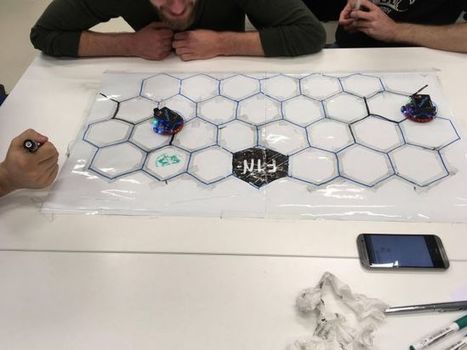
Mark Wars will have players drawing lines with markers in order to guide their ever-moving robot to a goal before their opponent can. However, as they take turns drawing lines, there is nothing stopping them from drawing a line that will mislead their opponent's robot, creating a constant sabotage between players as well.


Learn more / En savoir plus / Mehr erfahren:


https://www.scoop.it/t/21st-century-learning-and-teaching/?&tag=Coding


https://www.scoop.it/t/21st-century-learning-and-teaching/?&tag=makerspace


Gust MEES's insight:

The 2018 Game Developer's Conference will feature an exhibition called Alt.Ctrl.GDC dedicated to games that use alternative control schemes and interactions. Gamasutra will be talking to the developers of each of the games that have been selected for the showcase. You can find all of the interviews here.

Mark Wars will have players drawing lines with markers in order to guide their ever-moving robot to a goal before their opponent can. However, as they take turns drawing lines, there is nothing stopping them from drawing a line that will mislead their opponent's robot, creating a constant sabotage between players as well.


Learn more / En savoir plus / Mehr erfahren:


https://www.scoop.it/t/21st-century-learning-and-teaching/?&tag=Coding


https://www.scoop.it/t/21st-century-learning-and-teaching/?&tag=makerspace


No comment yet.
Scooped by Gust MEES
February 16, 2018 1:02 PM
Scoop.it!

4D Systems | 4D-Workshop-4-IDE | #Coding #Maker #MakerED #MakerSpaces 

Introducing 4D Systems' All New Workshop4 IDE Supports multiple development environments, to cater for different user requirements and skill level. Workshop4 is a comprehensive software IDE for Microsoft Windows that provides an integrated software development platform for all of the 4D family of processors and modules.


The IDE combines the Editor, Compiler, Linker and Downloader to develop complete 4DGL application code. All user application code is developed within the Workshop4 IDE. Workshop4 includes four development environments, for the user to choose based on application requirements or even user skill level. Designer This environment enables the user to write 4DGL code in its natural form to program the display module. ViSi - Genie An advanced environment that doesn’t require any 4DGL coding at all, it is all done automatically for you.


Simply lay the display out with the objects you want (similar to ViSi), set the events to drive them and the code is written for you automatically. ViSi -Genie provides the latest rapid development experience from 4D Systems. ViSi A visual programming experience that enables drag-and-drop type placement of objects to assist with 4DGL code generation and allows the user to visualise how the display will look while being developed.


Serial This environment is also provided to transform the display module into a slave serial display module, allowing the user to control the display from any host microcontroller or device with a serial port. 


Learn more / En savoir plus / Mehr erfahren:


https://www.scoop.it/t/21st-century-learning-and-teaching/?&tag=ARDUINO


https://www.scoop.it/t/21st-century-learning-and-teaching/?&tag=Visuino+-+Visual+Development+for+Arduino


https://www.scoop.it/t/21st-century-learning-and-teaching/?&tag=4D+Systems


Gust MEES's insight:
Introducing 4D Systems' All New Workshop4 IDE Supports multiple development environments, to cater for different user requirements and skill level. Workshop4 is a comprehensive software IDE for Microsoft Windows that provides an integrated software development platform for all of the 4D family of processors and modules.


The IDE combines the Editor, Compiler, Linker and Downloader to develop complete 4DGL application code. All user application code is developed within the Workshop4 IDE. Workshop4 includes four development environments, for the user to choose based on application requirements or even user skill level. Designer This environment enables the user to write 4DGL code in its natural form to program the display module. ViSi - Genie An advanced environment that doesn’t require any 4DGL coding at all, it is all done automatically for you.


Simply lay the display out with the objects you want (similar to ViSi), set the events to drive them and the code is written for you automatically. ViSi -Genie provides the latest rapid development experience from 4D Systems. ViSi A visual programming experience that enables drag-and-drop type placement of objects to assist with 4DGL code generation and allows the user to visualise how the display will look while being developed.


Serial This environment is also provided to transform the display module into a slave serial display module, allowing the user to control the display from any host microcontroller or device with a serial port. 


Learn more / En savoir plus / Mehr erfahren:


https://www.scoop.it/t/21st-century-learning-and-teaching/?&tag=ARDUINO


https://www.scoop.it/t/21st-century-learning-and-teaching/?&tag=Visuino+-+Visual+Development+for+Arduino


https://www.scoop.it/t/21st-century-learning-and-teaching/?&tag=4D+Systems


No comment yet.