21st Century Learning and Teaching
791.6K views | +11 today
21st Century Learning and Teaching
Related articles to 21st Century Learning and Teaching as also tools...
Curated by Gust MEES
Your new post is loading...

Popular Tags

Current selected tag: 'Coding'. Clear
Scooped by Gust MEES
February 22, 2018 8:25 AM
Scoop.it!

javl/image2cpp | image2cpp is a simple tool to change images into byte arrays to use with (monochrome) displays suchs as OLEDs | #Coding #Arduino #Maker #MakerED #MakerSpaces

javl/image2cpp | image2cpp is a simple tool to change images into byte arrays to use with (monochrome) displays suchs as OLEDs | #Coding #Arduino #Maker #MakerED #MakerSpaces | 21st Century Learning and Teaching | Scoop.it

image2cpp is a simple tool to change images into byte arrays to use with (monochrome) displays suchs as OLEDs, like those from Adafruit or Sparkfun.


While searching for a way to generate these arrays, I mostly found links to a piece of Windows software. Both the flakey results and the hassle of having to boot a virtual machine just to convert an image lead to me writing this pure html + javascript solution.

Alternatively you can also enter a byte array as input to turn it back into an image. This might be useful for debugging, or when you want to write the byte array yourself. I don't know.

Running the tool

You don't need any special dependencies / internet connection; all the necessary parts sit in a single .html file. So just open this index.html page in a (recent) browser to run the tool.


Or you can use the online version at:  


http://javl.github.io/image2cpp/


Learn more / En savoir plus / Mehr erfahren:


https://www.scoop.it/t/21st-century-learning-and-teaching/?&tag=ARDUINO


BTW: Above shown image is my "MAUSI", which was the "Mascot" for my Cyber-Security courses in Luxembourg EDUcation in 2003-2007. Those courses were mandatory for students up from 12 years old (7èmes).


Learn more about Cyber-Security in Luxembourg (Europe):


https://gustmees.wordpress.com/2017/11/22/luxembourg-and-cyber-security-how-did-it-start/


Gust MEES's insight:

image2cpp is a simple tool to change images into byte arrays to use with (monochrome) displays suchs as OLEDs, like those from Adafruit or Sparkfun.


While searching for a way to generate these arrays, I mostly found links to a piece of Windows software. Both the flakey results and the hassle of having to boot a virtual machine just to convert an image lead to me writing this pure html + javascript solution.

Alternatively you can also enter a byte array as input to turn it back into an image. This might be useful for debugging, or when you want to write the byte array yourself. I don't know.

Running the tool

You don't need any special dependencies / internet connection; all the necessary parts sit in a single .html file. So just open this index.html page in a (recent) browser to run the tool.


Or you can use the online version at:  


http://javl.github.io/image2cpp/


Learn more / En savoir plus / Mehr erfahren:


https://www.scoop.it/t/21st-century-learning-and-teaching/?&tag=ARDUINO


BTW: Above shown image is my "MAUSI", which was the "Mascot" for my Cyber-Security courses in Luxembourg EDUcation in 2003-2007. Those courses were mandatory for students up from 12 years old (7èmes).


Learn more about Cyber-Security in Luxembourg (Europe):


https://gustmees.wordpress.com/2017/11/22/luxembourg-and-cyber-security-how-did-it-start/


No comment yet.
Scooped by Gust MEES
February 19, 2018 8:15 AM
Scoop.it!

Touchscreen Function Generator | #Electronics #Arduino #Coding #Maker #MakerED #MakerSpaces #LEARNingByDoing 

Touchscreen Function Generator | #Electronics #Arduino #Coding #Maker #MakerED #MakerSpaces #LEARNingByDoing  | 21st Century Learning and Teaching | Scoop.it

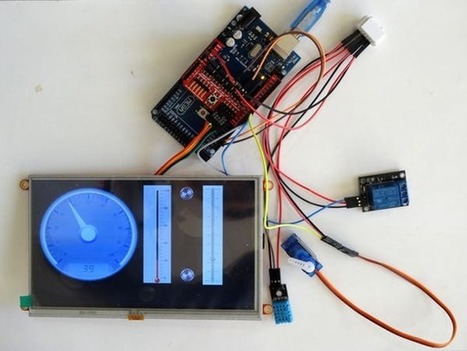
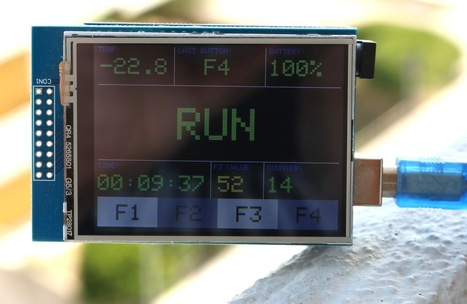
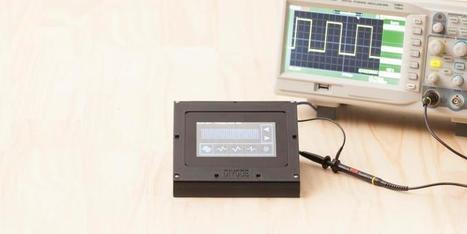
Create a useful function generator using a 4D Systems touchscreen display and an Arduino.


Learn more / En savoir plus / Mehr erfahren:


https://www.scoop.it/t/21st-century-learning-and-teaching/?&tag=ARDUINO


https://www.scoop.it/t/21st-century-learning-and-teaching/?&tag=4D+Systems


https://www.scoop.it/t/21st-century-learning-and-teaching/?&tag=makerspace


Gust MEES's insight:

Create a useful function generator using a 4D Systems touchscreen display and an Arduino.


Learn more / En savoir plus / Mehr erfahren:


https://www.scoop.it/t/21st-century-learning-and-teaching/?&tag=ARDUINO


https://www.scoop.it/t/21st-century-learning-and-teaching/?&tag=4D+Systems


https://www.scoop.it/t/21st-century-learning-and-teaching/?&tag=makerspace


No comment yet.
Scooped by Gust MEES
February 17, 2018 11:08 AM
Scoop.it!

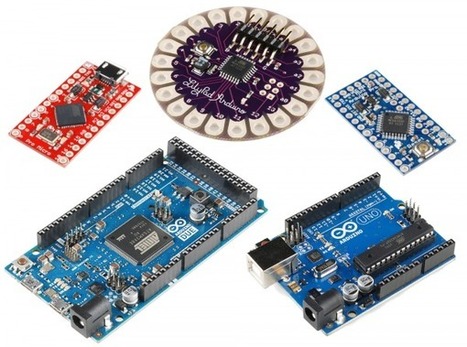
Arduino Comparison Guide - learn.sparkfun.com | #Coding #Maker #MakerED #MakerSpaces #Creativity #LEARNingByDoing 

Arduino Comparison Guide - learn.sparkfun.com | #Coding #Maker #MakerED #MakerSpaces #Creativity #LEARNingByDoing  | 21st Century Learning and Teaching | Scoop.it

Introduction
Let’s face it, there are a a lot of different Arduino boards out there. How do you decide which one you need for your project? In this tutorial, we’ll take a look at the diverse world of Arduino boards. We’ll begin with a tabular overview of the features each board has. Then we’ll delve deeper into each board, examining the pros, cons, and example use-cases.

Arduino is an open-source electronics prototyping platform based on flexible, easy-to-use hardware and software. It’s intended for artists, designers, hobbyists, and anyone interested in creating interactive objects or environments. Or more simply, you load on some code and it can read sensors, perform actions based on inputs from buttons, control motors, and accept shields to further expand it’s capabilities. Really, you can do almost anything.

All Arduino boards have one thing in common: they are programmed through the Arduino IDE. This is the software that allows you to write and upload code. Beyond that, there can be a lot of differences. The number of inputs and outputs (how many sensors, LEDs, and buttons you can use on a single board), speed, operating voltage, and form factor are just a few of the variables. Some boards are designed to be embedded and have no programming interface (hardware) which you would need to buy separately. Some can run directly from a 3.7V battery, others need at least 5V. Check the chart on the next page to find the right Arduino for your project.

Learn more / En savoir plus / Mehr erfahren:


https://www.scoop.it/t/21st-century-learning-and-teaching/?&tag=Coding


https://www.scoop.it/t/21st-century-learning-and-teaching/?&tag=makerspace


Gust MEES's insight:

Introduction
Let’s face it, there are a a lot of different Arduino boards out there. How do you decide which one you need for your project? In this tutorial, we’ll take a look at the diverse world of Arduino boards. We’ll begin with a tabular overview of the features each board has. Then we’ll delve deeper into each board, examining the pros, cons, and example use-cases.

Arduino is an open-source electronics prototyping platform based on flexible, easy-to-use hardware and software. It’s intended for artists, designers, hobbyists, and anyone interested in creating interactive objects or environments. Or more simply, you load on some code and it can read sensors, perform actions based on inputs from buttons, control motors, and accept shields to further expand it’s capabilities. Really, you can do almost anything.

All Arduino boards have one thing in common: they are programmed through the Arduino IDE. This is the software that allows you to write and upload code. Beyond that, there can be a lot of differences. The number of inputs and outputs (how many sensors, LEDs, and buttons you can use on a single board), speed, operating voltage, and form factor are just a few of the variables. Some boards are designed to be embedded and have no programming interface (hardware) which you would need to buy separately. Some can run directly from a 3.7V battery, others need at least 5V. Check the chart on the next page to find the right Arduino for your project.

Learn more / En savoir plus / Mehr erfahren:


https://www.scoop.it/t/21st-century-learning-and-teaching/?&tag=Coding


https://www.scoop.it/t/21st-century-learning-and-teaching/?&tag=makerspace


No comment yet.
Scooped by Gust MEES
February 17, 2018 8:09 AM
Scoop.it!

Gamasutra - Alt.Ctrl.GDC Showcase: Mark Wars | #Coding #Maker #MakerED #MakerSpaces #LEARNingByDoing #Robots

Gamasutra - Alt.Ctrl.GDC Showcase: Mark Wars | #Coding #Maker #MakerED #MakerSpaces #LEARNingByDoing #Robots | 21st Century Learning and Teaching | Scoop.it

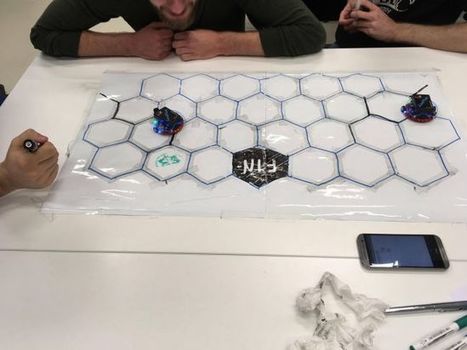
The 2018 Game Developer's Conference will feature an exhibition called Alt.Ctrl.GDC dedicated to games that use alternative control schemes and interactions. Gamasutra will be talking to the developers of each of the games that have been selected for the showcase. You can find all of the interviews here.

Mark Wars will have players drawing lines with markers in order to guide their ever-moving robot to a goal before their opponent can. However, as they take turns drawing lines, there is nothing stopping them from drawing a line that will mislead their opponent's robot, creating a constant sabotage between players as well.


Learn more / En savoir plus / Mehr erfahren:


https://www.scoop.it/t/21st-century-learning-and-teaching/?&tag=Coding


https://www.scoop.it/t/21st-century-learning-and-teaching/?&tag=makerspace


Gust MEES's insight:

The 2018 Game Developer's Conference will feature an exhibition called Alt.Ctrl.GDC dedicated to games that use alternative control schemes and interactions. Gamasutra will be talking to the developers of each of the games that have been selected for the showcase. You can find all of the interviews here.

Mark Wars will have players drawing lines with markers in order to guide their ever-moving robot to a goal before their opponent can. However, as they take turns drawing lines, there is nothing stopping them from drawing a line that will mislead their opponent's robot, creating a constant sabotage between players as well.


Learn more / En savoir plus / Mehr erfahren:


https://www.scoop.it/t/21st-century-learning-and-teaching/?&tag=Coding


https://www.scoop.it/t/21st-century-learning-and-teaching/?&tag=makerspace


No comment yet.
Scooped by Gust MEES
February 16, 2018 1:02 PM
Scoop.it!

4D Systems | 4D-Workshop-4-IDE | #Coding #Maker #MakerED #MakerSpaces 

Introducing 4D Systems' All New Workshop4 IDE Supports multiple development environments, to cater for different user requirements and skill level. Workshop4 is a comprehensive software IDE for Microsoft Windows that provides an integrated software development platform for all of the 4D family of processors and modules.


The IDE combines the Editor, Compiler, Linker and Downloader to develop complete 4DGL application code. All user application code is developed within the Workshop4 IDE. Workshop4 includes four development environments, for the user to choose based on application requirements or even user skill level. Designer This environment enables the user to write 4DGL code in its natural form to program the display module. ViSi - Genie An advanced environment that doesn’t require any 4DGL coding at all, it is all done automatically for you.


Simply lay the display out with the objects you want (similar to ViSi), set the events to drive them and the code is written for you automatically. ViSi -Genie provides the latest rapid development experience from 4D Systems. ViSi A visual programming experience that enables drag-and-drop type placement of objects to assist with 4DGL code generation and allows the user to visualise how the display will look while being developed.


Serial This environment is also provided to transform the display module into a slave serial display module, allowing the user to control the display from any host microcontroller or device with a serial port. 


Learn more / En savoir plus / Mehr erfahren:


https://www.scoop.it/t/21st-century-learning-and-teaching/?&tag=ARDUINO


https://www.scoop.it/t/21st-century-learning-and-teaching/?&tag=Visuino+-+Visual+Development+for+Arduino


https://www.scoop.it/t/21st-century-learning-and-teaching/?&tag=4D+Systems


Gust MEES's insight:
Introducing 4D Systems' All New Workshop4 IDE Supports multiple development environments, to cater for different user requirements and skill level. Workshop4 is a comprehensive software IDE for Microsoft Windows that provides an integrated software development platform for all of the 4D family of processors and modules.


The IDE combines the Editor, Compiler, Linker and Downloader to develop complete 4DGL application code. All user application code is developed within the Workshop4 IDE. Workshop4 includes four development environments, for the user to choose based on application requirements or even user skill level. Designer This environment enables the user to write 4DGL code in its natural form to program the display module. ViSi - Genie An advanced environment that doesn’t require any 4DGL coding at all, it is all done automatically for you.


Simply lay the display out with the objects you want (similar to ViSi), set the events to drive them and the code is written for you automatically. ViSi -Genie provides the latest rapid development experience from 4D Systems. ViSi A visual programming experience that enables drag-and-drop type placement of objects to assist with 4DGL code generation and allows the user to visualise how the display will look while being developed.


Serial This environment is also provided to transform the display module into a slave serial display module, allowing the user to control the display from any host microcontroller or device with a serial port. 


Learn more / En savoir plus / Mehr erfahren:


https://www.scoop.it/t/21st-century-learning-and-teaching/?&tag=ARDUINO


https://www.scoop.it/t/21st-century-learning-and-teaching/?&tag=Visuino+-+Visual+Development+for+Arduino


https://www.scoop.it/t/21st-century-learning-and-teaching/?&tag=4D+Systems


No comment yet.
Scooped by Gust MEES
February 12, 2018 12:52 PM
Scoop.it!

FIRST Global Challenge | International robotics challenge to ignite a passion for STEM

FIRST Global Challenge | International robotics challenge to ignite a passion for  STEM | 21st Century Learning and Teaching | Scoop.it

Mexico City: Each year, the FIRST Global Challenge is held in a different country. This year's challenge will be hosted in Mexico City, Mexico. Hear the announcement from our founder himself -- Dean Kamen. https://youtu.be/i0KJfh-3_ck More information coming soon!


Learn more / En savoir plus / Mehr erfahren:


https://www.scoop.it/t/21st-century-learning-and-teaching/?&tag=First+Global


Gust MEES's insight:

Mexico City: Each year, the FIRST Global Challenge is held in a different country. This year's challenge will be hosted in Mexico City, Mexico. Hear the announcement from our founder himself -- Dean Kamen. https://youtu.be/i0KJfh-3_ck More information coming soon!


Learn more / En savoir plus / Mehr erfahren:


https://www.scoop.it/t/21st-century-learning-and-teaching/?&tag=First+Global


No comment yet.
Scooped by Gust MEES
February 9, 2018 7:33 AM
Scoop.it!

Hacking STEM: Activity Library | #Microsoft #EDUcation #Coding #Arduino #Maker #MakerED #MakerSpaces #LEARNingByDoing #Creativity 

Hacking STEM: Activity Library | #Microsoft #EDUcation #Coding #Arduino #Maker #MakerED #MakerSpaces #LEARNingByDoing #Creativity  | 21st Century Learning and Teaching | Scoop.it
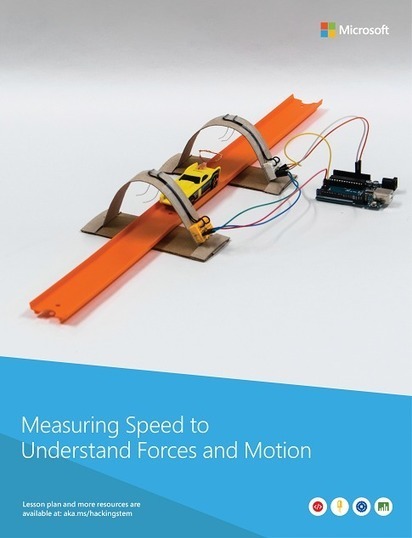
Microsoft offers STEM resources to help educators engage students with project-based lessons that compliment current STEM curriculum. A small incubation team inside of Microsoft focuses on developing next generation hardware, software, and services for K-12 education. Our goal is to support teachers in building inquiry and project-based activities that embed computational and design thinking into existing middle school curriculum.


We want to democratize STEM for 21st century learners and demonstrate how all schools can provide affordable opportunities to bring science in the classroom.


Learn more / En savoir plus / Mehr erfahren:


https://www.scoop.it/t/21st-century-learning-and-teaching/?&tag=Coding


https://www.scoop.it/t/21st-century-learning-and-teaching/?&tag=makerspace


Gust MEES's insight:
Microsoft offers STEM resources to help educators engage students with project-based lessons that compliment current STEM curriculum. A small incubation team inside of Microsoft focuses on developing next generation hardware, software, and services for K-12 education. Our goal is to support teachers in building inquiry and project-based activities that embed computational and design thinking into existing middle school curriculum.


We want to democratize STEM for 21st century learners and demonstrate how all schools can provide affordable opportunities to bring science in the classroom.


Learn more / En savoir plus / Mehr erfahren:


https://www.scoop.it/t/21st-century-learning-and-teaching/?&tag=Coding


https://www.scoop.it/t/21st-century-learning-and-teaching/?&tag=makerspace


No comment yet.
Scooped by Gust MEES
February 6, 2018 11:02 AM
Scoop.it!

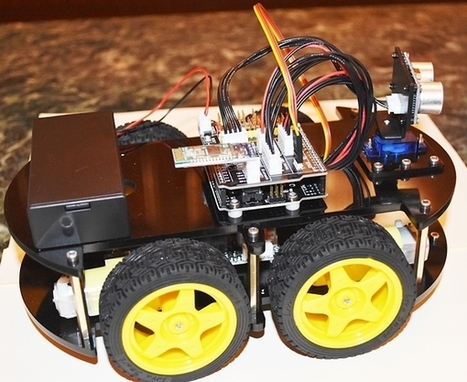
First Steps with the Arduino-UNO R3 | Maker, MakerED, Coding | SMART V3.0 ROBOT CAR Kit | #MakerSpaces #PracTICE 

First Steps with the Arduino-UNO R3 | Maker, MakerED, Coding | SMART V3.0 ROBOT CAR Kit | #MakerSpaces #PracTICE  | 21st Century Learning and Teaching | Scoop.it

First impressions . . The Kit is delivered in a well organized plastic box with a poster inside of all the parts with description and a CD with the PDF Manual, Code and Libraries. The manual in PDF format is actually very well documented an nobody should have problems to follow the instructions.…


Learn more / En savoir plus / Mehr erfahren:


https://www.scoop.it/t/21st-century-learning-and-teaching/?&tag=ARDUINO


https://gustmees.wordpress.com/?s=arduino


Gust MEES's insight:

First impressions . . The Kit is delivered in a well organized plastic box with a poster inside of all the parts with description and a CD with the PDF Manual, Code and Libraries. The manual in PDF format is actually very well documented an nobody should have problems to follow the instructions.…


Learn more / En savoir plus / Mehr erfahren:


https://www.scoop.it/t/21st-century-learning-and-teaching/?&tag=ARDUINO


https://gustmees.wordpress.com/?s=arduino


No comment yet.
Scooped by Gust MEES
January 30, 2018 6:24 PM
Scoop.it!

Raspberry Pi's latest competitor RockPro64 brings more power plus AI processor | #Maker #MakerED #MakerSpaces #Coding 

Raspberry Pi's latest competitor RockPro64 brings more power plus AI processor | #Maker #MakerED #MakerSpaces #Coding  | 21st Century Learning and Teaching | Scoop.it
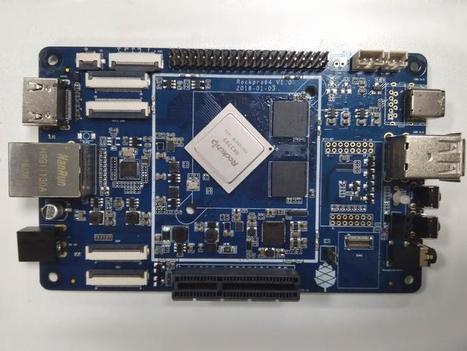
Pine64 has released a budget-friendly single-board computer with the high-powered Rockchip RK3399 system on chip (SoC).

Available from around $60, the RockPro64 board comes in two flavors, either with the hexa-core RK3399 SoC or the RK3399Pro, Rockchip's first "artificial-intelligence processor". Unveiled at CES 2018, it combines a CPU, GPU, and neural-network processing unit (NPU).

As noted by CNX-Software, a number of RK3999-based boards have been released in the past week but, priced at around $200 each, they've been aimed at business customers rather than home developers.

The RockPro64 with 2GB of RAM will cost between $59 and $65 and will be available from March, while the RockPro64-AI will cost $99 but won't be available until August 1, according to Pine64.


Learn more / En savoir plus / Mehr erfahren:


https://www.scoop.it/t/21st-century-learning-and-teaching/?&tag=Raspberry+Pi


Gust MEES's insight:
Pine64 has released a budget-friendly single-board computer with the high-powered Rockchip RK3399 system on chip (SoC).

Available from around $60, the RockPro64 board comes in two flavors, either with the hexa-core RK3399 SoC or the RK3399Pro, Rockchip's first "artificial-intelligence processor". Unveiled at CES 2018, it combines a CPU, GPU, and neural-network processing unit (NPU).

As noted by CNX-Software, a number of RK3999-based boards have been released in the past week but, priced at around $200 each, they've been aimed at business customers rather than home developers.

The RockPro64 with 2GB of RAM will cost between $59 and $65 and will be available from March, while the RockPro64-AI will cost $99 but won't be available until August 1, according to Pine64.


Learn more / En savoir plus / Mehr erfahren:


https://www.scoop.it/t/21st-century-learning-and-teaching/?&tag=Raspberry+Pi


Vivalist's curator insight, January 31, 2018 11:56 AM
Glad to see more affordable solutions for makers willing to push the envelope. This is a lot of tech for a decent price tag.

It's a chance for hobbyist to be able to tinker with neural networks, I could definitely use some additional brain power on weather data autonomously triggering relays for example :)
Scooped by Gust MEES
January 28, 2018 4:57 PM
Scoop.it!

Understanding the Arduino Sketchbook: Opening and Saving Arduino Sketches - YouTube | #Coding #PracTICE #Video #Tutorials 

Understanding how the Arduino IDE sets up its file directory system can spare you some confusion when it comes to saving, organizing and opening your Arduino sketches (or sketches you have downloaded from the internet).


Learn more / En savoir plus / Mehr erfahren:


https://www.scoop.it/t/21st-century-learning-and-teaching/?&tag=ARDUINO


Gust MEES's insight:
Understanding how the Arduino IDE sets up its file directory system can spare you some confusion when it comes to saving, organizing and opening your Arduino sketches (or sketches you have downloaded from the internet).


Learn more / En savoir plus / Mehr erfahren:


https://www.scoop.it/t/21st-century-learning-and-teaching/?&tag=ARDUINO


No comment yet.
Scooped by Gust MEES
January 21, 2018 11:32 AM
Scoop.it!

Snap! (Build Your Own Blocks) 4.1 | #Coding #VisualProgramming #LEARNingByDoing 

Snap! (Build Your Own Blocks) 4.1 | #Coding #VisualProgramming #LEARNingByDoing  | 21st Century Learning and Teaching | Scoop.it
You get a broadly inviting programming language for kids and adults that’s also a platform for serious study of computer science. (See the About page for details.)


Learn more / En savoir plus / Mehr erfahren:


https://www.scoop.it/t/21st-century-learning-and-teaching/?&tag=ARDUINO


Gust MEES's insight:
You get a broadly inviting programming language for kids and adults that’s also a platform for serious study of computer science. (See the About page for details.)


Learn more / En savoir plus / Mehr erfahren:


https://www.scoop.it/t/21st-century-learning-and-teaching/?&tag=ARDUINO


No comment yet.
Scooped by Gust MEES
January 19, 2018 7:43 PM
Scoop.it!

KinderLab Robotics | #KIBO #LEARNingByDoing #LEARNing2LEARN #Kids #STEM

KinderLab Robotics | #KIBO #LEARNingByDoing #LEARNing2LEARN #Kids #STEM | 21st Century Learning and Teaching | Scoop.it
Toys for learning about technology. Playfully!

Play the video above to learn more about KIBO


With KIBO, 4- to 7-year-olds create, design, decorate and bring their own robot to life! KIBO lets kids' imaginations soar - all without requiring screen time on PCs, tablets, or smartphones.


Learn more / En savoir plus / Mehr erfahren:


https://gustmees.wordpress.com/2014/08/24/coding-a-new-trend-in-education-and-a-big-responsibility/


Gust MEES's insight:
Toys for learning about technology. Playfully!

Play the video above to learn more about KIBO


With KIBO, 4- to 7-year-olds create, design, decorate and bring their own robot to life! KIBO lets kids' imaginations soar - all without requiring screen time on PCs, tablets, or smartphones.


Learn more / En savoir plus / Mehr erfahren:


https://gustmees.wordpress.com/2014/08/24/coding-a-new-trend-in-education-and-a-big-responsibility/


No comment yet.
Scooped by Gust MEES
January 15, 2018 9:13 AM
Scoop.it!

The EduBlocks Project | #Coding #Python #RaspBerryPi #LEARNingByDoing 

The EduBlocks Project | #Coding #Python #RaspBerryPi #LEARNingByDoing  | 21st Century Learning and Teaching | Scoop.it
Build Python 3 Code


EduBlocks is an easy way to learn the Python 3 syntax. It states the actual python code on the blocks.


Learn more / En savoir plus / Mehr erfahren:


https://www.scoop.it/t/21st-century-learning-and-teaching/?&tag=Coding


https://www.scoop.it/t/21st-century-learning-and-teaching/?&tag=Raspberry+Pi


Gust MEES's insight:
Build Python 3 Code


EduBlocks is an easy way to learn the Python 3 syntax. It states the actual python code on the blocks.


Learn more / En savoir plus / Mehr erfahren:


https://www.scoop.it/t/21st-century-learning-and-teaching/?&tag=Coding


https://www.scoop.it/t/21st-century-learning-and-teaching/?&tag=Raspberry+Pi


demiunique's comment, January 18, 2018 4:58 AM
nice
Scooped by Gust MEES
February 19, 2018 8:49 AM
Scoop.it!

Microsoft MakeCode is a free, open-source Block and JavaScript learn-to-code editor | #Coding #Maker #MakerED #MakerSpaces 

Microsoft MakeCode is a free, open-source Block and JavaScript learn-to-code editor | #Coding #Maker #MakerED #MakerSpaces  | 21st Century Learning and Teaching | Scoop.it
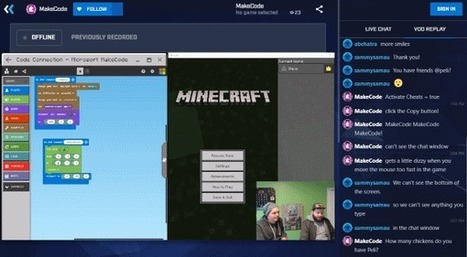
Microsoft MakeCode is a free, open-source Block and JavaScript learn-to-code editor that promotes a more inclusive approach to computing education.


Learn more / En savoir plus / Mehr erfahren:


https://www.scoop.it/t/21st-century-learning-and-teaching/?&tag=Coding


https://www.scoop.it/t/21st-century-learning-and-teaching/?&tag=makerspace


Gust MEES's insight:
Microsoft MakeCode is a free, open-source Block and JavaScript learn-to-code editor that promotes a more inclusive approach to computing education.


Learn more / En savoir plus / Mehr erfahren:


https://www.scoop.it/t/21st-century-learning-and-teaching/?&tag=Coding


https://www.scoop.it/t/21st-century-learning-and-teaching/?&tag=makerspace


Graphics Design's curator insight, February 20, 2018 2:27 AM

Just Kool Design Maker can give your custom letterhead Design a little promoting and publicizing touch, so you can get a decent presentation and consideration from your business clients.

Graphics Design's curator insight, February 20, 2018 2:36 AM

Just Kool Design Maker can give your custom letterhead Design a little promoting and publicizing touch, so you can get a decent presentation and consideration from your business clients.

Scooped by Gust MEES
February 17, 2018 11:45 AM
Scoop.it!

Visual programming language - Wikipedia | #Coding #Maker #MakerED #MakerSpaces #Creativity #LEARNingByDoing 

Visual programming language - Wikipedia

In computing, a visual programming language ( VPL) is any programming language that lets users create programs by manipulating program elements graphically rather than by specifying them textually. A VPL allows programming with visual expressions, spatial arrangements of text and graphic symbols, used either as elements of syntax or secondary notation.

Learn more / En savoir plus / Mehr erfahren:


https://www.scoop.it/t/21st-century-learning-and-teaching/?&tag=Visual+programming


https://www.scoop.it/t/21st-century-learning-and-teaching/?&tag=Visuino


Gust MEES's insight:

Learn more / En savoir plus / Mehr erfahren:


https://www.scoop.it/t/21st-century-learning-and-teaching/?&tag=Visual+programming


https://www.scoop.it/t/21st-century-learning-and-teaching/?&tag=Visuino


No comment yet.
Scooped by Gust MEES
February 17, 2018 8:26 AM
Scoop.it!

DIYODE Magazine is a print and digital publication supporting electronics enthusiasts and makers | #Coding #MakerED #MakerSpaces

DIYODE Magazine is a print and digital publication supporting electronics enthusiasts and makers | #Coding #MakerED #MakerSpaces | 21st Century Learning and Teaching | Scoop.it

DIYODE Magazine is a print and digital publication supporting electronics enthusiasts and makers.


Learn more / En savoir plus / Mehr erfahren:


https://www.scoop.it/t/21st-century-learning-and-teaching/?&tag=Coding


https://www.scoop.it/t/21st-century-learning-and-teaching/?&tag=makerspace


Gust MEES's insight:

DIYODE Magazine is a print and digital publication supporting electronics enthusiasts and makers.


Learn more / En savoir plus / Mehr erfahren:


https://www.scoop.it/t/21st-century-learning-and-teaching/?&tag=Coding


https://www.scoop.it/t/21st-century-learning-and-teaching/?&tag=makerspace


No comment yet.
Scooped by Gust MEES
February 16, 2018 9:31 PM
Scoop.it!

Visual Programming | Visuino Arduino tutorials - YouTube | #VideoTutorials #Coding #Maker #MakerED #MakerSpaces #PracTICE 

In computing, a visual programming language (VPL) is any programming language that lets users create programs by manipulating program elements graphically rather than by specifying them textually.[1][2] A VPL allows programming with visual expressions, spatial arrangements of text and graphic symbols, used either as elements of syntax or secondary notation.


For example, many VPLs (known as dataflow or diagrammatic programming)[3] are based on the idea of "boxes and arrows", where boxes or other screen objects are treated as entities, connected by arrows, lines or arcs which represent relations.


Learn more / En savoir plus / Mehr erfahren:


https://www.scoop.it/t/21st-century-learning-and-teaching/?&tag=Visual+programming


https://en.wikipedia.org/wiki/Visual_programming_language


No comment yet.
Scooped by Gust MEES
February 16, 2018 9:41 AM
Scoop.it!

Arduino: Connect 4D Systems ViSi Genie Smart Display | #Coding #Maker #MakerED #MakerSpaces 

Arduino: Connect 4D Systems ViSi Genie Smart Display | #Coding #Maker #MakerED #MakerSpaces  | 21st Century Learning and Teaching | Scoop.it
Connect 4D Systems ViSi Genie smart Touch Screen Display to Arduino, and program it - Quick and Easy!. Find this and other hardware projects on Hackster.io.


Learn more / En savoir plus / Mehr erfahren:


https://www.scoop.it/t/21st-century-learning-and-teaching/?&tag=ARDUINO


https://www.scoop.it/t/21st-century-learning-and-teaching/?&tag=Visuino+-+Visual+Development+for+Arduino


Gust MEES's insight:
Connect 4D Systems ViSi Genie smart Touch Screen Display to Arduino, and program it - Quick and Easy!. Find this and other hardware projects on Hackster.io.


Learn more / En savoir plus / Mehr erfahren:


https://www.scoop.it/t/21st-century-learning-and-teaching/?&tag=ARDUINO


https://www.scoop.it/t/21st-century-learning-and-teaching/?&tag=Visuino+-+Visual+Development+for+Arduino


No comment yet.
Scooped by Gust MEES
February 11, 2018 11:54 AM
Scoop.it!

200+ Arduino Projects List For Final Year Students | #Coding #Maker #MakerED #MakerSpaces #LEARNingByDoing

200+ Arduino Projects List For Final Year Students | #Coding #Maker #MakerED #MakerSpaces #LEARNingByDoing | 21st Century Learning and Teaching | Scoop.it
Best list of arduino project ideas along with sources we have published here. It includes arduino based battery charger, arduino based thermostat and etc..


Learn more / En savoir plus / Mehr erfahren:


https://www.scoop.it/t/21st-century-learning-and-teaching/?&tag=ARDUINO


Gust MEES's insight:
Best list of arduino project ideas along with sources we have published here. It includes arduino based battery charger, arduino based thermostat and etc..


GREAT place to find nearly everything and well documented...


Learn more / En savoir plus / Mehr erfahren:


https://www.scoop.it/t/21st-century-learning-and-teaching/?&tag=ARDUINO


Beatrice J. P. Vasconcelos's curator insight, February 12, 2018 12:42 PM
Achei interessante apesar de não ser minha área...IoT tai né gente...
Scooped by Gust MEES
February 8, 2018 3:16 PM
Scoop.it!

LEGO: Roboterbausatz Boost im Test |  #Coding #Maker #MakerED #PracTICE #MakerSpaces 

LEGO: Roboterbausatz Boost im Test |  #Coding #Maker #MakerED #PracTICE #MakerSpaces  | 21st Century Learning and Teaching | Scoop.it
Bisher waren Legos Roboterbausätze teuer und lockten mit ihrem Ingenieurs-Charme bestenfalls Erstsemester an. Boost soll nun auch die Jüngsten an das Programmieren heranführen.

Lust auf Lego? Das Set 17101 – Code-Name „Boost“ – hat einiges zu bieten. Herzstück ist der Move-Hub – ein per Bluetooth LE ansprechbarer Controller, an den sich bis zu zwei zusätzliche Aktoren/Sensoren anschließen lassen; er wird mit sechs AAA-Batterien bestückt. Zwei Motoren, ein Gyrosensor und eine RGB-LED sind im Move-Hub bereits integriert. Ein weiterer Motor und ein kombinierter Farb-/Entfernungssensor sind im Set enthalten. Der Move-Hub bildet die Basis für fünf spannende Grundmodelle vom klassischen Roboter über eine Technokatze bis zur Legofabrik. Die Modelle lassen sich per App in Bewegung setzen und programmieren.


Learn more / En savoir plus / Mehr erfahren:


https://www.scoop.it/t/21st-century-learning-and-teaching/?&tag=LEGO


Gust MEES's insight:
Bisher waren Legos Roboterbausätze teuer und lockten mit ihrem Ingenieurs-Charme bestenfalls Erstsemester an. Boost soll nun auch die Jüngsten an das Programmieren heranführen.

Lust auf Lego? Das Set 17101 – Code-Name „Boost“ – hat einiges zu bieten. Herzstück ist der Move-Hub – ein per Bluetooth LE ansprechbarer Controller, an den sich bis zu zwei zusätzliche Aktoren/Sensoren anschließen lassen; er wird mit sechs AAA-Batterien bestückt. Zwei Motoren, ein Gyrosensor und eine RGB-LED sind im Move-Hub bereits integriert. Ein weiterer Motor und ein kombinierter Farb-/Entfernungssensor sind im Set enthalten. Der Move-Hub bildet die Basis für fünf spannende Grundmodelle vom klassischen Roboter über eine Technokatze bis zur Legofabrik. Die Modelle lassen sich per App in Bewegung setzen und programmieren.


Learn more / En savoir plus / Mehr erfahren:


https://www.scoop.it/t/21st-century-learning-and-teaching/?&tag=LEGO


No comment yet.
Scooped by Gust MEES
February 5, 2018 6:52 PM
Scoop.it!

Arduino - How to build an Interface with a TFT-Display with buttons | #Coding #Maker #MakerED #MakerSpaces 

Arduino - How to build an Interface with a TFT-Display with buttons | #Coding #Maker #MakerED #MakerSpaces  | 21st Century Learning and Teaching | Scoop.it
On this page we show you how to create an interface for a TFT display with an Arduino. You can download source code and library here


It works with an 2.8 inches TFT-Display from ELEGOO (available on Amazon) and it shows how buttons get integrated in the sketch.


Learn more / En savoir plus / Mehr erfahren:


https://www.scoop.it/t/21st-century-learning-and-teaching/?&tag=ARDUINO


https://gustmees.wordpress.com/?s=arduino


Gust MEES's insight:
On this page we show you how to create an interface for a TFT display with an Arduino. You can download source code and library here


It works with an 2.8 inches TFT-Display from ELEGOO (available on Amazon) and it shows how buttons get integrated in the sketch.


Learn more / En savoir plus / Mehr erfahren:


https://www.scoop.it/t/21st-century-learning-and-teaching/?&tag=ARDUINO


https://gustmees.wordpress.com/?s=arduino


Kool Design Maker's curator insight, February 6, 2018 4:43 AM

The custom flyer design services producer is sufficiently experienced to deliver excellent and energetic shading flyer plan creator correct to your business and occasion topic. Regardless of in the event that you have officially chosen plans for your flyer simply send us your outline and we will have returned to you within 24 hours.

Scooped by Gust MEES
January 28, 2018 5:12 PM
Scoop.it!

Alternative Arduino Interfaces | #ArduBlock #Minibloq #Coding 

Alternative Arduino Interfaces | #ArduBlock #Minibloq #Coding  | 21st Century Learning and Teaching | Scoop.it
ArduBlock
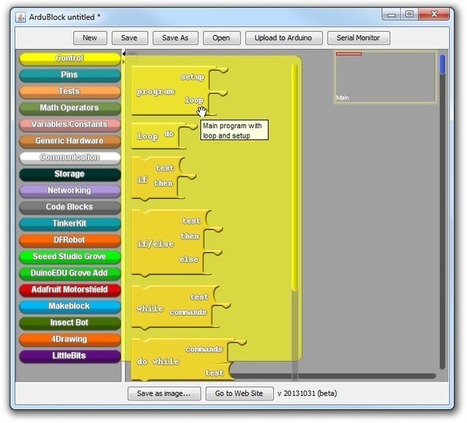
ArduBlock is a programming environment designed to make “physical computing with Arduino as easy as drag-and-drop.” Instead of writing code, worrying about syntax, and (mis)placing semicolons, ArduBlock allows you to visually program with an snapped-together list of code blocks.


Learn more / En savoir plus / Mehr erfahren:


https://www.scoop.it/t/21st-century-learning-and-teaching/?&tag=ARDUINO


Gust MEES's insight:
ArduBlock
ArduBlock is a programming environment designed to make “physical computing with Arduino as easy as drag-and-drop.” Instead of writing code, worrying about syntax, and (mis)placing semicolons, ArduBlock allows you to visually program with an snapped-together list of code blocks.


Learn more / En savoir plus / Mehr erfahren:


https://www.scoop.it/t/21st-century-learning-and-teaching/?&tag=ARDUINO


davidconover's curator insight, January 29, 2018 3:05 PM
Here is a cool and useful interface that will connect your code to the physical world. Drag and drop programming along with game design makes for an innovative way to connect ideas and applications for learning computer science. #cs4all, #stem
 
Vivalist's curator insight, January 31, 2018 12:50 PM
Encapsulated javascript like Scratch can be useful to get the basics of coding - and it can also help operating a microcontroller.

It can sooth the transition to actual coding in the natural evolution of those who become frustrated by blocks' limitations and want to know more.
Scooped by Gust MEES
January 23, 2018 8:23 PM
Scoop.it!

First Steps with the Arduino-UNO R3 | Maker, MakerED, Coding | Super Starter Kit UNO R3 Project | LCD and Sensors Project

First Steps with the Arduino-UNO R3 | Maker, MakerED, Coding | Super Starter Kit UNO R3 Project | LCD and Sensors Project | 21st Century Learning and Teaching | Scoop.it

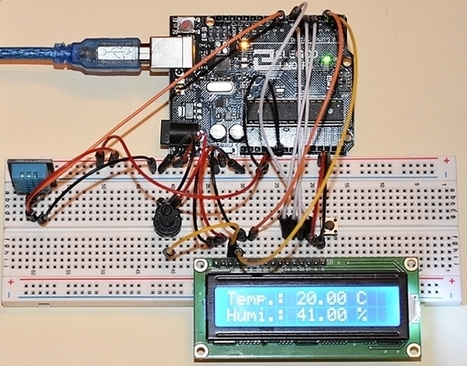
SO, as I got my new Super Starter Kit UNO R3 Project I am playing around a bit with it. In my previous post WE were wiring and testing a LCD-Display and coding to display a bit text on the LCD. That was actually very easy, so lets try out now some “Sensors“, e.g. a Temperature/Humidity Sensor and a Ultrasonic Sensor to measure distances. The measured values of those sensors will get displayed on the LCD-Display.


Learn more / En savoir plus / Mehr erfahren:


https://gustmees.wordpress.com/?s=maker


https://www.scoop.it/t/21st-century-learning-and-teaching/?&tag=ARDUINO


Gust MEES's insight:

SO, as I got my new Super Starter Kit UNO R3 Project I am playing around a bit with it. In my previous post WE were wiring and testing a LCD-Display and coding to display a bit text on the LCD. That was actually very easy, so lets try out now some “Sensors“, e.g. a Temperature/Humidity Sensor and a Ultrasonic Sensor to measure distances. The measured values of those sensors will get displayed on the LCD-Display.


Learn more / En savoir plus / Mehr erfahren:


https://gustmees.wordpress.com/?s=maker


https://www.scoop.it/t/21st-century-learning-and-teaching/?&tag=ARDUINO


Vivalist's curator insight, January 25, 2018 3:13 AM
Temperature and Humidity monitoring
Scooped by Gust MEES
January 21, 2018 11:18 AM
Scoop.it!

Digital Sandbox Experiment Guide | #Arduino #Coding #VisualProgramming #Maker #MakerED #MakerSpaces 

Digital Sandbox Experiment Guide | #Arduino #Coding #VisualProgramming #Maker #MakerED #MakerSpaces  | 21st Century Learning and Teaching | Scoop.it
Welcome to the Digital Sandbox!


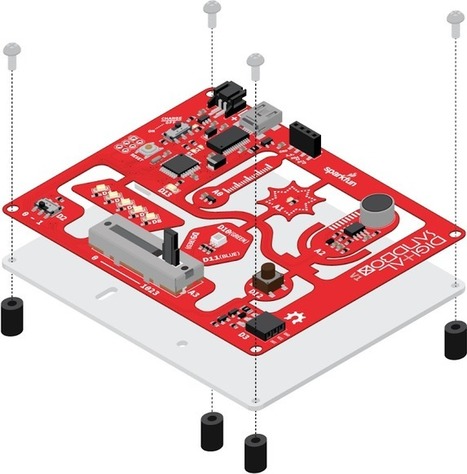
The Digital Sandbox is a learning platform that engages both the software and hardware worlds. It’s powered by a microcontroller that can interact with real-world inputs – like light or temperature sensors – while at the same time controlling LEDs, motors, and other outputs. The Digital Sandbox is equipped with everything, on board, that you will need to complete 13 experiments including controlling an LED, measuring how loud things are, detecting the temperature is, and more.


Learn more / En savoir plus / Mehr erfahren:


https://www.scoop.it/t/21st-century-learning-and-teaching/?&tag=ARDUINO


Gust MEES's insight:
Welcome to the Digital Sandbox!


The Digital Sandbox is a learning platform that engages both the software and hardware worlds. It’s powered by a microcontroller that can interact with real-world inputs – like light or temperature sensors – while at the same time controlling LEDs, motors, and other outputs. The Digital Sandbox is equipped with everything, on board, that you will need to complete 13 experiments including controlling an LED, measuring how loud things are, detecting the temperature is, and more.


Learn more / En savoir plus / Mehr erfahren:


https://www.scoop.it/t/21st-century-learning-and-teaching/?&tag=ARDUINO


No comment yet.
Scooped by Gust MEES
January 19, 2018 12:34 PM
Scoop.it!

First Steps with the Arduino-UNO R3 | Maker, MakerED, Coding | Super Starter Kit UNO R3 Project | #LEARNingByDoing #Creativity #PracTICE 

First Steps with the Arduino-UNO R3 | Maker, MakerED, Coding | Super Starter Kit UNO R3 Project | #LEARNingByDoing #Creativity #PracTICE  | 21st Century Learning and Teaching | Scoop.it

Super Starter Kit UNO R3 Project From Elegoo. In one of my previous blog posts I used Arduino-UNO Starter Kit, which I ordered at Conrad (English version) and I wasn't really impressed by the manual, it didn't satisfy to my expectations and needs. SO, I was looking around to find some distributors for a BETTER version...…


Learn more / En savoir plus / Mehr erfahren:


https://gustmees.wordpress.com/?s=arduino


Gust MEES's insight:

Super Starter Kit UNO R3 Project From Elegoo. In one of my previous blog posts I used Arduino-UNO Starter Kit, which I ordered at Conrad (English version) and I wasn't really impressed by the manual, it didn't satisfy to my expectations and needs. SO, I was looking around to find some distributors for a BETTER version...…


Learn more / En savoir plus / Mehr erfahren:


https://gustmees.wordpress.com/?s=arduino


No comment yet.