


Blog post at Blogging Tips For Bloggers - Learn how to blog on every level : Seems there are several people mentioning that they try to enter a hangout and get a message telling them they are blocked.

 Your new post is loading...
 Scoop.it! Blog post at Blogging Tips For Bloggers - Learn how to blog on every level : Seems there are several people mentioning that they try to enter a hangout and get a message telling them they are blocked. 
Scoop.it!

6 Ways You Can Put a Little 'Gangnam Style' into Video Marketing
Search Engine Watch Most video marketers have probably heard of the famous “Gangnam Style” video that, since its release in July 2012, is the most viewed and liked video on YouTube.
Scoop.it!

YouTube Network Holds Celebrity's AdSense Account Hostage
ReadWriteWeb A YouTuber since 2007 and the site's first video creator to hit $1 million profits through YouTube's partner program, in April 2011, Johnson enjoys an average of 4 million views...
Ileane Smith's insight:
I'm not interested in joining any YouTube "networks" and this is one reason why.
Scoop.it!

Video marketing can be an effective online marketing strategy to improve your click-through rates and search engine rankings.
Scoop.it!

David Siteman Garland interviews Chris Savage from Wistia.
Scoop.it!

Lou Bortone's Sweet 16 list of marketing videos online entrepreneurs can make and use in their business.
Scoop.it!

With Skoffer you can build in a screencast-recorder, that runs without installation directly from the browser, into your website. Via Baiba Svenca, michel verstrepen
Scoop.it!
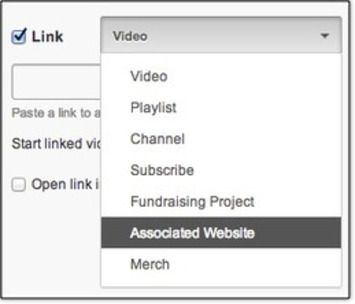
NOTE: As of 12/7/12 I do not see this option on my account. Apparently they are still rolling it out! Check to see if you have it. Associated Website annotations provide verified partners who are in good standing a way to annotate to their associated websites directly from their videos. Create an Associated Website Annotation To create an Associated Website annotation, you must first be part of YouTube’s partner program, and you also must verify your channels as the official representation of your brand on YouTube. To do so, navigate to your Settings, click on Associated website under your Channel settings, and follow the instructions. From Video Manager, click the downwards arrow next to the Edit button of the video you want to change, then select the annotations options.
Scoop.it!
If you think it's difficult to create websites with video on them.. think again! You are going to learn how to create one from scratch in under 3 minutes.. Watch this video to find out how. ---------- For more information about Bluehost and purchase your hosting today, visit: http://gotobluehost.com. If you purchase this through our affiliate link, we will also send you a bonus of our Video Course showing you how to create effective lead generation pages valued at $97.00. Thank you for watching and remember to click on the link below to learn more about Bluehost today: http://gotobluehost.com.
Scoop.it!
Visit http://thepodcastersstudio.com/gearfor a complete list of all my gear. Gear used in this video is linked at the bottom of this description. A Rode VideoMic Pro plugged into a Canon 60D sound test. This is a demo of the audio you get from the Rode VideoMic Pro compared to the in-camera microphone on the 60D or any other DSLR. The key is that the Rode has a plus 20 db gain switch. This allows you to turn down the noisy pre-amp inside the a DSLR with manual audio controls and turn on the +20db switch on the Rode. The VideoMic Pro does all the work to achieve proper audio levels and you get much cleaner sound directly into your DSLR video camera. I've seen several demonstrations of this microphone but most people are using it wrong. The key, once again, is the +20db gain. That is what makes this mic so much better and different from the rest. Best suggested viewing and comparison experience will come from watching in HD and listening on headphones. This will really give you a chance to hear the difference in quality and noise floor. Gear used and seen in this video:
Scoop.it!
http://www.fiveminutevideomarketing.com Inside this week's challenge you'll learn more about Online Video Search Engine Optimization and why onpage and offpa...
Scoop.it!

Strangely, on a day where the Washington Post is lamenting the lack of online video captioning for the hearing impaired, YouTube announces that they have a...
Scoop.it!

In this session we’re going to look at writing and planning out your screencast. A lot of people skip this step and just wing it, which is fine for some people and projects.
Scoop.it!
What links and how many should you be adding in your YouTube video description, it the topic of this Hot Blog Tips Hangouts on Air. Is there a limit to how m...
Ileane Smith's insight:
YouTube encourages us to add relevant links and social media links in our descriptions in the (old) YouTube playbook. I do see the links to my blog appearing in Google Webmaster Tools. I don't think about the links in the description as Calls to Action - I use Annotations for that. The social media links are so that people can connect on their favorite platform. Think about your blog sidebar, do you have more than one social media profile button there? Of course you do.
Scoop.it!

You wanna know the biggest problem with app reviews on YouTube? Most of the are fake. Developers will commonly pay to have their apps reviews in a positive light through a channel that has a fair number of subscribers. Which is nothing knew, as that kind of thing is always being done through social media. Even Amazon reviews you see are usually paid for by the product manufacturer or a marketing firm hired by the original creators. 2. UNIQUE APPS 3. APP JUDGMENT 4. SOLDIER KNOWS BEST 5. CNET Via Nicko Gibson
Scoop.it!
Subscribe to the Partner Support Channel: youtube.com/partnersupport Check out the new playbook: youtube.com/playbook.
Scoop.it!
http://basicblogtips.comYouTube auto generates pages for blogs that list all of the videos that are linked and embedded on that specific blog. In this video you’ll see auto-generated pages for Basic Blog Tips http://www.youtube.com/blogs/basicblogtips/ 2 Create a Website http://www.youtube.com/blogs/2createawebsite Smart Passive Income http://www.youtube.com/blogs/smartpassiveincome Suggestion for helping YouTube generate this page Subscribe to this YouTube channel http://basicblogtips.com/msileanespeaks
Scoop.it!
New premium hosting option so your uploads playback on a site that is branded with your logo and no ads. Also increases max length per upload to 2 hours (instead of usual 15 minutes).
Scoop.it!
Here's a Cool Hangout Tip: When making a Hangout Lower Third Custom Overlay Graphic this evening I discovered a cool trick... Glowing Edges! Visit Ronnie on ...
Scoop.it!

Not long ago, YouTube announced they would be launching associated website annotations.The program has only been in pilot mode for the last few weeks, but now it's totally here.
Scoop.it!
John from the YouTube product team walks through the latest details on YouTube and Google+ integration.

Simon Dadia's comment,
November 29, 2012 8:36 AM
Great overview of Gplus and Youtube coming together..

Jennifer Read Pleman's curator insight,
November 29, 2012 12:49 PM
G+ is really trying to help content creators engage with their viewers. This is one more step in the right direction.
Scoop.it!
How to use the Facebook Like Button Plugin to automatically attach videos to the updates shared on Facebook when someone 'likes' your content. Via Dotty Scott
Scoop.it!
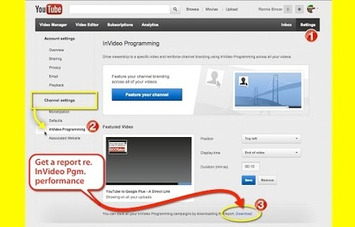
The Invideo Programming options look a lot like Annotations, but they are not accessed via the normal YouTube Annotations area. And because of that the Analytics Reports you can now get for how they are doing also don't come form the normal (Analytics) reports area.
Scoop.it!
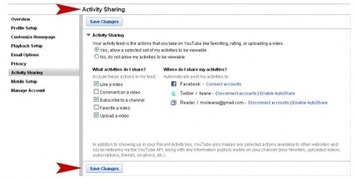
If you’re like me and want to have more control over what’s being shared from YouTube on Twitter, FaceBook, Google Reader and maybe even one day Google Plus, you should tweak your YouTube Account settings.
|

Curated by Ileane Smith
Blogger, Podcaster, YouTuber, Social Media Diva! Get ready to learn with Ms. Ileane http://learn.ileanesmith.com
#blogtips #youtubetips Other Topics

Basic Blog Tips
Keep up with tools and tips to help improve your blog and expand your audience! http://BasicBlogTips.com/tips download the Basic Blog Tips Android app here: https://play.google.com/store/apps/details?id=com.basicblogtips.blog

Blogging Contests
The hottest blogging contest around

Podcasts
Tips for creating effective podcasts and podcasting services and equipment curated by Ms. Ileane Smith from http://ileanesmith.com Helping you create "meaningful" content!

STEM Advocate
Science, Engineering, Technology and Math

YouTube Tips and Tutorials
http://YouTube.com/user/MsIleaneSpeaks | Anything to help you succeed on YouTube. Get the YouTube Rankings Assault Kit http://basicblogtips.com/tips
|






I have not personally blcoked anyone - but it is nice to know that they are being reviewed now.