Tools for Teachers & Learners
2.6M views | +5 today
Tools for Teachers & Learners
A collection of web and mobile based tools to help teachers and learners exploit digital resources
Curated by Nik Peachey
Your new post is loading...
Scooped by Nik Peachey
June 23, 2016 5:03 AM
Scoop.it!

Create Instant Interactive Text Based Activities

Create Instant Interactive Text Based Activities | Tools for Teachers & Learners | Scoop.it

Creating computer based materials can be incredibly time consuming and also very frustrating as websites and web based content can change so quickly, that's why it is always so nice to discover tools like Textivate which can enable you to create instant interactivity using almost any text you find from around the web.

Nik Peachey's insight:

Quite an old posting but a great tool for language learners.

No comment yet.
Scooped by Nik Peachey
June 20, 2016 8:43 AM
Scoop.it!

Floors -Game Creator

Floors -Game Creator | Tools for Teachers & Learners | Scoop.it

Pixel Press is a technology company focused on building engaging mobile gaming experiences for both sides of the brain: the analytical left side and the creative right side. Our products are fun for all ages, and flexible enough for many applications.

Nik Peachey's insight:

This looks like a geat tool for creating video games. Great for projects or for the 'maker' classroom.

Noa Curzon's curator insight, June 22, 2016 8:04 AM

חשוב מאד שילוב של משחוק בלמידה 

Alfredo Corell's curator insight, June 25, 2016 4:54 AM


Ready to draw your own video game?


Pixel Press Floors is changing the way we experience mobile games by letting anyone be the creator, publisher and player of their own video game. With the Pixel Press creator platform, you can literally draw your own video game – no coding required.

Denise Gallegos's curator insight, July 6, 2016 12:26 AM
Floors is a great application that allows students to design their own video game using basic skills for programming. I have used this application with third graders and they really enjoy it.
Scooped by Nik Peachey
June 20, 2016 1:02 AM
Scoop.it!

QwikSlides: Presentation creator from ClassTools.net

QwikSlides: Presentation creator from ClassTools.net | Tools for Teachers & Learners | Scoop.it
Create a multimedia presentation in just a few seconds and embed it on your blog, website or wiki!
Nik Peachey's insight:

Very easy way to create online presentations.

No comment yet.
Scooped by Nik Peachey
June 17, 2016 12:55 PM
Scoop.it!

Presentious

Presentious | Tools for Teachers & Learners | Scoop.it
Presentious turns your live presentations into recordings that pair your audio with each slide. It’s a powerful format that combines the narrative structure of slides with the context of commentary.
Nik Peachey's insight:

Very simple to use tool to get your presentations recorded and online.

Rosemary Tyrrell, Ed.D.'s curator insight, June 21, 2016 12:53 PM
Easy tool for recording audio with slides. I don't like that you can flip ahead thus getting the audio off sync with the slides, but it looks like you can control that. 
Scooped by Nik Peachey
June 17, 2016 1:27 AM
Scoop.it!

Showbie - the Paperless Classroom App for Teachers

Showbie - the Paperless Classroom App for Teachers | Tools for Teachers & Learners | Scoop.it
Showbie is a free educational app for teachers and students that makes creating and completing assignments, providing assessments, and storing grades easy.
Nik Peachey's insight:

Haven't tried this, but it looks like a useful tool for managing student homework.

elearning at eCampus ULg's curator insight, June 17, 2016 6:45 AM
A tool to try ... Definitly
MissForsaith's curator insight, May 6, 2021 8:20 PM
Showbie is used as a transformative classroom tool for both teacher and student use digitising communication and sharing of resources. Showbie allows the teacher to monitor students progress as they upload their work and provide written or audio feedback or comments. Teachers can assign homework, formative or summative assessments for students to access in class or at home. The real benefit for students is having a place for them to annotate work, have direct communication to their class through the discussion boards and access links and resources from other peers and teachers. Available on iPads as an app or web-based on a device.
Scooped by Nik Peachey
June 16, 2016 12:46 AM
Scoop.it!

10 of the best virtual reality apps for your smartphone

10 of the best virtual reality apps for your smartphone | Tools for Teachers & Learners | Scoop.it
If you’re getting started with VR on your smartphone, here are 10 of the best apps to explore. They’re regular Android and iOS apps rather than ones requiring Samsung’s Gear VR mobile headset – that’s a separate roundup in its own right for the future.
Nik Peachey's insight:

Some great free apps to get started with.

Lihi Telem's curator insight, June 16, 2016 12:50 AM
מגוון אפליקציות חינמיות לשיוב מציאות מדומה בלמידה והוראה
Scooped by Nik Peachey
June 14, 2016 11:07 AM
Scoop.it!

LiquidText

LiquidText | Tools for Teachers & Learners | Scoop.it
LiquidText improves upon the reading experience by allowing users to better understand, synthesize, visualize and collaborate over digital text.
Nik Peachey's insight:

I haven't tried this yet, but it does look very interesting as a digital literacy tool.

Ricard Garcia's curator insight, June 15, 2016 6:31 AM
Very useful app for a better reading experience.. who said literacy cannot be enhanced digitally?
Scooped by Nik Peachey
June 14, 2016 1:33 AM
Scoop.it!

Planbook & Lesson Planner. Free for Teachers. Common Curriculum

Planbook & Lesson Planner. Free for Teachers. Common Curriculum | Tools for Teachers & Learners | Scoop.it
Save time with easy templates. Align lessons to Common Core & 50 state standards. Organize with unit plans. Share with colleagues. Create unit plans.
Nik Peachey's insight:

Nice idea. Not sure how well lesson templates work, but you can create your own. A nice idea for managing your lessons.

Rosemary Tyrrell, Ed.D.'s curator insight, June 15, 2016 9:06 PM
This looks useful for collaborating on lesson plans. I'm not crazy about the way the scheduling tool works, but I could see it being a good tool. 
Scooped by Nik Peachey
June 11, 2016 10:03 AM
Scoop.it!

Chalkmotion

Chalkmotion | Tools for Teachers & Learners | Scoop.it

ChalkMotion is a a collaborative library of simple hand drawn images and online presentation tool, designed to help visualize and share ideas

Nik Peachey's insight:

Great way to animate students' drawing.

No comment yet.
Scooped by Nik Peachey
June 7, 2016 4:22 AM
Scoop.it!

Stunning Satellite Images of Earth | TIME.com

Stunning Satellite Images of Earth | TIME.com | Tools for Teachers & Learners | Scoop.it
Exclusive: Landsat satellite images capture Earth evolving over 30 years. See climate change, glaciers melting, deforestation, urban sprawl
Nik Peachey's insight:

Amazing timelapse images to stimulate discussion and research in the classroom.

Lilydale High School's curator insight, June 9, 2016 2:56 AM
Wonderful photos of change over time.
Scooped by Nik Peachey
June 5, 2016 1:25 AM
Scoop.it!

Miitomo | Nintendo

Miitomo | Nintendo | Tools for Teachers & Learners | Scoop.it
Miitomo is a smart-device app that sparks one-of-a-kind conversations between you and your friends. It's from Nintendo—and free to start!
Nik Peachey's insight:

Interesting app to get students interacting through Mii avatars.

No comment yet.
Scooped by Nik Peachey
June 5, 2016 1:14 AM
Scoop.it!

| Morfo -  3D Images

| Morfo -  3D Images | Tools for Teachers & Learners | Scoop.it

Use Morfo to quickly turn a photo of your friend's face into a talking, dancing, crazy 3D character!

Nik Peachey's insight:

A tool for making images 3D. You can also add voices and customise them. Might be nice for creating digital narrative.

Lihi Telem's curator insight, June 16, 2016 12:54 AM
כלי ליצירת אואטר מתמונה קיימת - ניתן להוסיף קובצי קול ולכן טוב ללמידת שפה או ליצירת קליפים קצרים להעברת מסרים שונים - אלטרנטיבה לvoki
Scooped by Nik Peachey
June 4, 2016 1:36 AM
Scoop.it!

Visual Understanding Environment

Visual Understanding Environment | Tools for Teachers & Learners | Scoop.it
The Visual Understanding Environment (VUE) is an Open Source project based at Tufts University. The VUE project is focused on creating flexible tools for managing and integrating digital resources in support of teaching, learning and research. VUE provides a flexible visual environment for structuring, presenting, and sharing digital information.
Nik Peachey's insight:

This looks potentially intersting.

No comment yet.
Scooped by Nik Peachey
June 21, 2016 12:38 AM
Scoop.it!

Crowdsourcing Knowledge with Students

Crowdsourcing Knowledge with Students | Tools for Teachers & Learners | Scoop.it

The great thing about tricider is that it is incredibly quick and simple to use, and yet it enables users to collect information and opinions from all over the web in a very easily digestible and powerful way.

Nik Peachey's insight:

An old blog post about Tricider. Still one of the tools I use most often.

Geraldine Jones's curator insight, July 7, 2016 3:56 AM
Share your insight
Scooped by Nik Peachey
June 20, 2016 5:09 AM
Scoop.it!

TrashedWorld - a global schools exchange programme on waste

TrashedWorld - a global schools exchange programme on waste | Tools for Teachers & Learners | Scoop.it

TrashedWorld is a global schools' platform for curriculum exchange work on the topic of waste with the dual aims of developing skills and awareness of waste issues whilst also developing skills and knowledge in the English language.

Nik Peachey's insight:

Great resource. Fits very much with my own 'Mind Your Waste' lesson plan.

No comment yet.
Scooped by Nik Peachey
June 17, 2016 1:00 PM
Scoop.it!

Introducing Recap!

Introducing Recap! | Tools for Teachers & Learners | Scoop.it
Video response and reflection app that lets teachers and parents see how students learn. Sign up for FREE!
Nik Peachey's insight:

Great tool for creating video learner diaries.

No comment yet.
Scooped by Nik Peachey
June 17, 2016 12:52 PM
Scoop.it!

Wikispaces

Wikispaces | Tools for Teachers & Learners | Scoop.it

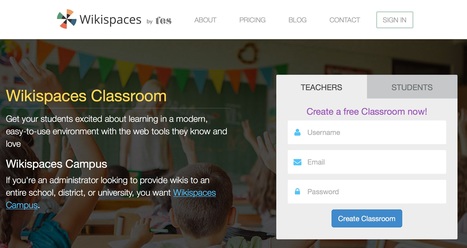
Wikispaces Classroom is a social writing platform for education. We make it incredibly easy to create a classroom workspace where you and your students can communicate and work on writing projects alone or in teams. Rich assessment tools give you the power to measure student contribution and engagement in real-time. Wikispaces Classroom works great on modern browsers, tablets, and phones.

Nik Peachey's insight:

Free and reliable Wikis for teachers.

Eva Oros's curator insight, June 17, 2016 3:52 PM
Share your insight
Kim Toll's curator insight, May 14, 2017 5:38 AM
A very diverse product which I will use to support the development of a unit on 'Seeking individual and business success'. 
Students’ working online is not just a growing trend in education but a 21st century required skill for students to learn, and Web sites known as wikis have emerged as a cheap and easy way to do it. They were designed to be an online forum, where someone could post a piece of information, and others would then edit it, or add to it. This dynamic is perfect in a classroom setting. Unfettered access means students can be involved in a project or lesson any time of day, from literally anywhere in the world. This ICT will be used to globally link with students in other parts of the world for their ideas and views. By scaffolding a WIKI with De Bono’s six thinking hats, all students in my class can contribute their ideas. 
Wikis encourage student interactions and collaborations. Students can form groups, work on a common project and post updates regarding their part in the project. To promote ‘Problem Based Learning’, students can use online debates, discussions, reviews of a class or presentation, feedback and information, notes, ideas, e-portfolios. Participating and organising group activity such as the Piktochart Infographic, equips students with a sense of ownership and responsibility, promoting ‘Student Centred Learning’. 
I shall use a wiki in all three phases of the learning sequence.  It will be used as a workspace, to publish findings, to collaborate, to reflect and to modify results.
I look forward to sharing this platform with my students as we learn about 'Entrepreneurial behaviours and skills'. 
1
3
3
Ms P's curator insight, June 20, 2017 10:10 AM
Definitely using wiki-space in a classroom one day! It transforms the way whole classes can collaborate together - it  provides a platform for the sharing of ideas, group/student collaboration and interaction that is effective, efficient, and can be accessed online anywhere.  You can create clear pages for various topics and groups, and put in calendars and time-frames. Teachers can scaffold the pages they add as they please which also allows room for differentiation and individualisation.
 It re-defines the assessment process for teachers, allowing them to measure student contribution in collaborative spaces and their engagement in real-time. 
I will use Wikispacses in my ICT assignment  learning sequence as a simple and effective way for group of students to work together to compile facts, opinions, feelings and ideas on a particular topic (in this case, a social media campaign on Human Rights). They use this information to inform a planning process to create their own media artefacts. Wikispace is a key resource for facilitating student collaboration in classrooms. 
Scooped by Nik Peachey
June 16, 2016 1:13 AM
Scoop.it!

Nik's QuickShout: Cloze Test Creation Tool

Nik's QuickShout: Cloze Test Creation Tool | Tools for Teachers & Learners | Scoop.it
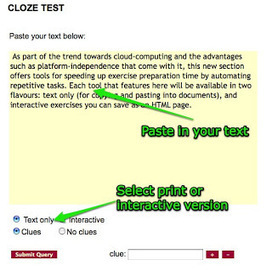
Once you have decided on the number of or type of words you want taken out of the text, you select either text only, for a printable classroom version or interactive to create an interactive online version of the exercise.
Nik Peachey's insight:

An old posting, but still one of the most popular tools at any of my training workshops.

Carolyn Quarterman's curator insight, June 17, 2016 5:16 PM
Haven't used it myself, but have heard that it is quite useful for teachers wanting to create a cloze activity from a text.
Scooped by Nik Peachey
June 15, 2016 12:46 AM
Scoop.it!

FoxType  - Sentence Analysis

FoxType  - Sentence Analysis | Tools for Teachers & Learners | Scoop.it

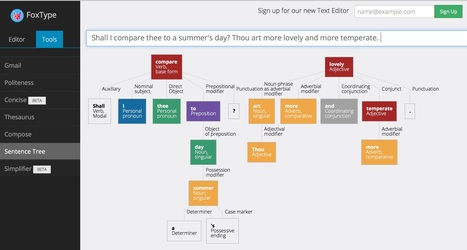
Visualise the grammar of a sentence.

Nik Peachey's insight:

Great. I really love this. Just type in the sentences and get a breakdown of the grammar.

Ricard Garcia's curator insight, June 16, 2016 2:06 AM
Foxtype is an interesting tool for college students and also for younger ones when learning to write proper texts
António Leça Domingues's curator insight, June 16, 2016 5:58 AM
Análise de construção de períodos de texto.
Marshall Gass's curator insight, June 16, 2016 4:00 PM
invaluable tool for writers. Get it.
Scooped by Nik Peachey
June 14, 2016 10:59 AM
Scoop.it!

W_rds - Fill the gap on the App Store

Find the missing letter in the W_rd before you run out of time, compete with your friends in the Game Center and become the champion!
Nik Peachey's insight:

A free game to get students thinking about words (Not at a particularly deep level) and spelling.

No comment yet.
Scooped by Nik Peachey
June 14, 2016 1:22 AM
Scoop.it!

Kids Learning Skills and Being Awesome. – DIY

Kids Learning Skills and Being Awesome. – DIY | Tools for Teachers & Learners | Scoop.it
The most creative community for kids in the galaxy. Use DIY to learn new skills and keep a portfolio.
Nik Peachey's insight:

Nice site to help kids learn new skills and share what they create.

No comment yet.
Scooped by Nik Peachey
June 8, 2016 12:56 AM
Scoop.it!

14 vídeos sin palabras para clases de idiomas

14 vídeos sin palabras para clases de idiomas | Tools for Teachers & Learners | Scoop.it
Vídeos sin palabras para usar en las clases de idiomas. ¿Sin palabras? ¡Sí! Se pueden hacer muchas actividades con ellos.
Nik Peachey's insight:

A great collection of videos without dialogue. Really useful for the language classroom. Just get students talking about the stories and writing their own script.

Anthoula Vasiliou's curator insight, June 9, 2016 2:43 PM
¿Se pueden hacer actividades sin palabras? pues, CLARO QUE SÍ!
Lihi Telem's curator insight, June 16, 2016 12:53 AM
מבחר סרטונים ללא מילים המאפשרים לתלמידים לדובב בעל פה או בכתב את המתרחש - מצויין ללמידה שפה או לפיתוח כישוריהבעה בכתב ובעל פה  יכול להיות שימושי גם בחינוך המיוחד
Scooped by Nik Peachey
June 5, 2016 1:33 AM
Scoop.it!

ImageCodr.org

ImageCodr.org | Tools for Teachers & Learners | Scoop.it

Simply enter in the URL of the picture page (as seen in your browser) you are interested in and ImageCodr.org will generate the ready to use HTML code. It will also display a brief and easy license summary, so you don't get in legal trouble because you missed something.

Nik Peachey's insight:

A very useful tool if you use images from flickr and you want to be sure you attributing them properly.

Howard Cohen's curator insight, June 5, 2016 11:04 AM
Makes life a little easier 
Scooped by Nik Peachey
June 5, 2016 1:19 AM
Scoop.it!

Shakespeare Translator

Shakespeare Translator | Tools for Teachers & Learners | Scoop.it
Turn your speak into Shakespeake with this English to Shakespearean translator.
Nik Peachey's insight:

I'm not sure how well this works but I'm sure it has potential for a lot of fun with students.

No comment yet.
Scooped by Nik Peachey
June 4, 2016 1:43 AM
Scoop.it!

The Handbook of Independent Journalism

The Handbook of Independent Journalism | Tools for Teachers & Learners | Scoop.it

Here is a free PDF handbook by Deborah Potter, who founded NewsLab (an online resource center for journalists) and taught journalism at The Poynter Institute. She’s even been a correspondent for CBS News and CNN.

Nik Peachey's insight:

This 68 page ebook is a really useful resource for teachers and students who are engaged with social media.

No comment yet.