

Things you love are Made with Code. Code your first creative project and meet music producers, fashion designers, humanitarians, and animators who are coding the world they want to see.
Get Started for FREE
Sign up with Facebook Sign up with X
I don't have a Facebook or a X account


 Your new post is loading...
 Your new post is loading...
Your new post is loading...
 Scoop.it!
Things you love are Made with Code. Code your first creative project and meet music producers, fashion designers, humanitarians, and animators who are coding the world they want to see. 
No comment yet.
Sign up to comment
Scoop.it!

The Twittertastic Teacher's Guide is the ultimate companion for bringing Twitter into your classroom, with 30 twitter-rific class activities, tips for expanding your PLN, and more!
Tina Jameson's insight:
Will be very useful for those teachers looking to introduce social networking into their teacher toolkit.
Scoop.it!

Here is a step-by-step pathway for using Solution Fluency to write a blog post, courtesy of the GDCF writing team!
Tina Jameson's insight:
Would you like to have a go at Blogging with a class? 'Global Digital Citizen' shares the planning and processes they use to publish their own excellent Blog. They even provide a very useful template that you could use. (Define / Discover / Dream / Design / Deliver / Debrief).
Scoop.it!

Common Sense Media improves the lives of kids and families by providing independent reviews, age ratings, & other information about all types of media.
Tina Jameson's insight:
Digital Compass - aimed at a middle school level, allows students to make a series of 'online' choices through this role playing 'choose your own story' adventure. It could be a useful and fun tool and a good starting point for getting kids to think about their rights, responsibilities and safety online.
Scoop.it!

The CILIP Information Literacy Group and InformAll submitted a joint response to the July 2014 UK Digital Skills Task Force’s interim report, Digital Skills for Tomorrow’s World, which was authored by Maggie Philbin.
Tina Jameson's insight:
This summarizes and provides the link to the report 'Digital Skills for Tomorrow's World' (Link also below): http://policy.bcs.org/sites/policy.bcs.org/files/Interim%20report.pdf While focusing on the UK, it is well worth reviewing, as it outlines the learning needs of students who are going to have to live, survive and work in our consistently developing digital world. (I particularly like way the report divided the population into four distinct tech savvy groups: Digital Muggles - those for whom technology is as alien as magic, then the Digital Citizens, Digital Workers and Digital Makers). There is also discussion as to how we can measure learning when 'information literacy is the process not the outcome'.
Scoop.it!

Edusocial has been developed by The Education Foundation in partnership with Facebook UK In 2013, The Education Foundation and Facebook teamed up to write the Facebook Guide for Educators to help support educators in the positive use of social media for good in schools and other education institutions.
Tina Jameson's insight:
A useful (Beta version) site - developing a support network for sharing good practice in using this popular social media to benefit education - How to set up pages to share homework, communicate effectively with parents, share professional development strategies with staff.
Scoop.it!

From
tackk

Quickly publish and share your message with one simple page. No signup, just easy, beautiful design.
Tina Jameson's insight:
What a versatile and useful tool - as a librarian looking for creative ways to market library events and displays I can envisage many uses for this. From the little time I have spent creating my first 'tack' - I would describe Tackk as something of a cross between 'Padlet' (Wallwisher) and 'Pinterest'.
Scoop.it!

"Our real-time web sharing technology enables remote collaboration by showing others what you see in your web browser." Via John Thomas
Tina Jameson's insight:
This looks like a seriously useful collaborative working tool - and is reported to be simple to use; though unlike other curators who have reviewed this site, I cannot see how to use this without registering.
Scoop.it!

"The aim of these modernisations to copyright law – many of which do no more than put us on an even footing with the rest of Europe – is to try and foster a legal and fully functional digital environment that supports an innovative UK digital economy, and treats citizens as digital citizens. It certainly seems to me this is a significant step in the right direction. "
Tina Jameson's insight:
Significant changes are being implemented in UK copyright law, which make sensible library / educational practice in data and media use - recognizing that staff and students are as likely to use music / video clips as part of a presentation as they are text excerpts.
Scoop.it!
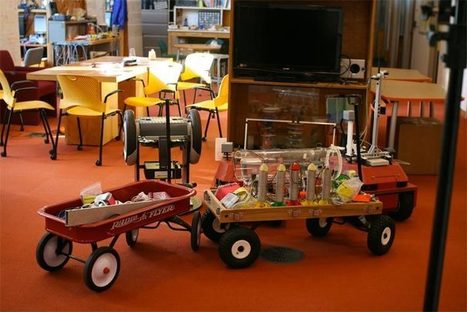
These web, desktop, and mobile apps will help your students become makers, inventors, builders, and programmers. Via Susan Grigsby @sksgrigsby
Tina Jameson's insight:
Great selection of apps - going to take me a while to explore them all. For those interested in STEM - a lot of potential here.

Juan Legarda's curator insight,
March 23, 2014 10:59 PM
The more we share, the more we learn…and therefore the wider we make the scope of possibilities for our students to discover!
Scoop.it!

Haiku Deck is a completely new kind of presentation software -- it’s simple, beautiful, and fun.
Tina Jameson's insight:
Looking for an alternative to PowerPoint? Register with Haiku Deck to use both on PC or as an app to create simple slides that are easy to share.
Scoop.it!

50 Free Animation Tools And Resources For Digital Learners
Tina Jameson's insight:
Would you like an avatar to give your lecture for you? One of many options suggested here.
Scoop.it!

via TeachThought 9 Steps For Schools To Create Their Own BYOD Policy If you haven’t noticed lately, Bring Your Own Device (BYOD) is kind of a big deal, both in business, technology, and educ...
Tina Jameson's insight:
This recommends a process to follow, as a school contemplates going down the BYOD path.
|
Scoop.it!

Safely and securely backchannel your classroom discussions. We provide educators full control of chat activities and provide students with a tool that makes learning engaging. Via Nik Peachey
Tina Jameson's insight:
This looks like an extremely useful classroom tool. (I'm hoping some of our class teachers will trial it). There is a free usable version, but at only $15 per year for up to 50 students - the paid version is really very affordable. The attractive thing about this tool is the high level of security it offers. Access is restricted to the group, profanities are filtered out, and teachers are able to moderate comments.

Kathy Lynch's curator insight,
July 31, 2015 8:54 AM
Thx Nik Peachey Check out this formative assessment system for BYOD. Compare it to Socrative and Kahoot 
Carmen Chavez, Ph.D.'s curator insight,
July 31, 2015 10:37 AM
Nice backchannel tool designed specifically for education. 
Craig Van Ham's curator insight,
March 24, 2016 9:09 PM
Nice backchannel tool designed specifically for education.
Scoop.it!
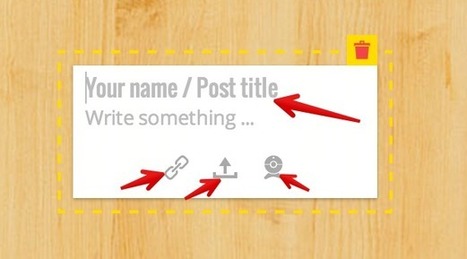
Padlet is a great platform for bookmarking and sharing digital content. Since in its launch a few years ago, Padlet (formerly Wallwisher) has undergone several great updates that make it an ideal tool to use with students in class. Before we see some of the ways to use this platform with students, let us have a look at some of its features .
Tina Jameson's insight:
I'm a big fan of Padlet - and use it like a library scrapbook to promote and provide evidence of displays and activities. Also a fantastic collaborative tool to use in a classroom - brainstorming / feedback etc. The free version has been more than adequate for my needs, and the privacy settings seem quite good - but they do also offer premium services - including one called Padlet Backpack - aimed specifically at the school market.
Scoop.it!

Cybersmart is a national cybersafety and cybersecurity education program managed by the Australian Communications and Media Authority (ACMA), as part of theAustralian Government's commitment to cybersafety. The program is specifically designed to meet the needs of its target audiences of children, young people, parents, teachers and library staff.
Tina Jameson's insight:
With information, videos and games aimed at all year levels, it is really worth taking the time to explore this site with your students. Highly recommended. My only wish for improvement is that they create a compatible App for Apple / Android users.
Scoop.it!
-- Created using PowToon -- Free sign up at http://www.powtoon.com/ . Make your own animated videos and animated presentations for free. PowToon is a free to...
Tina Jameson's insight:
A simple introduction / reminder to writing emails appropriately - useful at all levels, but particularly aimed at middle school students.
Scoop.it!

iPads are becoming an important part of education resources, whether as a learning tool for pupils or a teaching aid. The devices are being used in many subjects, often creating opportunities that were previously not possible. Via iPad Teachers
Scoop.it!

How often have we sat in a Staff Meeting or Professional Development day and listened to the talk turn into a complaint session with no real solutions being offered? I have one suggestion, join Twitter and start tweeting. This has been an invaluable tool for me. I started about a month ago professionally, meaning before … Via EDTECH@UTRGV, Melinda Miller
Tina Jameson's insight:
A brief argument for using Twitter as a PD tool.
Scoop.it!
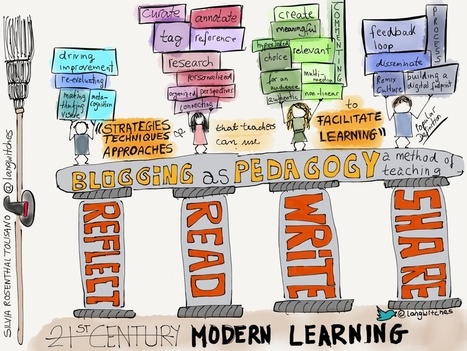
Blogging should not be an add-on, not an isolated project, but should be seen as PEDAGOGY. Ann Davis shared a definition of Pedagogy beyond a simple "method of teaching" (unfortunately I was not a...
Tina Jameson's insight:
If you are looking at 'blogging' as a possible classroom tool / strategy to use with students - then this infographic and accompanying 'blog' advice could be useful.

María Dolores Díaz Noguera's curator insight,
June 9, 2014 4:30 AM
Bloggins as Pedagogy: Facilitate Learning 
Sherri Wilson's curator insight,
June 9, 2014 9:27 AM
Love this definition of pedagogy. Makes total sense! 
Mónica Silakowicz's curator insight,
June 9, 2014 9:58 AM
Pedagogía: "Las estrategias, técnicas y enfoques que los profesores pueden utilizar para facilitar el aprendizaje."
Scoop.it!
Transforming media into collaborative spaces with video, voice, and text commenting.
Tina Jameson's insight:
This looks like a very interesting tool to use with the 'Flipped Classroom', for student peer reviews and presentations, and to become a seamless social tool that appears useful and easy to use. (Note that this is a subscription based product, priced based on the numbers of users at educational institution.)
Scoop.it!

The opportunity to extend access to technology in the classroom and at home is enticing, but school districts can get hung up on important details like providing a strong network, making sure each child has a device, and questions about around distraction. Of course, no one answer will work for all teachers or students, but one guiding principle that's shown to work is for schools to focus on how mobile technology will help shift instruction to be more collaborative, learner-driven and inquiry-based.
Tina Jameson's insight:
“Instead of this just being a technology initiative, it really is an instructional initiative". Using BYOD to encourage inquiry based learning.
Scoop.it!

3D Printing is less Costly and More Readily Available Then Most People Realize. Did you know that you can buy a 3D printer from Amazon.com for $1200 and start
Scoop.it!

From
tech
Living in the age of the web, it has become essential to create applications for both the web and mobile platforms. In order to build the best apps, you need the best tools. But, there are many tools available in the market, so it can be tricky deciding which one is the most appropriate. In this post, some of the best cloud-based tools to help developers in the process of building excellent apps are identified.
Tina Jameson's insight:
Tools to write apps!
Scoop.it!

via MindShift Taking selfies at funerals. Tagging pictures of teens drinking alcohol at parties. Kids (and adults for that matter) post a lot of silly stuff online — and although most of it ...
Tina Jameson's insight:
I think the easy answer is YES....article has a look at the whys and wherefores.
|







While aimed at encouraging girls to explore the world of coding - all students should enjoy this fantastic site. Make a Yeti dance, create an avatar, animate a GIF, mix music, design and LED dress and so many more projects to explore. As someone with very little experience in coding, I found the site both engaging and its projects achievable.