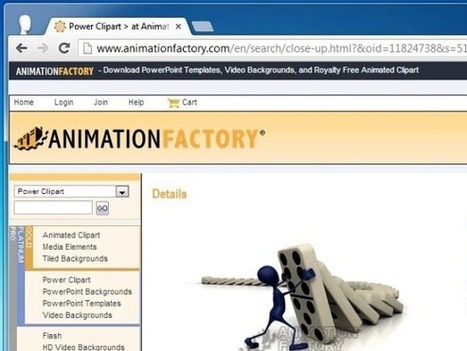
In a previous post we covered PresenterMedia.com, which provides 3D animations, clipart, and templates for Microsoft PowerPoint for making attention grabbing
Via FPPT

 Your new post is loading...
 Scoop.it! In a previous post we covered PresenterMedia.com, which provides 3D animations, clipart, and templates for Microsoft PowerPoint for making attention grabbing Via FPPT 
No comment yet.
Sign up to comment
Scoop.it!

Creating a collage of memorable photos using conventional applications like Adobe PhotoShop or the very rudimentary Microsoft Paint isn’t the easiest task Via FPPT
Scoop.it!

From
descary

Picozu offre des dizaines de fonctionnalités telles que les calques, pot de peinture, un outil aérographe, une gomme à effacer et un outil de rognage. Via Ticeman
Scoop.it!

alistairm 's curator insight,
April 26, 2013 12:03 PM
With the launch of XerteToolkits 2.0 it's now possible to bring benefits of rich interactive Xerte content to mobile devices. My favourite page types are the connectors (see sample http://tinyurl.com/jtdeg2) but the new flexible web page template is just brilliant - see link main Mitchellmedia link. Resize the browser, try it on your phone. See how it adapts. Any teacher with modest IT skills (eg PowerPoint, basic digital photos etc) can learn how to do this in half an hour. See next TechDis XerteFriday session on Flipping the Classroom - http://tinyurl.com/jtdeg3 and Xerte community site www.xerte.org.uk 
terrymc's curator insight,
May 1, 2013 11:52 AM
The approach of Xerte offers the potential to provide students with opportunities to be more creative working with their tutors - it is easy to understand and teach. Students can be more digitally experienced practitioners by exploring the features available to them.
Scoop.it!

ExamTime's free note taking software is the ideal study tool helping you build the best study resources for you. Via Kathleen Cercone, João Carreira, Paz Barceló, juandoming
Scoop.it!

Apply what you’re learning to your elearning courses
Practice, practice, and when you have more time, add some practice.
Focus on diverse demos and activities.
Scoop.it!

Discover some less known facts about grouping in PowerPoint. Find examples that support and showcase the features revealed. Via Baiba Svenca, Maria Palaska

Baiba Svenca's curator insight,
April 23, 2013 12:58 PM
The post discusses grouping function of PowerPoint. Learn how to scale multiple objects, how to apply gradient, shadow or 3D effect to grouped objects, and how to rotate a group of objects. Recommended for students who are learning to create PowerPoint presentations. Read also Part 2 about creative applications of grouping feature http://www.presentation-process.com/group-in-powerpoint.html#.UXa9gkrLu3M
Scoop.it!

Picozu est une application Web assez étonnante complète en anglais d'édition, de dessin, de manipulation et de correction de photos qui peut aussi s'installer sous forme d'une application pour Chrome ou Firefox. Via Ma veille
Scoop.it!

These resources may give you ideas and strategies for approaches to visual design for eLearning. Via Mayra Aixa Villar
Scoop.it!

Comment faire pour évaluer les travaux de plusieurs milliers d’étudiants à la fois ? Via Henri Lefèvre
Scoop.it!

Les filles! J'ai enfin réussi à créer une image cliquable regroupant toutes mes icônes "réseaux sociaux" sur...
|
Scoop.it!

New submitter JoeKilner writes "The Turbulenz HTML5 games engine has been released as open source under the MIT license. The engine is a full 3D engine written in TypeScript and using WebGL.
Scoop.it!

"Shotcut est un logiciel d'édition vidéo open source qui fonctionne sous Windows, Mac OS X et Linux. Il intègre de nombreuses fonctions de filtrage et d'encodage vidéo." Via Geemik Maria Açucena Da Silva
Scoop.it!
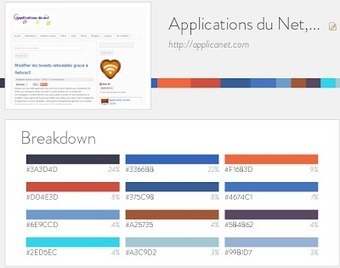
grace à cette application nous pourrons trouver les couleurs utilisées par un site donné Via Elena Pérez
Scoop.it!

La plupart des supports powerpoint utilisés en classe, en conférence, en réunion sont assommants ! Ceux qui assistent aux présentations s'ennuient (...) Via Michelle Laurissergues, Patrick W., Elke Höfler, Juergen Wagner
Scoop.it!

Si la fermeture de Picnik vous attriste et que vous n'avez pas les moyens de vous offrir une licence de Photoshop en ligne, optez pour un outil révolutionnaire Via Patrick W.
Scoop.it!

If you are looking for awesome animations to use in Keynote presentations then you can consider some of the following examples. Below you can see in action Animations for Keynote presentations. All these animated cliparts are provided by PresenterMedia in Quicktime format so you can easily play them in Mac or Apple. Animated Keynote templates can help you to enhance your presentation look and feel by providing awesome multimedia content to make modern Keynote presentations.
Via FPPT
Scoop.it!


Christoph Meier's curator insight,
May 5, 2013 6:04 AM
Dieser Service ist nur benutzbar, wenn man der Verwendung der eigenen Email-Adresse durch den Service-Anbieter (Google) und verschiedene weitere Bedingungen (z.B. Speicherung der Notizen auf Google Drive) akzeptiert.
Mit dem Tool können Videos von YouTube Videos und auch von Vimeo bearbeitet werden, aber anscheinend nicht Videos von Ted.com. Kommentare zum Video können in einzelne Zeilen geschrieben werden Diese Kommentare können mit dem Video synchronisiert werden (an- / abwählbare Option). Mit einem Klick auf den Kommentar wird dann jeweils die als Synchronisationspunkt hinterlegte Stelle im Video angesprungen.
Nach Beenden der Anwendung und mit dem nächsten Aufruf konnte ich zwar meine Notizen öffnen, aber das automatische Verbinden mit den Videos und den Zeitmarken hat nicht funktioniert.
In VideoNote.es findet sich auch ein Verweis auf ein Video, in dem erklärt wird, wie dieser Service verwendet werden kann, um Notizen zu Vorlesungsaufzeichnungen im Rahmen von Kursen bei Coursera anzufertigen (http://www.youtube.com/watch?feature=player_embedded&v=nGpGpv3u2Tc).
Christoph Meier's comment,
May 5, 2013 6:07 AM
Hallo Frau Brunnbauer, funktioniert dieses Tool denn bei Ihnen richtig? VG Christoph Meier

Carola Brunnbauer's comment,
May 6, 2013 9:03 AM
Ausführliche Tests konnte ich bisher leider noch nicht durchführen. Somit kenne ich das Problem, dass die Synchronisation beim nächsten Aufruf nicht funktioniert, noch nicht. Ich werde dies natürlich so bald wie möglich testen. Die fehlende Einbindung von Ted.com muss ich allerdings bestätigen. Hier hoffe ich auf eine baldige Erweitertung.
Scoop.it!
From
roget
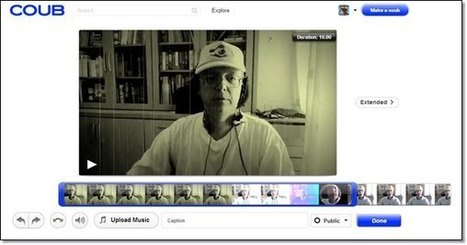
Youtube, c’est fait pour les vidéo qui ont une durée raisonnable, style 1 minute ou plus. Le gif, c’est pour passer une vidéo très courte sans son, sur des sites comme tumblr. Au milieu, il y acoub qui permet d’extraire une séquence vidéo de 10 secondes à passer en boucle. Soit vous prenez une vidéo youtube, soit vous téléchargez votre vidéo pour en extraire 10 secondes.
Scoop.it!
These resources may give you ideas and strategies for approaches to visual design for eLearning. Via Mayra Aixa Villar
Scoop.it!

Algunas maneras en que Twitter puede ser buen complemento en cursos de #elearning http://t.co/MuEEaEwRGt Via juandoming
Scoop.it!

Paul Forster's curator insight,
April 29, 2013 5:39 PM
A great little free tool that allows the user to copy and paste text and then creates flash-based activites to manipulate the text. A good way to use an IWB or to change the dynamic of a reading task- ordering, gap filling, text construction etc.
Scoop.it!

Do your visuals in eLearning offer functional features? Or are they mere eye candies? Carefully decide which category best serves your purpose. Via k3hamilton
|