Gamification: Is this a medium-term trend or really has come to permanently incorporated in our day to day? (Gamification: a long-term technological trend?
Via ThePinkSalmon

 Your new post is loading...
 Scoop.it! Gamification: Is this a medium-term trend or really has come to permanently incorporated in our day to day? (Gamification: a long-term technological trend? Via ThePinkSalmon 
No comment yet.
Sign up to comment
Scoop.it!
http://www.reallusion.com/iclone/previz/default.aspx iClone is a real-time 3D animation software with digital actors, quick animation tools and powerful came... Via Dulci
Scoop.it!

Écrire et modifier de code HTML, CSS et JavaScript en ligne avec la possibilité de récupérer un code pour embarquer des tutoriels de programmation sur une page Web. Via Frédéric DEBAILLEUL, Wilfried Caruel
Scoop.it!
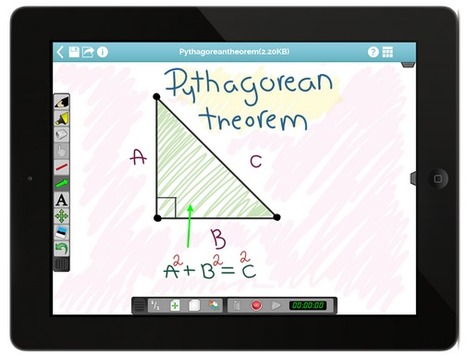
Animoby is a new way of doing presentations, tutorials and animations, with pictures, drawings and even audio. Show and explain with the speed and agility you want. Via Baiba Svenca

Anisa Dedej's curator insight,
September 29, 2013 5:51 AM
Animoby. Creare presentazioni, tutorial e animazioni
Scoop.it!

FlipSnack is a flipping book software that lets you convert PDF documents into Flash page flip digital publications that you can embed into your website.
Scoop.it!

Amy Burns's curator insight,
September 10, 2013 8:45 PM
Educlipper is an easy to use site for storing web sites.
Scoop.it!

Free Stylish PowerPoint Template is a nice fashion PPT template and slide design that you can download to prepare awesome presentations for Fashion Via FPPT

FPPT's curator insight,
September 11, 2013 12:51 AM
Free PPT template for Fashion design and presentations for woman
Scoop.it!

During a PowerPoint presentation you may be tempted to apply some changes to the presentation slides. Even if you can close the slideshow and go directly to the slide where... Via Baiba Svenca

Rosemary Tyrrell, Ed.D.'s curator insight,
September 10, 2013 2:17 PM
Simple reminder on how to use the pointer to draw on slides. This is a useful tool that is sometimes forgotten. 
Belinda Kittrell's curator insight,
September 11, 2013 2:28 PM
Great option to use in the classroom!
BK 
Training in Business's curator insight,
July 23, 2014 5:37 AM
How to Write on PowerPoint Slides during a Presentation
Scoop.it!

The Schneider - Rainbow Production Team Information/ InstructionsPhrasal Verbs and IdiomsJokes and RiddlesSketches and NarrativesChildren's Rhymes and Narratives The videos are produced in English and in German and a number of them have won awards at various competitions. Via elearning hoje

James OReilly's comment,
September 9, 2013 6:59 AM
Language Learning performing Poor in #virtualworlds #opensim #sl using #machinima http://ht.ly/oGLOH App wins
Scoop.it!

HTML5 and CSS3 techniques start the new standard with endless possibilities and with a responsive design it is easily usable with any device (Desktop, tablet, mobile phone), without removing any content!
Scoop.it!
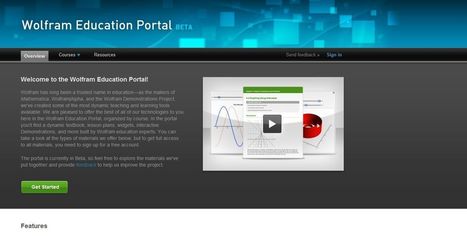
Wolfram has long been a trusted name in education—as the makers of Mathematica, Wolfram|Alpha, and the Wolfram Demonstrations Project, we've created some of the most dynamic teaching and learning tools available. We are pleased to offer the best of all of our technologies to you here in the Wolfram Education Portal, organized by course. In the portal you'll find a dynamic textbook, lesson plans, widgets, interactive Demonstrations, and more built by Wolfram education experts. You can take a look at the types of materials we offer below, but to get full access to all materials, you need to sign up for a free account. Via Frédéric DEBAILLEUL
Scoop.it!

Collagerator, disponible pour Windows et Mac OSX est un programme qui permet de créer très facilement, un collage réunissant certains moments préférés de votre vie, une façon simple et rapide pour les partager avec vos proches. L'application est très flexible, simple d'utilisation et offre un choix d'options qui devraient satisfaire même les éternels indécis...
Scoop.it!

Francois BOCQUET's curator insight,
August 31, 2013 12:24 PM
The Scratch Team is pleased to announce that the beta version of the Scratch 2.0 Offline Editor is now available. This version will work on Mac, Windows, and some versions of Linux (32 bit). |
Scoop.it!

Learn how to use the HTML5 FileReader API to read text and image files using JavaScript.
Scoop.it!

Download Festival of Lights PowerPoint Template is a free PowerPoint presentation design with candles to celebrate Diwali or the Festival of Lights Via FPPT
Scoop.it!

CCSearch est un meta moteur de recherche bien pratique qui vous permet de trouver des contenus multimédias sous licence Créative Commons. Via FrancoisMagnan, Bernard BRUNET
Scoop.it!

Learn how to embed that often intimidating HTML code right into your website or blog in no time with this quick tip. Via Frédéric DEBAILLEUL
Scoop.it!
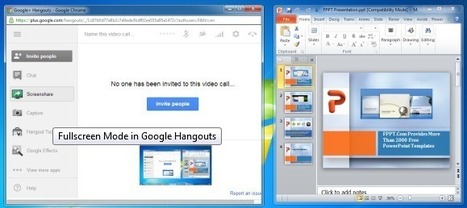
Google Hangouts is one of the best platforms for video calls, conference meetings and even small scale webinars. But Google Hangouts is not just limited to video call functionality, as you can perform a wide range of tasks via Hangouts, including providing online support or presenting presentations. In this post we will show you how to present a PowerPoint presentation using Google Hangouts. You can also use the below mentioned method for presenting your ideas using other applications, be it via a PDF Presentation, Excel Spreadsheet or even a video (e.g. a video presentation). Via Baiba Svenca, Jim Lerman

Baiba Svenca's curator insight,
July 16, 2013 12:18 PM
One of the options how you can present to your audience is using Google Hangouts. The post explains what has to be done to launch your presentation on GH. Very useful for small online conferences and webinars. This method can be successfully employed in flipped learning.

Alfredo Corell's curator insight,
September 12, 2013 6:26 PM
Useful for online webinars. Launch your presentations on Google Hangouts (collaborative toll, flipped learning purpouses too) 
Halina Ostańkowicz-Bazan's curator insight,
September 17, 2013 9:15 AM
Now we know how to present a PowerPoint presentation using Google Hangouts. Thank you for sharing.
Scoop.it!
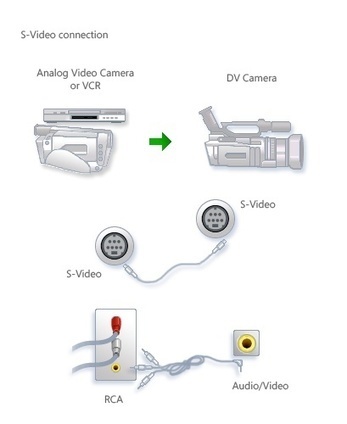
Use a DV camera, Windows Live Photo Gallery, and Windows Live Movie Maker to import old analog video to use in your movies. Via Gust MEES
Scoop.it!

Scoop.it!

Robin Good's curator insight,
September 8, 2013 3:02 PM
Snaplive is an up and coming free, open-source CMS which allows any publisher to edit the contents of its web site directly on the page, without needing to log in to a backend system. Snaplive works perfectly with WordPress and with the existing theme you are using and not only provides editing functions but it also allows you to add / create new content sections very easily. "Virtually ANY existing website or theme can become a Snaplive-powered editable website in a matter of minutes. All you need to do is add an HTML5 attribute to the div that will contain editable content." My comment: I haven't tried Snaplive but the video is quite self-explanatory. While not the first system that attempts to provide in-line, on-the-page content editing and creation, the fact that that is free and open-source, that it can work with most any existing web sites and with any WordPress theme makes it very interesting for many a web publisher. If installing and configuring is as easy as it is promised, then this could be a godsend both for many website designers as well as for their clients. My compliments to Niccolò Broggi for designing such a cool, elegant and useful tool. Currently in private alpha. For more info check: http://snaplive.org Blog: http://snaplive.org/blog/ Please do support this project with your contribution here: http://www.indiegogo.com/projects/snaplive-go-live-in-a-snap--12/x/3977105
Scoop.it!

The Open Educational Resources Research Hub (OER Research Hub) provides a focus for research, designed to give answers to the overall question ‘What is the impact of OER on learning and teaching practices?’ and identify the particular influence of openness. We do this by working in collaboration with projects across four education sectors (K12, college, higher education and informal) extending a network of research with shared methods and shared results. By the end of this research we will have evidence for what works and when, but also established methods and instruments for broader engagement in researching the impact of openness on learning. Via Alastair Creelman
Scoop.it!
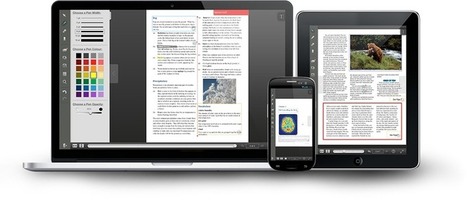
ActiveTextbook Turn your vision into reality by creating your own version of an existing PDF or textbook. Give it a dynamic touch, jot down notes, add video/audio clips, and discuss materials with your readers within your interactive content. Use Active Textbook to learn, teach or simply share your documents online – it's easy! Via LucianeCurator
|