


Rechercher des ressources : 545 ressources TBI Open Sankoré Mathématiques - #semainedesmaths
Via Canopé Beauvais

 Your new post is loading...
 Scoop.it! Rechercher des ressources : 545 ressources TBI Open Sankoré Mathématiques - #semainedesmaths Via Canopé Beauvais 
No comment yet.
Sign up to comment
Scoop.it!

Canva is a nice tool for designing infographics, collages, flyers, and slides in your web browser or on your iPad. I've been a fan of the service since it launched. Via Laurent Blanquer
Scoop.it!

This week's Motion Magic Under 5 covers exactly that topic and demonstrates how easy this task is to accomplish in Motion. A shape, a camera, and a couple of behaviors is all it takes to create a polished custom animation. Via planetMitch
Scoop.it!

One way to make your course easy to use is having intuitive, attractive navigation. Spending just a little extra time perfecting the menu will help learners understand where they are in the cours...
Scoop.it!

Over 5000 Icons in 77 Sets: Polygon, Flat Christmas, Grey Moonlight, Orange Moonlight, Pixelistica Blue, Christmas, Travel and Tourism - Part 2
Scoop.it!

Make a video online with wideo! Create professional marketing videos. Try out our video templates. Create explainer videos. Learn more: - http://www.scoop.it/t/21st-century-tools-for-teaching-people-and-learners/?tag=animation Via Ana Cristina Pratas, Gust MEES

Gust MEES's curator insight,
February 17, 2015 1:43 AM
Make a video online with wideo! Create professional marketing videos. Try out our video templates. Create explainer videos. Learn more: - http://www.scoop.it/t/21st-century-tools-for-teaching-people-and-learners/?tag=animation 
Alison Rostetter's curator insight,
February 21, 2015 12:54 PM
I'm always on the lookout for a good, easy-to-use video/animation maker as 'home-made' videos often inject some life into grammar and, when you learn something with pictures, I think it makes the learning more memorable.
Scoop.it!


THE OFFICIAL ANDREASCY's curator insight,
February 16, 2015 3:42 AM
Great collection of useful web design links.
Scoop.it!

Snap three pictures. Add captions. Choose graphics. And let Nutshell turn it all into a shareable cinematic story. Via Baiba Svenca, Mark E. Deschaine, PhD, Suvi Salo, Timo Ilomäki, Made Hery Santosa

Jamie Fulcher's curator insight,
February 19, 2015 3:48 PM
Looking forward to trying this out with some trainers. 
Marianne Hart's curator insight,
February 26, 2015 8:42 PM
Use for student PSA'a - Public Service Announcements
Scoop.it!

Comparatif des fonctionnalités de Powtoon et Moovly, deux applications en ligne permettant de réaliser des capsules vidéo sous forme d'animations
Scoop.it!

Here's How to Easily Design Awesome Posters and Images Online with Canva. Via Dr. Tom D'Amico (@TDOttawa) , Timo Ilomäki

esava2002@gmail.com's curator insight,
June 16, 2022 11:18 PM
This resource shows how to create a poster on Canva. This can be useful when demonstrating to my students on the projector an examplar on how to create their infographic.

elsagarcia.castells@gmail.com's curator insight,
September 10, 2023 9:05 PM
Easy for classrrom teachers to have, slides, notes, posters or newsletter templates!
Scoop.it!

Where can you find free, good quality images that are cleared to use for your blog posts or social media content? Via The Learning Factor, Jess Chalmers

Francisca e Rui Castro's curator insight,
February 12, 2015 5:44 AM
Love your post, thanks for sharing.
I also use http://morguefile.com, it's also free and have great photos.
Scoop.it!

Presefy est un service qui va vous permettre de rendre toutes vos présentations consultables et utilisables comme par magie depuis un smartphone ou une tablette. Via Amélie Silvert, Juergen Wagner

Amélie Silvert's curator insight,
February 11, 2015 10:41 AM
en version gratuite seulement 2 présentations et sinon les formats pdf et ppt(x) |
Scoop.it!
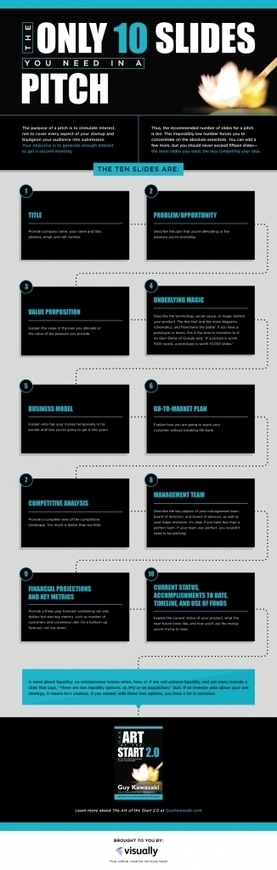
Guy Kawasaki is an evangelist of the 10/20/30 Rule of PowerPoint. It’s quite simple: a pitch should have ten slides, last no more than twenty minutes, and contain no font smaller than thirty points.This rule is applicable for any presentation to reach agreement: for example, raising capital, making a sale, forming a partnership, etc. Via The Learning Factor

The Learning Factor's curator insight,
March 8, 2015 6:02 PM
This infographic below will help you fine tune what to put on your ten presentation slides.
Scoop.it!
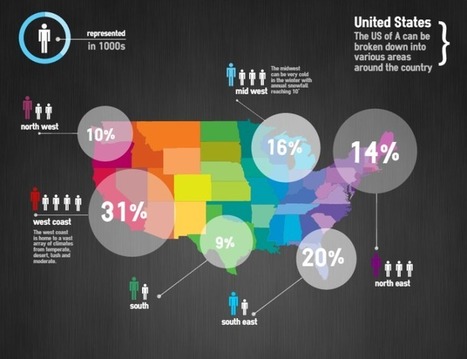
Data is crucial. However, displaying a chunk of plain data can be monotonous. Infographics visualize plain data and make it visually more appealing. Data turned into infographic has a higher potential to go viral and be effective. While many of us are designers who can design amazing infographs, Infographic Generators can come in handy to Designers and non-designers alike. They can be a time saving resource. So here is a list of 17 fantastic Infographic Generators I compiled together:... Via Jeff Domansky, Gisele Brugger

Willem Kuypers's curator insight,
March 9, 2015 2:37 AM
J'utilise de plus en plus les info-graphiques. Ce site aide à les créer pour ceux qui sont moins doués en graphisme. 
Fran Bozarth's curator insight,
March 11, 2015 2:31 PM
This could spice up just about any presentation - student or instructor.
Scoop.it!

This is your SUPER GUIDE for putting YouTube videos into PowerPoint! Follow the links below to find the tutorial for your version of PowerPoint...OR...slowly scroll down the page to learn some adva... Via Baiba Svenca
Scoop.it!

Lines Background Graphic available in EPS vector format // abstract, background, colorful, cover, design, line, lines, stripes, vector Via elearning hoje
Scoop.it!
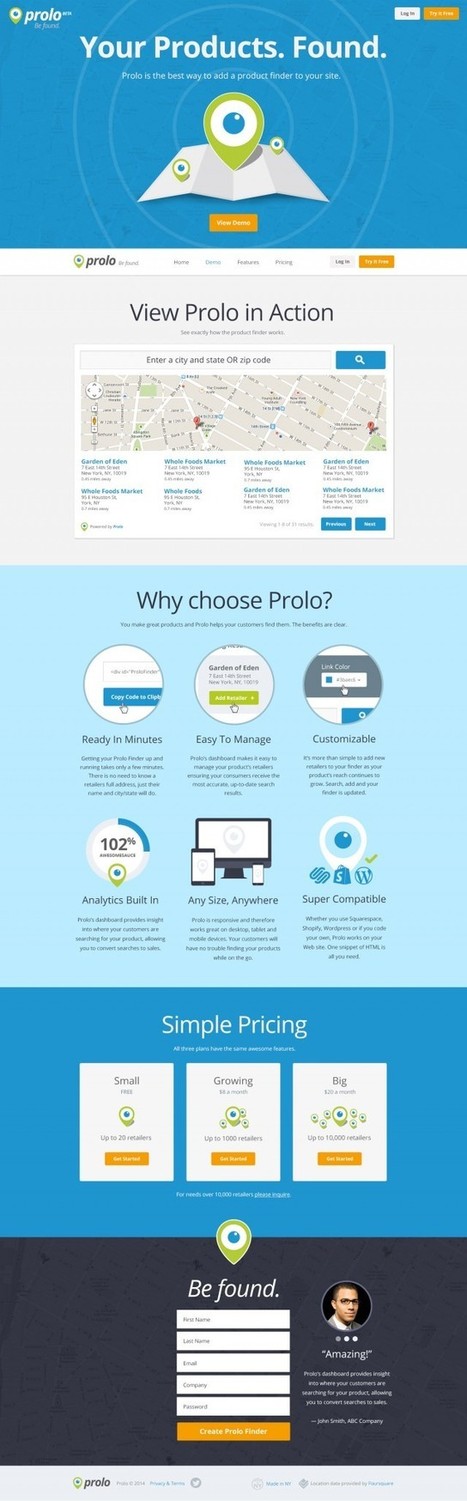
Here we look at the creative process professional web site designers use to make creative web site designs. From sketching to wireframes, mockups and more. Via Alessandro Rea
Scoop.it!

Internet and a screen resolution are advancing, therefore more and more designers use full sized photos as a website layout. A background image is a quite old web design trend, but still it is worth to be noticed. Via Spyros Thalassinos
Scoop.it!

Senongo Akpem analyzes some key features of case studies and provides tips on how to establish a human-centered design process for designing case studies. Via THE OFFICIAL ANDREASCY
Scoop.it!

Les diaporamas sont très souvent utilisés dans nos enseignements afin d’être les supports visuels de nos cours. Support obligatoire des conférences, animations institutionnelles, le diaporama possède à l’évidence des qualités pour diffuser l’information. C’est un exercice intéressant de communication qui permet de synthétiser les apports de contenus, d’énumérer plus facilement des points importants, de structurer un exposé.

's curator insight, February 17, 2015 2:58 AM
Alain Michel : "Cet article très complet nous explique d'abord comment bien "penser" ses présentations sur Prezi en mettant l'accent sur l'aspect primordial de la conception d'un vrai scénario avant de se lancer dans la création proprement dite. En quelques mots, le fait de "raconter une histoire" (storytelling) permettra de susciter l'intérêt, d'où une implication plus grande des apprenants. La seconde partie de cet article présente l'interface et les fonctions essentielles de Prezi pour permettre aux nouveaux utilisateurs débuter. Cet article est également téléchargeable au format PDF." 
Bernard DIVIALLE's curator insight,
February 21, 2015 10:18 AM
Utilisation pédagogique du storytelling : l’émotion comme vecteur d’acquisition des connaissances 
Christelle Quesne's curator insight,
August 10, 2015 6:13 AM
Cet article très complet nous explique d'abord comment bien "penser" ses présentations sur Prezi en mettant l'accent sur l'aspect primordial de la conception d'un vrai scénario avant de se lancer dans la création proprement dite. En quelques mots, le fait de "raconter une histoire" (storytelling) permettra de susciter l'intérêt, d'où une implication plus grande des apprenants. La seconde partie de cet article présente l'interface et les fonctions essentielles de Prezi pour permettre aux nouveaux utilisateurs de débuter. Cet article est également téléchargeable au format PDF.
Scoop.it!

Looking for tools and strategies for effective assessment in project-based learning? To support you, we've assembled this guide to helpful resources from Edutopia and beyond. Via LGA, juandoming, Henrietta Siemens
Scoop.it!

You can export a copy of your screen recordings as MP4 movies, and you can save individual frames from your screen recordings as PNG images. These functions can be helpful if you want to reuse you...
Scoop.it!

Kelly Maher writes for eSchool News about 8 great (and simple!) tools for creating amazing infographics. Via Dr. Tom D'Amico (@TDOttawa) , Timo Ilomäki
Scoop.it!

Microsoft Image Composite Editor ou Microsoft ICE pour faire plus court, arrive dans sa version numérotée 2. Application gratuite, elle permet de réaliser des images panoramiques en assemblant des photos numériques...
|






