The Nokia Lumia smartphones come packed with with entertainment features to make everyday a little more fun. The great gaming experience from Xbox LIVE is just one of the ways you can have fun on your Nokia Lumia smartphone. Last week, Xbox celebrated their 10th UK anniversary by looking back over the milestones in an interactive timeline, including adding Xbox LIVE to Windows Phone.It underlines how Nokia Lumia phones including the Nokia Lumia 610, Nokia Lumia 710, Nokia Lumia 800 and Nokia Lumia 900 are all welded to the plans for this world-beating games system.
Xbox LIVE was first launched on 15th November 2002 when fast Internet speeds made it possible to play high-def (at the time) games with other people from across the world. In today’s world, most mobile phones can achieve super-fast Internet speeds and in October 2010, Xbox LIVE launches on Windows Phone.
Today, Xbox LIVE has over 40 million users. That means your Nokia Lumia 610, Nokia Lumia 710, Nokia Lumia 800 and Nokia Lumia 900 all have direct access to that ever- increasing gaming network. With games like Splinter Cell Conviction, Need for Speed: Hot Pursuit, or Bug Village, you can collect gamerpoints from achievements right from your phone. Boosting your gaming-cred with your mates as you try to become the best gamer.
Wind that timeline on several years, and on 6th December 2011 the Xbox LIVE Companion app arrived for Windows Phones.
This moves beyond just having Xbox LIVE on your Nokia Lumia, your Windows Phone has now become the controller. With Xbox Companion, you can sit back on your couch, search for movies, play the latest song or interact with all the other services stored on your Xbox 360 – right on your phone....
...ymbian just got a new pull-down status bar a-la Android, which is a good thing. The new status bar is not as tall as the old one was and leaves more room for applications. Considering that Qt applications use the same status bar, you can not hardly tell the difference between a Qt app and a native app.
Besides showing notifications for new messages, missed calls, missed reminders, mobile network and WiFi network, the new status area has 4 non configurable shortcuts for turning on and off mobile data, WiFi, Bluetooth and silent mode.
The unlock screen appears when the phone is locked and you press the menu or unlock key, and shows you the time and your missed events, like messages, calls and the upcoming calendar events. Of course the phone can be locked using the knob too(if your model has one). The unlock screen now supports background images, and uses the one from the last visited homescreen....
...What precisely are you doing that you would take a device, though very well received, well loved, even award winning despite being 2011 specs on paper, to delay and delay and delay until the point that well, the competition has even better devices and no one cares about our Nokia phones?What precisely are you doing that you would need to actively disable something like internet sharing on the Nokia Lumia 800/710 at launch only to tell us they would possibly appear in some update to which has no definite date?
The trend of delays and waits is something Nokia fans (that remain) have had much practice in. Looking at the bright side, I guess at least it is still within the same half of the year, unlike before where we would have announcement and over 6 months later, the device appears in the shops. Whilst you delay, the competition does not stand still. How are we expected to catch up when we’re clearly going in reverse? (Unless of course there’s something quite significant, e.g. 41mp PureView which would take a while to compete against that camera, but even that should not be delayed).
How about creating some buzz, and then putting it on sale and then maintaining that buzz whilst your product is available for people to buy? Is something not ready in the phone? There’s only so much preparation, perfection and weeding you can do before the phone turns into a mythical Duke Nukem Forever project. Of course we don’t want rushed, botched devices, but there must be at least a certain level at which those devices can be ready and be put on sale?
Perhaps, most likely I am over simplifying and missing out key factors that are...
...The four options for shortcuts are:Task-manager/App switcherBattery SaverLock-Screen/Restart phoneBrightness control
I was most interested in the task manager app as it provided the answer to the question ”can we have a Symbian device WITHOUT a menu button”- simply the answer is NO; at least not yet- if this is the proposed solution (a softkey) then it won’t work because it’s not present consistently throughout the system. Still it’s a nice implementation for quicker switching (no long press needed) also it’s a workaround for people with problems with their Menu button.
The other shortcuts are pretty useful too- the brightness offers 4 settings (0%, 50%, 100% and Auto) which is a pretty time saving solution rather than having to go into settings and...
Mobile Industry News, Reviews, Tutorials, & Opinions.
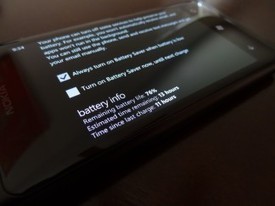
Above is a screenshot of the estimated battery remaining on my Nokia Lumia 800. It was in battery saver mode through the night, then I turned off the battery saver mode about 3 hours ago. Right now, in this screenshot, I have 3G off, WiFi on, email accounts connected, Rowi pushing tweets in real time, and a very weak signal in the house. Not too bad!
I think I can live with this new found battery life on my Nokia Lumia 800 thanks to the latest firmware.
Nokia released the Lumia 800 with sub-par battery life. This fact was widely published and got them a decent amount of bad publicity, despite the phone’s amazing design and fast operating system. While I was a extremely let down when I first heard about the phone dying after six hours, I remembered that this was Nokia’s first flirt with the Windows Phone OS and knew that a fix was promised via firmware update. Well a few days ago I updated my firmware to version 1600.2487.8107.12070, the latest available, and I’m happy to report that the battery life has been improved so much that I can now call the Nokia Lumia 800 battery life good, almost great.
I’ve always said that my phone should be able to get me through about 8-10 hours under heavy usage. Everyone’s usage differs, so I’ll break down mine...
...Traditionally, you take a photo and perform any edits to the photo afterwards. Not anymore. Creative Studio by Nokia transforms the way you take photos on your Nokia Lumia 710, Nokia Lumia 800 and the soon to be shipped Nokia Lumia 900by adding special effects to the photo, before you’ve even taken that perfect shot.Created by Nokia, Creative Studio transforms standard photos into something extra special, with ease.
There’s the option to take photos straight away with what are called Live Styles. These are live effects, relayed through your phone’s viewfinder. This means you don’t need to make the edits after you’ve taken the shot.
Live Styles include:
SketchDreamyNight visionCartoonColourSilkscreen
Alternatively, you can select any of the images already saved in your photo gallery and add special effects afterwards, if that’s what you prefer....
As you may know, Nokia has introduced Symbian Belle Feature Pack 1 (FP1) in Nokia 808 PureView.
...here is still some time left before these widgets released for old Belle but the good news is that Symbian modders at Dailymobile have extracted this widget for older Belle phones. Here is how you can get it on your Nokia Belle device (N8, C7, E7, E6, X7, C6-01, Nokia 603, 700 and 701)and enjoy the slideshow of Gallery pics right at your homescreen –1. Download this file and extract the contents. There are two .sis files in the archive – install any one of them in phone memory (one shows photos with white border and other shows without any border).
2. Now go to the sys/bin folder in archive and copy all the three...
This video will show you simple methods for taking the idea for your next app, and getting it on paper. From there, you can utilize various software to make your prototype a reality. Adobe Illustrator http://www.adobe.com/products/illustrator.html is one solution for this. Other tools used in the video are Balsamiq http://www.balsamiq.com/ and Inkscape http://inkscape.org/.
Be sure to check out the Nokia Icon Toolkit http://nokia.ly/Aj0pR8 for some ready-made icons you can use in your app. With the Visual design stencilshttp://nokia.ly/w5hqIO you can easily sketch how your app would look like.
Mobile Industry News, Reviews, Tutorials, & Opinions.
The Nokia Lumia 800 is one of the hottest devices out right now, and if you have the money, getting the whole Lumia 800 Entertainment Bundle will satisfy all of your music needs. It’s now available through Amazon Wirelessfor the high ticket price of $899. It does seem pretty steep, but like I said, you get a lot with the bundle.Here are the details from Amazon:
The Nokia Lumia 800 with Windows Phone. Fast Browsing with Internet Explorer 9 Mobile. 8MP camera with Carl Zeiss lens and LED Flash Free voice- guided car navigation.Purity HD Headset by Monster. The best sound for the best phone. High performance headset for people on the move.Nokia Play 360 portable wireless speaker delivers powerful, crisp 360 sound. Works with any music player using Bluetooth or 3.5mm audio cable. Compatible with NFC for quick pairing. Carry pouch included.Nokia Luna Bluetooth Headset. Universally compatible with devices that support Bluetooth. Pop up the headset to answer and push back to end.
If you buy all of this separate you’ll end up spending over $1,000 dollars. The phone comes unlocked and without contract. From the press release:
This special-edition bundle is available unlocked, without a contract for $899 and includes...
...It’s now just over a week since the most recent software update was officially released for the Nokia N9. I actually got mine on our last day at Mobile World Congress – feverishly downloading over a terrible WiFi connection in our Barcelona apartment.The official list of changes only includes the major feature improvements:
Video call support for Gtalk (get the app from Nokia Store)Support for folders in the Applications viewImproved camera with continuous (burst) shooting (3 frames per second)Face recognition for photos: easy to tag faces with namesNew Drive features: route options, favourites, speed limit alerts, and compass supportThreaded view support in Mail, and access to company address book (GAL) in Mail for Exchange (MfE). (Note! Activate GAL from Accounts.)Support for creating playlists and deleting songs in the music playerImproved web browsing history viewExtended copy-paste for web and documentsLanguage support for Thai, Hebrew, Persian, Vietnamese, and KazakhHundreds of new features and usability improvements
It’s that last item that’s perhaps the most interesting. If you follow the Maemo Talk forums at all, then you’ll be aware of what some...
It's already possible to get some fabulous games on your Nokia Lumia phone, but a fresh development in the world of video game engines means that we might be in...
Whether you’re a wordsmith or bookworm, you’ve probably played Scrabble or one of its online alternatives. Symbian has not been supported by the likes of “Words with Friends” and WordFeud – until now.
...Once you get playing, the rules are just the same as any of the other games in this genre (see above). There is a pool of letters randomly assigned to each player; there are no wildcards though – sorry, Words With Friends fans. Letters have various values, and the trick is to place the highest value tiles on squares that will double or triple their points, or spell words through tiles that will double or triple the entire word score. Your bonuses can stack up if you spell a word across several multipliers too.
To construct words, you must spell from top to bottom or left to right; you can’t go backwards or diagonally. Also, you can create multiple words by having rows or columns that interconnect and overlap, but all adjacent letters must make actual words.
If you find yourself absolutely stuck, you can elect to swap some or all of your tiles – however you may be limited if there are less letters remaining than you want to change. You can of course retire – but you’re not a quitter are you?!...
Pipe Mania was all the rage when I was young, with the player assembling randomly presented pieces of pipe into a plumbing layout through which water/goo can flow, all against the clock.
...Despite the name, there doesn't yet seem to be a version of BR Pipes Qt without the 'Free' addendum - so you'll have to put up with occasional interstitial adverts here. Not a huge problem and, if anything, the ads give you a 10 second break between brain-draining levels, in order to recover. One nice touch, that I hadn't seen before, is that you're asked your age and sex right at the start, so that the ads presented are appropriate.
Somewhat over-complicating the genre, there are four different types of level and four different game modes. Still, I suppose there's a favourite mode for everyone here. The points system is complicated too, and not really explained anywhere within the game, though you get more points for more complicated pipe structures and, apparently, more points for consecutive stretches of pipe portions of the same colour (if playing the 'colors' level...
This article is how I personally feel about the Nokia Lumia 800. The first part I originally published on my own blog in December, with the second part added in February. Next month I’ll be publishing a new article that talks about how I feel about the Lumia 800 after four months of using it daily.
This article is a list of my personal likes and dislikes so far of the Noka Lumia 800 after using it as my main phone for a few days. In general i’m really enjoying the device so far and finding it great to use as an every day device. Many of my opinions are most likely influenced by the N9 i’ve been using (and enjoying) for the last month or so.
Likes
Keyboard - I’ve used many on screen qwerty keyboards on many operating systems (Meego, Symbian, Android and iOS) but so far the Windows Phone keyboard has to be my favourite. It has good prediction, correction and i’m finding myself being able to type faster and more accurately than any of the others, even the 3rd party ones I used to use on my large screened android phone.
Calendar on lockscreen - It’s a very simple feature but being able to see my next recent calendar entry on the lockscreen is a welcome touch.
Speed - The Lumia is fast, not spotted any lag, pauses or freezes with it yet, it’s just always silky smooth. This really adds to the overall user experience.
User interface - At first I wasn’t a fan of the tiles but found they’ve grown on me very quickly. The whole UI is a joy to use and is just so simple to get to grips with. Love the transitions between screens and apps which along with subtle...
...This is the official Sky News app. It’s more video centric though they do have written articles, each is partnered with a video. A really nice feature is the ability to watch sky news live. Even the low quality video looks pretty sharp but there is a medium and high quality version available too. Oddly the live video is clearer than the pre-recorded ones. Perhaps this is to make it easier to watch when on the go.
As well as top news, you also have world news, business, politics and showbiz.
You can submit your own news as well. Demo video below – sorry lighting is poor,...
These days we expect a modern day smartphone to be capable out of the box and expendable with a wide range of third party applications that utilize that various bits of hardware that are fast becom...
...been using Sports Tracker, first a Nokia Beta Labs project, then successfully spun off into a self-sufficient service under the auspices of Sports Tracking Technologies. It is now truly cross platform, adding Android, iOS, MeeGo/Harmattan and Windows Phone. The very useful mobile client is backed up by a very pleasing, albeit entirely flash based web portal, that takes the analytical capabilities of the mobile client even further.Sports Tracker is not alone in this field. There are a number of other apps that offer a similar service, in all cases bringing something different to the party. While looking for training solutions last year to improve my race times, I stumbled upon miCoach, developed by Adidas. Adidas miCoach is an extensive system that works either via a mobile client or a shoe and podometer system that is tied together by a very extensive web portal. The key to miCoach is that it offers virtual coaching, and with Adidas’ sports heritage in mind, covers a breadth of disciplines, as well as strength and cardio based exercises.
These two apps have formed the foundation of my digital based training and for personal reasons I use both. Lately however I have felt the need to not only branch out, but also to streamline. I have to say; maintaining two services that for all intent and purposes achieve the same thing is a little tiresome. Thankfully there are other players in the scene. The key for me is cross platform compatibility. To my trusted two I have added Endomondo, an old hand actually, one that I dabbled with briefly in the S60 days and RunKeeper.
I used the apps side by side for a week on my training routine. I am a runner so my results might not be appropriate for some disciplines but the line of thinking probably is. I run four times a week, with a cross training session thrown in to the mix. Virtually all of my runs are on the road, a mix of interval, tempo and long distance running balanced by ‘easy’ recovery runs. I do the traditional interval training, in the form of 800m repeats on the track, with fartleks and tempo running done on the road.
What makes a great sports tracking app? First, I want a comprehensive but not bloated app that can function independently of a web portal. Particularly important is ease of use. I don’t want a fiddly UI when starting and ending workouts. The on-board analysis has to be decent. Immediately after a workout I want to be able to get some vital statistics quickly. Second, I would like compatibility with heart rate monitors and third, some extra functionality beyond just clocking the miles to speak. The service that balances this triad of expectations will be the service that wins out.
My training is captured primarily with the Nokia N8 and on the rare occasions an Android device, currently the HTC Desire S. This is a personal preference because I feel the hardware on the N8 is better suited to this than other devices I have used. I have tried doing my exercise with the E7, N79, N9 and the Samsung Galaxy SII and all were lacking in various aspects. This does mean my experience of the apps will be predominantly Symbian biased but where appropriate, I have looked at the Android equivalents at least from a usability perspective to balance this out.
Before I carry on, I have two give special thanks to two good friends Simon Thome and Quintin van Wyngaardt, fellow geeks and sports trackers, whose backgrounds in programming as embedded software engineers meant they know far more about this sort of thing than I do. I pitched the...
Among the many things modern smartphones can do, the ability to watch video and listen to music on the go has to be one of most widely used functions.
...You need a few things to create a solid multimedia smartphone - capable hardware, solid software and a healthy supply of media content coming through.
The Nokia Lumia 900 has each of these bases covered. When it launches in the second quarter of 2012, it could well be the prime choice for those you like to listen and watch on their phones.
Screen
This is the most obvious strength of the Nokia Lumia 900, and also the key distinction between it and the rest of the Lumia range. Put simply, video is going to look gorgeous on that 4.3-inch AMOLED display. The fact that it's AMOLED means that high definition movie content will look sublime. Home cinema buffs will tell you...
Somewhat bizarrely being yet another application with two names (also filed as 'Unwanted Item Remover'), PhotoPatcher is the prolific Oleg Derevenetz's attempt at a photo retouching utility, cloning parts of a photo to replace unwanted detail...
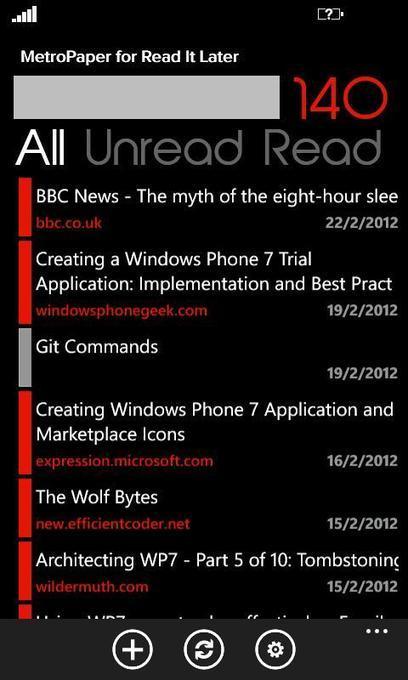
MetroPaper is a Windows Phone client for the Read It Later service. It allows a full sync of your Read It Later list to your phone, allowing you to read articles, pin them to your start screen and share them via social media. ...
If you prefer your games to have a cerebral focus rather than intense action, chances are you're a puzzle fan. As such, you need a game that will keep exercising your mind; so we're here to help. All About Symbian has reviewed more than its fair share of puzzle games over the years, so grab a cup of tea, load up your Nokia Store client, and read through our top five puzzle games list. We have something for everyone - physics puzzles, numeric puzzles, logic puzzles, and more....
The Nokia 808 PureView was announced a little over two weeks ago during Mobile World Congress and we still cannot stop talking about the momentus occasion.
...we are trying to be patient. However, if you are similar to us, you want to know all-things-Nokia about the 808 PureView before it can hit the shelves.Therefore, if you are looking for some ‘meaty’ insights into the 808, then take a look at the selection of videos below. The videos come from our dedicated bloggers and definitely make good watching. Each blogger looks into different features and aspects of the Nokia 808 PureView.
So, grab your cup of tea, or your beer, take a seat, relax and be entertained
Meet the new Nokia Lumia 900 with Windows Phone http://nokia.ly/zoyq6L Find out how fast amazing can be. And social. And beautiful. With its award winning de...
Sat there with a shiny new Nokia Lumia 710 in your lap? Wondering what to do with it next?
...The first time you turn your Nokia Lumia 710 on you'll be treated to a pretty self-explanatory step-by-step guide to help set you up. Whether you've completed all these steps or not, here are the five things you really should do with your new Windows Phone.
Set up Wi-Fi
You really don't want to be downloading that initial batch of apps and watching all those YouTube videos over your mobile network. You might well be blessed with a decent 3G or even 3.5G network signal, but what about those data allowance caps? The first thing you should do (if you haven't already) is set up a Wi-Fi connection.
Go into Settings, then Wi-Fi and flick the toggle to On. Your Nokia Lumia 710 will search for the nearest access point. Select the one you want (probably your home network) and input the password if necessary. You should see a little Wi-Fi symbol appear at the top of the screen to tell you you're connected!
Add your accounts
This is the next major step you should take, as the core Windows Phone experience is very much based around your email and social network accounts. Adding all your existing accounts will magically synchronise your contacts (complete with pictures!) and calendar entries, as well as pulling in your emails and social network updates as they arrive.
To add an account - whether Gmail, Facebook, Twitter, Hotmail or any other - simply go into Settings and then Email+accounts. Hit Add an account and select from the list of popular services. Then just add your email address and password and sign in. Once you've done this you can access your...
To get content containing either thought or leadership enter:
To get content containing both thought and leadership enter:
To get content containing the expression thought leadership enter:
You can enter several keywords and you can refine them whenever you want. Our suggestion engine uses more signals but entering a few keywords here will rapidly give you great content to curate.


 Your new post is loading...