Vimeo has been around since YouTube was created, but has never really had the popular vote, largely because there are few skateboarding cats, pirated music vids or ranting teenagers on it. The focus has always been on slightly more serious content, and it's great to see a native (well, Qt) Vimeo application appear officially. Compatibility seems to be Belle onwards, it seems. ...
Black, grey, and most recently white have been the most commonly used colors for mobile phones and smartphones by many manufacturers, and I must say I was starting to get fed up with nothing but black slabs being produced lately. No jab at anyone ;)
Inspired by Michael Hell's R-rated gadget photo-shoots I decided to summon three of my current smarphones which I consider a bit more colorful than the rest and they were very pleased to pose for the camera. ...
Opera Mini, just about everyone's favourite bandwidth-saving browser, has had a big update, reaching v7.0(29974), from the previous v6.5.
Full changelog below, but in summary, there's a new 'Smart Page', giving 'easy access to your social networks and favourite sites', plus new localisations, support for unlimited speed dials, performance improvements and (at long last) version upgrade notification, so you won't need to keep a look out at AAS for future updates.
Changelog for v7.0:
New features:
-New Smart Page with social integration
-Support for unlimited amount of speed dials
Improvements:
-RTL text support in UI
-When closing a tab - switch to the most recently used one
-Press status bar to get quick access to URL/search (S60 5.0 and Symbian^3/Anna phones only)
-Add a page to speed dial from the star menu (Touchscreen devices only)
-Support Russian keyboard layout (if using Russian localization)
-Improved support for third-party IMEs
-Version upgrade notification
-Improved RTL text rendering
-Added localizations for Arabic, Hebrew, Farsi and Urdu
-Improved performance and responsiveness on touch phones
-Fixed freeze problems with big Opera Link accounts
-Fixed reconnection problems
-General improvements and performance optimizations...
The Nokia Lumia 900 is a bit of a multimedia beast, so pairing it with the Nokia NH-930 Purity HD headset would seem to be a match made in heaven.
...Pulling the Nokia NH-930 Purity HD headset out of its packaging, you get a reassuring sense of quality even before you handle the slinky 'phones.
There's a lovely black swing-lid box, a moulded plastic interior and the kind of sturdy-but-stylish zip-up carry case you might be used to seeing carting around other premium brand headsets. You know - the kind whose zip somehow never snags on a loose piece of wire.
The good news is, this sense of quality continues inside the case. You might marvel at the compact dimensions of the case, and that's because the Nokia NH-930 headphones feature a smartly jointed frame. A couple of inches above left and right earpieces there's a swing mechanism that tucks the headset in on itself, making it easy to store away and lug around. These joints are made from some kind of solid plastic, and they lock into place with a satisfying click.
This is also where you can adjust the fit of the Purity HD head phones, with a slide-out mechanism smartly hidden near the hinge joints.
Another sign of quality is the included removable cable, which is shaped into a flat strip of rubber rather than your typical thin piece of wire. This results in a blissfully tangle-free experience.
In terms of both design and materials, the Nokia NH-930 Purity HD headset matches our black Nokia Lumia 800 (and by extension the equivalent Nokia Lumia 900) well. The outer band of the headset is made of a glossy black plastic material that not only looks good (if a little prone to finger prints), it also ties in with the Lumia phone's beautiful screen.
On the flip side of the headband a more sober matte plastic is used, which is a good choice as it'll be in direct contact with your sweaty head. At the apex of this band is a nicely padded area that should come in handy during extended listening sessions.
Slipping the headset on, the ear pieces are also well padded. This is useful because there's quite a clamping action to the Purity HDs. On the plus side this helps secure a firm fit and helps lock out external noise. On the negative side, those with a large cranium might experience a little discomfort on the external part of their ears after a prolonged listening session. This will likely ease up with repeated use as you grow accustomed to the headset and the band relaxes its grip a little.
Any initial discomfort felt on the ears certainly isn't felt in them. The quality of the sound pumped through the Nokia NH-930s matches the general build quality.
Whether handling the textured indie dream-pop of the latest Beach House record, the hypnotic synths of Biosphere's N-Plants album or the deep bassy thump of some classic Carl Craig techno, the Nokia NH-930 Purity HD coped admirably in our tests. It's a warm sound that doesn't drown out the treble with excessive bass as some close competitors tend to.
In truth, you can get an even better audio experience by going with one of the established audio brands, but of course where the Nokia NH-930 Purity HD headset scores over such headsets is compatibility with your Nokia Lumia 900, 800 or 710. The built-in remote control can not only skip...
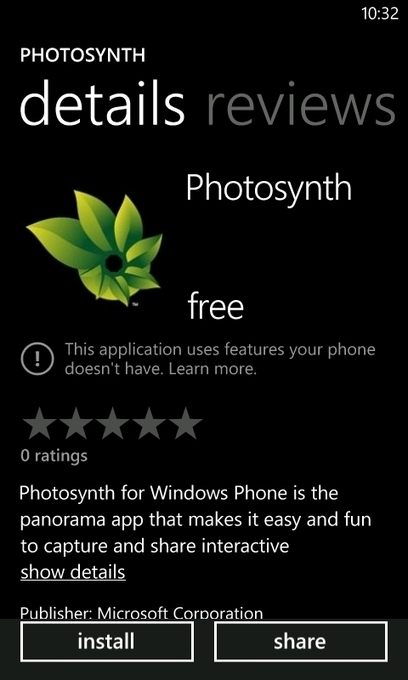
PhotoSynth is a really cool app that was just released for WP; it basically allows you to do full 360 degree and spherical panoramas (Currently Nokia Creative Studio only allows a maximum of 4 shots per panorama); anyways it’s a really cool app that you guys should check out. However it does claim it needs a gyroscope in the device and apparently the Lumia 800 doens’t have one (First I’m hearing of this); it’ll still works fine on it but supposedly it’ll give you better performance on a device with a gyroscope (Does the 900 have one?)...
Another day, another casual game. Even if part of me is yearning for another 'proper' HD epic, I wanted to at least screenshot this somewhat cutely macabre casual game - you have a volcano, spitting out flames and lava, and you have two nearby...
...Developed by the wonderfully named SwanAngel in Java, there are lots of lovingly crafted touches here, from the fire engine animations to the ever-encroaching flames on the buildings, to the way the time of day changes from black/night, complete with photorealistic moon and stars to bright sun/daytime.
Although the aim here is tapping to create safety platforms for desperate people, in many ways the actual gameplay is similar to the arcade classic Missile Command - you're having to take in the multiple falling bodies (literally) and their trajectories and speeds and then plan your platforms so that you get there in time (each platform disappears after a second). ...
Here's a neat idea for an elderly parent, disabled friend or someone else vulnerable, should they use (or you persuade them to use) a modern-ish (capable of running Qt) Symbian smartphone. It's all very well having your contact set up as a shortcut on their homescreen, but in the event of an emergency, they'll have to be physically able to tap a few times accurately to call you and it'll then take time to relay details. Red Help aims to drastically simplify the call to help.
...First, text messages are sent, with your predefined (but customisable) help string to the numbers that you provided earlier. Then, if location was also needed, this is estimated based on Wi-fi, cellular and GPS location and also sent, as a second text message.
As the carer, or son/daughter/friend, you then get these messages (here shown on an Android phone), with position shown as an actual address and also as lat/long, a nice touch in case the person isn't at a listed address (e.g. in a park), for the emergency services to respond to. ...
The Nokia Lumia 900 is a striking Windows Phone smartphone that comes with a 4.3-inch AMOLED screen that makes for a large and attractive viewfinder when using...
...The 4.3-inch AMOLED screen comes with a Nokia ClearBlack Display coating, so you'll find the screen works effectively as a viewfinder outdoors as well as indoors. As you can see from our test shots, we used the Nokia Lumia 900 on one of the sunniest days of the year and found the screen a pleasure to use.If you're looking for tech specs, then the 8-Megapixel camera is capable of producing images at 3264 x 2448 pixels in size. Depending on your needs you can drop this down to 7MP, 3MP and even 2MP if you simply want to capture the moment and share with friends via text message. The Nokia Lumia 900 has a 3x digital zoom, 28mm focal length and F-Stop/Aperture equivalent of f/2.2 and a focus range of 10cm to infinity. This all adds up to a pretty impressive array of features for what is a non-specialist camera.
A good camera needs reliable software and the Nokia Lumia 900 comes with that too. Sure, it's the standard Windows Phone software, Nokia hasn't tweaked it as far as we're aware. However, there are enough features to keep you busy. The layout of the camera software is nice and unobtrusive but tapping on the wheel in the bottom left-hand corner pulls up an array of setting options that allows you to fine tune everything from the White Balance to the ISO and even the Flicker Reduction mode.
This means that while the everyday user can simply point and shoot with the Nokia Lumia 900, if you're a little more picky, you'll be able to get the setting you like and use the Nokia Lumia 900 instead of your dedicated camera.
When it comes to taking snaps we found the Nokia Lumia 900 quick and fast. You can use the hardware Capture button on the side of the smartphone itself, or you can opt to simply tap the screen. We found this second method the smoothest, as you tap on the screen you can pick out the point you want to focus on and let the camera do the rest, focussing in and taking the shot. This method of capture works well for those who need to keep a steady hand when taking snaps as you won't need to press any buttons.
The combination of the 1.4GHz processor powering the Nokia Lumia 900 and the energy efficient Windows Phone operating system means that you'll find images snap and save quickly, so you won't be hanging around waiting.
As soon as the photo is processed it moves on freeing the viewfinder up for the next shot. If you want to look over the images you've taken, that's simply a case of swiping the top of the screen and you can flick through the gallery.
If you want to do more than just store your photos on the Nokia Lumia 900 that's easy too. You can share images use any of the standard methods, such as email and text, or even third-party applications such as Flickr and WhatsApp. From this options menu you can also send your picture to SkyDrive - the 25GB of online storage every Nokia Lumia owner gets free with their phone.
Overall, we're impressed with how the Nokia Lumia 900 handles itself in every day situations. True, it's not a specialist camera like you'll find on the Nokia N8, or the upcoming Nokia 808 PureView but for those who like to do a little more than just point-and-click, there is enough here to help you get the most of your snaps.
The excellent Soundtracker Radio app for Nokia Belle has been update to v2.0.4.
...he latest Soundtracker Radio update (v2.0.4) is a redeveloped version, tweaked to add more social features, and run more efficiently on Nokia Belle smartphones such as the Nokia N8.The new version of Soundtracker Radio for Nokia Belle adds user notifications when a Facebook and/or Twitter invitation is sent, and the ability to follow and un-follow users from their profile.
So next time you like the music station or artist hit the ‘View listeners for Station’ button, or ‘View Station’s Track History’ to discover listeners with similar music tastes. If you like the same music as they do, you can choose to follow them. That way you’ll always be in the loop on what they are listening to. With Soundtracker Radio you may even find your music soul mate....
Learn how to find directions with Nokia Maps 3.09.
Using Nokia Maps 3.09 to navigate to your destination couldn’t be easier. To get started hit the menu button on your Nokia Belle smartphone and scroll to the Maps app. If you already have the Maps app on your homescreen, even better.
Then as the video below explains, once you’ve opened Nokia Maps tap the search button and type in the text entry field the name of the location you wish to visit. Predictive search means you don’t even need to type in the whole address.
Then tap your search and choose whether you want directions for walking or driving. Nokia Maps also asks if you wish to take a train or bus to your location, or whether you wish to add or save a route for future reference. You get a different style of map depending on whether you chose to drive or walk to your destination. Voice-guided navigation is also on hand so that you won’t even need to look at your Nokia Belle device. Nokia Maps 3.09 is both safe, practical and very, very handy in a sticky situation.
Check out the video below to see it in action, and for an idea of what Nokia Maps 3.09 is like to use.
The Kauko pop-up café features design you can remotely control in real-time on the web. It's purpose is to demonstrate to those not naturally interested in design that design is everywhere, it affects us all and that anyone can affect design. The project was made for World Design Capital 2012 Helsinki by hasan & partners and Perfect Fools.
The whole nano-SIM design saga is over now that the European Telecommunications Standards Institute (ETSI) has come up with a decision on the matter. And the winner is... well, we don't really know for sure, but some say that Apple's design has been chosen. The nano-SIM design that has been picked is 12.3mm tall, 8.8mm wide, and 0.67mm thick. These dimensions match with the ones we see on Apple's blueprint, but this is also what we have on the revised drawings submitted by RIM and Motorola.
The new nano-SIM design is 40% smaller than today's micro-SIM standard, which was popularized by Apple and the iPhone. Shrinking the module would free up precious room inside of mobile devices for extra chips or extended batteries. It would also allow for the smartphones of tomorrow to be even slimmer. At the same time, nano-SIM cards will be "backwards compatible with existing SIM card designs."
Official renderings of the chosen nano-SIM design will be published on the ETSI web page in the near future. Perhaps they will reveal which company's design was chosen at the end.
Developer ZhuShuoSoft shows that it's possible to take an existing successful genre, mix it up and add a whole new layer of enjoyability. ...
...Let's be clear - Aircraft Control, here, is clearly a labour of love. While perhaps a bit more 'hard core' and thus less approachable to casual gamers, Aircraft Control certainly mixes the line drawing and flight sim genres in a way that appeals to me. At its core are aerial photographs of fifteen airports around the world. Whereas most 'flight control' games have cartoonish graphics, the developer here was aiming at pseudo-realistic aerial representations of a busy airport as seen from above....
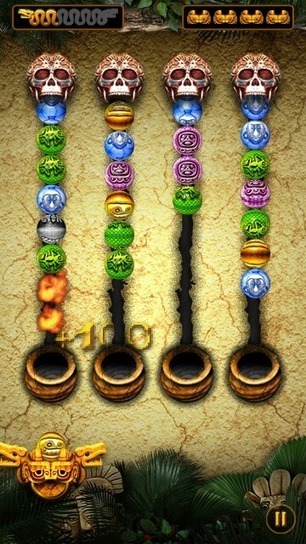
Take a classic game theme (Aztecs, jungle techno, coloured balls, temple runography) and apply it to simple 'Columns' arcade gameplay and you end up with.... Zuba Deluxe.
...ou'll get the idea immediately from the screenshots above. We're talking jungle foliage, Aztec skulls, mystically patterned and coloured orbs, but as soon as you see the descending columns above right, you'll know what to do. Drag the ball launcher from left to right as needed and tap to fire each ball into an advancing column. Match a colour or 'scarab' and you eliminate them from the playing area - match several and you get extra score.Level by level, you proceed, with balls advancing faster, the aim being to complete a certain number of eliminations with as few misses (where a column of balls falls into the hole) as possible. There are several stages of nine levels - I'm not sure how many because the documentation doesn't say, but suffice it to say that there's many hours of happy gameplay here.
In addition to the four ball columns, there are numerous powerup balls, some of which are shown below right - these fall between the columns and can be caught and fired to good effect. My favourite is a 'fire' ball which zaps...
The Nokia Lumia 900 is one of the most exciting smartphones to hit the market yet, mixing the excellent Windows Phone operating system with a phenomenal screen...
...CNET’s Natasha Lomas points out that the Lumia 900 “looks big and bold in the hand.” It’s the huge 4.3-inch ClearBlack display that will attract most consumers, however, and Lomas adds, “the display generally looks bright and colourful, with blacks appearing velvety and deep.” “The touchscreen itself is nice and responsive,” says Natasha, “jumping around on cue to even light taps and swipes.”Check out the NokNok.tv review of the Nokia Lumia 900
Pocket Lint’s Stuart Miles explains, “The Lumia design is different from the norm, is eye-catching and people will spot that and comment, so be prepared. The design is seamless with a clean curved look void of screws or panels.” We love the idea of watching films on the Lumia 900, but Miles highlights its ability as an eReader as well: “It’s perfect for reading a book via the Amazon Kindle app or watching a movie or TV show via Netflix.”
When compared to the Nokia Lumia 800, Stuart explains, “if you fancy the idea of a bigger screen this is the better of the two. It's more brash than the Lumia 800, but the experience is good. The screen's resolution is stretched to its limit at this size, but that's not enough to push it over the edge as in the Titan series from HTC.”
As with Lomas, Dave Oliver, from Wired, picks up on the sensitive touchscreen and deep blacks, adding, “it's beautifully sensitive, and Nokia's ClearBlack technology offers rich contrast with exceptionally deep, dark blacks offsetting the slightly oversaturated colours.”
Performance impresses, with Oliver pointing out, “it ain't slow, and the relative simplicity of the Windows OS certainly seems to be in its favour, since it whips through the apps with ease, even when you have a bunch of them open and running.”
“The latest Windows Phone 7.5 Mango is the operating system,” explains Dave, “which is beautiful to look at, and easy to find your way around, even if you're a Windows Phone newbie.”
So far so good, then, and the positive reception continues over at Stuff, where the website says, “with beautifully bright Windows Phone live tiles to distract you, the AMOLED and ClearBlack screen is by far the most 'glanceable' of the 2012 pack so far.”
“It's perfect if you want to view all of your social feeds in one place...
When Nokia Belle Feature Pack 1 landed on the Nokia 603, Nokia 700, Nokia 701 and then the Nokia N8, it gave each device a myriad new features, widgets and...
...From our first look at the new Nokia Belle upgrade guides letting you know how to use the best new widgets, take a look at our hands-on guides and tutorials.
Hands-on with Nokia Belle Feature Pack 1
In our first look at Nokia Belle Feature Pack 1 we take a brief overview at the new features on offer for the first time. From the many new widgets, to the new music player and lovely mechanical clock. Check out all the photos from our first impressions, right here.
Check out the first Nokia Belle Feature Pack 1
Nokia Belle Feature Pack 1 hands-on: How to use Weather Forecast
Nokia’s Weather Forecast app has been around for a while, but with Nokia Belle Feature Pack 1 it really comes alive. The new Weather Forecast widget places a helpful weather tool on the homescreen of your Nokia Belle phone, giving you a weather forecast of the rest of the days in the coming week, illustrated by gorgeous infographics.
The widget also features sunset and sunrise times, wind speed and the ability to pull up weather conditions from every major world city. It’s the best weather app you’ll find on a Nokia handset. Hit the link below to see it in action.
Check out our Nokia Belle Feature Pack 1 Weather Forecast how to
Nokia Belle Feature Pack 1 hand-on: How to use Facebook
The new Facebook widget was one of the first Nokia Belle Feature Pack. It lets you dive into any of Facebook’s functions at the touch of a button, letting you send a private message, check your events, view notifications respond to friend requests and update your status even quicker. A handy camera shortcut makes sharing photos a breeze.
Check out our Nokia Belle Feature Pack 1 hands-on: How to use Facebook
Nokia Belle Feature Pack 1 hands-on: How to use Twitter
More social networking goodness. If you’re a social butterfly, the new standalone Twitter widget is most convenient. It features shortcuts that let you check your Twitter stream, compose tweets and send private messages in an instant.
It works just like the default Twitter web app. Scroll through tweets by swiping down on the screen, and refresh to see new, incoming messages. If you use Twitter, this may be the best reason to download Nokia Belle Feature Pack 1 to your Nokia Belle phone.
Check out out Nokia Belle Feature Pack 1 hands-on: How to use Twitter
If you've yet to download Nokia Belle Feature Pack 1, you...
As the Nokia 808 PureView starts to roll out, leading climber Atte Miettinen shares experiences from the summit of Mount Everest
For most people, climbing one of the world’s great mountains would be an achievement enough. But not for Finnish mountaineer Atte Miettinen, 36, who has set himself the daunting task of conquering seven of them.Known as the Seven Summits challenge, he is attempting to climb the seven highest mountains on each of the seven continents. Fewer than 350 people have done it.
In May, Atte completed his sixth and the biggest mountain of them all: Mount Everest. Luckily for us, Atte also took a Nokia 808 PureView with him on the Everest expedition and took some great photos.
From his base in Dubai where he is resting before he embarks upon the final summit of Denali in Alaska in June, Atte spoke to me about his great endeavour and how it feels when you are standing on top of the world.
Why the Seven Summits challenge?
My first mountain was Kilimanjaro over 10 years ago. I was climbing mountains one at a time, graduating to more extreme ones each time and I started needing a goal.
I am a very goal-orientated person so I wanted something to strive towards and the Seven Summits seemed like a good way to go.
Is it a mental and spiritual challenge as well as a physical one?
Absolutely. Most people don’t realise that 10 weeks on Everest is not just climbing all the time. Physically it is very demanding but it is mentally demanding also and you have a lot of time to yourself.
When you are climbing it is difficult to breathe...
The evolution of Nokia camera phone family has continued with the revolutionary Nokia 808 PureView http://nokia.ly/AhbBSB Nokia 808
PureView is born from breakthrough PureView technology that takes the quality of camera phone photography to unprecedented levels. PureView captures more detail and depth because each pixel is oversampled to create one "pure" pixel that eliminates noise and offers natural colour.
One of the big improvements found in the new Nokia Lumia 900 is to multitasking. Are you making use of this feature?
...hen we talk about multitasking, we mean the ability certain phones have to juggle multiple tasks simultaneously, keeping them in memory so you can quickly swap between them at a moment's notice.The Nokia Lumia 900 is the best Windows Phone device yet for this. Whereas the other phones in the Nokia Lumia range can, at the time of writing, swap between five simultaneous tasks, the Nokia Lumia 900 can manage eight. This makes it even more of a good idea to take full advantage!
Multitasking is built into the Windows Phone 7.5 OS, and can be accessed simply by pressing and holding the Back button at any stage. You can even do it in the middle of operating an app or game. When you do this, a screen will pop up containing thumbnails of your eight most recently active tasks or applications, frozen at the point you last left them. Touch one of these and you'll jump straight back in.
That's how multitasking works on the Nokia Lumia 900 - but what's the point of it? Here are a couple of practical applications of this handy but often overlooked feature.
Gaming interruptions
Let's say you're deep into a game of geoDefense Swarm and you receive a text message. You're late into one of the final waves of a particularly gruelling level, so you don't really want to quit out. Do you check and lose your progress, or wait for a more convenient time? Neither - just quit out and deal with the text, then follow the above multitasking process. As if by magic, the precise moment you exited the game will have been preserved, and you'll be able to jump back in as if you'd never left.
Taking notes
So you've jotted down an important piece of information, such as a reference number or an address, in the Evernote app. Now you have to email that information to someone, but you can't remember what it was! Simply hold the Back button, scroll to the original Evernote note and remind yourself of the info - you can see it without having to actually enter the app. Go back to the message and continue - quick, before you forget again!
Relaying coordinates
You're talking someone into a location over WhatsApp or SMS, but you're having to refer back to Nokia Maps periodically to note landmarks or road names. As above, just enter the multitasking menu, glance at the map, then quickly return to your message to relay the information while it's fresh in mind.
Photo browsing
In the middle of flicking back through a day's heavy snapping on your Nokia Lumia 900 camera, you receive a message or email. The trouble is, if you quit out of the camera app you'll lose your position and will have to start again in the camera app or open up the Pictures app and try to...
The Nokia Lumia 900 isn't just about sparkly new hardware - it also brings a bunch of fresh software tweaks to the tablet, including internet tethering.
...One of the main features people have been crying out for on the Windows Phone OS is internet tethering.
With more and more people working remotely and with Wi-Fi coverage still a little spotty in the UK, being able to utilise our (reasonably) fast and stable 3G connectivity to get online is a major boon. It beats relying on an overloaded Cafe Wi-Fi network, anyway!
So how does the new tethering function work on the Nokia Lumia 900? Very well indeed!
As you can see from the pictures below, getting connected is a simple matter of going into the Settings menu and selecting Internet Sharing. You can then go into the setup screen and input an eight digit password, the purpose of which will become clear. You can also change the security type and the broadcast name - which is the name that will appear when you search for the phone on your computer.
As this suggests, your Nokia Lumia 900 will now be discoverable just like a Wi-Fi network. Click on it and you'll be asked for the password you put in earlier.
There you go - you're now connected to the internet through your Nokia Lumia 900! With a decent 3G signal you'll be able to browse the web pretty speedily, although we'd recommend holding the video-watching and music downloading until you get back to a regular network connection. It's possible to eat through your 1GB data allowance alarmingly quickly in this way!...
The Nokia Belle Feature Pack 1 has started to roll out and we've been asked by a couple of people how to get their hands on it.
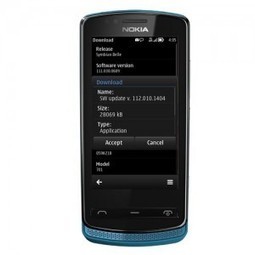
...Nokia Belle Feature Pack 1, also known as Nokia Belle firmware version 112.010.1401, will be an integral part of Nokia 808 PureView smartphones but it is also starting to rollout to the more recent Symbian Belle devices, namely the Nokia 700, Nokia 701 and Nokia 603.Nokia Belle Feature Pack 1: 10 things you need to know
The Nokia Belle firmware version 112.010.1401 update weighs in at 28MB and you can choose to get it via the Other The Air (OTA) service, we'd suggest using WiFi if you intend to do it this way, so it won't hit your data plan.
The easiest way to do this is to hit the Call button on your phone and input the digits *#0000# and this will pull up the Device Manager. Then all you need to do is check for updates. Nokia rolls out updates by build number, not by country, so it may be that your friend gets their update right away but not you. If this is the case then simply check back on a regular basis.
(For example, I'm still awaiting my update but Stephen is more than happy to gloat that his has arrived! Patience is a virtue in times like these!)
The other option is to plug your Nokia 700 into your PC and use Nokia Suite to download to desktop and then to your smartphone. This way you can backup your smartphone before you begin and should the worst happen and the process fail, at least you won't have lost any data!
Hands on with Nokia Belle Feature Pack 1
Once you've got the Nokia Belle firmware update the first thing you'll see is that the software version will now be version 112.010.1401.
However, the big thing is that once you've got your hands on the update you'll instantly know you've got it as there are a whole host of changes and visual clues that give it away. Take a look at the changelog below and see for yourself.
Nokia Symbian Belle Feature Pack 1 Changelog:
20 new Nokia Belle Widgets
Dolby Digital Plus audio
Nokia 8.2 browser
Nokia Maps
Microsoft Office apps
Improved multitask view
Theme Effects On/Off Option removed
Improved Menu options
Speed and performance enhancements – 1GHz Cpu clocked to1.3GHz
QT 4.8 implemented
Java Untime 2.4
Improved Menu UI
Have you already got Nokia Belle firmware version 112.010.1401 running on your Nokia 700? Let us know if you've spotted anything else, and how you're getting on with it in the Comments below.
Tags: firmware Nokia 603 Nokia 700 Nokia 701 Nokia Belle Nokia Belle firmware version 112.010.140 version 112.010.140
To get content containing either thought or leadership enter:
To get content containing both thought and leadership enter:
To get content containing the expression thought leadership enter:
You can enter several keywords and you can refine them whenever you want. Our suggestion engine uses more signals but entering a few keywords here will rapidly give you great content to curate.


 Your new post is loading...