Your new post is loading...

|
Scooped by
Giuseppe Mauriello
August 16, 2012 11:23 AM
|
Excerpted from article: "So you might be asking what more can be written about link building for bloggers? There are tons of great link-building strategies that can be utilized to increase e backlinks. Google released the Panda update that took rankings away from websites with low-quality content and sites with more advertising than content. Penguin, announced in April 2012, decreased search visibility of websites that participated in black-hat SEO, keyword stuffing, cloaking, link schemes, duplicate content, and other activities that violated Google Webmaster Guidelines. Now that you know some things to avoid, here are some things you can actually do to build links to your blog. 1. Submit your blog to blog directories: One advantage blogs have over other websites is the ability to submit to tons of various blog and RSS aggregators. There is a huge compilation of blog and RSS directories listed at TopRank. 2. Complete your social network and forum profiles: If you participate on any social media network, social bookmarking site, community, or forum, you will want to make sure that you have a link to your blog on that website in your profile. 3. Become a guest author: How do you find blogs to submit guest posts to? There are a few good ways. >> Search Google using queries with the keyword of your niche plus “submit guest post,” “guest post guidelines,” “guest author guidelines,” “guest post by,” and so on. >> Check out lists like the "202+ High Quality Internet Marketing PR3 – PR8 Blogs That Accept Guest Posts".
>> Join communities like My Blog Guest.
>> Use Google Authorship. 4. Contribute unique content to quality article networks: When I say unique content, I mean content that hasn’t been “spun” or published elsewhere. And when I say quality article networks, I mean ones that:
>> have some sort of moderation: they shouldn’t just let anyone post anything they want;
>> fit your niche, like Self Growth for the self-improvement and personal development niche;
>> have a built-in community that actually wants to read articles, like HubPages and Squidoo;
>> feature authors on their homepage, newsletters, etc.;
>> don’t have too many ads on article content or the site as a whole; 5. Get your content on weekly roundups: Your goal, if you want to be included in these roundups, is to get on the radar of the people who create them. 6. Comment on blogs: Blog commenting is powerful for a variety of reasons beyond just link building. Again, this is not to be abused for anchor text links and generic comments, but if you leave valuable engagement, you will likely get the attention of the blog owner and authors of the blog plus other members of the blog’s commenting community. This will inevitably drive traffic back to your website. 7. Use your blog’s design: If you have a unique design, there are galleries that exist purely to showcase blog designs. If you use WordPress, there are galleries that are all for WordPress designs. ***Link-building tools: - Spreadsheets...
- Webmaster Tools...
- Open Site Explorer...
- Authority Labs...
- Google Alerts..." Each element is analyzed with more information, examples and external links. It's very useful guide. Read full article here:
http://www.problogger.net/archives/2012/08/16/link-building-tips-and-tools-for-bloggers-in-a-post-panda-and-penguin-world/
|
|
Scooped by
Giuseppe Mauriello
August 15, 2012 11:15 AM
|
Excerpted from article: "Anyone can create a video and post it online, but creating an effective video that drives action is more science than art. Here are 10 secrets to producing a video that sells. 1. Start with your potential customer’s pain point: Think about what your product or service can do to help your customers solve their problems, no matter how small or large they may be. 2. Present your solution: After you have engaged viewers with your story, present the solution to them in a simple way that helps them fully understand the results your product or service has to offer. 3. Demonstrate your solution: Give your customers a visual tour of how your product or service will solve their problems using screenshots and product photos. 4. Present a call to action: If you want them to sign up for your mailing list, register for a customized online demo, call your sales line, or go to your product’s purchase page, incorporate that message into your video. 5. Keep it short and sweet. 6. Introduce your company in the first 30-seconds. 7. Use clear, crisp visuals: Try incorporating stock images and/or video from websites like istockphoto.com or stock animation sequences from sites like videohive.net when needed. Also, don’t forget about your video’s setting. 8. Add a professional voiceover: There is nothing worse than bad audio – it can make even the best video seem amateur and unprofessional. If your voice doesn’t make the cut, try voices.com where you can find professional voiceover talent for your video content. 9. Create a soundtrack: Find plenty of royalty-free options online using sources like audiojungle.net, premiumbeat.com, and ibaudio.com. 10. Don’t be afraid to be funny: Adding humor to your video will help them see the human side of your business..." Read full original article here: http://www.convinceandconvert.com/video-marketing/10-secrets-to-producing-a-video-that-drives-results/
|
|
Scooped by
Giuseppe Mauriello
August 13, 2012 5:43 AM
|
Excerpted from article by Joe Pulizzi on Content Marketing Institute: "Whether you sell products or services, the new rules of marketing require that, along with everything else you sell, the process of delivering consistently valuable information must be considered throughout the organization as, yes, a product. Why approach information as a product? Simple: Organizations today have no choice but to place that kind of importance and processes behind their content initiatives. Customers today are in complete control and filter out any message that does not benefit them in some way. We are seeing this trend happen now, as more businesses morph themselves into media companies. You are seeing appointments of titles such as “chief content officers” and businesses that are starting to hire full-time journalists. In order to be successful, you need marketing culture that includes both a strong marketing and publishing core, and a keen understanding of how consistent editorial content can maintain or change customer behavior. Three takeaways: - Start to think about your content packages as a series; - All product managers need to be trained in advanced storytelling techniques; - The pilot team..." Read full original article here: http://www.contentmarketinginstitute.com/2012/08/information-must-be-your-product/
|
|
Scooped by
Giuseppe Mauriello
August 7, 2012 9:03 AM
|
Excerpted from article: "In content marketing, you don't have to go it alone. Use your fans and your customers to launch crowdsourcing initiatives to create bigger, better content. Here are five ways crowdsourcing is impacting the future of content marketing: 1) Crowdsourcing speeds up the content creation process: You will never have enough time in the day to create the amount of content you want to create. With sites like CrowdSource.com, you can employ a scalable crowd of workers to create your content. With scalable labor, the only limitation to posting 5 articles per day is your budget. 2) Crowdsourcing gets your customers & potential customers involved: Invaluable crowdsourcing systems build in options for your community to produce work, not just paid crowdworkers. Letting your target audience get involved is like handing out the mic at a conference. 3) Crowdsourcing gets your target audience invested: Not only do your customers and potential customers get involved and actually tell you how to sell to them, but because they were involved with the process, they’re also now invested. 4) Crowdsourcing offers you diversity and creative choice: One of the main draws of using a site like Genius Rocket to crowdsource a commercial or viral video is the number of options to choose from along the way. Imagine what your video would look like if you or your internal team created it. 5) Crowdsourcing inherently atomizes your content marketing process: It always starts out this way because crowdsourcing is not natural. In a country where everything must be bigger and better, reports were due yesterday, and quantity & quality must be equally outpaced, it’s tough to imagine that projects need to be broken down into steps that could take no more than seconds to accomplish. However, to effectively use crowdsourcing, every project must be atomized as small as possible. Read full original article here: http://www.convinceandconvert.com/content-marketing-2/5-ways-crowdsourcing-improves-your-content-marketing/
|
|
Scooped by
Giuseppe Mauriello
August 6, 2012 10:38 AM
|
Excerpted from article: "You’re about to learn how to make each element of your landing page more enticing. And make your conversion rates go up. And celebrate your business growing. [N.B. | Each tip is analyzed with more details, many examples and external links. Here is the check-list] - How to command attention with your headlines: 1. Be useful. 2. Observe the rule of one. 3. Be ultra-specific. 4. Don’t be clever. 5. Be urgent. 6. Command attention. 7. Focus on loss aversion. - How to write compelling copy: 8. Use the word "you". 9. Reduce your text. 10. Adopt familiar language. 11. Include fascinating bullets. 12. Tell us why. 13. Don’t focus on features. 14. Anticipate objections. 15. Try video. 16. Write tight. - How to become trustworthy: 17. Avoid using I and we. 18. Provide proof. 19. Be unique. Nobody has confidence in copy cats. 20. Provide a reminder. 21. Use a conversational tone. 22. Add social proof. 23. Provide confidence. 24. Use symbols of trust. 25. Add a phone number. - How to create a persuasive call to action: 26. Be clear. 27. Have one primary call to action. 28. Remove side bars. 29. Remove top navigation. 30. Don’t use vague words. 31. Set expectations. 32. Increase value. 33. Use the power of FREE. 34. Reduce barriers. 35. Be urgent. - How to seduce with good design: 36. Stand out. 37. Show more. 38. Don’t use stock photos. 39. Add a photo of a real person. 40. Add captions. 41. Employ the power of the eye. 42. Use an arrow. 43. Embrace white space. 44. Be attractive. 45. Have your form above the fold. - 5 more ways to turbo-charge your landing pages: 46. Learn. 47. Test. 48. Evaluate. 49. Evolve. 50. Study. Read full, long and interesting article here: http://blog.kissmetrics.com/seduce-your-web-visitors/
|
|
Scooped by
Giuseppe Mauriello
July 24, 2012 4:10 AM
|
Excerpted from article: "Any good SEO campaign starts with proper keyword identification and categorization. The following keyword research process will provide a good structure and solid foundation for identifying, expanding, and prioritizing the keywords in your universe. 1. Identify Your Keyword Universe: Use your intuition, PPC data, competitor insight, analytics data, internal search data, Google suggest data, and any historical data from your client or your company to construct your initial "seed word" list. 2. Expand the List: Use the Google Keyword Tool (along with tools like Wordtracker and Keyword Discovery if you have access) to expand the seed word list and to understand relative search volumes of all your keywords. 3. Prioritize Your List: Your new expanded list is your "keyword universe." It is then appropriate to prioritize your keywords and choose the most important keywords that you will be targeting with your campaign. 4. Categorize Your Priority Keywords: Once you have a priority list of keywords for your campaign, you should categorize the keywords into segments specific to business goals. This allows for more granular reporting and understanding of performance. 5. Identify Preferred Landing Pages: You may find as you begin to do the on-page optimization (page titles, meta descriptions, H tags, and content) for your preferred landing pages that a particular page may be relevant to only one or two priority keywords. 6. Refine Your Keyword List Over Time: It's good practice to review these data sets monthly to identify any new opportunities that should be integrated into your SEO campaign. Read full article here: http://searchenginewatch.com/article/2193329/A-6-Step-Process-for-Keyword-Research
|
|
Scooped by
Giuseppe Mauriello
July 19, 2012 7:21 AM
|
Excerpted from article: "Rich Snippets are the content summaries that accompany Google search results for your webpages when they pop up in the main listings. Rich Snippets are incredibly important when it comes to ranking your content well in the new era that’s been wrought by Google’s Penguin update. If you really want to wrap your head around Rich Snippets and dive in with both feet, Schema.org is the best place to get started. Ultimately, Rich Snippets are based on microdata, microformats, RDFa, and similar standards. All of these schemas are included within the HTML5 specification, which makes them easy to integrate into your websites. Both Google and Bing take these microformats and behind-the-scenes data structures into account when deciding how they’ll rank content. To make your web properties more appealing to the search engines, the first thing you should do is head over to the Google-sponsored Rich Snippets Testing Tool to do some research. Simply enter the URL of the page you’re focusing on and see the results roll in. The RSTT will analyse your content and suggest ways in which you can improve your pages to rank better using RDFa and microformat techniques. Once you’ve gotten some feedback, you can start to modify back-end markup to address the problems you find. Tweaking markup is critical, because Google will look at how you semantically structure your layouts when deciding how to present a summation of your website in its results..." Read full interesting article here: http://j.mp/MtS16M
|
|
Scooped by
Giuseppe Mauriello
July 8, 2012 11:59 AM
|
Excerpted from article: "Four social media marketing tactics to help you improve your social media content and strategy. #1: How Do They Describe Themselves? By analyzing your followers’ bios, you can get a deeper look into the things that they value most highly about themselves. A great tool to find out how your audience members describe themselves is Followerwonk. This tool pulls a report of a startling amount of information about your Twitter followers, which you can use to develop your ideal audience persona. #2: When Are They Most Socially Active? Knowing when your fans are online and active is a key component of effective content delivery. A great tool to find out when your audience is most socially active is Tweriod. #3: Whom Do They Listen To? Engaging the top social influencers in your business niche is one of the quickest ways to get your message in front of your ideal audience. A key quote from a prominent member of your niche’s community can spark massive amounts of engagement and traffic. How can you find influencers in your niche who are both reachable and influential? A great tool to discover whom your audience listens to is Klout topic pages. #4: What Content Do They Want? The best way to find out what kind of content your audience wants is to use your brain. As far as I can tell, there isn’t another tool yet that will examine this on a large scale. For an easy solution, run a survey on your site with a widget like KISSinsights and ask your audience which smaller social sites they like to visit...." Read full article here: http://www.socialmediaexaminer.com/knowing-your-social-media-audience/
|
|
Scooped by
Giuseppe Mauriello
July 1, 2012 2:26 PM
|
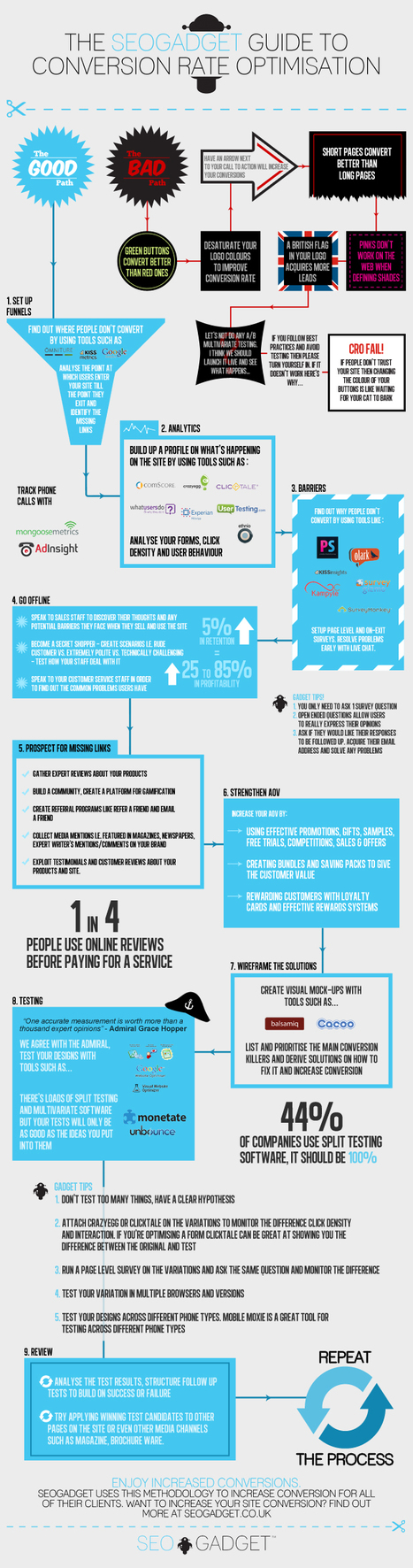
Excerpted from article: "To get good at driving real change, you’ve got to define a CRO methodology. The real trick to improving your conversion is pretty simple: identify, and target the core barriers to conversion and then, scientifically test the changes. This is the good path that we advocate for all inbound marketers to follow.
At the heart of conversion rate optimization is the notion of removing barriers to conversion. These are the forces stopping your site from converting visitors into sales. Barriers to conversion can include usability errors, weak persuasive techniques and often, page relevancy issues.
Here’s how we do it: Step 1 – Set up Funnels Setup your funnels and analyse the points where your users enter, until the point they exit. Try to identify the “missing links” or barriers to conversion.
Step 2 – Analytics Find out what’s actually happening when people land on your site, analyse what they do, what keywords they discovered you for and where they land.
Usability tools such as ClickTale are also great for funnels and their form analytics reveal where users drop off along your forms. CrazyEgg is another simple and effective tool that we use for click density analysis.
Step 3 - Barriers To identify barriers to conversion, you’ve got to build up a profile of people’s objections and opinions. Tools such as Kissinsights, Pop-Survey, Kampyle are really good for page level surveys and pretty simple to setup.
Step 4 – Go Offline If we know our target then the objective becomes easier. Study your website and understand your customers. Speak to sales staff to learn the likely barriers they face when they sell and use the site.
Step 5 – Prospect for Missing Links Study your website carefully and consider what you’re missing. For example, showing expert reviews, customer reviews, testimonials, or even taking the time to build a community.
Step 6 – Strengthen Average Order Value (AOV)
Step 7 – Wireframe the Solutions We use tools such as Balsamiq and Cacoo to wireframe the solutions and then prepare hypotheses for testing. Test scientifically, the most important thing to take away from testing is to learn what works and what doesn’t and to keep building structurally to increase conversion rate. No guesswork!
Step 8 - Testing We primarily use Google Website Optimiser (which is now becoming content experiments) and Visual Website Optimiser. There’s loads of split testing and multivariate software. But remember: it’s not the testing tool that increases your conversion it’s the ideas you put into it.
Step 9 - Review Review your test, analyse the analytics, click density and form analytics (ClickTale) and compare it to the original page, check the difference. Tracking AOV and revenue is so important when testing. Structure your follow up tests and build on your success, or failure.
Step 10 – Rinse & Repeat Repeat the process and keep building successful tests. Each time you test and find winning variations, you build up a portfolio of increases. Conversion rate optimization is an iterative process, which builds on the success of the previous test.
Read full article here: http://j.mp/MzYuQ9
|
|
Scooped by
Giuseppe Mauriello
June 20, 2012 8:33 AM
|
Excerpted from article: "As a marketer, you already know getting your visitors to perform an action is crucial to the success of any marketing initiative. Content marketing is no different. Tracking measurable actions (like newsletter subscribers, social shares, leads, clicks, and sales) tied to your content is crucial to gauging its efficacy.
Every piece of content you publish should be crafted with this in the forefront of your mind. If you’re not doing this, you’re wasting your time.
Here are the elements of impactful content:
1. Provocative Easily confused with controversy, being provocative is about more than raising eyebrows. Provocative content ignites emotion by pushing boundaries and challenges the status quo.
2. Visionary Are you causing a “Eureka moment” for the reader? Visionary content puts into words a frustration, realization, or need that the reader has, but may not have been fully aware of or seen properly verbalized previously.
3. Differentiated Differentiated content presents a completely original idea or discusses a tired topic in a new fashion or format. This is uncommon to most content and one of the toughest attributes to master.
4. Relevant Does your content appeal to your target audience? Content should be related to your brand without being an overt sales pitch. If you do go off topic, you’re doing so from the perspective of your vertical.
5. Timely Are you one of the first to cover hot topics? Even if you aren’t trying to break news, you should be incorporating current trends and news into your content. Leverage news items your audience is naturally talking about or seeking more information about.
6. Demonstrates Mastery Are you positioning your brand as a thought leader? Masterful content offers an unparalleled depth of insight. It expands on complex ideas and shows a comprehensive analysis on the topic unlikely to be found from other sources.
7. Can Be Delivered On Do you provide the solution? Content should intrigue the reader about your brand, and make them feel they have an unmet need only your brand can fill.
8. Narrative Are you telling a story with a clear beginning, middle, and end? Content with a strong narrative takes the reader on an exciting journey full of surprises and leads to a call-to-action of value for the brand. It’s cohesive, easy to understand, and inspires action related to the story...."
Each element is enriched with some examples. In addition at the end of post, the author has included an evaluation rubric for you to consistently measure if your content incorporates these attributes.
Read full article here: http://www.seomoz.org/blog/8-attributes-of-content-that-inspires-action
Check out content evaluation rubric here: https://docs.google.com/spreadsheet/ccc?key=0Aj1fS7E2HfcKdE1udGdoQXZ2VDJxTXpnaDFSWU1IaGc#gid=0
|
|
Scooped by
Giuseppe Mauriello
June 18, 2012 5:46 AM
|
Excerpted from original article: "Infographics are awesome. Many marketers don’t know how to get the best out of infographics and reap the benefits available. The primary benefits being the generation of inbound links and making your posts incredibly sharable. Here you’ll learn 12 ways to market an infographic: ***Building Your Own Infographic This is the ideal method, but it’s not always possible (time, money, design talent), but if you can make them yourself, then it’s way better. Here are a bunch of tactics for how to do it right. 1. Create content that people actually want... 2. Infographic research... 3. Make sure it’s got data on it... 4. Infographic Design & Data Visualization... 5. Add an embed code to let others re-post it... 6. Making your Infographic go Viral... 7. Use your network... ***Using other people’s infographics: People want backlinks – that’s why they create infographics in the first place. So this method of marketing serves two purposes; It gives you a content base to build a post from (awesome, quick and easy) and it gives some love back to the creator of the original work. 8. Finding Infographics... 9. Adding value... 10. What’s the proper etiquette for re-using others work?... ***Things You Should Do For all Infographics: Regardless of whether you designed your own infographic or sourced one from elsewhere, there are certain things you should always do to ensure they get the attention they deserve. Here are some examples: 11. Add Pin It buttons... 12. Tweetables: Set up important and entertaining stats formatted as Tweets..." This is just a summary. The full post includes many information, links, examples and key lessons. Read full article here: http://unbounce.com/content-marketing/ultimate-guide-to-marketing-with-infographics/
|
|
Scooped by
Giuseppe Mauriello
June 12, 2012 3:23 AM
|
How to make your content more shareable and drive traffic to your blog. Excerpted from article: #1: Identify Your Most Popular Posts and Keywords: Look at your top content and keywords in Google Analytics. If you’re using a social sharing plugin like Shareaholic or Digg Digg, you may be able to get some free analytics on your most popular content that can help you learn what your audience wants. #2: Track and Leverage Trends: Know what is top-of-mind for readers. Here are some free tools that will make your listening efforts more efficient: - LinkedIn Today; - Trendsbuzz; - Know Your Meme; - Google Insights; - Hashtags; - Topsy. Once you’ve identified the conversations that are happening, you should think of a way to use that information for a shareable blog post. #3: Think “Why Would People Share This?”: Only commit to your blogging ideas that show the promise of virality, and cut or tweak the ones that end up on the calendar “just because.” Don’t create noise, create value. #4: Make the Most of Your Headline: Think about the 4 U’s that Copyblogger teaches us about great subject lines and headlines: ***Useful: Why is the blog post valuable?
***Ultra-specific: What can I expect to learn from the blog post?
***Unique: Why is this blog post compelling and unique?
***Urgent: Why should I read this NOW? #5: Test Different Kinds of Promotion: But in order to do this effectively, you’ve got to consider what visuals will go along with your social media promotion as you are creating the content. #6: Optimize Your Content for Shareability: You need to familiarize yourself with the anatomy of a social share. Pay attention to the 3 highlight elements—the featured image, the page title and the meta description. WordPress bloggers can install the All in One SEO plugin so that these components are in one easy-to-find place. #7: Have Something Waiting for New Readers: Include calls to action to subscribe to future posts. Link to previous content in your posts to keep readers engaged in your blog. Use recommended content widgets to increase your time on site and drive readers to related content and other popular posts. Read full article here: http://j.mp/LLDEvr
|
|
Scooped by
Giuseppe Mauriello
June 8, 2012 3:46 AM
|
Excerpted from article on Mashable: "Link building is a concept that anyone involved in online marketing will come across and, more than likely, be involved in. The principle is simple — get high quality, relevant sites to link to your own. In doing so you not only generating traffic from visitors clicking through but also give search engines an indication as to the importance of your site. Here are six of the most popular link-building tools: 1. Ontolo: It is a powerful, sometimes complex, tool that can work wonders for someone who knows how to use it. For link prospecting it’s pretty much unparalleled but search phrases have to be pretty specific. In other words, this is not for the beginner link builder. If anything it’s better suited for larger companies or seo agencies. 2. BuzzStream: This tool allows you to create your own database of possible link-building sites, lets you assign them to a team member, and then offers options for touching base with site owners. 3. OpenSiteExplorer: Rand Fishkin’s SEOMoz is a very well-known name in the SEO industry with a reputation for delivering high-quality, easy-to-use tools. The program’s competitor analysis option gives you an easy way to look at and understand what competitors are doing to increase their rankings. This is done by giving you a list of metrics such as inbound links to a page or site, their anchor text, and ‘Domain Authority’. 4. Raven: Raven’s suite of SEO tools covers everything from on-page analysis to social media monitoring and link building. The thing that stands out here is the sheer size and scope of the available options. One of the perks of Raven is that it integrates with a number of external services. 5. Citation Labs: As a link builder, one of the most time-consuming tasks is to find top quality sites that are both relevant and likely to link to you — something that Citation Labs makes far easier than any of the other tools that I’ve come across so far. Simply choose the type of link or site that you’re looking for, enter a few relevant phrases, and wait for the software to generate your report. 6. Whitespark: Showing up at the top of specific search results can be a life-changing event for a local business, which is where Whitespark is aiming to help. Their local citation tool offers an easy solution to finding potential link partners at a local level. Simply enter your location and type of business, fine-tune the search phrase, and that’s it. Just a few seconds later you’ll have a list of potential link targets. Each tool is analyzed with more information. In addition, you can read Pros, Cons, Cost and Value for the Money. Read full article here: http://mashable.com/2012/06/07/link-building-tools/
|
|
|
Scooped by
Giuseppe Mauriello
August 15, 2012 5:49 PM
|
Excerpted from article: "How do you make your event stand out in the crowd? Not only that, how do you get people to actually spend the money to attend your event? Here are 15 ways: 1) Reward last year's attendees: The people who came the year before may be your biggest supporters. Show that you appreciate them by offering them a special discount for signing up early and quickly. 2) Offer early bird pricing: Have at least 2 different types of pricing: early bird and regular. 3) Ask early registrants to write blog posts: The people who register for your event first will be among your biggest supporters -- that means they're also good candidates to write blog posts for you to help promote the conference. 4) Don't just promote your conference; promote the location! The location of conferences can sometimes be one of the biggest draw for potential attendees -- it's kind of hard to say no to an event in a cool, beautiful city. Promote other attractions near where your conference is help that may interest attendees. 5) Get in touch with industry organizations to help promote. 6) Use LinkedIn for promotions targeted to your industry. 7) Start contests within your company. Your employees: encourage them to promote your event to the leads and customers they talk to through some friendly competition. 8) Consistently update social media accounts. 9) Advertise on social media. 10) Leverage event sponsors for promotion. 11) Sprinkle calls-to-action throughout your website: Your homepage should have a promotion to your conference. Your login page (if you have one) should have a promotion to your conference. Your blog should have banners promoting your conference. 12) Issue different types of passes: Some people may not be able to attend your whole event, whether they're unavailable for the full duration. Issuing different types of passes helps accomodate those people and drive more ticket sales. 13) Promote the "fun stuff." The main reason people attend conferences is for the beneifical content, sure, but promoting the parties and some of the nighttime activities definitely helps. I mean, who doesn't like to party? 14) Gamify the act of event promotion and ticket sales: During your webinars, for example, you could take advantage of the large audience to promote the conference by giving away free tickets to whoever tweeted the most with your webinar hashtag. 15) Ask your speakers to write blog posts promoting their sessions. The success of an event all comes down to its content. Reach out to speakers and ask them to write guest blog posts that promote their sessions, and give a sneak preview of what they'll be discussing..." Read full article here: http://blog.hubspot.com/blog/tabid/6307/bid/33482/15-Sure-Fire-Ways-to-Guarantee-Your-Next-Event-Is-SOLD-OUT.aspx
|
|
Scooped by
Giuseppe Mauriello
August 15, 2012 4:23 AM
|
Excerpted from article: "Your website may be your #1 sales tool, but it’s the content of the site that makes that tool work. Pictures, programming, tools and other fun stuff can be important in making your site visibly and functionally appealing to your visitors, but it is the content that sells. When you take time to create strong, user-focused content, visitors will find the information they need to make an informed decision about trying your products and services or supporting your cause. Your content isn’t there just to answer questions, it’s there to interact. To speak. To tell. To compel each visitor to move forward through the conversion funnel. Implement these 10 tips to create content that engages your visitors: 1) Establish your voice. 2) Use active words. 3) Eliminate typographical errors. 4) Make it skimmable & scannable. 5) Focus on your customers. 6) Speak to visitor personalities. 7) Talk about benefits over features. 8) Eliminate spammy text. 9) Add calls to action. 10) Link out to other sites. Information is what helps sell the products or services you offer. Eliminating content also limits an important part of the visitor’s quest for information that answers questions, provides justification and gives them a reason to continue..." Each tip is analyzed with more information. Read full article here: http://searchengineland.com/10-ways-to-create-engaging-content-for-action-129397
|
|
Scooped by
Giuseppe Mauriello
August 7, 2012 12:03 PM
|
Excerpted from article by Social Media Examiner: "Establishing a large audience of followers on Pinterest is one of the most important aspects of a successful Pinterest marketing campaign. Here’s the skinny: Although during the setup process you can choose to link your Pinterest account to your Facebook personal page, there is currently no way to automatically hook up to your Facebook fan page. There’s a way to get Facebook fans to create exposure for you on Pinterest. Here are five ways to use: #1: Get a Pinterest Tab for Your Facebook Fan Page: The easiest thing to do is just go to Woobox and create a Pinterest tab for your Facebook fan page. The Pinterest tab allows fans to view all of your boards and even your pins while staying on the Facebook platform. #2: Post Pinterest Links as Updates on Your Facebook Page: One way to build your follower base is to share the direct link to your Pinterest page as a status update and tell your fans WHY they should follow you on Pinterest. #3: Promote Specific Boards on Your Facebook Page: I recommend you promote a few different boards throughout the week. That way, you have the opportunity to showcase your Pinterest account to a wider audience on Facebook, and you can introduce them to the diverse areas of value shared on your Pinterest page. There are two ways you can promote a specific Pinterest board on Facebook. - Update your status by uploading an image of a pin to Facebook. Add a description and include a link to the board on which that pin is featured. - Post the link to your Pinterest board as part of a status update. An image of one of your pins on that board will be automatically generated. #4: How to Promote a Particular Pin: Sometimes the best way to really serve your Facebook community is to highlight the value that you are providing in one particular pin. This is a great way to get maximum exposure when pinning your own original content. Remember these posts can and will be shared across Facebook by your fans. The same two strategies apply here, as they do to promote a specific board above. You can either upload the image of the pin as a status update (or include a link in the image description), or you can just include the direct link to the pin in your status area. #5: Promote Your Pinterest Contests on Facebook: Contests and promotions are becoming all the rage on Pinterest. They are a very effective way to quickly add a lot of new followers and drive a ton of traffic to your site. A great way to leverage both platforms is to promote your Pinterest contest on your Facebook fan page. Read full article here: http://www.socialmediaexaminer.com/build-a-pinterest-following-with-facebook/
|
|
Scooped by
Giuseppe Mauriello
August 6, 2012 2:31 PM
|
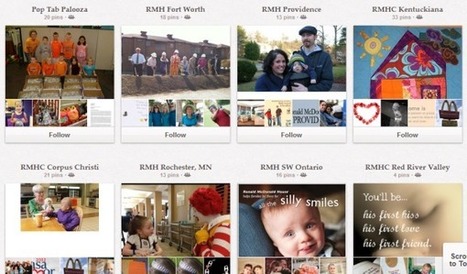
Excerpted from article: "With the rise in popularity of visual content, marketers are realizing that Pinterest is a great way to show off their brands' personalities, engage their social media fans and followers, and even generate some leads along the way. Here are 28 creative pinboard ideas to power your Pinterest marketing. 1) Idea/Inspiration/Example Board; 2) Philanthropy Board; 3) Marketing Campaign Board; 4) Video Board; 5) Customer Success Board; 6) Products/Services Board; 7) Behind the Scenes Board; 8) Contest Board; 9) Employee Board; 10) Mission Board; 11) User-Generated Board; 12) Blog Board; 13) Content/Resources Board; 14) Testimonials Board; 15) Visual Industry Data/Statistics Board; 16) Industry Infographics/Diagrams/Flowcharts Board; 17) Meme Board; 18) Complementary Products Board; 19) Inspirational Industry Quotes; 20) Events/Conferences Board; 21) Brand Lifestyle Board; 22) Industry Tips Board; 23) History Board; 24) Customer Interest Board; 25) Industry Cartoons Board; 26) A Day at the Office Board; 27) Newsjacking Boards; 28) Boards Organized By Location; Each pinboard is analyzed with many details, links and images. Read full interesting article here: http://blog.hubspot.com/blog/tabid/6307/bid/33457/28-Creative-Pinboard-Ideas-From-Real-Brands-on-Pinterest.aspx
|
|
Scooped by
Giuseppe Mauriello
July 30, 2012 9:32 AM
|
Excerpted from article: "If you consider that significant blog traffic from LinkedIn can come directly from LinkedIn profile views, it makes sense to work to increase your profile views. #1: Add Profile Links: Showcasing descriptive and interesting links on your LinkedIn profile will encourage visitors to click through! You can link directly to your blog homepage, or you can link to specific landing pages on your blog where you provide a special offer to potential subscribers. #2: Build Connections to Boost Your LinkedIn Profile Views: If you want to grow your visibility on LinkedIn, connect with anyone who presents a good reason for connecting! As you grow your connections, your updates on LinkedIn will be visible to more people. #3: Get Active and Engaged to Drive LinkedIn Profile Views and Blog Traffic: Examples of LinkedIn activities that will get visibility: - Update your profile;
- Post a status update;
- Participate in a group discussion;
- Comment on someone else’s status update;
- Post to your LinkedIn company page;
- Answer questions in LinkedIn Answers; #4: Use LinkedIn on the Go: LinkedIn has developed robust mobile applications to make networking on the go easy and fun. When you participate on LinkedIn through your mobile devices you can stay engaged and visible with your connections anytime and anywhere. #5: Post Blog Articles as Status Updates and Link to Relevant Articles: - Don’t be afraid to repurpose your blog posts as status updates from time to time.
- Post during high-traffic periods.
- Edit your comments to engage your connections. #6: Leverage LinkedIn Tools and Applications: Choose the appropriate blog application to install to pull your blog posts into your LinkedIn profile. This will enhance your profile and showcase your latest insights from your blog. #7: Utilize the LinkedIn Share Button on Your Blog: Using the LinkedIn Share button will not only help you get your posts shared on LinkedIn by blog visitors, but that in turn will drive views to your profile and new traffic to your blog!..." Read full original article here: http://www.socialmediaexaminer.com/drive-more-blog-traffic-using-linkedin/
|
|
Scooped by
Giuseppe Mauriello
July 19, 2012 1:05 PM
|
Excerpted from article: "The concept of link bait is a little bit subjective, and marketers should consider link bait as any piece of content that generates significantly more links and traffic than the average piece of content they publish. The term seems to have originated from the SEO world, referring to content that is effective for attracting inbound links to your website, thus boosting your off-page SEO. Let's use this article to talk about why link bait is so effective, how it can benefit your marketing, and how you can approach creating top-notch link bait content that your readers love ... and value. Link bait content can be extremely beneficial to your marketing. Here are 3 powerful reasons why: 1) Increased Search Rankings... 2) Tons of (Sustainable) Traffic ... & Conversion Opportunities!... 3) Exposure to New Audiences... As we mentioned earlier, what any given marketer considers to be link bait is going to vary from business to business, industry to industry, and audience to audience. The key is to experiment with ideas you suspect will be successful for your particular blog, regularly conduct analyses like the one I did above, and learn from what tends to work as link bait for you. So if you're just starting to figure out what has historically made successful link bait content for marketers, here are some ideas to get you going: 1) Original, Striking Data; 2) Controversial Content; 3) Being the Most Comprehensive (Or First) Resource on a Popular Topic; 4) Visual Content; 5) Content That's Creative, Entertaining, or Fun; 6) A Title People Simply Can't Help Themselves From Clicking (Accompanied by Awesome Content) By now, you should be pretty convinced that link bait isn't always some evil, black-hat marketing tactic you need to avoid like the plague. But that doesn't mean all link bait is high quality, or that you can't abuse it...." Each element is analyzed with more information and accompanied by a successful link bait example from the HubSpot blog. Read full article here: http://j.mp/PmCLvt
|
|
Scooped by
Giuseppe Mauriello
July 10, 2012 5:46 AM
|
From article by Heidi Cohen on Content Marketing Institute: "Images are content marketing's magnetic force, driving social media efforts and sales. Try these 10 tactics for integrating photographs. More importantly for marketers, photographs not only drive social media action, but they also support sales. Here are 10 tactics to help achieve your content marketing goals: 1) Develop special images aligned with your marketing. 2) Commission special visual content. 3) Extend content marketing and advertising campaigns. 4) Enhance your subject with related or complimentary images. 5) Repurpose existing content. 6) Curate images. 7) Acquire digital rights for images. 8) Optimize images for findability. 9) Use images to help your sales efforts. 10) Encourage social sharing..." Each tactic is analyzed with more details. Read full article here: http://www.contentmarketinginstitute.com/2012/07/10-tactics-for-integrating-photographs-in-content/
|
|
Scooped by
Giuseppe Mauriello
July 5, 2012 11:16 AM
|
Excerpted from article: "One of the hardest things to do in keyword research is to uncover related keywords. With that in mind, the tools I’m reviewing today all help identify related keywords that you may want to search in more detail. All of the tools I reviewed for this article are free to the public. Some have paid options, but I’ve only covered the free features. 1) KeywordEye: The nice thing is that it also has options for several other countries and returns results in language. The free version of this tool does limit you to 100 keywords, so while it’s useful for high level ideas, it’s not a keyword research substitute. Another nice feature is the ability to order the cloud visualization it returns – by Adwords competition or by search volume. 2) KeywordSpy: Keyword Spy allows you to quite literally “spy” on keywords. It’s a great name. There are several features of the free version of this tool, but the one I like the best is the Domain spy tool. Just type any domain into the search box, make sure the radio button for “domains” is selected, and you can get reasonably accurate data on how much that site is spending in paid search, who their competitors are, what keywords they spend the most money on, and more. 3) SEMRush: This tool is also a paid tool with a free option, but unlike other free options, I think this tool provides just enough data in its free application to be useful. One element that I like in SEMRush that I haven’t seen elsewhere is the metric for the number of results in Google. That’s this number for any given search...." Each tool is analyzed with more information. Read full article here: http://j.mp/N8JOTb
|
|
Scooped by
Giuseppe Mauriello
June 25, 2012 10:34 AM
|
Excerpted from article: "Producing the same types of content over and over is not only boring for you, but it doesn’t exactly stimulate your prospects, either. Well, we think it’s high time you shook up your content balance and experimented with some new types of content you’ve never tried before.
Here are 14 types of under-used content we think more marketers should be implementing in their campaigns and on their websites.
1) Animated GIFs; 2) Comics/Cartoons; 3) Concept/Content Visualizations; 4) Controversial Content; 5) Livestreaming Video; 6) Embedded Tweets; 7) Event Information; 8) Infographics; 9) Memes; 10) Music Videos; 11) Original Data; 12) Podcasts; 13) SlideShare Presentations; 14) User-Generated Content;
Each element is analyzed with more information. Read full article here: http://j.mp/MQ6fMx
|
|
Scooped by
Giuseppe Mauriello
June 19, 2012 10:40 AM
|
Excerpted from article: "Are you wondering how to best use the Facebook Timeline features? The right steps can capture the attention of your fans and potential customers. What I am referring to is pinning, highlighting and milestones—three Timeline features that can dramatically change the number of people who interact with your content.
To supercharge your content on Facebook, consider implementing these three new Facebook Timeline features for your page.
#1: Pin a Post A pinned post is a status update that you manually select to stay at the top of your Timeline, meaning it will not slip down the Timeline as you continue to add other posts to your page.
Here are a few simple ideas to help you decide on the best pinning strategies for your business. You can use a pinned post to build your fan base and/or your email list. Offer something of value in exchange for the Like or a fan’s name and email.
Consider creating a welcome video and then posting it on your page as a status update, with a message such as, “Welcome!
The next time you are promoting a webinar, teleclass or any online or offline event, use an image as your promotional banner and pin it to your page.
#2: Highlight a Post A highlighted post is a status update that you have selected to expand across your Timeline, taking up the space of both columns. Highlighting a post will help you draw more attention to the most important content on your page.
Here are a few smart strategies to help you make the most of your highlighted posts. Highlight your customer testimonials... Use highlighted posts to explain a new service or program to your fans and create multiple images to roll out over a designated period of time to grab your fans’ attention.
#3: Create Milestones Milestones are a great way to tell the story of your business through words and images. They can appear anywhere on your Timeline, depending on the date you designate.
Always include an engaging image in your milestone. This will ensure your milestone will stand out and capture attention. Also make sure to include a call to action with a link to more information in your milestone...."
Read full article here: http://j.mp/Lwh5Nh
|
|
Scooped by
Giuseppe Mauriello
June 12, 2012 4:20 PM
|
Excerpted from original article: "When I’m looking for landing pages that are underperforming, some of the metrics that I take into account include: - Bounce rate;
- Navigation summary;
- Conversion rates; Before I talk more specifically about each of these metrics, I want to touch on the power of using filters in your web analytics. If you notice that similar pages have higher than average bounce rates, for example, you can use filters to test whether or not this trend is true across the whole page type. ***Bounce Rate: You should look for individual pages with remarkably high bounce rates; high traffic means they are a good opportunity for improvement. Also look for running themes and think of some ideas on how to test those themes using filters as discussed above. ***Navigation Summary: You might want to check out the navigation summary report for your key pages to see where users are going next: - Go to Content > Site Content > All Pages.
- Click on the page name.
- Select Navigation Summary from the top of the report.
- Click (entrance) in the previous page path pane on the left so that we’re just looking at users who are landing there. ***Conversion Rate: Conversions can be thrown into the mix here to give you the full picture; after all, even if a page has an incredibly low bounce rate, it might be worth nothing to you if it doesn’t ultimately convert. You have to do a little more work in GA to view landing pages with conversions by setting up a custom report. 5 things that might be wrong with your landing pages: 1. Is the traffic source relevant to your business? 2. Is the traffic source relevant to that landing page? 3. Have you got show-stopping technical or usability problems? 4. Are you observing basic landing page principles? 5. Are you speaking your potential customers’ language? What next? - Make obvious improvements straight away... - Testing new pages... - Analysis and Iteration... Each element is analyzed with full information and with some links as examples or tools to use. Read full article here: http://www.seomoz.org/blog/identifying-and-fixing-your-worst-landing-pages
|
|
Scooped by
Giuseppe Mauriello
June 10, 2012 2:15 PM
|
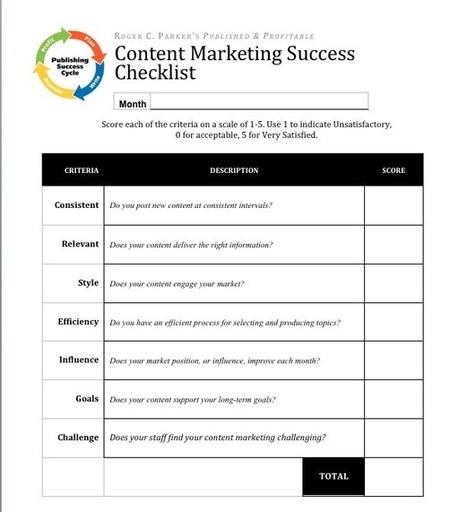
Excerpted from article: "As the halfway point of 2012 approaches, we suggest using this seven-step checklist for measuring your content marketing success. The goal is to take a fresh look at your content marketing from a broader, long-term perspective. The process will help you pinpoint the areas of your content strategy that are working well, and those that could use some fine-tuning. Use the Content Marketing Success Worksheet below to record your responses to the following questions: 1. Consistency: How consistent is your content marketing? 2. Relevance: Does your content marketing deliver the right information? 3. Style: Does your content engage your market? 4. Efficiency: Do you have an efficient process for selecting and producing topics for your content? 5. Influence: Does your market position or level of influence improve each month? 6. Goals: Does your content support your firm’s long-term goals? 7. Challenge: Does your staff find your content marketing to be adequately challenging? It’s easy to put this analysis process into play in your organization — there are just two main steps: 1. Share the Content Marketing Success worksheet with your staff. 2. Rate your content marketing on a scale of 1–5. No content marketing program is ever finished — there is always room for improvement." Each element is analyzed with more information. Read full article here: http://j.mp/KspKKn
|