Your new post is loading...

|
Scooped by
Jim Lerman
November 19, 2011 7:22 PM
|
From Lisa Nielsen: In the 21st century, the connected classroom is no longer a privilege. It is a right. Fortunately, more and more school systems are bringing their students out of the past and into the present with a basic internet connection, laptop, and projector. With the right building blocks in place, teachers will be positioned to transform their classrooms from disconnected spaces where learning happens in isolation to global communication centers. Here are the building blocks for success that you should put in place for effective change.
|
|
Scooped by
Jim Lerman
November 19, 2011 12:54 PM
|
A list of over 100 of the top blogs and sites on online learning, learning technologies, e-learning, edtech, education and some more related subjects to this blog. From George Goncalves' blog Learning Online Info.
|
|
Scooped by
Jim Lerman
November 19, 2011 12:46 PM
|
Nadia Jones presents three fantastic TED Talks about education and reinventing learning...
|
|
Scooped by
Jim Lerman
November 18, 2011 9:15 PM
|
A series of 10 videos designed to get you up and running on Scoop.it in no time. Part of the TeachertrainingVideos.com website. Nicely done -JL
|
|
Rescooped by
Jim Lerman
from Video for Learning
November 18, 2011 8:20 PM
|
A continuosly updated collection of visually appealing video infographics examples... Some great examples of why Video Infographics are superior and more effective than infographics - superb Scoop.it by @robingood
Via theo kuechel
|
|
Rescooped by
Jim Lerman
from Video for Learning
November 18, 2011 8:17 PM
|
Watch quality Canadian documentary, animation and Fiction... ... The National Film Board of Canada's education pages include playlists, interactive resources and studyguides to support the use of their moving images in education.
Via theo kuechel
|
|
Rescooped by
Jim Lerman
from Learning, Teaching & Leading Today
November 18, 2011 8:07 PM
|
"NOTE: Google Plus is now open to everyone, and they’ve announced huge improvements to the service at the same time. You can read more about their improvements here.
Against my better judgment , I took advantage of Lee Kolbert’s generous offer today of providing Google+ invites to her Twitter followers. I’m still trying to figure out how, and if, I’m going to find the time for another network (for those of you who don’t know, Google+ is Google’s brand-new effort to create a Facebook-like social network), but enough people whose judgment I respect seem to think it could be a valuable tool. So I’m going to spend some time checking it out.
In the process of beginning to do this exploring, I’ve found some useful resources that I thought I’d share here. Feel free to make other suggestions, too."
Via Dennis Richards
|
|
Rescooped by
Jim Lerman
from mlearn
November 18, 2011 8:02 PM
|
Apple's iPad completely changed the way people think about tablets and mobile computing. These 10 must-have iPad apps will help you understand why.
Via John Evans, michel verstrepen
|
|
Scooped by
Jim Lerman
November 18, 2011 7:54 PM
|
The five Cs below will empower educators to discover how they and their students can begin building personal learning networks specific to the learner’s needs; extending relevant learning connections to like-interested people around the globe.
|
|
Rescooped by
Jim Lerman
from Digital Presentations in Education
November 18, 2011 7:42 PM
|
Listed here are 9 Free Alternatives to the Microsoft Office Product – Powerpoint.
Via Baiba Svenca
|
|
Scooped by
Jim Lerman
November 18, 2011 7:22 PM
|
Clefit is the first simple and straightforward app to ever make building and sharing professional quality interactive media easy from your tablet device. If you are a writer, illustrator, photographer, blogger, digital scrapbooker, fashion/graphic/media designer and more...
|
|
Scooped by
Jim Lerman
November 18, 2011 6:52 PM
|
A new report from Civic Enterprises and the Everyone Graduates Center looks at Early Warning Indicator and Intervention Systems (EWS), a collaborative approach by educators, administrators, parents, and communities that uses data to keep students on the path to graduation. The best EWS are characterized by features that enable rapid identification of students who are in trouble; rapid interventions that target students' immediate and longer-term need for support, redirection, and success; frequent monitoring of interventions; rapid modification of interventions that are not working; and shared learning from outcomes. The report gives an overview of the current research, informed by conversations with teachers on the front lines, district and state officials in the process of building EWS, nonprofits working with school systems to implement EWS, and researchers working to refine and extend early-warning indicators. The report also outlines emerging best practices and policy recommendations, so that advocates can apply the best in data innovation to their work with the hope of accelerating high school graduation rates and improving college and work readiness. The report notes that EWS are rapidly evolving toward even broader usage, with efforts underway to integrate school readiness indicators at the start of student's schooling, and college and career readiness indicators throughout K-12 schooling.
|
|
Scooped by
Jim Lerman
November 18, 2011 6:42 PM
|
The Museum of Mathematics will open in Manhattan in 2012 and they already have their website up and running. The goal of the museum is to enhance public understanding of mathematics. The materials on the site are divided into six primary sections, including "Press", "News", and "Gallery". In the "Gallery", visitors can learn about the Museum's construction and also watch entertaining and instructional videos. The videos include "Symmetry, Art & Illusion", "The Man Who Loved Only Numbers", and "The Geometry of Origami". Further along, visitors can learn about their traveling exhibition "The Math Midway" and also sign up to receive their Twitter updates. The site is rounded out by a link where visitors can become a museum member or shop for math-related items
|
|
|
Scooped by
Jim Lerman
November 19, 2011 7:19 PM
|
At the recent iNacol Virtual Schools Symposium I listened to high school students who have experience learning this way as well as teachers who have experience with these students, share some advice for making this type of learning even better. Here is their advice as well as suggestions for tools that teachers can use to heed this advice.
|
|
Scooped by
Jim Lerman
November 19, 2011 12:49 PM
|
The internet catalogue for students, teachers, administrators & parents.
Over 20,000 relevant links personally selected by an educator/author with over 30 years of experience.
|
|
Scooped by
Jim Lerman
November 19, 2011 12:38 PM
|
Here’s something legitimately new: With Lytro’s camera, you can take a picture and then decide what you want to focus on after you’ve shot it. When viewing a Lytro photograph on your computer, you simply click your mouse on any point in the image, and that area will come into focus. Change the focal point from the flower to the child holding the flower. Make the background blurry and the foreground clear. Do the opposite — you can change the focal point as many times as you like.
|
|
Scooped by
Jim Lerman
November 18, 2011 8:25 PM
|
Last week the delegates at the Diverse 2011 conference were treated to fascinating presentation by Dr Roy Pea Professor of Education and Learning Sciences at Stanford University on using video for classroom observation...
|
|
Rescooped by
Jim Lerman
from Video for Learning
November 18, 2011 8:18 PM
|
Coach's Eye is a video analysis tool that allows you to shoot video on an iPhone and the review it in slow motion or frame by frame. You can also annotate video with drawings or audio commentary. The quality and control of the slow motion is superb. Although designed for sports use, I am sure users will find it useful for many other kinds of video. This great example was shot earlier by my friend Kevin McLaughlin @kvnmcl http://www.youtube.com/watch?v=y1fl4e2j2Wo&feature=youtu.be Currently available for £0.69 / 0.99$
Via theo kuechel
|
|
Rescooped by
Jim Lerman
from Learning & Technology News
November 18, 2011 8:15 PM
|
So you have heard about blogging with your students and you are considering taking the plunge but just not sure what or how to do it? I am here to tell you; blogging with my students has been one of the most enriching educational experiences we have had this year, and that says a lot. So to get you started, here is what I have learned
Via Nik Peachey
|
|
Rescooped by
Jim Lerman
from mlearn
November 18, 2011 8:02 PM
|
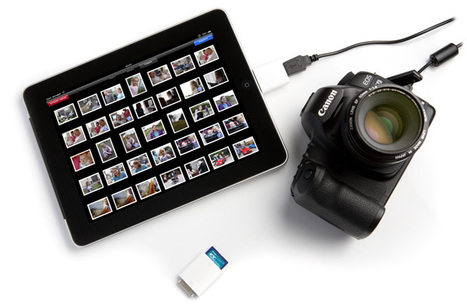
Today we will show you how you can user your iPad with your Digital Camera or a DSLR, all of us love to click pictures on our holidays.
Via Tiaan Jonker, michel verstrepen
|
|
Rescooped by
Jim Lerman
from Digital Presentations in Education
November 18, 2011 8:01 PM
|
SpeakerNotes is a simple presentation tool that augments the application you currently use to create slides. While leading presentation authoring tools will allow you to display simple slide shows, SpeakerNotes provides many capabilities that you will not find in other tools.
Via Baiba Svenca
|
|
Scooped by
Jim Lerman
November 18, 2011 7:47 PM
|
Excellent list of PP alternatives from David Kapuler.
|
|
Scooped by
Jim Lerman
November 18, 2011 7:31 PM
|
SlideRocket is a terrific online presentation-making app. If your school has Google Apps Education Edition, it is eligible for free connection to SlideRocket. Find info here. -JL
|
|
Scooped by
Jim Lerman
November 18, 2011 7:17 PM
|
Despite the fact that we’re well into the 21st century innovative educators often still have to make a case for using the tools of the world inside school. This post was written for those looking to justify their decision to use technology to support readers and writers. Links are given to 11 studies, which are also briefly described. From Lisa Nielsen.
|
|
Scooped by
Jim Lerman
November 18, 2011 6:46 PM
|
Creating a bibliography or set of references used to be quite time consuming, however a number of free programs and applications have helped make this process much simpler. One such application is CiteThisForMe, which allows users to create their own references via this handy form. CiteThisForMe uses the Harvard referencing style, and visitors just need to enter a number of details to create each reference. Visitors have the option to cite a book, newspaper, journal, website, or other type of source. This version is compatible with all operating systems
|