Your new post is loading...

|
Rescooped by
Jim Lerman
from Online Video Publishing
November 24, 2011 5:19 PM
|
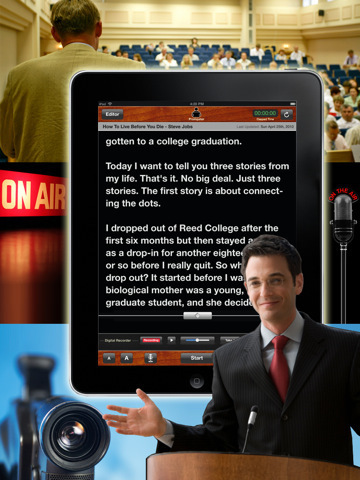
Prompster turns your iPad into a portable teleprompter, eliminating the need for written notes or flash cards. You can write and edit speeches from within the app and change both the font size and font type. Prompster will scroll your words through the screen at user adjustable speeds...
Via Baiba Svenca, Robin Good
|
|
Rescooped by
Jim Lerman
from Online Video Publishing
November 24, 2011 5:13 PM
|
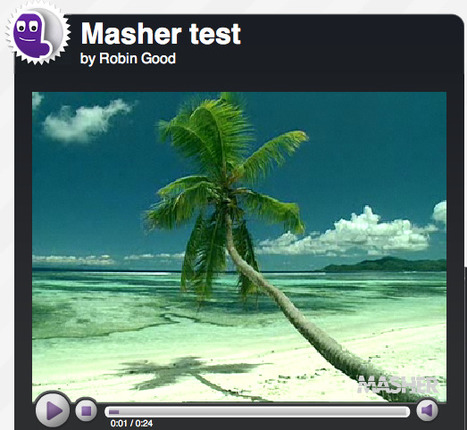
Masher is an online free service which allows you to easily create video mashups, utilizing not only your own uploaded material, but also the rich and growing library of clips, images and music tracks provided by the service itself (though third-party providers). Masher provides you with a very simple editor interface in which you can add, juxtapose and edit your media clips by simply dragging and dropping them on a timeline. It is also possible to overlay simple titles and add some basic effects to any video. To be honest, I was quite impressed with the ease with which you can work in Masher, and although I spent only 10 minutes testing it out, I was surprised with the results. In less than 90 seconds I was able to put this together: http://masher.com/player.jsp?key=ff18beef-1996-ad26-ff66-0000fc97018c&adscheme=0 and altough it is a piece of tropical nothingness, shows that if you have a topic and know what you want, Masher can really help you to put together a video even when you may have no available material at all.
Try it out: www.masher.com
Via Robin Good
|
|
Rescooped by
Jim Lerman
from Online Video Publishing
November 24, 2011 5:05 PM
|
|
|
Rescooped by
Jim Lerman
from Digital Presentations in Education
November 23, 2011 11:45 PM
|
This PowerPoint template has interactive slides that allows you to add information on the notebook pages and then advance the slides in slide show mode seeing the notebook page turn for each slide.
Via Baiba Svenca
|
|
Scooped by
Jim Lerman
November 23, 2011 8:34 PM
|
Google has shaved $50 to $130 off of the price of its Google Chromebook cloud notebooks as the holidays close in.
|
|
Scooped by
Jim Lerman
November 23, 2011 9:58 AM
|
Online Teaching Activity Index
ION is always trying to further the knowledge of online education. In the course of our research and practice, we come across many best practices in online teaching.
This index represents a compilation of those activities to help instructors plan their online and hybrid courses. A complete description of each activity is given, along with examples when possible. Common educational uses of each activity are discussed as well as common educational objectives. Furthermore, teaching strategies for the given activity are provided. This index is primarily directed towards the use of these activities in senior high school and higher education. It also represents evidence that many quality educational activities are possible and feasible in the online classroom.
|
|
Scooped by
Jim Lerman
November 23, 2011 9:55 AM
|
Video: Even when children are high achievers and facile with new technology, many seem gradually to lose their sense of wonder and curiosity, notes John Seely Brown. Traditional educational methods may be smothering their innate drive to explore the world. John Seely Brown, former chief scientist at Xerox, has morphed in recent years into the “Chief of Confusion,” seeking “the right questions” in a range of fields, including education. He finds unusual sources for his questions: basketball and opera coaches, surfing and video game champions. He’s gathered insights from unorthodox venues, and from more traditional classrooms, to paint quite a different picture of what learning might look like.
|
|
Rescooped by
Jim Lerman
from Docentes y TIC (Teachers and ICT)
November 23, 2011 9:50 AM
|
The online meeting space continues to see lots of innovation, especially at what you can get for free. There is a new service from FreeConferenceCalls.com called FreeScreenSharing.com that says exactly what it does and some major feature enhancements to YamLabs.
Via Robin Good, Ana Rodera
|
|
Rescooped by
Jim Lerman
from Tools for Teachers & Learners
November 23, 2011 9:48 AM
|
From Nik Peachyt. This is a really useful free iPhone app which turns your phone into an image scanner. The images are then uploaded to a website.
Via Nik Peachey
|
|
Rescooped by
Jim Lerman
from Tools for Teachers & Learners
November 23, 2011 9:29 AM
|
This is a great website which enables you to create html 5 based websites that work with mobile devices. A great tool for projects etc.
Via Nik Peachey
|
|
Scooped by
Jim Lerman
November 23, 2011 12:29 AM
|
Blogger Andrew Miller celebrates teachers who engage their students' cognitive abilities through creative methods.
|
|
Rescooped by
Jim Lerman
from Docentes y TIC (Teachers and ICT)
November 23, 2011 12:05 AM
|
"Aimed at teachers and those interested in using games with an educational intent, this handbook aims to provide some useful anchoring points for educators to make sense of the area and to develop practical approaches to the use of computer games as a medium for learning." This is a very accessible overview of elements, theories, and examples of game-based learning for compulsory education. It also looks to be a decent source of references if you're looking for some literature pointers.
Via Ana Rodera
|
|
Scooped by
Jim Lerman
November 22, 2011 11:57 PM
|
The next step is for teachers to share what they learn. Notice I haven’t had teachers create a Twitter account yet. This is scary to many so just stick with consumption of content.
|
|
|
Rescooped by
Jim Lerman
from Online Video Publishing
November 24, 2011 5:13 PM
|
With Microsoft Expression Encoder 4, you can record a movie of your desktop screen of any size and simultaneously capture the webcam video and audio narration from a microphone. Alternatively, you may capture the screen activity without the audio and add a voiceover later at the time of producing the video using the “Audio Overlay” feature. Expression Encoder has been around for a while but with one limitation – the free version would only let you screen capture 10-minute video clips and if you were to record clip of longer duration, you had to switch to Expression Encoder Pro. Well the good news is that Microsoft has recently released a new version – Expression Encoder SP2 – that contains bug fixes and stability enhancements and they’ve also dropped the time limitation. Read more: http://www.labnol.org/software/camtasia-studio-alternative/20333/
Via Robin Good
|
|
Rescooped by
Jim Lerman
from Online Video Publishing
November 24, 2011 5:09 PM
|
This screencasting guide from Amit Agarwal of Digital Inspiration, provides a rich set of useful links to tools, services and software for creating effective screencasts, that you may not be aware of. Among the interesting recommendations Amit has included some resources on where to pick-up good audio soundtracks, a short list of good mikes, as well as his preferred camcorders and webcams.
Useful, resourceful. 8/10
Find out more: http://www.labnol.org/software/screencasting-toolkit/18831/
Via Robin Good
|
|
Scooped by
Jim Lerman
November 23, 2011 11:54 PM
|
Loosely based on the idea of combining face-to-face education with online instruction, the blended model of schooling is growing in popularity.
|
|
Scooped by
Jim Lerman
November 23, 2011 11:36 PM
|
This site describes a teacher's enthusiasm for Schoology - a very interesting combination of an LMS and a social network that is available for free use. Jonathan Martin, a middle school teacher in Arizona, discusses a 5-teacher pilot in his school. I have personally explored Schoology and have recommended it to others. It difinitely warrants a close look, in my opinion. -JL
|
|
Scooped by
Jim Lerman
November 23, 2011 8:30 PM
|
The Saco School District is proving that technology and rural schools can go hand in hand.
|
|
Scooped by
Jim Lerman
November 23, 2011 9:57 AM
|
We’ve all used them, first as students and now as online instructors: activities in a class meant to highlight, spotlight, underline, enhance, or explain some aspect of the subject we are teaching. Too often, not much thought or effort is given to these activities, resulting in outdated and unsuccessful activities. With the right approaches and a bit of knowledge, online instructors can create activities that are dynamic, effective, and interesting. Here’s how …
|
|
Scooped by
Jim Lerman
November 23, 2011 9:54 AM
|
Early career researchers should look carefully at the benefits of incorporating social media into their academic work, writes Sarah-Louise Quinnell, whose use of blogging and social media tools in her PhD has led her to find her first academic post. In my previous posts here, and on Networked Researcher, I have taken time to emphasise how social media can be used for professional development purposes. The goal for many early-career researchers, especially those who have recently completed their PhDs, is to gain the first academic position. I have always said that I believe a well developed online identity will assist in promoting your work, and you as a researcher, and I can now say that I have gone from academic blog to academic job: I will soon start my new role as E-learning Development Advisor within the Graduate School Researcher Development Unit at King’s College London.
|
|
Rescooped by
Jim Lerman
from Tools for Teachers & Learners
November 23, 2011 9:49 AM
|
From Nik Peachey. This looks like a great tool for creating your CV. You can include a video clip with the CV and attachments that can be downloaded from it. Great for the 21st Century digitally literate job seeker.
Via Nik Peachey
|
|
Scooped by
Jim Lerman
November 23, 2011 9:35 AM
|
Clefit is the first simple and straightforward app to ever make building and sharing professional quality interactive media easy from your tablet device. If you are a writer, illustrator, photographer, blogger, digital scrapbooker, fashion/graphic/media designer and more...
|
|
Scooped by
Jim Lerman
November 23, 2011 9:27 AM
|
Isn't video editing too complicated and time consuming? Magical video editing. In a click! Upload your file, give the project a title, and add some background music (either your own or Magisto’s stock tunes). Then sit back and let the algorithms go to work. The software automatically cuts less interesting parts and combines what’s left into a montage of scenes seamlessly woven together using cuts, fades, and other fancy editing tricks.
|
|
Rescooped by
Jim Lerman
from Docentes y TIC (Teachers and ICT)
November 23, 2011 12:06 AM
|
The iPad is a truly great platform for writing. With the option of the iPad's on-screen virtual keyboard, or physical keyboards (such as the Apple Wireless Keyboard, or the iPad Dock Keyboard), iPad owners can quite easily type on their iPad as if it were a computer.
Via Sam Gliksman, Ana Rodera
|
|
Rescooped by
Jim Lerman
from Docentes y TIC (Teachers and ICT)
November 23, 2011 12:03 AM
|
Hello and welcome! The UCSF Portfolio tool, which is based on the Mahara Platform, is a fully featured electronic portfolio, journal, resume builder and social networking system, connecting users and creating online communities. This Support Center provides instructional resources to UCSF Portfolio users. Here you will find training videos, documents, a user forum and updates about the tool from system administrators.
Via Heath Sawyer, Ana Rodera
|